Active threads
Showing topics posted in for the last 365 days.
- Past hour
-
 $ cat /etc/os-release PRETTY_NAME="Debian GNU/Linux 13 (trixie)" NAME="Debian GNU/Linux" VERSION_ID="13" VERSION="13 (trixie)" VERSION_CODENAME=trixie DEBIAN_VERSION_FULL=13.4 Compile phase failed due to missing package (ntpdate) Short log: [🌱] Configuration prepared for BOARD build [ x98h.csc ] [✨] Repeat Build Options (early) [ ./compile.sh build BOARD=x98h BRANCH=edge BUILD_DESKTOP=no BUILD_MINIMAL=no KERNEL_CONFIGURE=no RELEASE=trixie ] [🌱] Checked directory OK for mount options [ /home/*****/build/.tmp ('main temporary dir') ] [🌱] Preparing [ host ] [🌱] Python2 not available on host release 'trixie' [ ancient u-boot versions might/will fail to build ] [🌱] Updating apt host-side for installing host-side packages [ 50 packages ] [🌱] Installing host-side packages [ binfmt-support bison libc6-dev make dpkg-dev gcc ccache device-tree-compiler dwarves flex imagemagick jq libbison-dev libelf-dev libfdt-dev libfile-fcntllock-perl libmpc-dev libfl-dev lz4 libncurses-dev libssl-dev libusb-1.0-0-dev ntpdate patchutils pkg-config pv qemu-user-static arch-test swig u-boot-tools uuid-dev zlib1g-dev expect colorized-logs zip pigz pbzip2 lzop gdisk aria2 axel parallel rdfind libpython3-dev libffi-dev libgnutls28-dev gcc-aarch64-linux-gnu libc6-amd64-cross gcc-arm-linux-gnueabi gcc-or1k-elf ] [🔨] E: Package 'ntpdate' has no installation candidate [💥] error! [ Failed to install host packages; make sure you have a sane sources.list. ] [💥] Cleaning up [ please wait for cleanups to finish ] [🌿] ANSI log file built; inspect it by running: [ less -RS output/logs/log-build-dd186c47-e7eb-49f8-8d38-836915cf0aec.log.ans ] [🌱] Share log manually: [ use one of the commands below (or add SHARE_LOG=yes next time!) ] Note ntpdate has a more recent version: ntpsec-ntpdate Should I try to compile in a Debian 12 computer? I am afraid of messing with 'sources.list'. Thanks in advance.
 -
Wayland 1.25 refreshes its documentation with three new chapters covering Wayland XML specification, content model updates, and color management design. View the full article
- Today
-
Hi @sven-ola , I'm having an issue where my portrait-oriented monitor isn't displaying anything properly. I have a portrait-oriented monitor, and when I try to connect it via HDMI, it doesn't display anything—the screen remains blank. I found this in dmesg: [drm] spacemit_hdmi_connector_detect() hdmi status connected [drm] Initialized spacemit 1.0.0 for c0440000.display-subsystem-hdmi on minor 1 [drm] spacemit_hdmi_connector_detect() hdmi status connected [drm] spacemit_hdmi_get_edid_block() len 128 [drm] spacemit_hdmi_get_edid_block() len 128 spacemit-drm-drv c0440000.display-subsystem-hdmi: [drm] Cannot find any crtc or sizes I added `video=1080x1920@60` to the kernel parameters. Now it outputs: [ 4.162834] spacemit-drm-drv c0440000.display-subsystem-hdmi: [drm] User-defined mode not supported: "1080x1920": 60 137020 1080 1152 1160 1176 1920 1934 1936 1942 0x68 0x5 [ 4.162871] spacemit-drm-drv c0440000.display-subsystem-hdmi: [drm] Cannot find any crtc or sizes I think this is because the driver only supports a resolution of 1920x1080, but not 1080x1920. dmesg.txt
-
 @Jugo Slaven What version of Armbian are you running?
 -
I have seen some kernel errors w.r.t. trim on Silicon Power 16GB SD-card, was in ROCK3A. But no other errors. Kernel is unspecified, although I might be able to figure out which/what, you can even search this forum, then you know yourself. This errors do not occur on a RPi4 v1.1 (with RPL OS and kernel). So if you want to know, dig more into logs, doe specialistic blocklevel error checking. In general: welcome to SD-card magic!. See also this:
-

Kernel not updating in image with armbian build
eselarm replied to KV1's topic in Armbian Project Administration
Why repair the filesystem first while you anyway overwrite the whole storage device then? /dev/sdb1 suggests an USB SD-card adaptor is used. Both the adaptor, which translates USB protocol into MMC commands, and the SD-card itself, which also does internal block managing, can mess up the filesystem. Not as long as this is plugged into the computer where the imager (or dd) is running, but once removed and put into the SBC, power is lost and re-applied. The USB + SD-card hardware (and also OS driver in the computer) might have flaws in its implementation. It could easily be that SD-card signals 'ready' to OS, so you then take out USB + SD-card, but that actually not all is committed to the actual flash and still some is in buffers or the SD-card is still doing wear-leveling and doesn't do that in a correct way. And worse, if fake sized counterfeit, the firmware might be busy doing its 'magic tricks' to fake hundreds of GB size while only 8 or 32 GB is actual flash chip. So unfortunately, even if using a verify step in writing an image, the actual content on the SD-card might be different from the image file once the SD-card is put in the SBC. I remember such a case on this forum where someone did manual block-level compare of storage device and image. I also have had such issue at least once. It is the situation where you just re-do / re-write again without knowing what is wrong. And/or use other SD-card, other USB-adaptor, other computer, etc. To prevent such issues, I tend to use (the) SBC itself to write SD-cards. My RPI4 runs from USB-SSD, so SD-card slot is free. I trust RPL HW more than various USB SD-card adaptors. Earlier test I mentioned using the the Armbian-imager was on NanoPi-R6C running from eMMC+NVME, so same story, free SD-card slot. It ran Armbian Trixie KDE6 and 7.0-rc rockchip64 kernel. I was also forced to more or less, because on my Tumbleweed N100 box the Armbian Imager only stayed white (some EGL error). That was with x86-64 AppImage. I thought it would be better to install from a .deb hence walked to my powered-on ARM64 running Debian. Anyway I do normally not use images. I would rather use ddrescue (enable mapfile option) to check and make sure image is same as on storage device. That helped also in the past for 4TB HDD's (when risk of bit-rot). It is CLI based and allows to re-do check after power-cycle. -

Booting armbian manually from u-boot shell over UART
Thành replied to user03's topic in Amlogic CPU Boxes
Could you please send me the DTB file that your motherboard displays and only receives internet signals? I have a motherboard that's similar to that one. - Yesterday
-
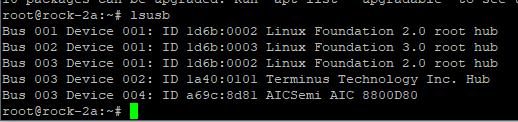
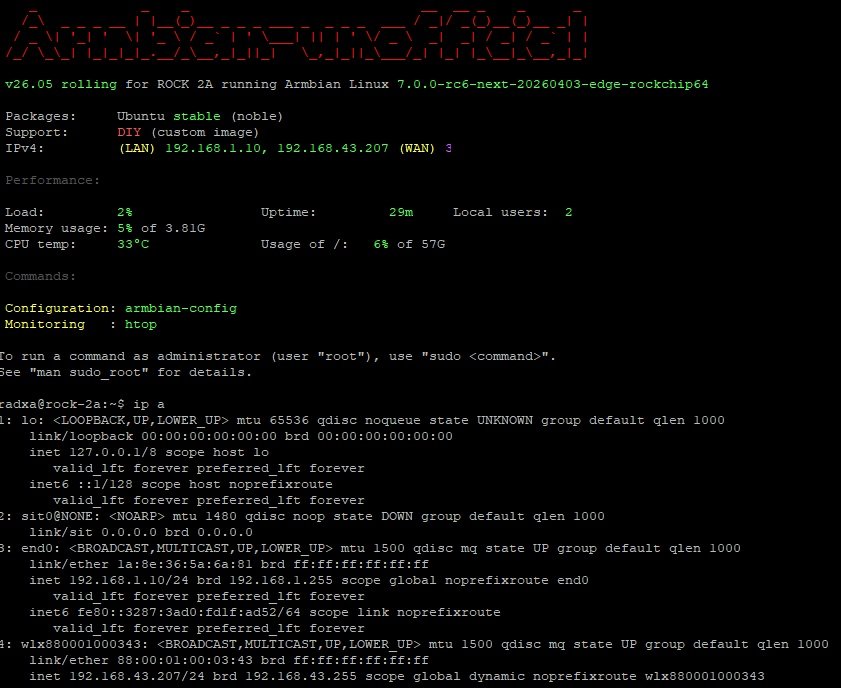
It is not working with this patch because offcially AIC8800 is not supported in kernel > 7.0-rc6 plus in my image Wifi was initially disabled With new image it is better: I made a small fix to make it running with some commands as root: ``` # unzip AIC_FIX.zip # mkdir -p /lib/modules/$(uname -r)/kernel/drivers/net/wireless/aic8800 # cp aic_btusb.ko aic_load_fw.ko aic8800_fdrv.ko /lib/modules/$(uname -r)/kernel/drivers/net/wireless/aic8800/ # depmod -a # cat /etc/modules-load.d/aic8800.conf aic_load_fw aic8800_fdrv aic_btusb # cp -r aic8800_fw /lib/firmware/ # cp -pr aic8800_fw/USB/aic8800D80/ /lib/firmware/ # modprobe aic_load_fw # modprobe aic8800_fdrv # modprobe aic_btusb # lsmod |grep -i aic aic_btusb 57344 0 aic8800_fdrv 626688 0 cfg80211 1200128 1 aic8800_fdrv aic_load_fw 86016 1 aic8800_fdrv ``` Please also remember as it is experimental and all you do it is on your own risk HDMI is not working and we need some code first, I guess for this part: CONFIG_PHY_ROCKCHIP_INNO_HDMI_QP
-
 Ok, maybe I am not able to boot because this image is not for the stock PocketCHIP but for one which requires a custom breakout board: https://github.com/armbian/build/pull/7647 Maybe I could have found that out sooner if there was a device page for this custom PocketCHIP in the community supported devices page at ttps://www.armbian.com/community/. Who/how is supposed to create it? The board maintainer? How is one supposed to do that? There is no mention in the Board Maintainers Procedures and Guidelines. I haven't anything on the armbian github repositories about the boards information on this page. It would be important to have the device page, especially when the image was created for custom developed PCBs. Only after some digging and finding the PR where the device was added, I was able to figure out why I may not be able to boot the pocketchip-sd armbian image.
 -
 @Ducdanh Nguyen probably a real H313 SOC. You know this! You were on the other thread.
 -
 Try sysctl vm.overcommit_memory=1 QEMU is probably trying to commit lots of virtual memory, but not using it. Don't know why it behaves like this.
 -
 Our multimedia engineering team delivered major improvements to GStreamer 1.28: hardware acceleration and zero-copy pipelines, HDR and color support for Wayland, AI inference integration, plus critical codec and RTP/WebRTC interoperability fixes. View the full article
 -
OK I see, now I remember, HAOS aarch64 has been there for download for a long time, I even recommended it to some one on another forum who also only saw the Intel VM, but as I indicated, is a bit hidden on github: https://github.com/home-assistant/operating-system/releases/ and direct latest link: https://github.com/home-assistant/operating-system/releases/download/17.2/haos_generic-aarch64-17.2.img.xz I personally don't want the Proxmox stuff indicated by Markus, I just use the standard packages available In Debian (or Opensuse) for years, on both Intel and Arm. Like indicated install virt-manager. It is manual install, but at least then more control. I used/use a mix of LVM based block devices and also just raw images (like unxz the one referenced). I see on RPi4 I have the HAOS VM configured with 2 vCPUs and 1GB RAM. On RK3588, so OPi5+, you will need CPU pinning if you use the vendor kernel (6.1) as it does not support mixing big and little (Cortex-A76 and Cortex-A55). Or use just 1 vCPU for the VM, then de-facto no mixing. Mixing is no problem with mainline based kernel, so then you can just use 8 vCPU's if you want. I currently have my NanoPi-R6C running with kernel 6.19.10+deb14-arm64-16k (from Debian sid) and works fine with VM's and all 8 cores.
-
networking in bpi-m5 with new 26.03.1 release.
SteeMan replied to gene1934's topic in Software, Applications, Userspace
As a moderator having watched this thread, I'm going to close it down, as I don't think anything else productive will be said at this point. However I do want to thank both @bedna and @eselarm for their time and effort to help. Armbian appreciates all the volunteers who make these forums possible. -
I have tested the latest build (26.2.0-trunk.668) and found that USB 3.0 is still not operational. Has anyone been able to get this working?
- Last week
-
I have an H50-labeled tv box with a different board (T98-3318-V2.3) but with exactly the same problem - no HDMI even though all the software debug traces show that everything video-related gets called and works. I first tried to make it work 5 years ago and failed and a few months ago I revisited it just to see if I can make it work now in the age of AI. I made a really deep dive into reverse engineering it. I rooted the original Android firmware and dumped anything I could, extracted and analyzed with Ghidra the vendor u-boot and kernel (wasn't particularly helpful) and finally managed to execute the u-boot binary in Renode by emulating a lot of hardware stuff with code or by simply replacing functions with successful returns all the way to the point of u-boot displaying the splash screen and with various hooks and warnings about peripheral accesses I collected a comprehensive trace of everything that u-boot was doing, and in that trace, the AI noticed a certain GPIO access and suggested replacing this vcc-host-vbus { compatible = "regulator-fixed"; enable-active-high; gpio = <0x74 0x00 0x00>; pinctrl-names = "default"; pinctrl-0 = <0x76>; regulator-name = "vcc_host_vbus"; regulator-always-on; regulator-min-microvolt = <0x4c4b40>; regulator-max-microvolt = <0x4c4b40>; vin-supply = <0x77>; phandle = <0x100>; }; with this vcc-display-en { compatible = "regulator-fixed"; gpio = <0x74 0x00 0x01>; pinctrl-names = "default"; pinctrl-0 = <0x76>; regulator-name = "vcc_display_en"; regulator-always-on; regulator-boot-on; regulator-min-microvolt = <0x4c4b40>; regulator-max-microvolt = <0x4c4b40>; vin-supply = <0x77>; phandle = <0x100>; }; in the standard rk3318-box.dts which made HDMI work.
-

Hardware video acceleration with recent armbian/mainline kernel (Kodi)
Joe K replied to XXXBold's topic in Orange Pi 5
Hello, I made a buld with the vendor kernel for mekotronics R58SV2, and build ubutu desktop Gnome. I definately have no HW decoding since with fhd .mp4 h264 videos the beast runs on 100% cpu all cores what did I wrong? Help appreciated -
After installing the latest update, my 3D printer warns about outdated instructions in the MCU and asks to recompile and flash it. What should I do?
-
This does not support f2fs I guess; standard in U-Boot is only FAT and Ext4 Some never U-Boot builds also include Btrfs. f2fs I have not seens working, but you will need to build a custom u-boot yourself then. Other option is at add Armbian argument to use an extra bootfs, tha will then be FAT or Ext4, so you can still use f2fs for rootfs. I would make U-Boot understand Btrfs and then use Btrfs for rootfs, as for several boards/platforms that is already default (likely only when you use newer/edge/mainline U-Boot).
-
Providing logs with armbianmonitor -u helps with troubleshooting and significantly raises chances that issue gets addressed.
-
@Werner I imagine there are plenty of people here who could help solve similar problems. In theory, I could provide a pair of an old RPI (master) and a 4A (slave), with the slave serial connected to the master and power controlled via the GPIO, and they are also on the same VLAN. However, if something goes wrong it needs control to the slave's SD card, all I've found is an SD card extender, and it needs something like an emulator that connects to the master via the same USB/SPI.
-

Error at the end of image generation.
Werner replied to Guilherme's topic in UEFI x86 / qemu x86 / arm64
First: https://forum.armbian.com/terms Second: Provide full logs -

Industrial android board - RK3288 (possible EVB)
Mauricio Scotton replied to Mauricio Scotton's topic in Rockchip
Hey tparys! Thank you very much for your reply and apologies for my delay getting back to you. I haven't had much time to play with this board, but lately I've managed to do some very good progress. Basically I've got Armbian 20 Bullseye working with kernel 6.19. that was a victory! Versions that work/don't: [WORKS] Armbian_20.07_Arm-32_bullseye_current_5.7.7_desktop.img (From a MiQi board) [NOPE] Armbian_25.11.1_Tinkerboard_bookworm_current_6.12.58-homeassistant.img [NOPE] Armbian_25.11.1_Tinkerboard_noble_current_6.12.58_minimal.img [NOPE] Armbian_25.11.1_Tinkerboard_trixie_current_6.12.58_minimal.img [NOPE] Armbian_26.2.0-trunk.370_Tinkerboard_noble_current_6.18.8_xfce_desktop.img [NOPE] Armbian_26.2.1_Tinkerboard_trixie_current_6.18.8_minimal.img Armbians 25 up, some times hangs at Starting Kernel, and majority of the times stops at Loading Ramdisk, all of them tested with most of the DTBs provided The android that runs on the other working board has a kernel with version 4.4 Havent test that because I believe it stops earlier than that I have extracted the DTB from the working Android and got a frankenstein EVB DTS working with some of the features. So far I've got working: *4Cores *2GB Ram *Wifi (using rtw8723d_fw.bin ) *Status LED What doesn't work for sure: -Ethernet -FE2.1 USB Hub 2.0 Untested: ? LVDS 1/2 Panel ? EDP 1/2 Panel ? Speaker ? MIC ? SIM Card Module (Attached to the FE2.1 Hub, so defo not working) And maybe some other peripherals that I was not able to test. I'm still to make the FE2.1 USB Hub work as the 4 only USB physical ports are not working. Also ETH has an issue on stmmac that returns the reset value. and this was merged recently to the kernel. (I'm trying to build v6.19 from source with my patch, but thats being painful too ) Here is my stmmac patch: diff --git a/drivers/net/ethernet/stmicro/stmmac/stmmac_main.c b/drivers/net/ethernet/stmicro/stmmac/stmmac_main.c index 01ede5148163..9f0ee9ea96fa --- a/drivers/net/ethernet/stmicro/stmmac/stmmac_main.c +++ b/drivers/net/ethernet/stmicro/stmmac/stmmac_main.c @@ -3208,8 +3208,7 @@ static int stmmac_init_dma_engine(struct stmmac_priv *priv) ret = stmmac_reset(priv); if (ret) { - netdev_err(priv->dev, "Failed to reset the dma\n"); - return ret; + netdev_warn(priv->dev, "Failed to reset the dma, device will work with reduced throughput\n"); } I have also attached my current DTS built on top of the EVB version based on the Android with logs from both. Once again, thank you very much for your help! Best Regards, Mauricio. Armbian 20 Bullseye booting log.txt Android Boot Full log.txt android_check.dts rk3288-evb-rk808-armbian-fixed36.dts -

Trying to boot Armbian on LinknLink iSG Box SE
Sancho replied to Sancho's topic in Rockchip CPU Boxes
Finally managed to restore the box to stock official Android firmware, everything works as expected. I also tested a firmware for the H96 Max M1, with this one the WiFi is not working, they seem to use a different wifi chip. Any recommendations on where to start with flashing Armbian on this device?