Active threads
Showing topics posted in for the last 365 days.
- Past hour
-
I have a nice armbian image on an SSD on a rock5b board. I want to copy it to an sd card for cloning on other boards. Does anyone know how this can be done? It doesn't come out via dd
- Today
-

SV6256P WiFi Now Working on Linux 6.x (Armbian Tested)
jock replied to Kevin su's topic in Allwinner CPU Boxes
Hello, congratulations for your achievement! I wonder if you had the chance to give a shot to the ssv6051 sibling... the original drivers (one for ssv6051 and another for ssv6x5x) were really a mess that @ilmich and me did a lot of work at the time to cleanup and fix things in the past time. We concentrated against the ssv6051 driver at the time and in fact the ssv6051 driver already works in mainline kernel (it is in the rockchip 32bit patch directory), although it is still quite a mess. Here it is the repository if you want to take a look to the commits. We also started an attempt to do a clean and proper reimplementation of the ssv6xxx driver, but actually never went over firmware loading (the repo is private since it was a heavy WIP, but can share if you have enough will to take a look to that) -
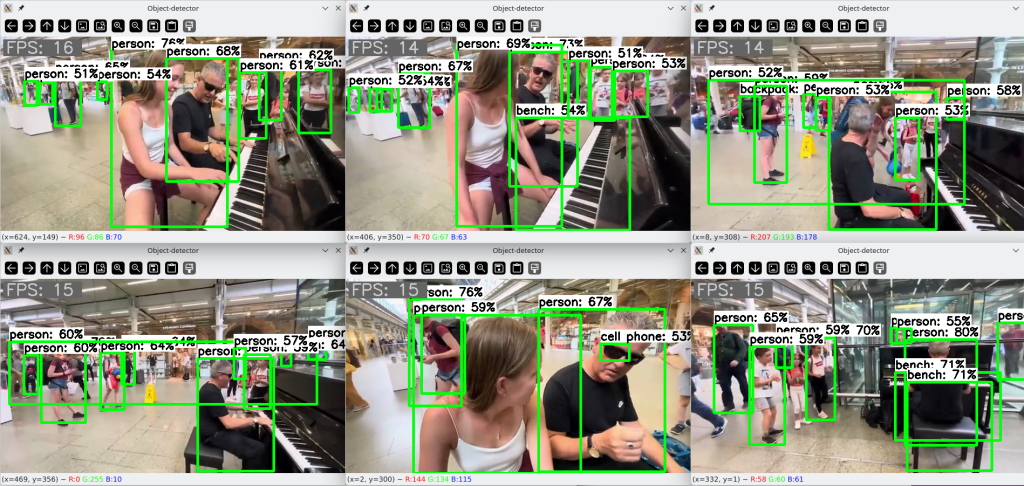
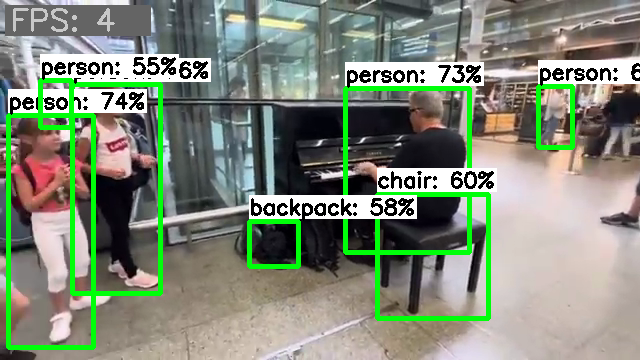
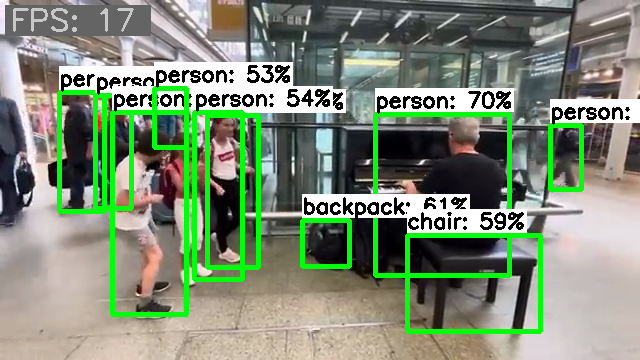
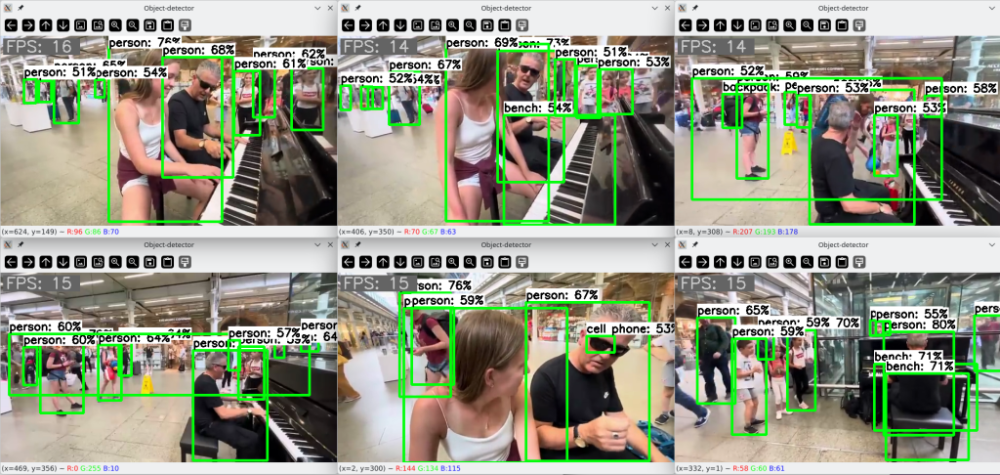
Lately, I've been playing around a bit with computer vision detection. I managed to patch together a PoC script with which I conducted some tests. The results are quite promising. The frame rate is just based on the round trip time of my test script, so it only roughly reflects the inference time. The throughput includes all additional overhead but is sufficiently informative for a relative comparison. Inference on a single CPU core delivers an image throughput of about 4 images: Inference on a single NPU core delivers an image throughput of about 17 images: Inference on eight CPU cores delivers an image throughput of about 21 images. But all eight cores run over 80% during this, and after a short time the fan kicks in. The headroom is also quite limited, for e.g., to perform other tasks concurrently. Running several similar inference tasks concurrently immediately results in a proportional drop in frame rate per task. When six similar inference tasks are executed simultaneously with NPU delegates, they are distributed across the three available NPU cores, and the SoC utilization is moderate enough that the fan doesn't even turn on. The throughput does not degrade and the CPU cores remain available for other tasks as well: For my tests, I used a random video clip. For the inference, I used a model pre-trained with the COCO dataset. With its 4.1MB memory size and its 80 object classes, it delivers surprisingly good results. Using the NPU hardware not only reduces the load on the CPU cores but also provides additional acceleration of processing. But the best part is that only current mainline code is required for use. No dependencies on proprietary implementations or outdated software stacks. It just works out-of-the-box, you just need to know how to use it.
-
That "rvdisplay" string is found in the following files: libVK_IMG.so, libsutu_display.so, and libpvr_dri_support.so. When comparing the OpiRV2 versions of these files with https://gitee.com/spacemit-buildroot/img-gpu-powervr I got 9a640=spacemit vs 9a2d0=rvdisplay. Thus, Xunlong has source code for these (different offsets, rvdisplay is one char longer). So no need to hack Armbian kernel, I presume GPU works if we use *.so from gitee repo. HTH // Sven-Ola
-
Yes usermod -aG docker yourusername , then reboot, was what I needed to let the armbian build script continue Warning: if you forget the "a" in -aG, you will get locked out being admin in your own computer Second roadblock: I needed to install qemu as per: https://forum.armbian.com/topic/52127-running-armbian-build-on-x86-64/#findComment-219019 Thank you Werner!
-

Cubitruck have the false Time and i can't change this
Coolzero1982 replied to Coolzero1982's topic in Allwinner sunxi
This morning, the difference is not as big as yesterday, but it is still there. Why isn't it synchronized via NTP? sudo date -s “2026-02-10 04:13:00” Tue, Feb 10, 04:13:00 CET 2026 root@cubietruck ~ > date Tue, Feb 10, 06:11:41 CET 2026 -
 I installed Filebrowser via armbian-config but it didn't work. The container was restarting and there was: Using database: /database/filebrowser.db Error: open /database/filebrowser.db: permission denied in the .log file. The developers of Filebrowser explained they introduced some breaking changes and documented the changes that have to be made to avoid that error: - User: File Browser no longer runs as root, but as user with PID 1000 and GID 1000. You can still change this by using Docker's --user flag [https://www.docker.com/blog/understanding-the-docker-user-instruction/]. - Volumes: the volumes with the database and configuration are now aligned with the s6-overlay images. Instead of mounting the files themselves, which leads to frequent issues, you now mount the surrounding directory. Unfortunately, these are breaking changes and will require updates on your side. Assuming you have a database.db, a .filebrowser.json and the data in /data, do the following: 1. Change the path of database in .filebrowser.json to /database/filebrowser.db 2. Rename database.db to filebrowser.db 3. Rename .filebrowser.json to settings.json 4. Put them in the same directory locally, let's say /app/filebrowser/ 5. Change the permissions of both directories: sudo chown -R 1000:1000 /app/filebrowser /data 6. Mount with the flags -v /app/filebrowser:/database -v /app/filebrowser:/config - you can also choose to put them in separate directories, but it is not needed. If you are still getting errors, please make sure that the paths/volumes you are mounting have read-write permission for user 1000:1000. For more up to date information regarding how you should use the Docker image, check filebrowser.org/installation.html#docker [https://filebrowser.org/installation.html#docker] But how exactly to apply those changes after the container already has been created and started via armbian-config?
 -
http://blog.armbian.com/content/images/2026/02/githubhighlights-2-1.webpThis week in Armbian development saw significant advancements across kernel, firmware, and build targets. The release of 6.18.y kernel UEFI images marks a major update, alongside expanded desktop build options including Cinnamon and KDE Neon for UEFI systems. Notable board support enhancements include the addition of custom build targets for Amlogic TV Boxes, the Raspberry Pi Zero 2W as a virtual board, and improved support for Orange Pi 3 LTS and Odroid M2 devices. Automation improvements streamline inventory rebuilds and board data management, while new features such as Armbian board auto-detection and browser enablement for Riscv64 boards enhance usability. Several bug fixes and configuration updates address issues across Hyper-V images, kernel configs, and u-boot versions. The changelog also highlights upgrades to wireless firmware, dependency management, and support for BTRFS on NanoPi R3S-LTS, reflecting ongoing efforts to broaden compatibility and stability. 6.18.y kernel UEFI images are out. by @igorpecovnik in armbian/armbian.github.io#221abl: feat: add extraargs from armbianEnv for mkbootimg. by @CodeChenL in armbian/build#9341Add -hyperv suffix to REDI_VARIANT for Hyper-V images. by @igorpecovnik in armbian/armbian.github.io#216Add Cinnamon and KDE Neon desktop builds for UEFI. by @igorpecovnik in armbian/armbian.github.io#209Add cloud image extensions to UEFI minimal targets. by @igorpecovnik in armbian/armbian.github.io#211Add custom build targets for Amlogic TV Boxes. by @SteeManMI in armbian/armbian.github.io#224Add ENABLE_EXTENSIONS to UEFI desktop targets. by @igorpecovnik in armbian/armbian.github.io#210Add KDE Neon and RISC-V XFCE desktop targets. by @igorpecovnik in armbian/armbian.github.io#214Add Raspberry Pi Zero 2W board as virtual board. by @igorpecovnik in armbian/armbian.github.io#223Add remote execution method for inventory rebuild. by @igorpecovnik in armbian/armbian.github.io#222Add REMOVE_EXTENSIONS blacklist support to generate_targets.py. by @igorpecovnik in armbian/armbian.github.io#217ath12k: Upgrade to WLAN.HMT.1.1.c5-00302-QCAHMTSWPL_V1.0_V2.0_SILICON…. by @kasimling in armbian/firmware#118Automation: when board data changes on push, execute inventory rebuild at armbian.github.io. by @igorpecovnik in armbian/build#9354BPI-M4-Zero / KickPi K2B: Update u-boot to v2026.01, ATF to lts-v2.12.9 and fixup the KickPi K2B linux DTS. by @pyavitz in armbian/build#9340Enable Browsers on two Riscv64 boards. by @igorpecovnik in armbian/armbian.github.io#219Extension: Bump Nvidia propriatery driver. by @igorpecovnik in armbian/build#9338feat: add Armbian board auto-detection and toast notification system. by @SuperKali in armbian/imager#91feat: add Dependabot configuration for dependency management. by @SuperKali in armbian/imager#70File was removed while it remained in series control file. . by @igorpecovnik in armbian/build#9339Fix errors in .editorconfig. by @iav in armbian/build#9363Fix file_extension extraction for Hyper-V cloud images. by @igorpecovnik in armbian/armbian.github.io#215Fix K3 issues - APT Caching, PB2, Missing KConfig. by @Grippy98 in armbian/build#9349KDE Neon: drop conflicting packages in order to assemble KDE desktop. by @igorpecovnik in armbian/build#9337kernel configs: disable unprivileged BPF. by @neheb in armbian/build#9082khadas-edge2: remove legacy uboot. by @efectn in armbian/build#9367Limit exposed.map to maximum 2 entries per board. by @igorpecovnik in armbian/armbian.github.io#220meson64: ressurect 6.12 as BRANCH=oldlts. by @rpardini in armbian/build#9350Odroid M2: Move main build target to CURRENT kernel branch. by @igorpecovnik in armbian/build#9357Odroid-M2: update uboot to v2025.10. by @mlegenovic in armbian/build#9359Orange Pi 3B: Update config. by @dust-7 in armbian/build#9370OrangePi 3 LTS: Add DTS and DEFCONFIG to u-boot v2026.01. by @pyavitz in armbian/build#9352OrangePi 3 LTS: Add ethernet support to u-boot defconfig. by @pyavitz in armbian/build#9365OrangePi 3 LTS: Fixup u-boot LED nodes. by @pyavitz in armbian/build#9358OrangePi 3 LTS: Update crust and u-boot defconfig. by @pyavitz in armbian/build#9372OrangePi 3 LTS: Use extlinux, remove aw859a-wifi.service, update current defconfig, etc.... by @pyavitz in armbian/build#9362Promoting Opi 3LTS and Odroid M2, demoting cubox-i and Jetson Nano. by @igorpecovnik in armbian/build#9353Radxa E52C: add mainline U-Boot support and kernel target configuration. by @okrc in armbian/build#9366radxa-e54c: board config: remove wayland-sessions-mask extension. by @schwar3kat in armbian/build#9351Refactor mesa-vpu extension: add architecture-specific browser selection. by @igorpecovnik in armbian/build#9347Remove Rockchip gpio patch, already applied upstream. by @tparys in armbian/build#9368Restore qemu performance fix for Ubuntu Noble. by @tparys in armbian/build#9371Restructured qcom/sm8550/ayn directory. by @Squishy123 in armbian/firmware#117Rock 5B Plus: Add GPIO names to edge dts. by @JohnTheCoolingFan in armbian/build#9348Support BTRFS on NanoPi R3S-LTS. by @clarkmcc in armbian/build#9343View the full article
- Yesterday
-
See here:
-

ZeroPi booting with 25.5.0-trunk.256, but not newer images
MichaIng replied to TimoA's topic in Allwinner sunxi
The raised U-Boot version here is the culprit: https://github.com/armbian/build/commit/b8844c9 Maybe done by accident, since the commit/PR message does not mention the ZeroPi at all, or that it has been successfully tested on that board. Removing those two lines BOOTBRANCH="tag:v2025.04" BOOTPATCHDIR="v2025-sunxi" , reverting to U-Boot v2024.01 and respective patch dir, solves it for us. Of course, if someone finds time, it would be interesting to find out which missing patches or changes in upstream U-Boot are causing the issue. What I see in our logs is that the last starting and never finishing service is one which calls "udevadm settle", hence waits for udev rules to be processed, endlessly. The NanoPi NEO image boots on the board, but using the NanoPi NEO device tree on the ZeroPi image does not boot, which left only the bootloader as culprit. Maybe it puts some device into a bad state which causes the kernel/udev hang. Duplicate topic: -
 My recent RK3588 kernel adventure: - dual-core H.265 (HEVC) encoding working live at full 4K@60 on armbian-build edge kernel (6.19-rc8) for Rock 5B[+] and Orange Pi 5 Ultra. - fix for setting HDMIRX EDID (this didn't work in mainline on any of my tested hardware) This is out-of-tree (practical focus over upstream goals), but it's stable and producing clean bitstreams. Repo: https://github.com/rcawston/rockchip-rk3588-mainline-patches Feedback welcome.
 -
@zcrself Your board might be missing some components for UART to work properly. Have you tested your TTL to USB adaptor on other boards to see if it works?
-
@Almir Oliveira why are you looking for a build that is over three years old and includes a Linux kernal that is no longer supported? Why not download the latest build from the Armbian downloads page?
-
Please help. Hello everyone, please help me out. I urgently need to enable secure boot on my Allwinner H3 Nanopi neo core. I tried following the instructions from the forum https://forum.armbian.com/topic/3033-h3-soc-boot-rom-security-e-fuse/#findComment-84051 . But I couldn't burn the E-Fuse. At stage 5, when loading ./sunxi-fel -v -p write 0x2000 of the compiled code and checking whether the changes were applied, sunxi-fel sid/list/version doesn't work. I have to reboot the board, and then I see no result. Please help me solve this problem and burn it so that the bootloader signature is present and it is impossible to boot from the SD card using third-party means. Please, if you have any information, help me.
-
@marcosdsdba the only driver that works is from kernel 4.4. Unless someone figures out a way to port this to a modern kernel, your only option is to use a usb wifi adapter.
-

How you can help test upcoming Armbian 26.02 images?
Igor replied to Igor's topic in Advanced users - Development
Once board is tested, its moved to its final destination https://www.armbian.com/nanopi-m4-v2/ I tested it KDE was enabled "as is" / at last moment. I am not familiar with KDE much, so I don't know what to enable. I know that there could be issues between Neon and Ubuntu packages, so we kept this minimal. https://github.com/armbian/build/blob/main/config/desktop/noble/environments/kde-neon/config_base/packages Tested boards are moving to /dl Thank you for help. -
I don't see it specifically listed, but does Armbian run on the Beaglebone black?
-
Community support is fine for me, thanks for your job! Are there system packages I shouldn't upgrade with apt to not break OS in my case? Maybe kernel or hardware-specific tools...).
-
After digging into more details, I think Armbian has moved to use new U-Boot generated FIT image u-boot-rockchip-spi.bin for SPI boot, however, it doesn't work to boot NVMe rootfs and sometimes breaks the board and I have to erase SPI to get SD card booting. Couldn't find more information how Armbian does MTD boot now. Note that older vendor SPI bootloader can boot kernel 6.18.8 but I ran into other issue like freezing system for a couple of minutes so that I'd say to avoid use old MTD image with 26.2 6.18 kernel.
-
Have you tried the install instructions and build from here: https://www.armbian.com/amlogic-s9xx-tv-box/
- Last week
-

[ODROID C2] USB ports are (again?) not working properly
blaubarschbube replied to teknoid's topic in Odroid C2
On my Gentoo setup, I never had any USB issues before 6.6, even without the usbcore.autosuspend=-1 option. With 6.6, though, USB doesn’t work for me even with that option enabled. The fix from all2 worked for me, so thanks to that I put together what I think is a slightly more robust solution: -
 Hello everyone, good day. I have a problem and I want to share it with you, maybe we can find a solution. I have a Next MyBox Android box, model H313, with 2GB of RAM (I don't know the LDDR3 type, but I think it's LDDR3). I want to install Armbian on this device via an SD card, but I have a problem: the eMMC flash memory was faulty and causing a short circuit. I removed and cleaned it, but now when I try to install Armbian like X96Q with the SD card, I can't see a display or an IP address on my router. There's no HDMI display either. If you have any information about this, could you please share it?
-

Efforts to develop firmware for H96 MAX V56 RK3566 8G/64G
GmP replied to Hqnicolas's topic in Rockchip CPU Boxes
@GBEM yes the service file can be improved, also it might be worth it to blacklist some unuseful module like: sudo nano /etc/modprobe.d/blacklist.conf # Add: blacklist btusb blacklist btrtl blacklist btbcm blacklist btintel -
UPDATE for Multitool Finally I managed to let the Opensource OP-TEE work with the rockchip miniloader! This means that the Multitool should now work on any board, without freezes and booting issues! The new version can be downloaded from the first page of this thread. Please report if it works for you, thanks!
-
@jock Hi, I have updated the build source for the leds overlay files (leds 6 and 7) for both the the rockchip64 H50 tvbox and the T9 tvbox, for kernels 6.12 (old non scrolling driver) and 6.18 (new scrolling driver) the version for 6.18 is also fine for 6.19. Have a look at my fork in https://github.com/gpaesano/build. Some modifications are just refinements other are functional. I have built all the images and variants on a ubuntu linux and are running well. I am not familiar with pull requests and do not want to be impolite, so If you think there is some added value please support it. All the best @GmP