Active threads
Showing topics posted in for the last 365 days.
- Past hour
-
 This would be amazing. I don't suppose anything came of this? I'm not sure if armbian-install is still actively maintained, but I'm not having any luck using it with several boards I have now.
 -
Ty. Trixie Current and Vendor both boot properly, thank you! (The one difference is that Vendor keeps the LED ring on, Current starts with it on and then goes to green flashing like the other builds) EDIT - with the Vendor build, the USB-A port doesn't recognize any devices. I'll stick with current. Trixie (minimal) isn't available in Armbian Imager, btw, just bookworm and forky. I don't suppose there's a vendor version of trixie for the Radxa Cubie a5e? Current build has a power issue that the Radxa build doesn't.
- Today
-
I noticed that the Cubie a5e would reboot when anything that draws moderate power (>100mA) was connected to the USB3 port. Thought it was my power supply or USB cable, but after changing that out and doing some testing, I have determined that the reboot problem doesn't happen with the Radxa Bullseye image, only with the Armbian Trixie. I haven't had a chance to test older Armbian builds to see if it broke somewhere along the way, but that's what I'll do next. Armbian boot (26.2.0 trunk 385): U-Boot SPL 2026.01_armbian-2026.01-S127a-P96c6-H560c-Va7f1-B2eb2-R448a (Feb 03 2026 - 12:13:55 +0000) DRAM: 2048 MiB Trying to boot from MMC1 NOTICE: BL31: v2.13.0(debug):armbian NOTICE: BL31: Built : 12:13:32, Feb 3 2026 NOTICE: BL31: Detected Allwinner A523 SoC (1890) NOTICE: BL31: Found U-Boot DTB at 0xa0c06a8, model: Radxa Cubie A5E INFO: Configuring SPC Controller INFO: BL31: Platform setup done INFO: GICv3 without legacy support detected. INFO: ARM GICv3 driver initialized in EL3 INFO: Maximum SPI INTID supported: 287 INFO: BL31: Initializing runtime services INFO: BL31: cortex_a55: CPU workaround for erratum 1530923 was applied INFO: PSCI: Suspend is unavailable INFO: BL31: Preparing for EL3 exit to normal world INFO: Entry point address = 0x4a000000 INFO: SPSR = 0x3c9 ns16550_serial serial@2500000: pinctrl_select_state_full: uclass_get_device_by_phandle_id: err=-19 U-Boot 2026.01_armbian-2026.01-S127a-P96c6-H560c-Va7f1-B2eb2-R448a (Feb 03 2026 - 12:13:55 +0000) Allwinner Technology CPU: Allwinner A523 (SUN55I) Model: Radxa Cubie A5E DRAM: 2 GiB sunxi_set_gate: (CLK#35) unhandled Core: 88 devices, 25 uclasses, devicetree: separate WDT: Not starting watchdog@2050000 MMC: mmc@4020000: 0 Loading Environment from FAT... Unable to read "uboot.env" from mmc0:1... In: serial@2500000 Out: serial@2500000 Err: serial@2500000 Net: eth0: ethernet@4500000 starting USB... sun4i_usb_phy phy@4100400: External vbus detected, not enabling our own vbus USB EHCI 1.00 USB OHCI 1.0 USB EHCI 1.00 USB OHCI 1.0 Bus usb@4101000: 1 USB Device(s) found Bus usb@4101400: 1 USB Device(s) found Bus usb@4200000: 1 USB Device(s) found Bus usb@4200400: 1 USB Device(s) found scanning usb for storage devices... 0 Storage Device(s) found Hit any key to stop autoboot: 0 PCIe: Acquiring resources... PCIe: All resources acquired. Starting power-on sequence... PCIe: Toggling external device reset (PERST#)... PCIe: Hardware power-on sequence successful. PCIe: Disabling DBI write protection... PCIe: DBI region: 0x04800000-0x04c80000 PCIe: IO region: 0x21000000-0x22000000 PCIe: MEM region: 0x22000000-0x30000000 PCIe: CFG region: 0x20000000-0x21000000 PCIe: Lanes: 1, Max Speed: Gen2 Link Status: 0x00000004 RDLH_LINK_UP: 0 SMLH_LINK_UP: 0 LINK_SPEED: 0 LINK_WIDTH: 0 Link Status: 0x00000004 RDLH_LINK_UP: 0 SMLH_LINK_UP: 0 LINK_SPEED: 0 LINK_WIDTH: 0 Link Status: 0x00000017 RDLH_LINK_UP: 1 SMLH_LINK_UP: 1 LINK_SPEED: 0 LINK_WIDTH: 0 pcie link up success PCIe: Link active at Gen2 Device 0: Vendor: 0x1e0f Rev: 10410105 Prod: X06PD8L0QUM1 Type: Hard Disk Capacity: 244198.3 MB = 238.4 GB (500118192 x 512) ... is now current device Scanning nvme 0:1... Found U-Boot script /boot.scr 4641 bytes read in 0 ms ## Executing script at 4fc00000 U-boot loaded from SD Boot script loaded from nvme 263 bytes read in 0 ms Load fdt: /dtb/allwinner/sun55i-a527-cubie-a5e.dtb 37110 bytes read in 1 ms (35.4 MiB/s) Working FDT set to 4fa00000 Failed to load '/dtb/allwinner/overlay/sun55i-a527-fixup.scr' 16552556 bytes read in 55 ms (287 MiB/s) 39950848 bytes read in 102 ms (373.5 MiB/s) Moving Image from 0x40080000 to 0x40200000, end=0x42900000 ## Loading init Ramdisk from Legacy Image at 4ff00000 ... Image Name: uInitrd Image Type: AArch64 Linux RAMDisk Image (gzip compressed) Data Size: 16552492 Bytes = 15.8 MiB Load Address: 00000000 Entry Point: 00000000 Verifying Checksum ... OK ## Flattened Device Tree blob at 4fa00000 Booting using the fdt blob at 0x4fa00000 Working FDT set to 4fa00000 Loading Ramdisk to 49036000, end 49fff22c ... OK Loading Device Tree to 0000000048fc4000, end 0000000049035fff ... OK Working FDT set to 48fc4000 Starting kernel ... Armbian_community 26.2.0-trunk.385 Trixie ttyS0 radxa-cubie-a5e login: Radxa Bookworm Boot: [207]HELLO! BOOT0 is starting! [210]BOOT0 commit : 33d8db429a-dirty [214]periph0 has been enabled [218]set pll end [219]PL gpio voltage : 3.3V [224]PMU: AXP2202 [229]PMU: AXP1530 [234]power mode:33, sys_vol:920 [239]vaild para:1 select dram para0 [242]dram_para[0]:0x4b0 [245]dram_para[1]:0x8 [247]dram_para[2]:0x7070707 [250]dram_para[3]:0xd0d0d0d [253]dram_para[4]:0xe0e [256]dram_para[5]:0x84848484 [259]dram_para[6]:0x310a [262]dram_para[7]:0x10001000 [265]dram_para[8]:0x0 [267]dram_para[9]:0x34 [270]dram_para[10]:0x1b [272]dram_para[11]:0x33 [275]dram_para[12]:0x3 [277]dram_para[13]:0x0 [280]dram_para[14]:0x0 [282]dram_para[15]:0x4 [285]dram_para[16]:0x72 [287]dram_para[17]:0x0 [290]dram_para[18]:0xe [292]dram_para[19]:0x0 [295]dram_para[20]:0x0 [297]dram_para[21]:0x26 [300]dram_para[22]:0x80808080 [303]dram_para[23]:0x6060606 [306]dram_para[24]:0x1f0b0503 [309]dram_para[25]:0x0 [312]dram_para[26]:0x3a000000 [315]dram_para[27]:0x802f3333 [318]dram_para[28]:0xc0c0bbbf [321]dram_para[29]:0x35352f31 [325]dram_para[30]:0xc64 [327]dram_para[31]:0x48484848 [331]board init ok [353]enable_jtag [355]card no is 0 [357]sdcard 0 line count 4 [360][mmc]: mmc driver ver 2023-03-24 16:23 [370][mmc]: Wrong media type 0x0 [374][mmc]: ***Try SD card 0*** [395][mmc]: HSSDR52/SDR25 4 bit [398][mmc]: 50000000 Hz [401][mmc]: 60906 MB [403][mmc]: ***SD/MMC 0 init OK!!!*** [414]DRAM BOOT DRIVE INFO: V0.67 [419]DRAM_VCC set to 1100 mv [545]DRAM retraining ten [671]DRAM retraining ten [689][AUTO DEBUG]32bit,1 ranks training success! [718]Soft Training Version: T2.0 [7773][SOFT TRAINING] CLK=1200M Stable memtest pass [7778]DRAM CLK =1200 MHZ [7781]DRAM Type =8 (3:DDR3,4:DDR4,7:LPDDR3,8:LPDDR4) [7792]phy_dfs_clk1 = 800M [8078]phy_dfs_clk2 = 400M [8169]phy_dfs_clk3 = 150M [8290]phy_dfs_clk0 = 1200M [8293]DRAM MDFS VERSION INFO: V0.660 [8298]DRAM MDFS time =38892 ns [8301]DRAM SIZE =2048 MBytes, para1 = 310a, para2 = 8000000, tpr13 = 6465 [8329]DRAM simple test OK. [8332]dram size =2048 [8339]nsi init 2023-2-23 [8343]error:bad magic. [8463]Loading boot-pkg Succeed(index=1). [8467]Entry_name = u-boot [8476]Entry_name = monitor [8480]Entry_name = scp [8484]Entry_name = dtb [8487]mmc not para [8489]Jump to second Boot. NOTICE: BL31: OP-TEE 32bit detected NOTICE: BL31: U-BOOT 32bit detected NOTICE: BL31: v2.5(debug):a6e1826c1 NOTICE: BL31: Built : 10:10:43, Mar 28 2025 NOTICE: BL31: No DTB found. nsi init ok 2022-11-08 ERROR: Error initializing runtime service opteed_fast U-Boot 2018.07-11-boot-aw2501-g4f803d1684e-dirty (Dec 05 2025 - 10:08:58 +0000) Allwinner Technology [08.641]CPU: Allwinner Family [08.644]Model: Radxa Cubie A5E I2C: ready [08.655]DRAM: 2 GiB [08.659]Relocation Offset is: 75e60000 [08.721]secure enable bit: 0 [08.725]PMU: AXP2202 [08.753][AXP2202] comm status : 0x0 = 0x20, 0x1 = 0x90 [08.758][AXP2202] onoff status: 0x20 = 0x4, 0x21 = 0x0 [08.763][AXP2202] reboot/charge status: 0xf0 = 0x0 [08.768]PMU: AXP1530 [08.771]CPU=1008 MHz,PLL6=600 Mhz,AHB=200 Mhz, APB1=100Mhz MBus=600Mhz [08.777]gic: sec monitor mode SPI ALL: ready [08.782]flash init start [08.785]workmode = 0,storage type = 1 [08.788][mmc]: mmc driver ver uboot2018:2024-10-18 9:01:00 -- uboot2018:2025-03-28 10:03:00 [08.796][mmc]: get sdc_type fail and use default host:tm1. [08.802][mmc]: can't find node "mmc0",will add new node [08.807][mmc]: fdt err returned <no error> [08.811][mmc]: Using default timing para [08.814][mmc]: SUNXI SDMMC Controller Version:0x50500 [08.843][mmc]: card_caps:0x3000000a [08.846][mmc]: host_caps:0x3000003f [08.851]sunxi flash init ok get value error [08.860]Loading Environment from SUNXI_FLASH... OK [08.867]No ethernet found. [08.877]Fail to get de's irq! [08.915]NOT support bridge yet [08.918]Warn: no find panel or bridge [08.921]hdmi@5520000 disconnected [08.924]drm hdmi get mode: 1920x1080@60Hz hdmi@5520000: use force output detailed mode clock 148500 kHz, flags[5] H: 1920 2008 2052 2200 V: 1080 1084 1089 1125 bus_format: 0 [09.134]the secure storage item0 copy0 magic is bad [09.148]the secure storage item0 copy1 magic is bad [09.152]usb burn from boot delay time 0 weak:otg_phy_config [09.163]usb prepare ok [09.466]overtime [09.471]do_burn_from_boot usb : no usb exist cann't get the boot_base from the env [09.494]update part info [09.498]update bootcmd pcie link up success PCIe speed of Gen2 [09.908]change working_fdt 0xbbe0fe18 to 0xbbddfe18 get value error [09.914][mmc]: get sunxi-mmc0 string failed [09.918]The storage not support sample function [09.924]## error: update_fdt_dram_para_from_bootpara : FDT_ERR_NOTFOUND ret 0 [09.935]chip id : 0x0000ff10 0x00004824 0x0000d710 0x00001d96 [09.940]chip id : 0x0000ff10 0x00004824 0x0000d710 0x00001d96 [09.946]Could not find nodeoffset for used ext pmu:reg-axp1530 [09.951]update dts curr_device:0 Device: SUNXI SD/MMC Manufacturer ID: 3 OEM: 5344 Name: SR64G Bus Speed: 50000000 Mode : SD High Speed (50MHz) Rd Block Len: 512 SD version 3.0 High Capacity: Yes Capacity: 59.5 GiB Bus Width: 4-bit Erase Group Size: 512 Bytes Hit any key to stop autoboot: 0 starting USB... USB0: start sunxi USB-DRD... config usb clk ok sunxi USB-DRD init ok... USB EHCI 1.00 scanning bus 0 for devices... 1 USB Device(s) found USB1: start sunxi USB1-Host... config usb clk ok sunxi USB1-Host init ok... USB EHCI 1.00 scanning bus 1 for devices... 1 USB Device(s) found scanning usb for storage devices... 0 Storage Device(s) found Device 0: device type unknown ... is now current device ** Bad device usb 0 ** ** Bad device usb 0 ** mmc0 is current device Scanning mmc 0:2... Scanning mmc 0:3... Found /boot/extlinux/extlinux.conf Retrieving file: /boot/extlinux/extlinux.conf ERROR: reserving fdt memory region failed (addr=bbed0000 size=7e9000) 1323 bytes read in 7 ms (184.6 KiB/s) U-Boot menu 1: Debian GNU/Linux 11 (bullseye) 5.15.147-13-aw2501 2: Debian GNU/Linux 11 (bullseye) 5.15.147-13-aw2501 (rescue target) Enter choice: 1: Debian GNU/Linux 11 (bullseye) 5.15.147-13-aw2501 Retrieving file: /boot/initrd.img-5.15.147-13-aw2501 ERROR: reserving fdt memory region failed (addr=bbed0000 size=7e9000) 7060674 bytes read in 300 ms (22.4 MiB/s) Retrieving file: /boot/vmlinuz-5.15.147-13-aw2501 ERROR: reserving fdt memory region failed (addr=bbed0000 size=7e9000) 20992512 bytes read in 877 ms (22.8 MiB/s) append: root=UUID=9645203c-b680-44b6-8b18-068d9e110402 console=ttyAS0,115200n8 rootwait clk_ignore_unused mac_addr=08:ef:6c:c7:8b:ad mac1_addr=08:ef:6c:c7:8b:ac quiet splash loglevel=4 rw earlycon consoleblank=0 console=tty1 coherent_pool=2M irqchip.gicv3_pseudo_nmi=0 cgroup_enable=cpuset cgroup_memory=1 cgroup_enable=memory swapaccount=1 kasan=off Retrieving file: /usr/lib/linux-image-5.15.147-13-aw2501/allwinner/sun55i-a527-cubie-a5e.dtb ERROR: reserving fdt memory region failed (addr=bbed0000 size=7e9000) 161015 bytes read in 18 ms (8.5 MiB/s) get value error [16.446]The storage not support sample function ret 0 [16.563]update dts stop sunxi USB-DRD ok... stop sunxi USB1-Host ok... Loading Ramdisk to 49944000, end 49fffcc2 ... OK ERROR: reserving fdt memory region failed (addr=bbed0000 size=7e9000) [16.598]Starting kernel ... [16.601]total: 16601 ms [16.603][mmc]: MMC Device 2 not found [16.606][mmc]: mmc 2 not find, so not exit NOTICE: [SCP] :wait arisc ready.... NOTICE: [SCP] :arisc version: [364dad9bcd34230512f015ab5c6cefa12bd238d0] NOTICE: [SCP] :arisc startup ready NOTICE: [SCP] :arisc startup notify message feedback NOTICE: [SCP] :sunxi-arisc driver is starting NOTICE: BL3-1: Next image address = 0x40200000 NOTICE: BL3-1: Next image spsr = 0x3c5 [ 0.071969] AW BSP version: caee29fcb3, 2025-12-09 07:23:49, RadxaOS SDK [ 0.140107] sunxi:twi_sunxi-2502000.twi0:[ERR]: pinctrl_get failed [ 0.140127] sunxi:twi_sunxi-2502000.twi0:[ERR]: TWI failed to get resource [ 0.143734] sunxi:axp2101-6-0036:[ERR]: Unable to match OF ID [ 0.310164] sunxi:ccu_ddr:[ERR]: dram_clk:1200 [ 0.310191] sunxi:ccu_ddr:[ERR]: dram_div:0x1f0b0503 [ 0.310832] sunxi:pin-2000000.pinctrl:[ERR]: unknown pin [ 0.310842] sunxi:pin-2000000.pinctrl:[ERR]: unknown pin [ 0.310886] sunxi:pin-2000000.pinctrl:[ERR]: unknown pin [ 0.310892] sunxi:pin-2000000.pinctrl:[ERR]: unknown pin [ 0.311482] sunxi:sunxi_uart-uart0:[ERR]: uart0 error to get fifo size property [ 0.386566] NSI_PMU 2020000.nsi-controller: no topo process for clk path type:0 [ 0.394816] no topo process for topo type:0 [ 0.402846] sunxi:sunxi_mmc_host-4022000.sdmmc:[ERR]: Could not get mbus clock [ 0.411011] sunxi:sunxi_mmc_host-4022000.sdmmc:[ERR]: Could not get store clock [ 0.419251] sunxi:sunxi_mmc_host-4022000.sdmmc:[ERR]: Could not get msi_lite clock [ 0.457791] sunxi:sunxi_mmc_host-4020000.sdmmc:[ERR]: Could not get mbus clock [ 0.466069] sunxi:sunxi_mmc_host-4020000.sdmmc:[ERR]: Could not get store clock [ 0.474428] sunxi:sunxi_mmc_host-4020000.sdmmc:[ERR]: Could not get msi_lite clock [ 0.475236] sunxi:sunxi_mmc_host-4022000.sdmmc:[ERR]: smc 1 p2 err, cmd 1, RTO !! [ 0.492239] sunxi:sunxi_mmc_host-4022000.sdmmc:[ERR]: smc 1 p2 err, cmd 1, RTO !! [ 0.501531] sunxi:sunxi_mmc_host-4022000.sdmmc:[ERR]: smc 1 p2 err, cmd 1, RTO !! [ 0.510880] sunxi:sunxi_mmc_host-4022000.sdmmc:[ERR]: smc 1 p2 err, cmd 1, RTO !! [ 0.520159] sunxi:sunxi_mmc_host-4022000.sdmmc:[ERR]: smc 1 p2 err, cmd 1, RTO !! [ 0.529448] sunxi:sunxi_mmc_host-4022000.sdmmc:[ERR]: smc 1 p2 err, cmd 1, RTO !! [ 0.538076] sunxi:sunxi_mmc_host-4021000.sdmmc:[ERR]: Could not get mbus clock [ 0.538726] sunxi:sunxi_mmc_host-4022000.sdmmc:[ERR]: smc 1 p2 err, cmd 1, RTO !! [ 0.546202] sunxi:sunxi_mmc_host-4021000.sdmmc:[ERR]: Could not get store clock [ 0.562758] sunxi:sunxi_mmc_host-4021000.sdmmc:[ERR]: Could not get msi_lite clock [ 0.572128] sunxi:sunxi_mmc_host-4022000.sdmmc:[ERR]: smc 1 p2 err, cmd 1, RTO !! [ 0.581414] sunxi:sunxi_mmc_host-4022000.sdmmc:[ERR]: smc 1 p2 err, cmd 1, RTO !! [ 0.590691] sunxi:sunxi_mmc_host-4022000.sdmmc:[ERR]: smc 1 p2 err, cmd 1, RTO !! [ 0.600035] sunxi:sunxi_mmc_host-4022000.sdmmc:[ERR]: smc 1 p2 err, cmd 1, RTO !! [ 0.609310] sunxi:sunxi_mmc_host-4022000.sdmmc:[ERR]: smc 1 p2 err, cmd 1, RTO !! [ 0.617707] sunxi:sunxi_mmc_host-4021000.sdmmc:[ERR]: smc 2 p1 err, cmd 52, RTO !! [ 0.627037] sunxi:sunxi_mmc_host-4021000.sdmmc:[ERR]: smc 2 p1 err, cmd 52, RTO !! [ 0.635533] sunxi:sunxi_mmc_host-4022000.sdmmc:[ERR]: smc 1 p2 err, cmd 1, RTO !! [ 0.644823] sunxi:sunxi_mmc_host-4022000.sdmmc:[ERR]: smc 1 p2 err, cmd 1, RTO !! [ 0.654111] sunxi:sunxi_mmc_host-4022000.sdmmc:[ERR]: smc 1 p2 err, cmd 1, RTO !! [ 0.663385] sunxi:sunxi_mmc_host-4022000.sdmmc:[ERR]: smc 1 p2 err, cmd 1, RTO !! [ 0.672711] sunxi:sunxi_mmc_host-4022000.sdmmc:[ERR]: smc 1 p2 err, cmd 1, RTO !! [ 0.682003] sunxi:sunxi_mmc_host-4022000.sdmmc:[ERR]: smc 1 p2 err, cmd 1, RTO !! [ 0.691285] sunxi:sunxi_mmc_host-4022000.sdmmc:[ERR]: smc 1 p2 err, cmd 1, RTO !! [ 0.700598] sunxi:sunxi_mmc_host-4022000.sdmmc:[ERR]: smc 1 p2 err, cmd 1, RTO !! [ 0.709898] sunxi:sunxi_mmc_host-4022000.sdmmc:[ERR]: smc 1 p2 err, cmd 1, RTO !! [ 0.719191] sunxi:sunxi_mmc_host-4022000.sdmmc:[ERR]: smc 1 p2 err, cmd 1, RTO !! [ 0.727648] sunxi:sunxi_mmc_host-4022000.sdmmc:[ERR]: retry:set phase failed or over retry times [ 0.737523] sunxi:sunxi_mmc_host-4022000.sdmmc:[ERR]: retry:give up [ 0.744833] sunxi:sunxi_mmc_host-4020000.sdmmc:[ERR]: sdc0 :the host don't support tuning in kernel [ 1.235336] sunxi:sunxi_sidefuse init success! [ 1.241281] inno-combphy 4f00000.phy: get select3v3-supply fail [ 1.740355] sunxi-rc-recv 2005000.irrx: sunxi_irrx_resource_get: get ir protocol failed [ 1.771768] sunxi:axp2202_battery:[ERR]: axp2202-battery device is not configed [ 1.794813] sunxi-rfkill soc@3000000:rfkill: get gpio chip_en failed [ 1.804693] [NAND][NE] Not found valid nand node on dts [ 3.128108] cma: cma_alloc: reserved: alloc failed, req-size: 512 pages, ret: -12 [ 4.777883] sunxi:VE:[ERR]: 409 map_max_ve_freq_by_vf_sun55iw3(): can not match dvfs[0x1] and vol[900 mv], use default ve_freq [ 4.815646] cma: cma_alloc: reserved: alloc failed, req-size: 512 pages, ret: -12 [ 4.827791] sunxipart: failed to parse sunxi_gpt! [ 5.002596] sunxi:sound-mach:[ERR]: 535 simple_parse_of(): simple_dai_link_of failed [ 5.046546] sunxi:sound-codec-hdmi:[ERR]: 442 sunxi_codec_dev_probe(): register codec-hdmi success [ 5.064198] sunxi:sound-mach:[ERR]: 535 simple_parse_of(): simple_dai_link_of failed [ 5.084859] debugfs: Directory '7114000.i2s2_plat' with parent 'sndhdmi' already present! [ 5.094216] sunxi:sunxi_mmc_host-4021000.sdmmc:[ERR]: smc 2 p1 err, cmd 52, RTO !! [ 5.105028] sunxi:sunxi_mmc_host-4021000.sdmmc:[ERR]: smc 2 p1 err, cmd 52, RTO !! [ 5.175761] axp2202-bldo1: Restricting voltage, 3300000-1800000uV [ 5.182730] sunxi-rfkill soc@3000000:rfkill: wlan power[0] (axp2202-bldo1) set voltage failed [ 5.192433] sunxi-rfkill soc@3000000:rfkill: set power failed [ 5.250133] sunxi:sunxi_mmc_host-4021000.sdmmc:[ERR]: smc 2 p1 err, cmd 7, RTO !! [ 5.258714] sunxi:sunxi_mmc_host-4021000.sdmmc:[ERR]: smc 2 p1 err, cmd 7, RTO !! [ 5.267263] sunxi:sunxi_mmc_host-4021000.sdmmc:[ERR]: smc 2 p1 err, cmd 7, RTO !! [ 5.275819] sunxi:sunxi_mmc_host-4021000.sdmmc:[ERR]: smc 2 p1 err, cmd 7, RTO !! [ 5.310636] sunxi:sunxi_mmc_host-4021000.sdmmc:[ERR]: smc 2 p1 err, cmd 52, RTO !! [ 5.320383] sunxi:sunxi_mmc_host-4021000.sdmmc:[ERR]: smc 2 p1 err, cmd 52, RTO !! [ 5.625825] aicbsp: sdio_err:<aicwf_sdio_bus_pwrctl,1404>: bus down [ 6.762994] ieee80211 phy0: [ 6.762994] ******************************************************* [ 6.762994] ** CAUTION: USING PERMISSIVE CUSTOM REGULATORY RULES ** [ 6.762994] ******************************************************* Debian GNU/Linux 11 radxa-cubie-a5e ttyAS0 radxa-cubie-a5e login:
-

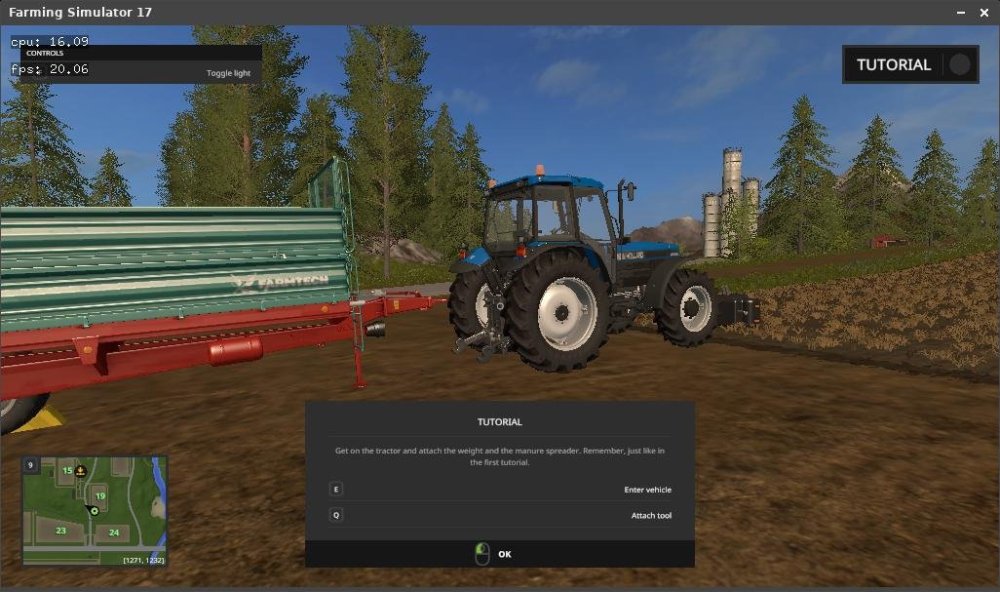
Gaming experience with Orange Pi 5 (RK3588) on Armbian
KhanhDTP replied to KhanhDTP's topic in Orange Pi 5
I understand now, because the x86/FarmingSimulatorGame2017.exe file forces the use of the OpenGL renderer. Both full-screen and windowed modes are working normally for me. Armbian 25.11.2 Noble XFCE (BSP Kernel: 6.1.115) + PanVk - mesa 26.0 (https://launchpad.net/~ernstp/+archive/ubuntu/mesaaco) + Box64 arm64 v0.4.1 1aed7e028 (https://ryanfortner.github.io/box64-debs/) + proton-10.0-3-amd64-wow64 (https://github.com/Kron4ek/Wine-Builds/releases/download/proton-10.0-3/wine-proton-10.0-3-amd64-wow64.tar.xz) + OpenGL (Panfrost)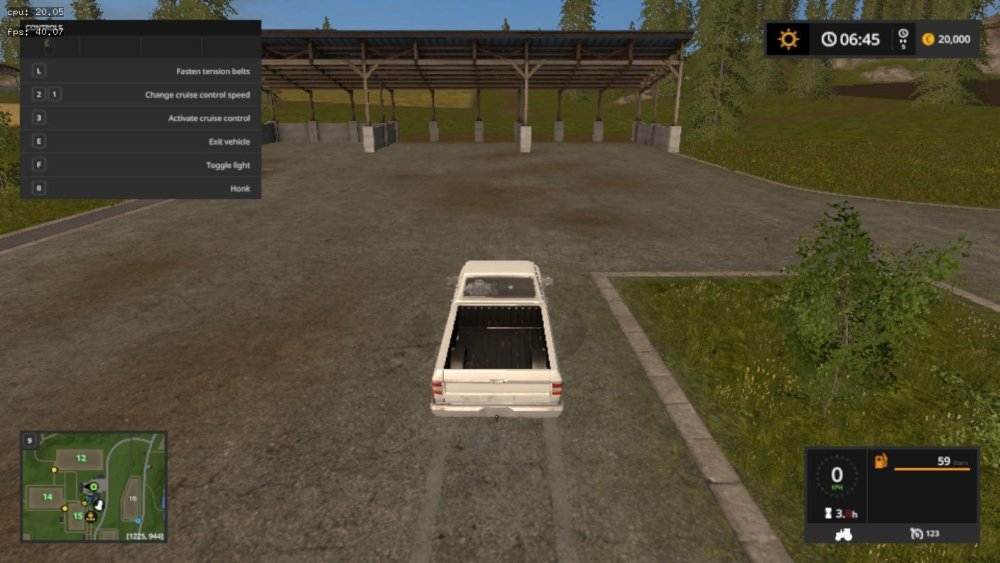
-
Hi, after find out that the usb-connector right so have I tried install on a usb3-sata-m2 disk, I have problem to install. I created partision on the usb-disk with ambian-install, and after that trying to select 8 (download and install clean image), but it can't find any image for my board. I have no eMMC on my 4GB ram radaxa zero 3Wso I run from SD-card.
-
I own the same box. Do you unbrick your box in the meanwhile?
-
The related PR states this was tested. @Efe Çetin can you confirm this still works as expected?
-
I've been trying to get the LCD working on my box. I've used Nicks image - Armbian-unofficial_25.05.0-trunk_X98h_bookworm_edge_6.12.11_xfce_desktop I've followed instructions for OpenVFD and tm16xx on these forums but both result in an Exec Format Error when I try to install the compiled module. From what I have read this is a version mismatch between the kernal and what the module was built with but when I compare uname -r with the vermagic of the module they match. I initially installed the linux headers from Nick's Github: linux-headers-edge-sunxi64_25.05.0-trunk_arm64_6.12.11. After I got the format error I tried installing headers from Armbian-config but get the same result. Make wouldn't work at all initially until I did a symlink between the relevant folders in usr/src and lib/modules. Maybe that stuffed something up?
-
@marcosdsdba I would compile this on the box. Install kernel headers. Post the errors you are getting. https://github.com/NickAlilovic/build/releases/download/20250306/linux-headers-edge-sunxi64_25.05.0-trunk_arm64__6.12.11-S62b2-Da873-P8a5c-C1abcH02eb-HK01ba-Vc222-B9bbb-R448a.deb
- Yesterday
-

how to enable wifi (SV6256P) in H616 DDR3 Tv box
marcosdsdba replied to Jain Ziad's topic in Allwinner CPU Boxes
@Jain Ziad Try this: https://forum.armbian.com/topic/57960-sv6256p-wifi-now-working-on-linux-6x-armbian-tested/ -
@brunorro What a read! That's cool stuff - hopefully those guys'n'gals visit the next station on their journey soon: from TH1520, via JH7110, then (hopefully) X1. At least that mailbox communication sounds similar with the SpacemiT SoC: power management via extra rCPU is also a thing here. Thank you for the link // Sven-Ola
-
I'm trying to enable UART6, UART7, and UART10 via overlays on a sige5 board. UART6 AND UART7 are working fine but I'm not seeing UART10 in the /dev directory. Could someone help me debug this?
-
@gabriel_altoe Try this: https://brandolamarck.substack.com/p/como-extrair-e-decompilar-a-device. I'll take some time to try and follow the tips. I'll post any updates here.
- Last week
-

SV6256P WiFi Now Working on Linux 6.x (Armbian Tested)
Kevin su replied to Kevin su's topic in Allwinner CPU Boxes
While reviewing the system logs, I noticed several ftrace warnings appearing in dmesg. After investigating the root cause, I have applied the necessary configuration updates to eliminate these logs. The driver is now running cleanly without any ftrace-related noise. -
 Hi, did you resolve this? I'm having trouble with the same thing and this seems to be the only forum where this is mentioned. It seems to be a watchdog issue?
 -

How you can help test upcoming Armbian 26.02 images?
Torte replied to Igor's topic in Advanced users - Development
Board: MKS-Klipad50 Images: * Armbian_26.2.1_Mksklipad50_noble_current_6.18.8_minimal.img.xz * Armbian_26.2.1_Mksklipad50_trixie_current_6.18.8_minimal.img.xz Passed tests: * gpg and sha checksum files * boot from emmc, leds, display, touch, usb, internal wifi * initial setup, uboot-console, full klipper/klipperscreen install, reboot Result: All expected images do exist, verify and work properly. -
Any news or predictions on when HDMI and VAAPI will work? I want to use the board as a Jellyfin server!
-
I managed to burn the eFuse. Now I can load the uart0hello.sunxi file signed with toc0 and even get the "Hello H3..." output. But I can't sign the system image or even just the SPL; when I boot from them, the console is silent. Does anyone have any thoughts or know what to do?
-
Great! It's working now, sorry, I made it too complex previously.
-
Collabora continues to be a key contributor to the Linux kernel, with 125 patches from 21 developers! Highlights include Arm Mali GPU improvements, expanded MediaTek and Rockchip SoC support, Rust integration progress, and new Rockchip video capture functionality. View the full article
-

Efforts to develop firmware for H96 MAX M9 RK3576 TV Box 8G/128G
a.ni replied to Hqnicolas's topic in Rockchip CPU Boxes
I've made some improvements of .dts for H96 MAX M9S, tested on Linux version 6.19.0-edge-rockchip64 (build@armbian) What's new: GPU working USB 3.0 mode working Currently working: both USB ports, incl. USB 3.0 mode GPU (using Panfrost driver) HDMI (audio+video) Ethernet port Wifi (using aic8800 DKMS drivers provided by https://github.com/radxa-pkg/aic8800/releases) Leds Not working: NPU Bluetooth S/PDIF rk3576-evb1-v10-main-h96-v5.dts dmesg-19.0.txt -

-
armbian-config submenu STO001
-
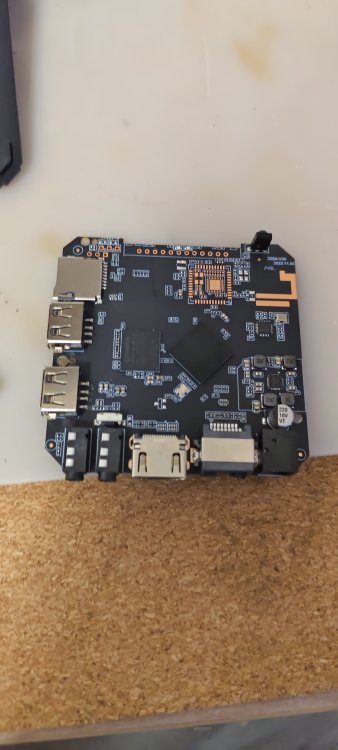
Hello friends, in general, a friend gave me an x96q TV set-top box, I want to install armbian on it and then install klipper and use it on my 3d printer, I'm not good at this, maybe someone can help
-
Yeah, don't do that.. At least read "<application> --help" before doing sensitive stuff like that if you are unfamiliar. If that happened to you, and that is the reason you typed that.. For future reference: If you have a root account, you can change to root user with "su root" and enter passwd. You are then root and can add your user back to the groups needed. Or you can use the debian "child safe" way, "adduser <user> <group>" (only works on already existing users and groups) instead of usermod to begin with. But best is you learn usermod, since that will let you utilize that knowledge on pretty much any unix system.