Active threads
Showing topics posted in for the last 365 days.
- Past hour
-

Armbian for H313 X96-Q LPDDR3 TV-Box
Maurizio Finesso replied to sicxnull's topic in Allwinner CPU Boxes
Hi @sicxnull, @Nick A thank you very much for your support. Probably last night I was very confused when I wrote my post. Of course the v5.1 updated will be nice to have but looking better I can say to you and to @ventara that the armbian image suggested from Nick to Trauma (https://github.com/NickAlilovic/build/releases/download/20250306/Armbian-unofficial_25.05.0-trunk_X98h_bookworm_edge_6.12.11_xfce_desktop.img.xz) works fine on X96Q vs 5.1 only things the led in front remain always red and that why I was thinking it doesn't boot. Ethernet port works but wifi doesn't work. Never mind ethernet is enough. On the other side when I compare the two release (sicxnull and Nick) I didn't realize that I copy two times the same image on two different sd (I was really too tired) so don't consider the indication that I give you apart the wifi chip. That is right! -

[Bug]: Ethernet rarely connecting successfully in Orange Pi 3 LTS
Werner replied to iMagz's topic in Allwinner sunxi
Oh great. Then I'll steal borrow your dts and replace the one currently in the framework later - Today
-

OZPI v1 new image with Armbian v26.2 Debian stable (trixie)
TRay replied to TRay's topic in Allwinner sunxi
Today all works, thank you for all who fixed this problem 🙂 apt update Get:1 http://security.debian.org trixie-security InRelease [43,4 kB] Get:2 http://deb.debian.org/debian trixie InRelease [140 kB] Get:3 http://deb.debian.org/debian trixie-updates InRelease [47,3 kB] Get:5 https://github.armbian.com/configng stable InRelease [5 467 B] Get:4 http://armbian.lv.auroradev.org/beta trixie InRelease [39,4 kB] Get:6 http://deb.debian.org/debian trixie-backports InRelease [54,0 kB] Get:7 http://security.debian.org trixie-security/main armhf Packages [88,8 kB] Get:8 http://deb.debian.org/debian trixie/non-free armhf Packages [69,9 kB] Get:9 http://deb.debian.org/debian trixie/non-free-firmware armhf Packages [6 685 B] Get:10 https://github.armbian.com/configng stable/main armhf Packages [434 B] Get:11 http://deb.debian.org/debian trixie/main armhf Packages [12,7 MB] Get:12 http://deb.debian.org/debian trixie/contrib armhf Packages [50,6 kB] Get:13 http://deb.debian.org/debian trixie-updates/main armhf Packages [5 144 B] Get:14 http://deb.debian.org/debian trixie-backports/main armhf Packages [133 kB] Get:15 http://deb.debian.org/debian trixie-backports/contrib armhf Packages [4 368 B] Get:16 http://deb.debian.org/debian trixie-backports/non-free-firmware armhf Packages [3 856 B] Get:17 http://deb.debian.org/debian trixie-backports/non-free armhf Packages [1 520 B] Fetched 13,4 MB in 12s (1 073 kB/s) 32 packages can be upgraded. Run 'apt list --upgradable' to see them. -

Booting armbian manually from u-boot shell over UART
SteeMan replied to user03's topic in Amlogic CPU Boxes
Specifically the file you want to look at is aml_autoscript What happens on a normal amlogic TV box is when the hidden reset button is pressed during boot, the boot loader looks for this file and runs it. This file then changes the stored uboot environment such that subsequent boots follow a new boot flow to boot first from sd or USB and fall back to android. If you follow the logic you can find the actual boot commands in the other files that get called. -
 Thanks @Werner this is fixed, it works. In my case auto selected mirror is fi.mirror.armbian.de .
 -
Workaround solution: downgrade to 2.3.2 apt install zfs-dkms=2.3.2-2 zfsutils-linux=2.3.2-2 libzpool6linux=2.3.2-2 libzfs6linux=2.3.2-2 libuutil3linux=2.3.2-2 libnvpair3linux=2.3.2-2 # block unwanted upgrade: apt-mark hold zfs-dkms=2.3.2-2 zfsutils-linux=2.3.2-2 libzpool6linux=2.3.2-2 libzfs6linux=2.3.2-2 libuutil3linux=2.3.2-2 libnvpair3linux=2.3.2-2
-

Gaming experience with Orange Pi 5 (RK3588) on Armbian
KhanhDTP replied to KhanhDTP's topic in Orange Pi 5
Armbian 25.11.2 Noble XFCE (BSP Kernel: 6.1.115) + PanVk - mesa 26.0 (https://launchpad.net/~ernstp/+archive/ubuntu/mesaaco) + box64 4.1 (https://ryanfortner.github.io/box64-debs/) + wine-10.20-staging-tkg-ntsync-amd64-wow64 (https://github.com/Kron4ek/Wine-Builds/releases/tag/10.20) + dgVoodoo2 (https://github.com/dege-diosg/dgVoodoo2/releases) + DXVK-stripped v2.1 (more likely to be crash-proof than other Dxvk versions) ~60fps@720p (Medium/High settings) box64 environment variables: Need for Speed - Underground 2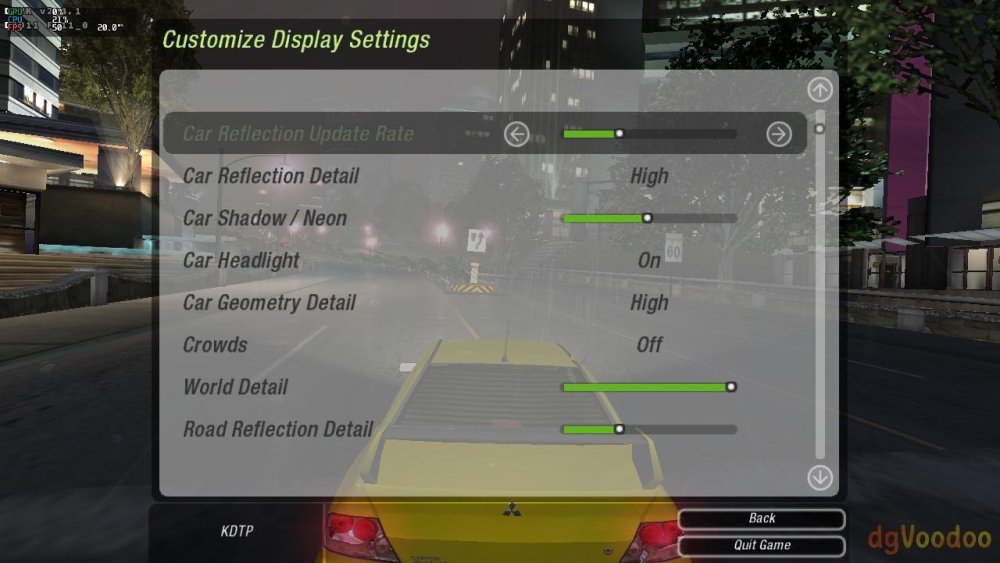
-

Vontar KK MAX / HK1 RBOX R2 / R3 - RK3566 4GB/32GB(or 64GB)
kang_001 replied to Deoptim's topic in Rockchip CPU Boxes
Hello, the link you shared has expired. Could you please re-analyze it -
Hello, im trying to get my rk322x board with SV6051P chip to work, i tried every LED config but wpa_supplicant crashes on boot every time. Here are the dmesgs: dmesg_led8.logdmesg_led7.logdmesg_led6.logdmesg_led5.logdmesg_led4.logdmesg_led3.logdmesg_led2.logdmesg_led1.logdmesg_default_dto.log Anyway to fix this?
- Yesterday
-
First testing on similar device (Odroid N2) didn't reveal any troubles. Need to locate VIM3 and try to recreate.
-
@chris178 SmartSolution on discord says his camera works. SmartSolution Hi, i had problem with camera and isp color quality After check and test download radxa-a733 t2 rsdk , image file and upload on mmc and after load system all camera works good
-
Duplicate
-

Efforts to develop firmware for Vontar KK Max 8gb/128gb"
Hqnicolas replied to gersones's topic in Rockchip CPU Boxes
That's advanced as hell for build, but you can use any Rockchip SDK to make it, Some factoryes share the SDK online Some don't you will just compile a copy of the same file that you can find in the android image -
And others: https://docs.armbian.com/Mirrors/#current-mirrors
-
Efforts to develop firmware for H96 MAX M9 RK3576 TV Box 8G/128G
Hqnicolas replied to Hqnicolas's topic in Rockchip CPU Boxes
It works with this old drivers in windows. CP2102 doesn't reach high baud rates in linux. Baud rate: 1500000 Data bit: 8 Stop bit: 1 Parity check: none Flow control: none ☑️ CP2104 TTL Tested the original one! ☑️ CP2102 TTL Tested the chinese fake one! with this Driver -
I can confirm that booting Odroid M1 from SD card does not work with U-Boot versions newer than 2024.04. Many thanks to IAV for providing a workaround. Perhaps most people are booting from NVMe now, so this issue has flown under the radar? # Install U-Boot 24.5.1 (maps to upstream v2024.04) apt-get install -y linux-u-boot-odroidm1-edge=24.5.1 # Freeze the package at that version "printf 'linux-u-boot-odroidm1-edge hold\n' | sudo dpkg --set-selections" # Flash SPI directly from the package artifacts (or via armbian-install) flashcp -v /usr/lib/linux-u-boot-edge-odroidm1/idbloader.img /dev/mtd0 flashcp -v /usr/lib/linux-u-boot-edge-odroidm1/u-boot.itb /dev/mtd2 # Confirm strings /dev/mtd0 | grep -m1 "U-Boot" # U-Boot SPL 2024.04 (Jan 10 2026 - 10:54:44 +0100) strings /dev/mtd2 | grep -m1 "U-Boot" # FIT image for U-Boot with bl31 (TF-A) Now I can boot from sdcard again w/o RCY button. To use only ZFS on my system I compiled zfs into U-Boot. That worked but the problem was still with U-Boot's handling of the mmc1 somehow. Even though zfsls/zfsload were present in the SPI-flashed U-Boot, that build immediately reinitialized mmc1 in HS200 (1.8 V) mode and hit the “Card did not respond to voltage select! : -110” failure before the boot script could run. So the inability to boot the ZFS v28 pool was due to the SPI U-Boot’s bad MMC tuning, not the ZFS commands themselves. For future reference I’ll leave here on how to built U-Boot with ZFS support from the upstream sources: # Workspace & Dependencies apt install git gcc-aarch64-linux-gnu bison flex device-tree-compiler libssl-dev make python3 ninja-build build-essential mkdir -p ~/work/u-boot && cd ~/work/u-boot # Upstream U-Boot git clone --depth=1 --branch v2024.04 https://source.denx.de/u-boot/u-boot.git # Firmare blobs git clone --depth=1 https://github.com/rockchip-linux/rkbin.git # Prepare .config cd u-boot cp configs/odroid-m1-rk3568_defconfig .config scripts/config --file .config --enable CONFIG_CMD_ZFS yes "" | olddefconfig # Compile make -j$(nproc) \ BL31=../rkbin/bin/rk35/rk3568_bl31_v1.45.elf \ ROCKCHIP_TPL=../rkbin/bin/rk35/rk3568_ddr_1560MHz_v1.23.bin # Flash SPI directly from the package artifacts (or via armbian-install) cp spl/u-boot-spl.bin /usr/lib/linux-u-boot-edge-odroidm1/idbloader.img cp u-boot.itb /usr/lib/linux-u-boot-edge-odroidm1/u-boot.itb flashcp -v /usr/lib/linux-u-boot-edge-odroidm1/idbloader.img /dev/mtd0 flashcp -v /usr/lib/linux-u-boot-edge-odroidm1/u-boot.itb /dev/mtd2
-
Why is there no image for RK3288?
-
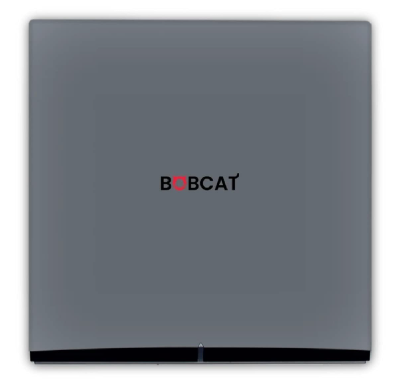
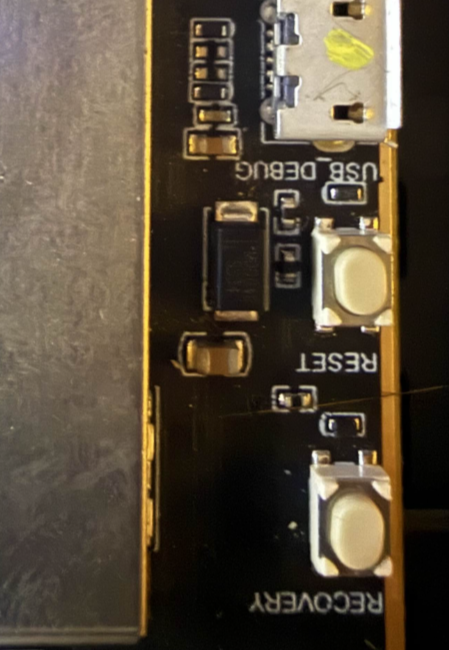
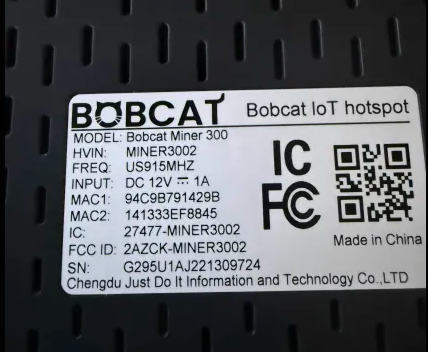
After a ton of time porting the dts for modern kernels, i have a working release for the Bobcat 300 29X Variant To compile https://github.com/sicXnull/armbian-build/tree/Bobcat-29x . ./compile.sh build BOARD=bobcat-29x BRANCH=current BUILD_DESKTOP=no BUILD_MINIMAL=yes EXPERT=yes KERNEL_BTF=no KERNEL_CONFIGURE=NO KERNEL_GIT=shallow RELEASE=bookworm Link to Prebuilt Armbian-unofficial_26.02.0-trunk_Bobcat-29x_bookworm_current_6.18.4.img.xz First check to see if you have a compatible version. Flip the unit over and check the serial number. It will start with G290 or 295. This does not work on 28 or 285. How to Flash 1) Install Rockchip Flash Tools 2) Download bootloader (rk356x_spl_loader_ddr1056_v1.10.111.bin) attached here. 3) Boot device into LOADER mode. Plug USB Cable in to back of the unit, powered off. Open the device. With it powered on hold the reset button for 1 second, then immediately let off and hold the recovery button down until the PC recognizes you in LOADER mode 4) Follow the flash procedure found here. WARNING While I2C/Spidev is functional, i did not install Helium or the Lora packet forwarder for testing. Flash this image at your own risk if you still wish to use helium mining. rk356x_spl_loader_ddr1056_v1.10.111.bin
- Last week
-
 Yep Already tried that:- "chatgpt+gemini have given lots of ideas like patches, hooks, extensions but none of them work. (grrrrrr!)." Didn't work probably because the source is not an ASCII text file but a large CPIO binary. But....I am just running a make right now which looks like it might work..... don't want to jinx it....
 -
duplicate
-
This isn't a DMA problem. There are too many inconsistencies in the audio driver. The driver needs to be fixed first.
-
A quite easy workaround until it's resolved up-upstream is to install and enable the Cinnamenu applet and disable the "vanilla" menu applet. Right-click on the taskbar/panel, choose "Applets" and the rest is straightforward. To place the Cinnamenu in the bottom left corner, right click on the taskbar/panel and enter Edit mode to be able to move stuff around, finish Edit mode and you're all set.
-
moved to off-topic since op is not using Armbian.
-
All clear for the PCIe MSI: it is something with that Intel 7260 card. Today, I got two other M.2 Wifis: MT7922 and RTL8822ce, both seem to work on current and also on edge. Thus, I consider this as a success. Here's some screen blurb. // Sven-Ola
-
Minor update, I hardcoded usage of uboot debugging option and removed cache to force compiling uboot. But output from bootloader remained the same: U-Boot SPL 2024.01_armbian-2024.01-S866c-P7738-Ha5c2-Vcc17-Bf389-R448a (Jan 08 2026 - 10:33:14 +0000) DRAM: 512 MiB Trying to boot from MMC1 Maybe detailed logging was already enabled? But it still does not give me any hints. Especially my board does not contain any additional slots like emmc, only for micro sd card (I don't understand why bootloader tries to use mmc1) UPD: I find out question with a little bit similar problem (hang out on mmc1) but need time to understand the reason, maybe it has similar issue