All Activity
- Past hour
-
@tiobily Ram detect and training looks just fine above.... you could interrupt the boot and test memory. what OS image did you use above? I could try it on my device (also 8GB but modded). Did you try different microSD cards? Just tried @Nick A image and u-boot section is very similar. However boot continues with linux kernel at the point your debug stalled.... I can't see much clue as to why you're having that issue from the log above unfortunately...
- Today
-
Thanks, I ran from sdcard and these options work on Dolamee D5: overlays=cpu-hs emmc emmc-ddr-ph45 led-conf-default
-
hi @chris178! 1 - factory 8gb, not modded, lpddr4 2 - boot log: ▒...... [151]HELLO! BOOT0 is starting! [154]BOOT0 commit : {9f6fab4f-dirty} [168]dram_para_total:0xf [171]vaild para:6 select dram para10 [175][mmc]: mmc driver ver 2024-03-20 10:36 [184][mmc]: Wrong media type 0x0 [188][mmc]: ***Try SD card 0*** [197][mmc]: HSSDR52/SDR25 4 bit [200][mmc]: 50000000 Hz [202][mmc]: 59638 MB [205][mmc]: ***SD/MMC 0 init OK!!!*** [210]DRAM BOOT DRIVE INFO: V0.601 [215]DRAM_VCC set to 1100 mv [217]DRAM CLK =1800 MHZ [220]DRAM Type =8 (8:LPDDR4,9:LPDDR5) [320]Training result is = 7 [323]DRAM Pstate 1 training, frequency is 1200 Mhz [433]Training result is = 7 [436]DRAM Pstate 2 training, frequency is 800 Mhz [642]Training result is = 7 [645]DRAM Pstate 3 training, frequency is 400 Mhz [3829]Training result is = 7 [3832]DRAM Pstate 0 training, frequency is 1800 Mhz [3840]Actual DRAM SIZE =8192 M [3843]DRAM SIZE =8192 MBytes, para1 = 311a, para2 = 20001001, dram_tpr13 = 6067 [3858]DRAM simple test OK. [3864]error:bad magic. [3928]error: dtb not found for scp [3931]mmc not para [3933]Jump to ATF: monitor_base = 0x48000000, uboot_base = 0x4a000000, optee_base = 0x0 NOTICE: BL31: OP-TEE 32bit detected NOTICE: BL31: U-BOOT 32bit detected NOTICE: BL31: v2.5(debug):5fc237a6a NOTICE: BL31: Built : 09:05:28, Feb 26 2025 NOTICE: BL31: No DTB found. ERROR: Error initializing runtime service opteed_fast U-Boot 2018.07-12-boot-aw2501-gb2d229198b2-dirty (Jan 06 2026 - 03:45:33 +0000) Allwinner Technology [03.985]CPU: Allwinner Family [03.988]Model: Radxa Cubie A7A I2C: ready [04.052]DRAM: 8 GiB [04.061]Relocation Offset is: 75d89000 [04.114]secure enable bit: 0 [04.117]PMU: AXP8191 [04.119]PMU: AXP8191 VER_A FDT ERROR:fdt_get_regulator_name:get property handle twi-supply error:FDT_ERR_INTERNAL [04.131]bmu_axp515_probe pmic_bus_read fail [04.135][AXP8191] onoff status: 0x50 = 0x1, 0x51 = 0x0 [04.140][AXP8191] charge status: 0x4 = 0x0 [04.144]CPU=1014 MHz,PLL6=1200 Mhz,AHB=200 Mhz, APB1=24Mhz MBus=600Mhz [04.150]gic: sec monitor mode SPI ALL: ready [04.194]flash init start [04.196]workmode = 0,storage type = 1 [04.200][mmc]: mmc driver ver uboot2018:2024-10-18 9:01:00 -- uboot2018:2025-03-28 10:03:00 [04.208][mmc]: get sdc_type fail and use default host:tm1. [04.216][mmc]: can't find node "mmc0",will add new node [04.221][mmc]: fdt err returned <no error> [04.224][mmc]: Using default timing para [04.228][mmc]: SUNXI SDMMC Controller Version:0x50530 [04.246][mmc]: card_caps:0x3000000a [04.249][mmc]: host_caps:0x3000003f [04.252]sunxi flash init ok get value error [04.262]Loading Environment from SUNXI_FLASH... OK No ethernet found. [04.299]NOT support bridge yet [04.302]Warn: no find panel or bridge [04.403]drm hdmi get mode: 1920x1080@60Hz hdmi0@5520000: use force output detailed mode clock 139190 kHz, flags[5] H: 1920 2008 2052 2080 V: 1080 1082 1087 1115 bus_format: 0 clk_set_rate: <NULL> has NULL parent [04.505]suxni tcon hdmi set rate: 139190000Hz and get diff: -139190000Hz [04.577]the secure storage item0 copy0 magic is bad [04.589]the secure storage item0 copy1 magic is bad [04.593]usb burn from boot delay time 0 [04.599]usb prepare ok [04.902]overtime [04.906]do_burn_from_boot usb : no usb exist skip update boot_param cann't get the boot_base from the env [04.917]update part info [04.922]battery temp is -1 [04.926]update bootcmd [04.934](not enough data: expected >= 8 cells, got 4 cells) Link up timeout Speed change timeout PCIe speed of Gen1 Override default fdtfile to allwinner/sun60i-a733-cubie-a7z.dtb [07.376]libfdt fdt_check_header(): FDT_ERR_BADMAGIC [07.382]libfdt fdt_path_offset() returned FDT_ERR_BADMAGIC [07.388][mmc]: get sunxi-mmc0 string failed [07.392]The storage not support sample function [07.398]## error: update_fdt_dram_para_from_bootpara : FDT_ERR_NOTFOUND ret 0 [07.408]chip id : 0x00005100 0x00004900 0x00004810 0x00001d62 [07.414]mac addr => 08:51:49:58:7f:71 [07.417]chip id : 0x00005100 0x00004900 0x00004810 0x00001d62 [07.423]mac addr => 08:51:49:58:7f:70 [07.427]/chosen/rng-seed node not exit [07.430]no battery, disabled battery functons [07.434]Could not find nodeoffset for bat_supply [07.439]update dts curr_device:0 Device: SUNXI SD/MMC Manufacturer ID: ff OEM: 0 Name: SDU1 Bus Speed: 50000000 Mode : SD High Speed (50MHz) Rd Block Len: 512 SD version 3.0 High Capacity: Yes Capacity: 58.2 GiB Bus Width: 4-bit Erase Group Size: 512 Bytes [ufs]info:Driver version 0.0.24 2024.12.30 16:00 [ufs]info:Cal words 0x60:val 0xb0880000, 0x64:val 0x4f21a959 [ufs]err:uic c 16,uic a 0,1,0 [ufs]err:e 80000010,0,0,0,0 [ufs]err:int s 0,400 [ufs]err:Device not present [ufs]err:wait device link startup failed [ufs]info:peer link startup timeout [ufs]info:Cal words 0x60:val 0xb0880000, 0x64:val 0x4f21a959 [ufs]err:uic c 16,uic a 0,1,0 [ufs]err:e 80000010,0,0,0,0 [ufs]err:int s 0,400 [ufs]err:Device not present [ufs]err:wait device link startup failed [ufs]info:peer link startup timeout [ufs]info:Cal words 0x60:val 0xb0880000, 0x64:val 0x4f21a959 [ufs]err:uic c 16,uic a 0,1,0 [ufs]err:e 80000010,0,0,0,0 [ufs]err:int s 0,400 [ufs]err:Device not present [ufs]err:wait device link startup failed [ufs]info:peer link startup timeout [ufs]info:Cal words 0x60:val 0xb0880000, 0x64:val 0x4f21a959 [ufs]err:uic c 16,uic a 0,1,0 [ufs]err:e 80000010,0,0,0,0 [ufs]err:int s 0,400 [ufs]err:Device not present [ufs]err:wait device link startup failed [ufs]info:peer link startup timeout [ufs]err:link startup failed -6 [ufs]err:ufshcd_probe() failed -6 fail to init ufs sunxi_flash - sunxi_flash sub-system Usage: sunxi_flash sunxi_flash init storage_type sunxi_flash read mem_addr part_name [size] sunxi_flash read_mtd mem_addr part_name [size] sunxi_flash write <mem_addr> <part_name> [size] sunxi_flash write <mem_addr> <part_name> [offset] [size] sunxi_flash write_mtd <mem_addr> <part_name> sunxi_flash boot0 force_dram_update_size <new_val> sunxi_flash boot0 force_dram_update_flag <new_val> Hit any key to stop autoboot: 0 starting USB... USB0: start sunxi USB-DRD... config usb clk ok sunxi USB-DRD init ok... USB EHCI 1.00 scanning bus 0 for devices... 1 USB Device(s) found USB1: start sunxi USB1-Host... config usb clk ok sunxi USB1-Host init ok... USB EHCI 1.00 scanning bus 1 for devices... 1 USB Device(s) found scanning usb for storage devices... 0 Storage Device(s) found Device 0: device type unknown ... is now current device ** Bad device usb 0 ** ** Bad device usb 0 ** mmc0 is current device Scanning mmc 0:2... Scanning mmc 0:3... Found /boot/extlinux/extlinux.conf Retrieving file: /boot/extlinux/extlinux.conf 1307 bytes read in 19 ms (66.4 KiB/s) U-Boot menu 1: Debian GNU/Linux 11 (bullseye) 5.15.147-14-a733 2: Debian GNU/Linux 11 (bullseye) 5.15.147-14-a733 (rescue target) Enter choice: 1: Debian GNU/Linux 11 (bullseye) 5.15.147-14-a733 Retrieving file: /boot/initrd.img-5.15.147-14-a733 31153067 bytes read in 1310 ms (22.7 MiB/s) Retrieving file: /boot/vmlinuz-5.15.147-14-a733 19030528 bytes read in 808 ms (22.5 MiB/s) append: root=UUID=6f750720-329a-45f0-a4b5-abc5797b040a console=ttyAS0,115200n8 rootwait clk_ignore_unused mac_addr=08:51:49:58:7f:71 mac1_addr=08:51:49:58:7f:70 quiet splash loglevel=4 rw earlycon consoleblank=0 console=tty1 coherent_pool=2M irqchip.gicv3_pseudo_nmi=0 cgroup_enable=cpuset cgroup_memory=1 cgroup_enable=memory swapaccount=1 kasan=off Retrieving file: /usr/lib/linux-image-5.15.147-14-a733/allwinner/sun60i-a733-cubie-a7z.dtb 193692 bytes read in 145 ms (1.3 MiB/s) [16.025]libfdt fdt_path_offset() returned FDT_ERR_BADMAGIC [16.034]The storage not support sample function ret 0 [16.136]mac addr => 08:51:49:58:7f:71 [16.140]mac addr => 08:51:49:58:7f:70 [16.145]no battery, disabled battery functons [16.152]update dts stop sunxi USB-DRD ok... stop sunxi USB1-Host ok... Loading Ramdisk to 4824a000, end 49fffbab ... OK ERROR: reserving fdt memory region failed (addr=48000000 size=1000000) [16.232]Starting kernel ... [16.235]total: 16235 ms [16.237][mmc]: MMC Device 2 not found [16.240][mmc]: mmc 2 not find, so not exit NOTICE: [SCP] :wait arisc ready.... NOTICE: [SCP] :arisc version: [d463b9da43dc50320f21ba51c6c51afe2db20d83] NOTICE: [SCP] :arisc startup ready NOTICE: [SCP] :arisc startup notify message feedback NOTICE: [SCP] :sunxi-arisc driver is starting NOTICE: BL3-1: Next image address = 0x40200000 NOTICE: BL3-1: Next image spsr = 0x3c5 nothing happen after that my workaround ( with claude help ) edit extlinux.conf and add mem=4G append root=UUID=0e1a597a-1884-4b41-a07c-733efecf176c console=ttyAS0,115200n8 earlyprintk=sunxi-uart,0x2500000 rootwait mem=4G clk_ignore_unused any higher value dosent work.
-

Hardware video acceleration with recent armbian/mainline kernel (Kodi)
Joe K replied to XXXBold's topic in Orange Pi 5
Hi Igor, Thank you for your reply. I build an Image for Mekotronics R58V2, but I leaned today we dont have the R58S2 (yet) our current device is the R58s, with a build provided by Mekotronics and the HW decoding works with QT-Multimedia as playback back-end, This is this build: v26.02 rolling for Mekotronics R58S running Armbian Linux 6.1.84-vendor-rk35xx. This device is not yet supported, at least I could not find it here. I will discuss with Mekotronics to get also at least Standard support from Armbian in future. I do have also Mekototronics R58X and R58HD devices we want to use also in ffuture the have better support level here as well. I could not find any Forums related to Mekotronics devices and seams can not open one or add threads to the Rockchip rk35xx section, there loads of OragePi stuff but I could not see that officially you support any of them, anyway I gave up with them cause they are ...lets say below expectations ;-). Please give me a hint. As Iam new here please excuse if you get sometimes strange question, but Iam working with arm boards already for a while. Using CLI is not an option, we actually install LX-Qt together with the application. Thanks for helping! -
Booting from mtd/nvme should just work. Most common problems: - dirty mtd/emmc. vendor/unmatching boot loader can cause issues. - mixup between m.2 sata and actual nvme. Correct overlay/dt must be used - wrong rootfs uuid in armbianEnv.txt after running armbian-install (after done, do not reboot but mount freshly written nvme to a random folder and check if the uuid is correct)
-
Hi everyone, I just got an Orange Pi 5 and am experiencing the same issue as the OP. I've since then installed the bootloader on the SD card and the rootfs on the NVME drive. I don't really understand what came out of the discussion here: is it possible to boot from the MTD? Thanks a lot! EV
-

Hardware video acceleration with recent armbian/mainline kernel (Kodi)
Igor replied to XXXBold's topic in Orange Pi 5
Gnome (wayland) desktop with kernel 6.18.y Probably this way? apt install mpv mpv --hwdec=auto test.mkv (+) Video --vid=1 (*) (hevc 1920x816 25.000fps) (+) Audio --aid=1 --alang=mul (*) (aac 2ch 48000Hz) AO: [alsa] 48000Hz stereo 2ch float VO: [gpu] 1920x816 yuv420p But something is still missing ... not hw accelerated. Sorry, not an expert here. I am happy when Chromium says it. -
 A friendlier, faster, snap-free desktop install in armbian-configIf you've installed a desktop environment with armbian-config over the last few months, you may have noticed things feel different: there's a tier you can pick, the browser actually works on every arch, uninstall doesn't take half your system with it, and there's no snap pop-up surprising you on Ubuntu builds. That's not by accident — the desktop submodule has been quietly rebuilt from the ground up. Here's what landed, why we did it, and what it means for you. Pick the desktop you want — at install, and afterThree tiers, instead of one all-or-nothing install: minimal — DE + display manager + a terminal. About 500 MB. Perfect for headless boards with an occasional HDMI session, or anyone who'd rather curate apps themselves.mid — adds a WWW browser, file manager, image viewer, media player, calculator, archive tool, torrent client, and the SD-card flasher. About 1 GB. The "everyday desktop" sweet spot.full — adds LibreOffice, GIMP, Inkscape, Audacity, Thunderbird, and VS Code. About 2.5 GB. Workstation-shaped.And — because changing your mind is allowed — you can move between tiers any time without a reinstall. armbian-config --api module_desktops upgrade de=xfce tier=full computes the delta and only adds what's missing. The reverse path, downgrade, only removes packages from the original install manifest, never anything you added on your own. Snap-free Chromium, Firefox, and ThunderbirdOn Ubuntu, the apt names chromium, firefox, and thunderbird are snap-transitional packages — installing them silently pulls in snapd, runs the apps in a snap sandbox, and gives you a slow start, broken hardware acceleration, and a confusing menu of "two Chromiums" if you ever want the real thing. Armbian images don't ship snapd, so we now route those names to real, native .debs hosted on apt.armbian.com. The desktop install path writes an apt pin priority file at /etc/apt/preferences.d/armbian-desktops that forces our packages to win over the snap-shims — even on systems where the snap version is technically newer. The result: apt install chromium gives you a real, native Chromium. No snapd. No surprise pop-ups. On amd64 systems, the browser slot maps to Google Chrome (also from apt.armbian.com); on RISC-V Ubuntu builds you get real Firefox. Debian releases keep using upstream chromium / firefox-esr — those have always been real .debs and need no help. One desktop, every supported distro and archEach DE — XFCE, GNOME, KDE Plasma, KDE Neon, MATE, Cinnamon, i3-wm, xmonad, Enlightenment, Budgie, Deepin — is now a single declarative YAML file in the configng repo. The engine works out which packages exist on which release on which arch, substitutes per-platform replacements where needed, and silently drops broken ones. Same XFCE definition runs on Debian bookworm/trixie/forky and Ubuntu noble/resolute across arm64 / amd64 / armhf / riscv64. Adding a new desktop environment is a YAML edit and a smoke test — no per-distro shell scripts, no codepaths to chase. Clean uninstall, every timeEvery desktop install records a manifest of exactly which packages it added — under /etc/armbian/desktop/<de>.packages. Removal undoes only those. Packages that were already on your system before you installed the desktop stay put. No more "I uninstalled XFCE and lost half my system." The little stuff that's easy to missAuto-login that doesn't trash your config. Enable / disable autologin for gdm3, sddm, or lightdm via in-place sed edits — your WaylandEnable=false and other tweaks survive.Container-aware. Same code path works inside Docker without trying to start a display manager. CI builds and scripted installs work without special-casing.U2F security keys. Plug in your Yubikey and WebAuthn just works — the udev rules ship via libfido2-1 on resolute, libu2f-udev on older releases.Printer panel works. GNOME Settings → Printers no longer says "some settings cannot be unlocked" — cups-pk-helper ships with every desktop install now.VS Code from us, not Microsoft's repo. Installing code no longer prompts you to add Microsoft's apt source — we host the real package, the prompt is suppressed, the pin keeps Microsoft from sneaking in over the top.A weekly self-audit catches driftA scheduled Claude AI supported GitHub Actions workflow scans the YAML matrix against armbian/build's supported releases and the live Debian/Ubuntu archives — flags releases not yet covered, flags packages that no longer exist upstream — then opens a PR with proposed YAML fixes. Dead packages and missing releases stop accumulating silently. Try itOn any modern Armbian install: sudo armbian-config # or scripted: sudo armbian-config --api module_desktops install de=xfce tier=full sudo armbian-config --api module_desktops upgrade de=xfce tier=full sudo armbian-config --api module_desktops downgrade de=xfce tier=mid sudo armbian-config --api module_desktops remove de=xfce Supported desktops today: XFCE, GNOME, KDE Plasma, KDE Neon (Ubuntu noble only), MATE, Cinnamon, i3-wm and xmonad, Enlightenment, Budgie and Deepin experimental. Supported targets: Debian bookworm / trixie / forky and Ubuntu noble / resolute on every Armbian arch. View the full article
 -
 A friendlier, faster, snap-free desktop install in armbian-configIf you've installed a desktop environment with armbian-config over the last few months, you may have noticed things feel different: there's a tier you can pick, the browser actually works on every arch, uninstall doesn't take half your system with it, and there's no snap pop-up surprising you on Ubuntu builds. That's not by accident — the desktop submodule has been quietly rebuilt from the ground up. Here's what landed, why we did it, and what it means for you. Pick the desktop you want — at install, and afterThree tiers, instead of one all-or-nothing install: minimal — DE + display manager + a terminal. About 500 MB. Perfect for headless boards with an occasional HDMI session, or anyone who'd rather curate apps themselves.mid — adds a WWW browser, file manager, image viewer, media player, calculator, archive tool, torrent client, and the SD-card flasher. About 1 GB. The "everyday desktop" sweet spot.full — adds LibreOffice, GIMP, Inkscape, Audacity, Thunderbird, and VS Code. About 2.5 GB. Workstation-shaped.And — because changing your mind is allowed — you can move between tiers any time without a reinstall. armbian-config --api module_desktops upgrade de=xfce tier=full computes the delta and only adds what's missing. The reverse path, downgrade, only removes packages from the original install manifest, never anything you added on your own. Snap-free Chromium, Firefox, and ThunderbirdOn Ubuntu, the apt names chromium, firefox, and thunderbird are snap-transitional packages — installing them silently pulls in snapd, runs the apps in a snap sandbox, and gives you a slow start, broken hardware acceleration, and a confusing menu of "two Chromiums" if you ever want the real thing. Armbian images don't ship snapd, so we now route those names to real, native .debs hosted on apt.armbian.com. The desktop install path writes an apt pin priority file at /etc/apt/preferences.d/armbian-desktops that forces our packages to win over the snap-shims — even on systems where the snap version is technically newer. The result: apt install chromium gives you a real, native Chromium. No snapd. No surprise pop-ups. On amd64 systems, the browser slot maps to Google Chrome (also from apt.armbian.com); on RISC-V Ubuntu builds you get real Firefox. Debian releases keep using upstream chromium / firefox-esr — those have always been real .debs and need no help. One desktop, every supported distro and archEach DE — XFCE, GNOME, KDE Plasma, KDE Neon, MATE, Cinnamon, i3-wm, xmonad, Enlightenment, Budgie, Deepin — is now a single declarative YAML file in the configng repo. The engine works out which packages exist on which release on which arch, substitutes per-platform replacements where needed, and silently drops broken ones. Same XFCE definition runs on Debian bookworm/trixie/forky and Ubuntu noble/resolute across arm64 / amd64 / armhf / riscv64. Adding a new desktop environment is a YAML edit and a smoke test — no per-distro shell scripts, no codepaths to chase. Clean uninstall, every timeEvery desktop install records a manifest of exactly which packages it added — under /etc/armbian/desktop/<de>.packages. Removal undoes only those. Packages that were already on your system before you installed the desktop stay put. No more "I uninstalled XFCE and lost half my system." The little stuff that's easy to missAuto-login that doesn't trash your config. Enable / disable autologin for gdm3, sddm, or lightdm via in-place sed edits — your WaylandEnable=false and other tweaks survive.Container-aware. Same code path works inside Docker without trying to start a display manager. CI builds and scripted installs work without special-casing.U2F security keys. Plug in your Yubikey and WebAuthn just works — the udev rules ship via libfido2-1 on resolute, libu2f-udev on older releases.Printer panel works. GNOME Settings → Printers no longer says "some settings cannot be unlocked" — cups-pk-helper ships with every desktop install now.VS Code from us, not Microsoft's repo. Installing code no longer prompts you to add Microsoft's apt source — we host the real package, the prompt is suppressed, the pin keeps Microsoft from sneaking in over the top.A weekly self-audit catches driftA scheduled Claude AI supported GitHub Actions workflow scans the YAML matrix against armbian/build's supported releases and the live Debian/Ubuntu archives — flags releases not yet covered, flags packages that no longer exist upstream — then opens a PR with proposed YAML fixes. Dead packages and missing releases stop accumulating silently. Try itOn any modern Armbian install: sudo armbian-config # or scripted: sudo armbian-config --api module_desktops install de=xfce tier=full sudo armbian-config --api module_desktops upgrade de=xfce tier=full sudo armbian-config --api module_desktops downgrade de=xfce tier=mid sudo armbian-config --api module_desktops remove de=xfce Supported desktops today: XFCE, GNOME, KDE Plasma, KDE Neon (Ubuntu noble only), MATE, Cinnamon, i3-wm and xmonad, Enlightenment, Budgie and Deepin experimental. Supported targets: Debian bookworm / trixie / forky and Ubuntu noble / resolute on every Armbian arch. View the full article
 -
 Waiting for the delivery of the USB-to-TTL converter. My old USB-serial adapter didn' t work.
 - Yesterday
-
Can you post logs of both working and not working boards? If they are exactly the same software, it sounds like a hardware issue. If the HardKernel images works as expected, perhaps you've updated all 3, but not rebooted the working one yet?
-
@tiobily Is your a7z factory 8GB or modded out of curiosity (lpddr4 or lpddr5) ? Are you able to connect serial console onto uart0 (pb9, pb10) header pins (3.3V TTL uart adapter) and see right after power is applied to the board the debug of dram detection and training? Debug will show if full 8GB is being detected - once this is confirmed, we can take it from there.
-

Trying to boot Armbian on LinknLink iSG Box SE
rosic replied to Sancho's topic in Rockchip CPU Boxes
I got into similar situation and Loader mode is not working now. How did you manage to restore the box? Have you found the correct pins to short? Thank you a lot in advance :) -
@ioncube Were you able to use VPU with Jellyfin?
-
 If anybody needs a simple way to check text on the web or extract text from online PDFs on low‑spec SBCs, here is surf.py. It’s a tiny Python‑based terminal browser designed for boards like Orange Pi Zero, so you’re not completely blind internet‑wise even without a full browser. Starts with: ./surf.py domain.com Dependencies outside standard library: requests, PyPDF2. surf.py
 -

H96 Max RK3528 - Cannot boot Armbian from TF/SD card
jock replied to Alexander Polko's topic in Rockchip CPU Boxes
Hello, you can only boot from sdcard with that device if you follow the rockchip boot sequence, ie: you have to pack u-boot and trust.img using loaderimage tool from rockchip rkbin repository. That tools decorates the uboot/trust.img binaries with some signature and checksum, then you have to put on specific positions on your sdcard and the miniloader, residing in the emmc, will boot from sdcard once it validates correctly the binaries you supplied. You may take a look to my multitool github project for some reference. I have you same box and it boots on mine. Unfortunately on this particular box, the manufacturer disabled the sdcard boot at SoC/hardware level: this means that the trick to erase the internal flash to boot from sdcard, which worked fine for older SoCs, does not always work with rk3528-based (and probably other rk35xx) boards -

Hardware video acceleration with recent armbian/mainline kernel (Kodi)
XXXBold replied to XXXBold's topic in Orange Pi 5
@Igor Thanks for the answer! So you run the latest Armbian to test? https://armbian.com/boards/orangepi5 from here? Which image? Would using the CLI version also work (I don't need a desktop). Can you maybe also verify if HEVC works? (H264 works also quite okay in pure CPU iirc). -
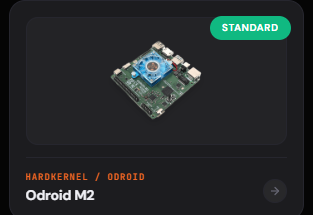
oDroid M2 is now in Standard suuport ! Thanks to the Armbian Team 👍
-
Anyone has a working image with GPU / VPU support? In the official Jammy I am using VPU is supported via gstreamer / CEDRA https://github.com/defencedog/orangepi4A/tree/main/GPU_VPU
-
hello i have ths a7z with 8gb ram. Actualy im using with only 4gb (ok for my application). I can boot only if i set mem=4g. Any workaround for that? i tried all images ive found and no one can boot with 8gb.
-

Beginner friendly help to boot linux in Allwinner
Werner replied to Hyper Fox's topic in Allwinner CPU Boxes
moved -

Beginner friendly help to boot linux in Allwinner
Hyper Fox replied to Hyper Fox's topic in Allwinner CPU Boxes
Heads up i dont have pc if the process needs it mainly if there's any other way do let me know -
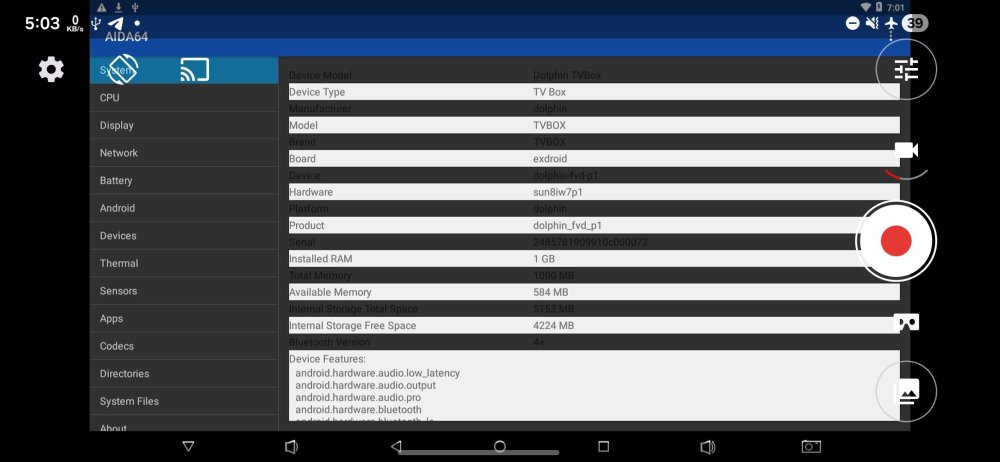
Hello guys i want to use linux on mx pro tv box from pendrive when i flash armbian image to pendrive and click the secret button on box nothing boots up can any one guide me on this thankyou:)
-
moved to tvboxes
-

Armbian for RK3128 TVBox board
Chiều Nhạt Nắng replied to Chiều Nhạt Nắng's topic in Rockchip CPU Boxes
Reserved for updates.