All Activity
- Past hour
-
@ioncube Were you able to use VPU with Jellyfin?
- Today
-
 If anybody needs a simple way to check text on the web or extract text from online PDFs on low‑spec SBCs, here is surf.py. It’s a tiny Python‑based terminal browser designed for boards like Orange Pi Zero, so you’re not completely blind internet‑wise even without a full browser. Starts with: ./surf.py domain.com Dependencies outside standard library: requests, PyPDF2. surf.py
 -

H96 Max RK3528 - Cannot boot Armbian from TF/SD card
jock replied to Alexander Polko's topic in Rockchip CPU Boxes
Hello, you can only boot from sdcard with that device if you follow the rockchip boot sequence, ie: you have to pack u-boot and trust.img using loaderimage tool from rockchip rkbin repository. That tools decorates the uboot/trust.img binaries with some signature and checksum, then you have to put on specific positions on your sdcard and the miniloader, residing in the emmc, will boot from sdcard once it validates correctly the binaries you supplied. You may take a look to my multitool github project for some reference. I have you same box and it boots on mine. Unfortunately on this particular box, the manufacturer disabled the sdcard boot at SoC/hardware level: this means that the trick to erase the internal flash to boot from sdcard, which worked fine for older SoCs, does not always work with rk3528-based (and probably other rk35xx) boards -

Hardware video acceleration with recent armbian/mainline kernel (Kodi)
XXXBold replied to XXXBold's topic in Orange Pi 5
@Igor Thanks for the answer! So you run the latest Armbian to test? https://armbian.com/boards/orangepi5 from here? Which image? Would using the CLI version also work (I don't need a desktop). Can you maybe also verify if HEVC works? (H264 works also quite okay in pure CPU iirc). -
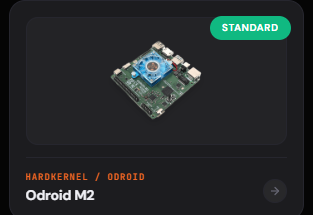
oDroid M2 is now in Standard suuport ! Thanks to the Armbian Team 👍
-
Anyone has a working image with GPU / VPU support? In the official Jammy I am using VPU is supported via gstreamer / CEDRA https://github.com/defencedog/orangepi4A/tree/main/GPU_VPU
-
hello i have ths a7z with 8gb ram. Actualy im using with only 4gb (ok for my application). I can boot only if i set mem=4g. Any workaround for that? i tried all images ive found and no one can boot with 8gb.
-

Beginner friendly help to boot linux in Allwinner
Werner replied to Hyper Fox's topic in Allwinner CPU Boxes
moved -

Beginner friendly help to boot linux in Allwinner
Hyper Fox replied to Hyper Fox's topic in Allwinner CPU Boxes
Heads up i dont have pc if the process needs it mainly if there's any other way do let me know -
Hello guys i want to use linux on mx pro tv box from pendrive when i flash armbian image to pendrive and click the secret button on box nothing boots up can any one guide me on this thankyou:)
-
moved to tvboxes
-

Armbian for RK3128 TVBox board
Chiều Nhạt Nắng replied to Chiều Nhạt Nắng's topic in Rockchip CPU Boxes
Reserved for updates. -

Help needed S905 SOC Bricked No sdcard slot
kar 412 replied to Information Tech's topic in Amlogic CPU Boxes
i am working on same box you can contact me for its fix -
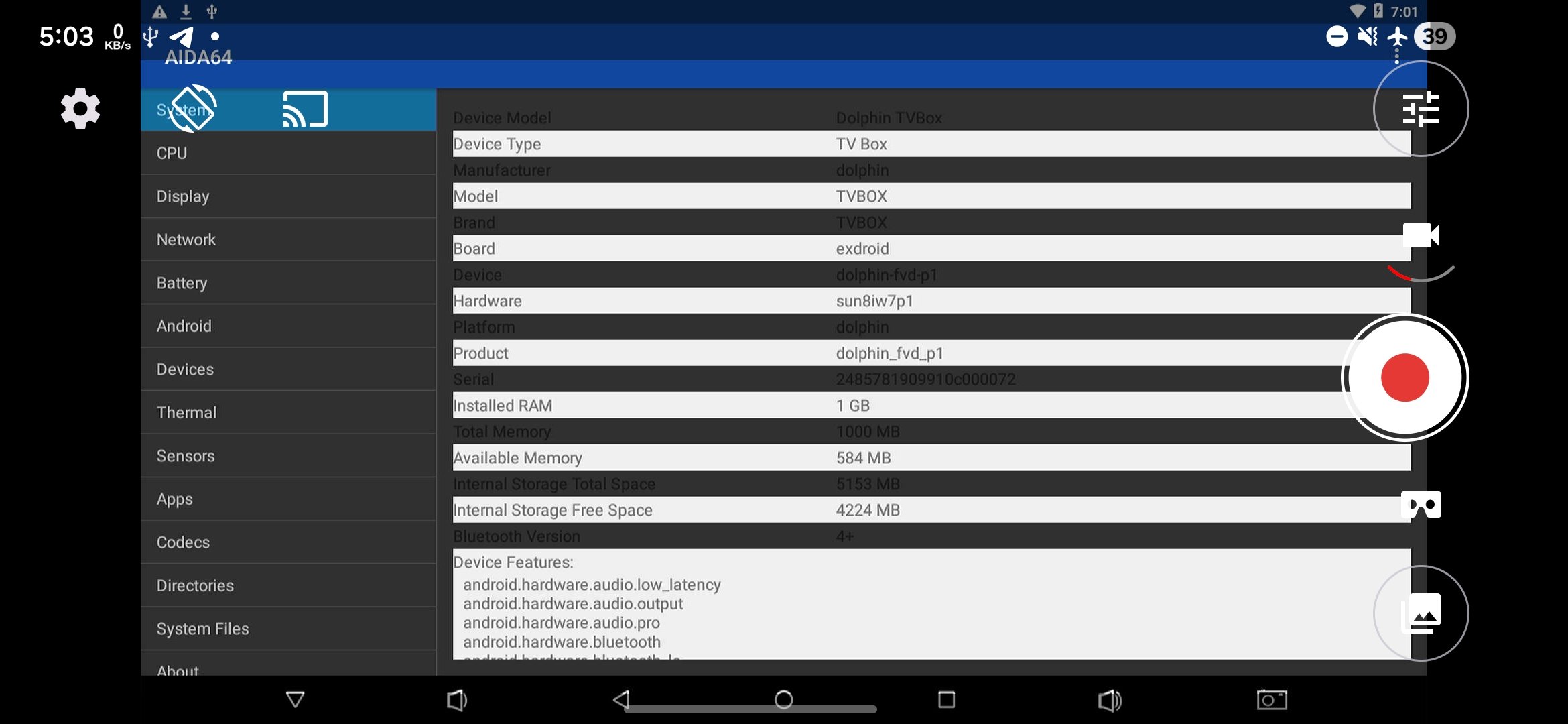
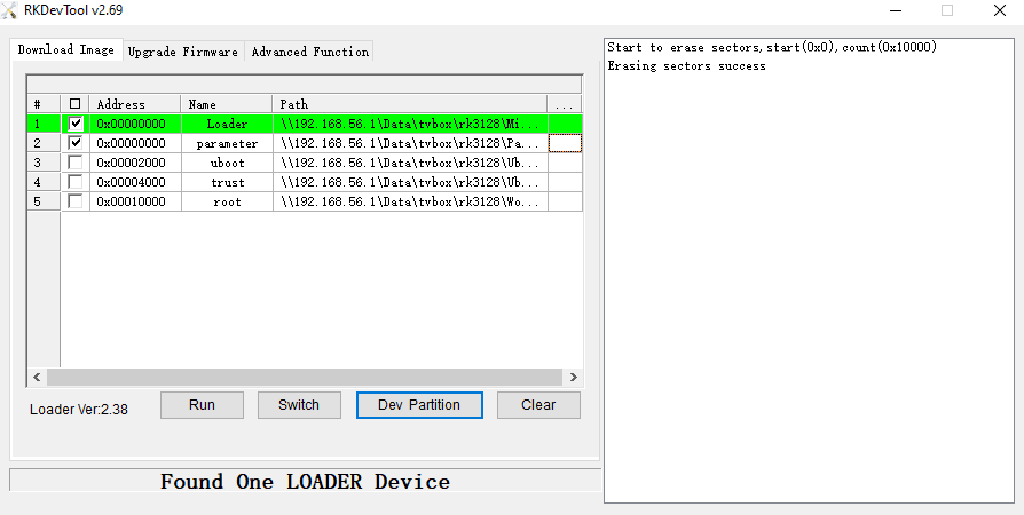
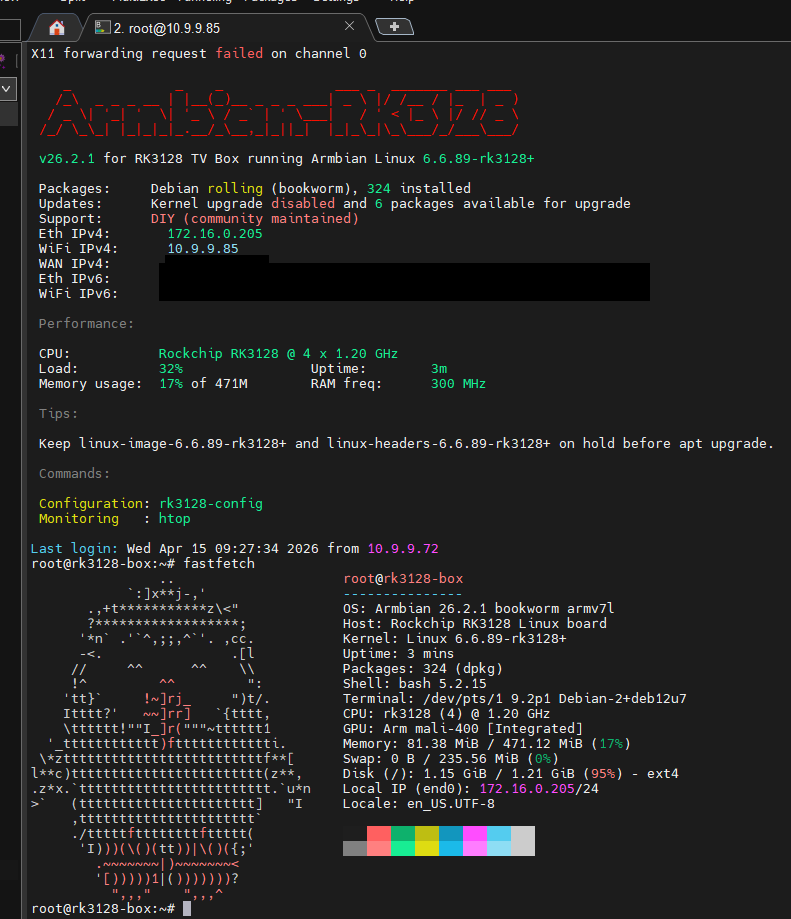
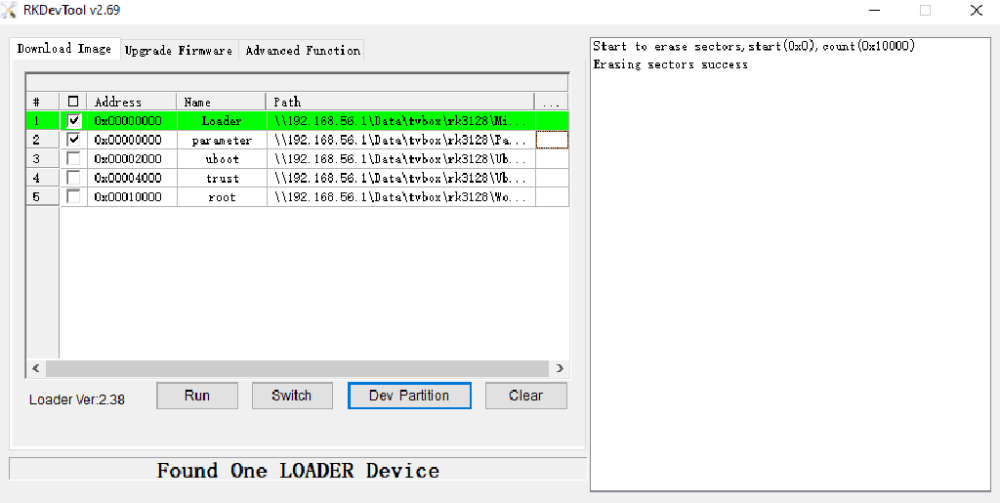
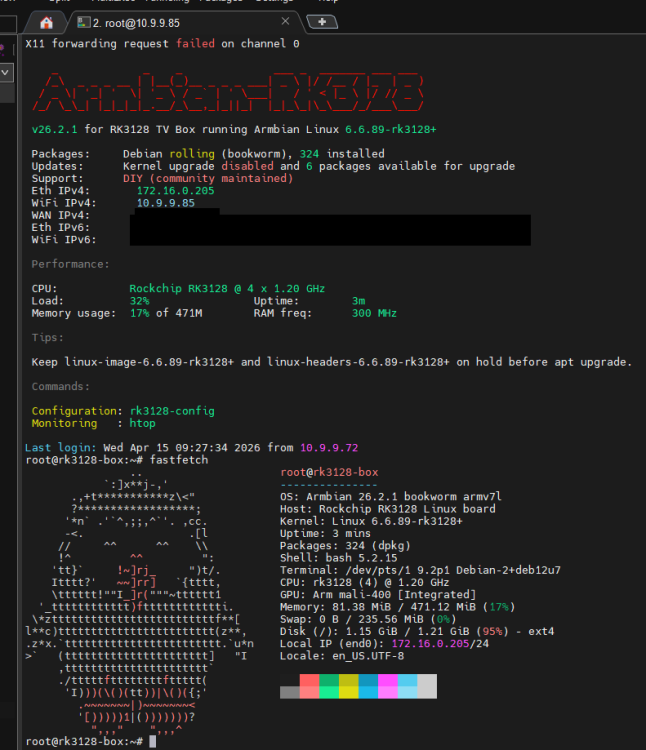
DISCLAIMERS (PLEASE READ): - Everything in this post is provided AS-IS. This is not an official Armbian-supported target, and neither the Armbian project nor I am responsible for any damage, data loss, or broken devices caused by flashing or testing these images. - As with other TV boxes, please assume there may be board variants, undocumented hardware changes, weak power supplies, and marginal NAND/eMMC chips. Test carefully before writing anything to internal storage. - Please keep discussion and support in the forum thread, not in the official Armbian issue tracker. Hi all, I would like to share my work on bringing Armbian to Rockchip RK3128 TV boxes. These boxes are quite old now, and I do not think they are especially common anymore. Still, I suspect a lot of people may have one lying around somewhere in a drawer, unused after Android updates stopped or the original firmware became too slow to care about. I also had several of them lying around at home, which is what pushed me to start this project in the first place. Since I could not find an RK3128 Armbian effort comparable to the RK322x one, I decided to try doing the port myself. Another important motivation was simply to reduce e-waste: if even some of these old boxes can be turned into usable Linux machines again instead of being thrown away, that already feels worthwhile to me. First and foremost, I want to send special thanks to @jock and @fabiobassa for their RK322x TV box work on this forum. Their work was the foundation that made this RK3128 effort much easier to start from. 1. Main references and source code: Blog post with the full write-up: https://chieunhatnang.de/p/building-armbian-for-rockchip-rk3128/ Follow-up post for kernel 6.6.89 work: https://chieunhatnang.de/p/building-armbian-for-rockchip-rk3128-part-2/ Build scripts and releases: https://github.com/chieunhatnang-personal/RK3128-Linux-SupportingScripts RK3128 kernel 4.4 tree: https://github.com/chieunhatnang-personal/linux-kernel-4.4-rk3128-tvbox RK3128 kernel 6.6 tree: https://github.com/chieunhatnang-personal/linux-kernel-6.6-rk3128-tvbox 2. Current status At the moment I have two kernel lines: `4.4.194`, the older vendor-based line, which is already usable in practice `6.6.89`, the newer line, which allows these boxes to run a more up-to-date Armbian userspace What works in the current build: Custom U-Boot based on Rockchip U-Boot 2017.09 All four CPU cores, up to 1.2 GHz CPU frequency scaling and governors DRAM frequency control, both dynamic and fixed NAND, eMMC, SD card, and USB booting. The booting order is: USB >> SD Card >> NAND/eMMC (NAND and eMMC cannot be enabled at the same time because they share pins) OTG and EHCI/OHCI USB support Ethernet Wi-Fi support for SSV6051P, ESP8089, and several Realtek chips GPU acceleration UART1 and UART2, configurable Kernel `6.6.89` status in a bit more detail: CPU DVFS is stable after replacing the inherited/leakage-based OPP assumptions with a board-specific RK3128-safe table. The stable points I ended up using are `216 / 408 / 600 / 816 / 1008 / 1200 MHz` DMC / RAM devfreq works. In practice, simply enabling `dmc` works much better than I first expected, and boards can settle at different normal rates such as `396 MHz` or `456 MHz` GPU on `6.6.89` uses `Lima`, not the old Mali blob stack. That gives a maintainable Mesa/DRM path and hardware-accelerated OpenGL ES instead of depending on a legacy userspace blob VPU/video decode is still the weak point. I tried both `RKMPP` and `Hantro/V4L2` directions, but video processing is still limited, so I do not consider this a polished media-playback setup yet What does not work yet / known limitations: Bluetooth: not implemented or at least not validated, because I do not have a board with Bluetooth to test VPU / hardware video decoding is not in good shape yet SD card and SDIO Wi-Fi are currently using PIO mode on both kernel lines. This is slower than DMA, but stable enough for normal use 3. Image implementation I also made two RK3128 Armbian images based on existing RK322x Armbian images rather than building everything from scratch: Armbian 22.02: Based on the build provided by @jock, running kernel 4.4.189 Armbian 26.02: Based on the official Armbian build for rk322x, running kernel 6.6.89 In both cases, the idea was the same: keep the working RK322x Armbian userspace as a base, then replace the RK322x-specific parts with RK3128 ones, while the kernels themselves are based on Rockchip kernel sources. Compared with the original RK322x images, the RK3128 work mainly replaces or adds: boot.cmd / boot.scr changes so the boot flow can handle NAND and USB properly RK3128-specific Wi-Fi drivers and boot-time module loading logic rk3128-config a delayed Wi-Fi loader service RK3128-specific motd information the RK3128 kernel, DTB, and overlays For the `6.6.89` image specifically, there is some extra image-level cleanup and repackaging: remove the RK322x kernel / dtb / u-boot / BSP packages from the donor image pin those RK322x packages so they do not come back on upgrade install the RK3128 `6.6.89` Debian kernel packages rebuild the BSP package under the RK3128 name 4. Quick installation notes All required files are available from the releases page: The releaes page: https://github.com/chieunhatnang-personal/RK3128-Linux-SupportingScripts/releases Armbian 26.02 image: https://github.com/chieunhatnang-personal/RK3128-Linux-SupportingScripts/releases/download/kernel-6.6-armbian-26-v1.0/A26-release-20260415.zip Armbian 22.02 image: https://github.com/chieunhatnang-personal/RK3128-Linux-SupportingScripts/releases/download/kernel-4.4-armbian-22-v1.1/release-20260412.zip There are three installation layouts that are currently supported: 1. SD card only Pros: safest option, does not touch internal storage, easy to test and easy to remove, and if a board has an SD slot it can still be useful even when NAND/eMMC is completely dead Cons: slower than internal storage, and not every board has an SD slot Best for: first boot, testing, and boards where you want to keep the original Android install untouched 2. Full install to NAND / eMMC Pros: fastest and cleanest setup, uses the internal storage already present on the board Cons: overwrites the original Android install, and old NAND/eMMC may already be unreliable Best for: boards with healthy internal storage when you want a fully self-contained install 3. Hybrid install: bootloader on NAND / eMMC, rootfs on USB or SD card Pros: usually the most practical option for old TV boxes, works well when internal storage is only reliable enough for bootloader pieces, and can also help on boxes with problematic Android boot behavior Cons: more manual than the other methods, still depends on internal storage for the bootloader, and performance depends on the USB drive or SD card used Best for: boxes with weak or aging internal NAND/eMMC, or boxes where you want to avoid a full install to internal storage I describe each method in more detail below. 4.1. Install and boot from SD card Prepare: idbloader.img uboot.img trust.img rootfs.img Create an MBR partition table on the SD card, leave the first 16 MB empty, create one Linux partition, then write: idbloader.img to the raw device at seek=64 uboot.img to the raw device at seek=16384 trust.img to the raw device at seek=24576 rootfs.img to the first partition, not to the whole disk Example: DEV=/dev/sdX sudo parted -s "$DEV" mklabel msdos sudo parted -s "$DEV" mkpart primary ext4 16MB 100% sudo partprobe "$DEV" sudo dd if=idbloader.img of="$DEV" seek=64 conv=fsync sudo dd if=uboot.img of="$DEV" seek=16384 conv=fsync sudo dd if=trust.img of="$DEV" seek=24576 conv=fsync sudo dd if=rootfs.img of="${DEV}1" bs=4M status=progress conv=fsync sync I also provide a bootcardmaker.sh helper script in the same release directory to simplify this process. 4. 2. Full install to NAND / eMMC Prepare: rkxx_loader_vx.xx.xxx.bin parameter.txt uboot.img trust.img rootfs.img Then: Boot the board normally Connect a USB cable to the OTG port Open RKDevTool v2.69 In Advanced Function, erase the first 0x10000 sectors with Start LBA = 0x0 and Count = 0x10000 Press ResetDevice Wait for the board to return in MaskROM mode Go to Download Image Flash Loader, parameter, U-Boot, Trust, and rootfs 4. 3. Hybrid install: bootloader on NAND / eMMC, rootfs on USB or SD card This is the layout I use most often, and in practice it is probably the most useful one for old TV boxes. It is especially useful when internal NAND/eMMC is still good enough for Loader / parameter / U-Boot / Trust, but not reliable enough for a full root filesystem. A common symptom on these old boxes is that Android starts to boot and then hangs, or that the internal storage is simply too unreliable to trust with a full install. In this hybrid layout: Internal NAND/eMMC stores Loader, parameter, U-Boot, and Trust The root filesystem lives on USB or SD card Important: rootfs.img is a filesystem image, not a full disk image Write rootfs.img to a partition such as /dev/sdX1, not to the whole device Tools like BalenaEtcher are the wrong fit for this particular image layout Example: sudo dd if=rootfs.img of=/dev/sdX1 bs=4M status=progress conv=fsync sync 4.4. Post-install configuration After the board boots successfully, you can configure it either from the local console over HDMI or remotely over SSH if Ethernet is connected. Default login: user: root password: 1234 The first login will ask you to change the password. After that, run: rk3128-config This is the board-specific configuration tool for enabling and adjusting hardware features that may differ between RK3128 boxes. The most important options are: Wi-Fi chip selection RAM dynamic frequency: disabled by default. Enabling it can improve performance, but on some boards it may cause kernel hangs. If that happens, switch it back to disabled SD card storage enablement when booting from another device Display resolution OTG mode selection 5. Testing feedback is welcome If anyone here has RK3128 boards and wants to test, feedback would be very useful, especially for: Board photos and PCB markings Whether the board uses NAND or eMMC Boot method that works: SD, USB, NAND, eMMC Which Wi-Fi chip is present Serial logs, dmesg, and failure reports If there is enough interest and enough board coverage, I would be happy to keep improving this, cleaning it up further, and making it easier for other people to test. 6. Credits - @jock and @fabiobassa for the RK322x TV box work on the Armbian forum, which provided the main starting point, the images and practical reference for this RK3128 effort - Rockchip for the original kernel code base used as the foundation for both kernel lines
-

Orange Pi 5: No graphics when booting the UEFI arm64 images
eselarm replied to snow's topic in Orange Pi 5
I had similar experience, can't remember exact numbers and versions etc as I already considered it not going to work, so did not take notes. Was on NanoPi-R6C, so same RK3588S at least. I think I already had put 'serial' as console in the EDK2 setup (is in eMMC for NanoPi-R6C), but not the older display option (GOP or so, forgot it). For my trial it was just the kernel, so instead of the a latest edge-rockchip64 that works all fine with EDK2 v1.1 in my setup, it was the generic UEFI-ARM64 kernel. You use a full image, so I think something is missing or not implemented yet. Also, my main assumption was (and is), is that only serial console is working for a CLI image. I have always a serial console cable available/prepared, although you need an extra other computer, but your OPi5 should simply run, just display is not initialized. You can look in dmesg, there might be a lot of HDMI debug/info, might also be the kernel and your HDMI monitor experience miscommunication, timing issue. I rebooted again with 7.0-rc3 rockchip64 and that worked again. Now I did some apt pinning so I can install/use Debian sid kernel (6.19.11 at the moment). That works the same as the armbian build 7.0-rc3 rockchip64. Also Opensuse Tumbleweed with its default 6.19 kernel works fine. -

Hardware video acceleration with recent armbian/mainline kernel (Kodi)
Igor replied to XXXBold's topic in Orange Pi 5
On vendor kernel you need to enable overlay https://github.com/armbian/build/blob/main/extensions/mesa-vpu.sh#L18-L28 mainline based gnome desktop + apt install kodi (just tested 4k/H264 video works without any problems) -
Hardware video acceleration with recent armbian/mainline kernel (Kodi)
XXXBold replied to XXXBold's topic in Orange Pi 5
Thanks for the responses! TBH I am not very familiar with the software stack from userspace required for video playback. So, some questions: - @chaitan3: You mentioned using a custom ffmpeg for mpv. Do you know if ffmpeg is also needed for kodi (when just using it to playback videos, not converting)? In https://github.com/mpv-player/mpv/pull/14690#issuecomment-4159253319 you mentioned you used kernel 6.19, but this didn't have mainline support yet, maybe the situation with 7.0 is different? - Does anyone here have a rough idea what is still needed for Kodi (including the whole software stack below) to fully support HW video decoding on said platform (good if you know if specific PRs), without needing custom patches and possible ETA for that? -
I have three identical Odroid HC 4 which has been running the same software and using the kernel 6.12.32-current-meson64. Their are configured as NAS where the data is split across all three devices and therefore their are running constantly. A couple of weeks ago began the fan on one of the machines behavior different. It would either be running a full speed or no running, it was no longer possible to control via PWM. Now last week did another one start with the same behavior. I was do the following to test and validate the issue: I have disable the fancontrol service and manually written to hwmon2/pwm1 to set the PWM. Which was possible on the healthy HC4, but on the unhealthy HC4 would it only be full speed or no speed. I have tried the latest version of Armbian Noble and Trixie the hwmon2/pwm1 is exposed but doesn't allow me to modify the speed of the fan. I have tried the official os image from Hardkernel and here does the fan work as expected.
-
Greetings, I have an Orange Pi 5 with the edk2 1.1 UEFI bios on the SPI, and an NVMe installed. The BIOS has been set to "Mainline" in the device tree option I tried visiting here https://armbian.com/boards/uefi-arm64 and burning the minimal current6.18.8 CLI image to my USB stick. The Orange Pi 5 displays the graphical grub menu with no problems, complete with penguin in the background etc, but once I choose the boot Armbian option, it displays a few lines of terminal output and then the monitor goes black as if the GPU is initializing and a desktop or graphic would be about to show - when instead, the monitor just reports no signal instead. The system isn't frozen, the perhiperals are on and I can alt+ctrl+del to reboot it. It's just attached to a very basic 1080p ASUS monitor that only does 60hz so I'm not sure what could be wrong Thanks for any advice
-
Since we do not add any Intel drivers this regression may come from upstream. You could test nightly build which have kernel 7.0. Also total random guess: Perhaps more recent kernels expect more recent firmware blobs, perhaps the ones on the board are outdated (or are expected to be on a different place)? No clue though through which package those are shipped though. Seems like the files have been touched last around 7 month ago: https://git.kernel.org/pub/scm/linux/kernel/git/iwlwifi/linux-firmware.git/tree/intel/iwlwifi
-
Perhaps related https://github.com/armbian/firmware/commit/36ec4377c197af9ced4a02aaa660ade54c83f93d
-
moved to tvboxes
- Yesterday
-
 @Sergioclr Well that is the u-boot root directory. Where the main Makefile is located. I added my own root_key.pem in the patch. You don't have to generate one. The root_key.pem for Allwinner H616/618/313 devices is not a single, universal file, but rather an RSA private key file used for signing bootloader images (TOC0) in secure boot implementations. In many commercial H616-based TV boxes, Secure Boot is enabled by the manufacturer, but the efuses (which store the root key hash) are not permanently locked, allowing the use of custom keys openssl genrsa -out root_key.pem
 -
This week, Collabora is at the YouTube Device Partner Summit in Tokyo showcasing our ongoing work with YouTube, notably on their TV app and the RDK platform, which has resulted in the RDK's integration as a core platform for Cobalt development. View the full article
-
Hi, guys! I have a tablet Iconbit Skat LE that have android 4.2.2. I want to make from it a ha dashboard. So I found info that I can install armbian. But I have an issue, it doesn't contains my tablet or even company of it. So maybe someone can help to explain?