
All Activity
- Past hour
-
I bought this board because it has 2 lanes. So I changed the number of lanes in the dtb from 1 to 2. I need confirmation of an expert but my quick speed test with 2 lanes looks promising : gt@yy3568:~$ sudo hdparm -tT --direct /dev/nvme0n1p1 /dev/nvme0n1p1: Timing O_DIRECT cached reads: 1062 MB in 2.00 seconds = 530.34 MB/sec Timing O_DIRECT disk reads: 928 MB in 3.00 seconds = 308.97 MB/sec gt@yy3568:~$ sudo dmesg | grep lane [ 4.183004] phy phy-fe8c0000.phy.6: lane number 0, val 1 [ 4.183679] phy phy-fe8c0000.phy.6: lane number 1, val 2 pcie@fe280000 { compatible = "rockchip,rk3568-pcie"; #address-cells = <0x03>; #size-cells = <0x02>; bus-range = <0x20 0x2f>; clocks = <0x0f 0x8f 0x0f 0x90 0x0f 0x91 0x0f 0x92 0x0f 0x93>; clock-names = "aclk_mst\0aclk_slv\0aclk_dbi\0pclk\0aux"; device_type = "pci"; interrupts = <0x00 0xa5 0x04 0x00 0xa4 0x04 0x00 0xa3 0x04 0x00 0xa2 0x04 0x00 0xa1 0x04>; interrupt-names = "sys\0pmc\0msg\0legacy\0err"; #interrupt-cells = <0x01>; interrupt-map-mask = <0x00 0x00 0x00 0x07>; interrupt-map = <0x00 0x00 0x00 0x01 0xcb 0x00 0x00 0x00 0x00 0x02 0xcb 0x01 0x00 0x00 0x00 0x03 0xcb 0x02 0x00 0x00 0x00 0x04 0xcb 0x03>; linux,pci-domain = <0x02>; num-ib-windows = <0x06>; num-ob-windows = <0x02>; max-link-speed = <0x03>; msi-map = <0x2000 0x66 0x2000 0x1000>; num-lanes = <0x02>; phys = <0xca>; phy-names = "pcie-phy"; power-domains = <0x11 0x0f>; reg = <0x03 0xc0800000 0x00 0x400000 0x00 0xfe280000 0x00 0x10000 0x00 0xf0000000 0x00 0x100000>; ranges = <0x1000000 0x00 0xf0100000 0x00 0xf0100000 0x00 0x100000 0x2000000 0x00 0xf0200000 0x00 0xf0200000 0x00 0x1e00000 0x3000000 0x03 0x80000000 0x03 0x80000000 0x00 0x40000000>; reg-names = "dbi\0apb\0config"; resets = <0x0f 0xc1>; reset-names = "pipe"; status = "okay"; pinctrl-names = "default"; pinctrl-0 = <0xcc>; reset-gpios = <0x58 0x1e 0x00>; vpcie3v3-supply = <0xcd>; phandle = <0x271>; legacy-interrupt-controller { interrupt-controller; #address-cells = <0x00>; #interrupt-cells = <0x01>; interrupt-parent = <0x01>; interrupts = <0x00 0xa2 0x01>; phandle = <0xcb>; }; };
-
After much trouble with my old build environment I cloned Hqnicolas build repo. Now I can confirm that it seems to work. I made a quick speed comparison between the ssd and my external USB drive: gt@yy3568:~$ sudo hdparm -tT --direct /dev/sda /dev/sda: Timing O_DIRECT cached reads: 178 MB in 2.00 seconds = 88.89 MB/sec Timing O_DIRECT disk reads: 322 MB in 3.01 seconds = 106.88 MB/sec gt@yy3568:~$ sudo hdparm -tT --direct /dev/nvme0n1p1 /dev/nvme0n1p1: Timing O_DIRECT cached reads: 1160 MB in 2.00 seconds = 579.44 MB/sec Timing O_DIRECT disk reads: 690 MB in 3.00 seconds = 229.89 MB/sec Thank you very much to both @Arthur Gu and @Hqnicolas
-
 Here your debugging activity will need to start. There is an awful lot of things unknown, to others on this forum but more important, also to yourself. It could already be that your server (Armbian) has nothing to do with it, but that it is the info in your router (even caching stuff) that has refreshed, simply because you probably restarted, so something was not 'reset proof'. I have seen many of such things myself in my house/home networking and in conjunction with various ISP's (also mobile4G). Which made me use my own (open-source) router instance for example, so I can at least check all what is needed in such case as you have. But it might be simple, you can use wget (do 'man wget' first to see all options) to mimic browser behavior and that should already say something. If docker etc is involved, make sure you understand all (virtual) networking, it can get very complex. I haven't seen potentially disturbing things from Armbian 26.2.1, but I removed/blocked also several things, like no netplan.io, that at least works on Debian Trixie based installs. There have been lots of security related updates in Debian recently, so make sure you log and see changes to packages (edit listchanges.conf)
 - Today
-
 Hello, I’m facing yet another strange problem, and I am posting it here as well, because I think it could be OS related. Some details about my server: Armbian 26.2.1 trixie Nginx Nextcloud (latest) MariaDB Letsencrypt (updated 3 weeks ago) Until a few days ago, every browser on any of my devices could call the web gui of my server and Nextcloud presented its login page. Then, after the latest OS update, suddenly browsers tell my they can’t connect to the server, but every synching app on any of devices still work perfectly! And I can even access my files on the server by using FolderSync’s¹ internal file browser. It is just the browsers that can’t connect any more, no matter which browser, no matter which device! There is no error message in the appropriate log files, neither in the system log, nor in Nextcloud’s own log, and the message that the browsers present is simply some variation of “I can’t connect to server”. No specific reason, no error code. This is more than strange to me. I would get it if synching apps would have stopped working as well, but that is not the case. Does any one have an explanation for this mystery? If you need more information, just let my know! Many thanks in advance! (¹ Synching app on Android.)
 -
Perfect! It seems to be working well. ### lsblk: NAME FSTYPE SIZE MOUNTPOINT UUID mmcblk0 29.1G └─mmcblk0p1 ext4 28.8G / 53bf3b54-4988-4318-bf78-9ff6f0b851e5 mmcblk0boot0 4M mmcblk0boot1 4M zram1 ext4 50M /var/log 921565d0-0680-469e-ac03-555369d9549f zram2 0B nvme0n1 238.5G ├─nvme0n1p1 ntfs 529M 80DE33D8DE33C566 ├─nvme0n1p2 vfat 100M 5A34-53D4 ├─nvme0n1p3 16M └─nvme0n1p4 ntfs 237.8G 220438F50438CD93
-
Hello, I have a Tanix TX6-A TV box and I’ve tried many Armbian builds, including the ones from https://armbian.com/boards/tanix-tx6 and ophub. However, the onboard Wi-Fi does not work on any of them. Has anyone found an Armbian image that works properly with the Tanix TX6-A, including Wi-Fi support?
-

Rupa X88 Pro 13 - RK3528 board with images
fedes_gl replied to fedes_gl's topic in Rockchip CPU Boxes
I own the one of the 1st post and I managed to run Kodi desktop within Armbian. Just did few tests as I don't know how to set up remote control and many other things. HDMI works fine but no hardware acceleration for H265 videos (or at least doesn't work smooth enough as in the Android FW). LAN also works but is HW limited to 100mbps as stated by Joao -
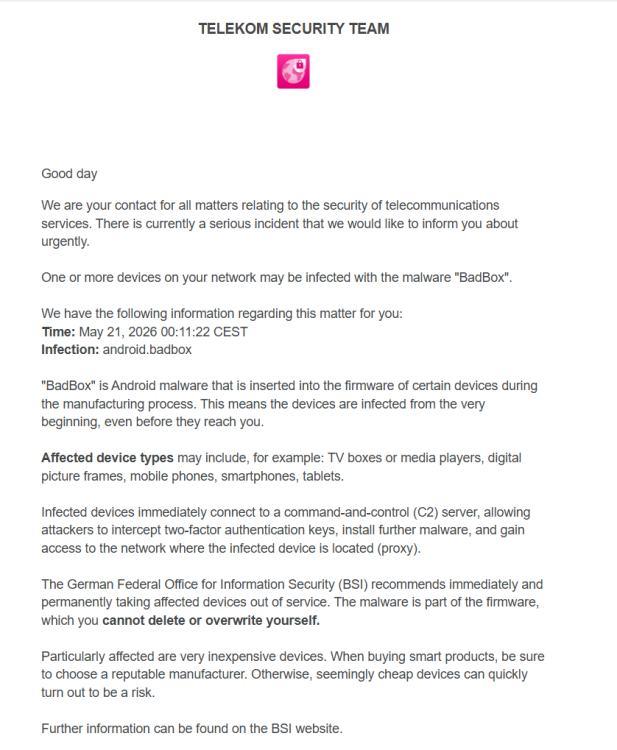
I know it was already written here in some of the messages that these devices are not secure. But now I got a message from Telekom that they detected a Chineese spyware connection: The timeframe is exactly when I have switched the device on with an Android on board.
- Yesterday
-
You'd better upgrade the kernel to 6.18 and keep Debian Bookworm, because Trixie has an mpv version which is not exactly friendly with hardware video decoding because some things are in the middle of a transition
-
OK, it looks like the BSP PCIe driver might have some issues related to power management. I’m not entirely sure of the root cause yet, but when I connected an NVMe drive, it got extremely hot and failed to initialize properly. The NVMe dmesg output suggested adding the following kernel parameters: nvme_core.default_ps_max_latency_us=0 pcie_aspm=off This resolved the NVMe issues on my side. I’ll try to dig deeper into the root cause, but @humanus please give it a try as well.
-
 Thank you @greg396 for this sum-up on how to upgrade to 6.12 Since last months, have you experience any issue with this version ? I'm on 6.6.8 based on kernel 23.08.0. Stable so far...
 -
Hi @OverNautt! Sorry not replying in time. Great that you found a solution to your issue and provided feedback!
-
My board is A7Z so unfortunately I couldn't fully test the Ethernet drivers. Hi @qq20739111 / @humanus, any luck with the on board Ethernet? FYI, my new version utilizes mainline MMC drivers as well. And I'm looking into PCIE at the moment.
-
@Sand_Death I just updated my build with @alexc's BSP changes, which include the latest AIC8800 drivers. I'm building an image right now, so I haven't tested it yet. I haven't tested Ethernet either. Maybe Alex can help you with that.
-
Hi, @Nick A yes, of course, I extracted the archive and burned the .img image, but I burned the image using Armbian Imager. Today I tried burning the manufacturer's image to another flash drive, and it launched successfully. After that, I tried burning yours again, and everything worked on a different flash drive when burning it using BalenaEtcher! Amazing! The only thing I want to point out is that I have rev 1.10 selected, and the network card doesn't seem to be detected (wired connection). root@radxa-cubie-a7a:~# sudo lshw -class network *-network description: Wireless interface physical id: 12 logical name: wlan0 serial: 9c:04:b6:84:46:4b capabilities: ethernet physical wireless configuration: broadcast=yes driver=usb driverversion=6.18.19-edge-sun60iw2 ip=192.168.99.218 multicast=yes wireless=IEEE 802.11 root@radxa-cubie-a7a:~# I tried downloading and installing the driver from the radxa repository (the USB version). Because the dmesg output was like this. root@radxa-cubie-a7a:~# sudo dmesg | grep -i -E 'firmware|loading|failed' [ 0.000000] [ T0] psci: PSCIv1.1 detected in firmware. [ 0.000247] [ T0] sunxi:timer_sun50i:[ERR]: request bus clock failed [ 0.000252] [ T0] sunxi:timer_sun50i:[ERR]: sun50i timer of resource get failed [ 0.070642] [ T1] sunxi-iommu-v2 3900000.iommu: master probe failed with -517 [ 3.080921] [ T1] axp8191-temp-ctrl: Failed to locate of_node [id: 0] [ 3.210460] [ T1] NSI_PMU 2020000.nsi-controller: Get support-ecc failed [ 4.708335] [ T1] Loading compiled-in X.509 certificates [ 7.426931] [ T1] sunxi:VE:[WARN]: 392 ve_dvfs_get_attr(): get vf table failed, default 624MHz [ 7.459393] [ T1] sunxi:VE:[WARN]: 392 ve_dvfs_get_attr(): get vf table failed, default 624MHz [ 8.120987] [ T179] powervr 1800000.gpu: [drm] loaded firmware powervr/rogue_36.56.104.183_v1.fw [ 10.773578] [ T1] systemd[1]: systemd-hibernate-clear.service - Clear Stale Hibernate Storage Info skipped, unmet condition check ConditionPathExists=/sys/firmware/efi/efivars/HibernateLocation-8cf2644b-4b0b-428f-9387-6d876050dc67 [ 10.859899] [ T287] aic_load_firmware :firmware path = /lib/firmware/aic8800D80/fw_patch_table_8800d80_u02.bin [ 10.872268] [ T287] aic_load_firmware :firmware path = /lib/firmware/aic8800D80/fw_adid_8800d80_u02.bin [ 10.880698] [ T287] ### Upload fw_adid_8800d80_u02.bin firmware, @ = 201940 size=1708 [ 10.881217] [ T287] aic_load_firmware :firmware path = /lib/firmware/aic8800D80/fw_patch_8800d80_u02.bin [ 10.889530] [ T287] ### Upload fw_patch_8800d80_u02.bin firmware, @ = 1e0000 size=32192 [ 10.898148] [ T287] aic_load_firmware :firmware path = /lib/firmware/aic8800D80/fw_patch_8800d80_u02_ext0.bin [ 10.906475] [ T287] ### Upload fw_patch_8800d80_u02_ext0.bin firmware, @ = 20b43c size=13788 [ 10.934395] [ T287] aic_load_firmware :firmware path = /lib/firmware/aic8800D80/fmacfw_8800d80_u02.bin [ 10.943638] [ T287] ### Upload fmacfw_8800d80_u02.bin firmware, @ = 120000 size=349096 [ 11.028999] [ T287] cfg80211: Loading compiled-in X.509 certificates for regulatory database [ 12.141961] [ T335] sunxi:sound-mach:[ERR]: 537 simple_parse_of(): simple_dai_link_of failed [ 12.162251] [ T335] sunxi:sound-mach:[ERR]: 537 simple_parse_of(): simple_dai_link_of failed [ 12.219436] [ T9] aic_load_fw 1-1.4:1.0: probe with driver aic_load_fw failed with error -1 [ 12.219683] [ T9] aic_load_fw 1-1.4:1.1: probe with driver aic_load_fw failed with error -1 [ 12.219876] [ T9] aic_load_fw 1-1.4:1.2: probe with driver aic_load_fw failed with error -1 [ 12.344962] [ T9] AICWFDBG(LOGERROR) rwnx_load_firmware: aic_userconfig_8800d80.txt file failed to open [ 12.344978] [ T9] AICWFDBG(LOGERROR) wrong size of firmware file [ 12.392525] [ T77] sunxi:sound-ac101:[ERR]: 1725 ac101_probe(): try read ac101 5 times but failed, ac101 probe failed [ 12.413143] [ T77] sunxi-snd-mach soc@3000000:i2s0_mach: ASoC: failed to instantiate card -1 [ 12.427459] [ T77] sunxi-snd-mach soc@3000000:i2s0_mach: probe with driver sunxi-snd-mach failed with error -1 [ 12.775283] [ T1] systemd[1]: systemd-hibernate-clear.service - Clear Stale Hibernate Storage Info skipped, unmet condition check ConditionPathExists=/sys/firmware/efi/efivars/HibernateLocation-8cf2644b-4b0b-428f-9387-6d876050dc67 [ 13.577615] [ T1] systemd[1]: systemd-hibernate-clear.service - Clear Stale Hibernate Storage Info skipped, unmet condition check ConditionPathExists=/sys/firmware/efi/efivars/HibernateLocation-8cf2644b-4b0b-428f-9387-6d876050dc67 However, updating the driver didn't help. But as far as I understand, the AIC8800 drivers are the drivers for WiFi and Bluetooth. I also tried to torment Google Gemini and ran the command it recommended, its output is like this root@radxa-cubie-a7a:~# sudo dmesg | grep -i -E 'eth|mac|realtek|stmmac' [ 0.000000] [ T0] Machine model: sun60iw2 [ 0.000000] [ T0] psci: probing for conduit method from DT. [ 0.000000] [ T0] Kernel command line: root=UUID=34b3b4ba-6c61-4aff-9fb5-d8dbaf8a9d1e rootwait rootfstype=ext4 splash plymouth.ignore-serial-consoles console=ttyS0,115200 console=tty1 consoleblank=0 loglevel=7 ubootpart=7cb3a0a1-d0c5-4814-b3bf-acf7cb5fee06 usb-storage.quirks=0x2537:0x1066:u,0x2537:0x1068:u mac_addr= coherent_pool=2M irqchip.gicv3_pseudo_nmi=0 cgroup_enable=cpuset cgroup_memory=1 swapaccount=1 kasan=off no_console_suspend fsck.fix=yes fsck.repair=yes net.ifnames=0 cgroup_enable=memory [ 0.000000] [ T0] Unknown kernel command line parameters "splash ubootpart=7cb3a0a1-d0c5-4814-b3bf-acf7cb5fee06 mac_addr= cgroup_enable=memory cgroup_memory=1", will be passed to user space. [ 4.882846] [ T12] sunxi-drm soc@3000000:sunxi-drm: late IOMMU probe at driver bind, something fishy here! [ 7.841902] [ T1] mac_addr= [ 9.766287] [ T1] systemd[1]: systemd 257.13-1~deb13u1 running in system mode (+PAM +AUDIT +SELINUX +APPARMOR +IMA +IPE +SMACK +SECCOMP +GCRYPT -GNUTLS +OPENSSL +ACL +BLKID +CURL +ELFUTILS +FIDO2 +IDN2 -IDN +IPTC +KMOD +LIBCRYPTSETUP +LIBCRYPTSETUP_PLUGINS +LIBFDISK +PCRE2 +PWQUALITY +P11KIT +QRENCODE +TPM2 +BZIP2 +LZ4 +XZ +ZLIB +ZSTD +BPF_FRAMEWORK +BTF -XKBCOMMON -UTMP +SYSVINIT +LIBARCHIVE) [ 10.868628] [ T1] systemd[1]: systemd-pcrmachine.service - TPM PCR Machine ID Measurement skipped, unmet condition check ConditionSecurity=measured-uki [ 11.005686] [ T283] aic_load_firmware :firmware path = /lib/firmware/aic8800D80/fmacfw_8800d80_u02.bin [ 11.015312] [ T283] ### Upload fmacfw_8800d80_u02.bin firmware, @ = 120000 size=349096 [ 12.061513] [ T346] OF: /soc@3000000/i2s0_mach: Read of boolean property 'soundcard-mach,routing' with a value. [ 12.072296] [ T346] OF: /soc@3000000/i2s0_mach: Read of boolean property 'soundcard-mach,pin-switches' with a value. [ 12.089497] [ T346] sunxi:sound-mach:[WARN]: 372 asoc_simple_parse_ucfmt(): set data late to default [ 12.107845] [ T346] sunxi:sound-mach:[ERR]: 537 simple_parse_of(): simple_dai_link_of failed [ 12.156684] [ T346] sunxi:sound-mach:[WARN]: 372 asoc_simple_parse_ucfmt(): set data late to default [ 12.176300] [ T346] sunxi:sound-mach:[ERR]: 537 simple_parse_of(): simple_dai_link_of failed [ 12.211549] [ T78] OF: /soc@3000000/i2s0_mach: Read of boolean property 'soundcard-mach,routing' with a value. [ 12.227920] [ T78] OF: /soc@3000000/i2s0_mach: Read of boolean property 'soundcard-mach,pin-switches' with a value. [ 12.247053] [ T78] sunxi:sound-mach:[WARN]: 372 asoc_simple_parse_ucfmt(): set data late to default [ 12.260641] [ T78] sunxi:sound-mach:[ERR]: 537 simple_parse_of(): simple_dai_link_of failed [ 12.279264] [ T78] sunxi:sound-mach:[WARN]: 372 asoc_simple_parse_ucfmt(): set data late to default [ 12.345223] [ T78] OF: /soc@3000000/i2s0_mach: Read of boolean property 'soundcard-mach,routing' with a value. [ 12.345250] [ T78] OF: /soc@3000000/i2s0_mach: Read of boolean property 'soundcard-mach,pin-switches' with a value. [ 12.345271] [ T78] sunxi:sound-mach:[WARN]: 372 asoc_simple_parse_ucfmt(): set data late to default [ 12.345288] [ T78] sunxi:sound-mach:[ERR]: 537 simple_parse_of(): simple_dai_link_of failed [ 12.355471] [ T78] OF: /soc@3000000/i2s0_mach: Read of boolean property 'soundcard-mach,routing' with a value. [ 12.355526] [ T78] OF: /soc@3000000/i2s0_mach: Read of boolean property 'soundcard-mach,pin-switches' with a value. [ 12.355570] [ T78] sunxi:sound-mach:[WARN]: 372 asoc_simple_parse_ucfmt(): set data late to default [ 12.355597] [ T78] OF: /soc@3000000/i2s0_mach/soundcard-mach,cpu: Read of boolean property 'soundcard-mach,mclk-fp' with a value. [ 12.355878] [ T78] sunxi-snd-mach soc@3000000:i2s0_mach: ASoC: DAPM unknown pin HS MIC Jack [ 12.355886] [ T78] sunxi-snd-mach soc@3000000:i2s0_mach: ASoC: DAPM unknown pin HP Jack [ 12.491963] [ T78] sunxi-snd-mach soc@3000000:i2s0_mach: ASoC: failed to instantiate card -1 [ 12.500679] [ T78] sunxi-snd-mach soc@3000000:i2s0_mach: probe with driver sunxi-snd-mach failed with error -1 [ 12.696783] [ T1] systemd[1]: systemd-machine-id-commit.service - Save Transient machine-id to Disk skipped, unmet condition check ConditionPathIsMountPoint=/etc/machine-id [ 12.879365] [ T1] systemd[1]: systemd-machine-id-commit.service - Save Transient machine-id to Disk skipped, unmet condition check ConditionPathIsMountPoint=/etc/machine-id [ 12.895054] [ T1] systemd[1]: systemd-pcrmachine.service - TPM PCR Machine ID Measurement skipped, unmet condition check ConditionSecurity=measured-uki [ 13.872897] [ T1] systemd[1]: systemd-machine-id-commit.service - Save Transient machine-id to Disk skipped, unmet condition check ConditionPathIsMountPoint=/etc/machine-id [ 13.888466] [ T1] systemd[1]: systemd-pcrmachine.service - TPM PCR Machine ID Measurement skipped, unmet condition check ConditionSecurity=measured-uki [ 15.517187] [ T983] Bluetooth: BNEP (Ethernet Emulation) ver 1.3 Could it be that a different type of Ethernet is used here?
-

Armbian with preinstalled Home Assistant supervised
Igor replied to Igor's topic in Software, Applications, Userspace
Me neither. This is my primary intention, just currently overwhelmed with things. I did some changes on top on official: https://github.com/armbian/supervised-installer -
Hi @jock, thanks for the feedback! Honestly, I didn't expect the current images to be that up to date — when I was looking for a stable image for the RK322x I ended up grabbing what was readily available (24.2.5 Bookworm) without checking if there were newer ones. My bad for not looking more carefully. I'll update the box to Trixie with kernel 6.18 and also take a look at the ffmpeg/mpv thread you mentioned. Appreciate the pointers!
-
@reinoldo vieira nice you found a pipeline that works with gstreamer! I have a couple of notes though: why using such an old armbian image with such old kernel? Current images are on Debian Trixie with kernel 6.18 (edge packages are on 7.0) hardware video acceleration is working for years on rk3229, there is a thread mentioned in first page to an ffmpeg repository to achieve that with mpv
-
For mate IIRC they use gnome's gnome-language-selector (start it in a terminal if you are missing the icon in settings), but it was a while since I used that desktop-env so I could be wrong. My old notes says the setting should be in: System > Control Center > Language Support For your information (as a fellow Swedish person): there is a locale called en_DK.UTF-8 that you might want to use instead. That way you get the correct settings for Scandinavian (like date/clock format for example) but the language is English. Or you can probably do it in terminal altogether: sudo dpkg-reconfigure locales # select en_DK.UTF-8 here, or whatever locale you want to use, I will use the dk version in this example localectl set-locale LANG=en_DK.UTF-8 sed -i "s/sv_SE/en_DK/" ~/.dmrc
-
Hello @vlw, Pull latest from build framework, compile and retry, we migrate R76S to use mainline uboot due a issue with uboot vendor. Let's update us.
-
Seems like Mate change to sv_SE.UTF-8, but there are no app to change launguish in Mate. Think I have to remove mate?
-

Armbian with preinstalled Home Assistant supervised
ebin-dev replied to Igor's topic in Software, Applications, Userspace
Thanks for looking into this. As the docker install does not have access to apps it would be quite restricted and not really usable for many. I would certainly not use it. May be you could try to set up the supervised install (I know it is not supported anymore by HA) ? That would bring a lot of attention to Armbian ... -
thanks @Arthur Gu, I will test and include into a PR to armbian tested on 6.18.32-current-rockchip64 https://paste.armbian.com/ekupotacut ok, I find your PR: https://github.com/armbian/build/pull/9832 will apply the instructions to a new PR https://github.com/armbian/build/pull/9877 tested on 7.0.9-edge-rockchip64 https://paste.armbian.com/amimofemog
-
This is a work-in-progress resource for bare-metal bringup for Rockchip devices. Source code: https://github.com/petabyt/rk https://danielc.dev/rk/
-
 The issue has been resolved. It turns out that the official release has already configured the necessary documents or files before distribution. When I used im‑config, it gave me no response at all. Following the XDG Autostart manual, I copied /usr/share/applications/org.fcitx.Fcitx5.desktop to ~/.config/autostart; after that, fcitx5 starts automatically and works normally when I reboot or log out and back in. Thanks










.thumb.jpg.20ed26dd68aaee94a94b227bf670a8eb.jpg)

