Active threads
Showing topics posted in for the last 365 days.
- Past hour
-
Hi @ebin-dev, @SymbiosisSystems, and everyone in this thread, Following the recurring instability reports here and in the older topic ( https://forum.armbian.com/topic/30074-helios64-armbian-2308-bookworm-issues-solved/ ), I've packaged your opp-microvolt workaround as an opt-in DT overlay in the Armbian build framework. PR: https://github.com/armbian/build/pull/9822 — adds the overlay to both Armbian kernel trees: `rockchip64-current` (6.18) and `rockchip64-edge` (7.0). What you get once this lands: - `rockchip-rk3399-helios64-cpu-stability.dtbo` ships inside the regular `linux-dtb-{current,edge}-rockchip64` package. No hand-patching of DTBs, no separate downloads; `apt upgrade` keeps the overlay in sync with whatever DTB your kernel ships. - **Not enabled by default** — for the people whose Helios64 "just works", the mainline OPPs stay untouched. I don't want to push a tree-wide voltage bump onto every user when only some units exhibit the instability. - Activation is the standard Armbian way, either: armbian-config → System → Kernel → Manage device tree overlays → [*] rk3399-helios64-cpu-stability → save → reboot or manually, by adding the overlay name to the `overlays=` line in `/boot/armbianEnv.txt` (the `rockchip-` prefix is implicit, because `overlay_prefix=rockchip` is already set on this board): overlays=rk3399-helios64-cpu-stability Then reboot. Voltages are exactly the ones from your post in this thread — https://forum.armbian.com/topic/58597-helios64-armbian-trixie-with-linux-618-incl-opp-microvolt-patch/?do=findComment&comment=237456 (opp00..opp06 raised to 900 / 900 / 900 / 950 / 1025 / 1100 / 1175 mV; opp07 left at the mainline 1.20 V; `max` everywhere kept at 1.25 V). Frequencies are not touched. End-to-end verified on my Helios64 with both kernels: - current / 6.18.30, Trixie SD-card image - edge / 7.0.7, Trixie SD-card image (locally built) After enabling the overlay and a reboot: for n in 0 1 2 3 4 5 6 7; do od -An -tx4 --endian=big \ /sys/firmware/devicetree/base/opp-table-1/opp0$n/opp-microvolt done opp00 000dbba0 000dbba0 001312d0 opp01 000dbba0 000dbba0 001312d0 opp02 000dbba0 000dbba0 001312d0 opp03 000e7ef0 000e7ef0 001312d0 opp04 000fa3e8 000fa3e8 001312d0 opp05 0010c8e0 0010c8e0 001312d0 opp06 0011edd8 0011edd8 001312d0 opp07 00124f80 00124f80 001312d0 ...which matches your table 1:1. U-boot log line on boot: Applying kernel provided DT overlay rockchip-rk3399-helios64-cpu-stability.dtbo confirms that u-boot picks up the `.dtbo` from `/boot/dtb/.../rockchip/overlay/` and applies it via `fdt apply` before the kernel starts. Ready-to-flash **current/6.18** images, built from the PR branch by the official Armbian builder workflow: https://fi.mirror.armbian.de/incoming/iav/helios64/archive/ - Armbian_26.5.0_Helios64_resolute_current_6.18.30_minimal.img.xz - Armbian_26.5.0_Helios64_resolute_current_6.18.30_xfce_desktop.img.xz - Armbian_26.5.0_Helios64_trixie_current_6.18.30_minimal.img.xz If any of you can grab one of those (or wait for a nightly after the PR is merged) and confirm the workaround applies cleanly through the overlay path on your board, that would help the PR land. Bug reports are welcome too. Attribution lives in the overlay README block (look for the heading `### rk3399-helios64-cpu-stability`), pointing back to forum topics 30074 and 58597, prahal and ebin-dev: https://github.com/armbian/build/blob/feat/helios64-cpu-stability-overlay/patch/kernel/archive/rockchip64-6.18/overlay/README.rockchip-overlays https://github.com/armbian/build/blob/feat/helios64-cpu-stability-overlay/patch/kernel/archive/rockchip64-7.0/overlay/README.rockchip-overlays Thanks!
- Yesterday
-
You shouldn't be getting into android recovery. How did you burn the image to the SD card? On what platform? The fact that I'm seeing things like "System Volume Information" and "box-config" which aren't directories that should exist on an Armbian image, it looks like something strange has happened to your SD card image.
-
It works. I am just showing you an easy way to connect to the board if you don't have UART or display output, even if temporarily.
-
 See how Tyr moves beyond MCU firmware boot to build the group, queue, VM, submission, and completion paths needed to run real Vulkan workloads on Mali CSF GPUs. View the full article
 -

Rupa X88 Pro 13 - RK3528 board with images
sr4armbian replied to fedes_gl's topic in Rockchip CPU Boxes
@Joao Cordeiro Thanks for your reply. You are right, Amlogic S905X3 seems to be a good hardware without much issue for running Linux servers. -
Glad that you got it fixed and figured out a way to set this up. 🙌. I went with similar method, used USB Male to Male cable, Factory Flash Tool and maskrom pins to load the image that I have mentioned in above post, However I am still stuck with no HDMI and LED Display is not showing the clock, but a script which shows the IP address. This was part of the image created by the one who complied it. If you could share steps to get the one that is working (HDMI, Clock, Etc.,) for you would be helpful.
-
You have the lspci verbose output so you can work back to get the non-verbose output as well. Should I have anything connected to the PCI lane or not? I know my USB devices work, at least with the internal controller, the question was about what exactly is the output/situation you need me to test.
-
 No risk of "starting a war," as I quite frankly don't give a damn about your opinion. The mitigations the devs have posted are easy to apply, so this is solved as far as I'm concerned. You must be really fun at parties, bedna
 -
I see it is this board, quite new: http://www.orangepi.org/html/hardWare/computerAndMicrocontrollers/details/Orange-Pi-4A.html You can see at https://github.com/armbian/build/commits/main/config/boards/orangepi-4a.csc that no manintainer is defined, so up to yourself to figure out what is wrong. You need to start with attaching a serial debug cable (see 3 pins next to power key) Also I see this board has SPI-flash, there might be an old U-Boot variant in there that does not work together with mainline based 7.0.x kernel.
-

Have Armbian for Tanix TX1 QHZIW_H313_TX1_EMCP_V2.0?
Juan Esteban replied to Lesano's topic in Allwinner CPU Boxes
To my knowledge, there are two versions of this device: the "old" version and the new version, which has a 6031 Wi-Fi chip. Here are the two DTS files extracted from the original android tv firrmware for each hardware version. Hope it helps. Tanix_TX1_6031_DTS.txt Tanix_TX1_DTS.txt -

Teclast T60 AI rooting + armbian possibility Allwinner A733
YODAI replied to Taz's topic in Allwinner CPU Boxes
Hi guys 1: First, I'm happy to register on your forum. 2: I needed to root my TECLAST T60 IA tablet to test it with some software, and I found this post on your forum. 3: My problem is: #: I followed the rooting steps up to step 5. #: Thinking it was better to install the new firmware first and then proceed with rooting. #: My big mistake was starting the firmware update with PhoenixSuit and the bootloader unlocked. After a while, I got a firmware error, and after restarting, I got this message. 4: I tried to enter fastboot mode by pressing the power button, volume down button, and volume up button, but I can't get into fastboot mode. I hope you can help me figure out how to enter fastboot mode, install the firmware, and then try to root the device.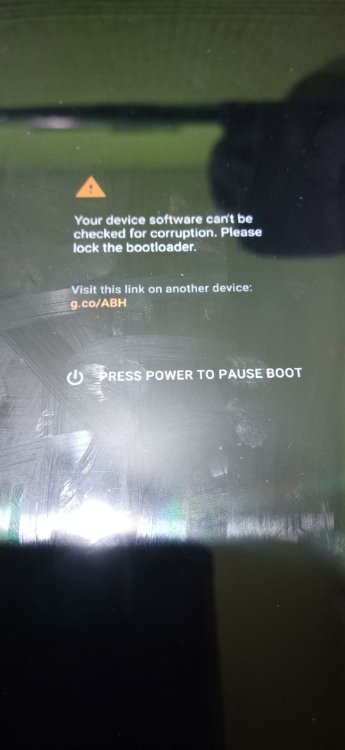
-
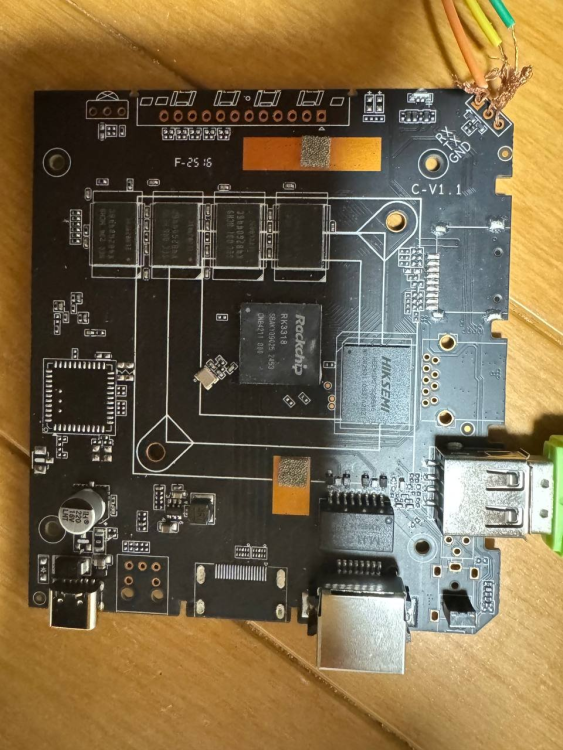
Hi everyone. I have this RK3318 chip box running Ubuntu, but I can't enable SSH to reinstall it. It doesn't have a display output port. Is there any way to reinstall the OS without desoldering the eMMC to reflash it? (I don't know how to put it back if I take it off). I've already tried flashing via USB and the RX/TX/GND lines, but neither worked. Model: AROP-01 CPU: Quad-core ARM processor Memory: 2GB System Storage: 64GB eMMC Network Interface: 1 × Ethernet USB Interface: 1 × USB Type-C Power: 5V/2A Dimensions: 103 × 103 × 20 mm Package Contents: 1 × Manual, 1 × Ethernet Cable, 1 × Power Cable Thank you.
-

What hardware will comfortably run Waydroid?
samlevy0515 replied to dreamlayers's topic in Software, Applications, Userspace
Great question — I’d really like to know too! Have you tried a lightweight Android image like LineageOS-microG inside Waydroid, or tweaked the GPU rendering settings? - Last week
-
 Hi, I am assuming that you have a standard Q1 TV Box (Allwinner H313 based). 1) Download Armbian Imager here; 2) Install the version for your operating system; 3) After installing, choose "Manufacturer=ALLWINNER", Board="X96Q TV BOX", Operating system="minimal Trixie current" and Storage ( I suggest a good quality Class 10 SD card); 4) After writing the image, insert the SD card into the available SD slot; 5) Insert a wooden toothpick or a Q-tip into AV/Reset input; 6) Click (kindly) and hold the toothpick and connect the TV Box power supply to the power entry; 7) Release the toothpick after 8-10 seconds. if the HDMI connector is plugged you should see the Armbian initial boot process Note: some TV Boxes don't need items 5, 6 and 7. I hope it helps.
 -
Hi. I've also been having issues with my Orange Pi 5. It seems the problem is that the module was removed from the kernel, but I haven't looked into it in detail yet. The folks at NixOS seem to have solved this issue https://github.com/waydroid/waydroid/issues/2094 I have this specific problem waydroid show-full-ui [22:49:14] Starting waydroid session [22:49:14] RuntimeError: Command failed: % /usr/lib/waydroid/data/scripts/waydroid-net.sh start vnic is waydroid0 sudo /usr/lib/waydroid/data/scripts/waydroid-net.sh start modprobe: FATAL: Module ip_tables not found in directory /lib/modules/6.18.10-current-rockchip64 iptables v1.8.11 (legacy): can't initialize iptables table `filter': Table does not exist (do you need to insmod?) Perhaps iptables or your kernel needs to be upgraded. Failed to setup waydroid-net. My system user@orangepi5:~$ uname -a Linux orangepi5 6.18.10-current-rockchip64 #2 SMP PREEMPT Wed Feb 11 12:42:01 UTC 2026 aarch64 GNU/Linux I'm not a network expert, so I hope someone can help. Are you having the same problem?
-
Oh Thanks, I'll give a try this way.
-
Join us next week in Utrecht for RustWeek! We'll be running a SuperTuxKart tournament to showcase Tyr, the Rust driver for Arm Mali GPUs. Come and see if you've got what it takes! View the full article
-
Armbian_community_26.2.0-trunk.886_Yy3568_resolute_current_6.18.28_gnome_desktop.img the nvme ssd does not working, any idea? root@yy3568:~# lsblk NAME MAJ:MIN RM SIZE RO TYPE MOUNTPOINTS mmcblk0 179:0 0 58.2G 0 disk ├─mmcblk0p1 179:1 0 325M 0 part ├─mmcblk0p2 179:2 0 27.6G 0 part └─mmcblk0p3 179:3 0 30.2G 0 part mmcblk0boot0 179:32 0 4M 1 disk mmcblk0boot1 179:64 0 4M 1 disk mmcblk1 179:96 0 29.7G 0 disk └─mmcblk1p1 179:97 0 29.4G 0 part /var/log.hdd / zram0 253:0 0 3.8G 0 disk [SWAP] zram1 253:1 0 50M 0 disk /var/log zram2 253:2 0 0B 0 disk root@yy3568:~# root@yy3568:~# root@yy3568:~#dmesg | grep -E "pcie|nvme|PCIe" | tail -n 30 lsblk -o NAME,SIZE,TYPE,MOUNTPOINTS,TRAN [ 0.098950] /pcie@fe260000: Fixed dependency cycle(s) with /pcie@fe260000/legacy-interrupt-controller [ 0.133093] /pcie@fe280000: Fixed dependency cycle(s) with /pcie@fe280000/legacy-interrupt-controller [ 2.745055] rockchip-dw-pcie 3c0000000.pcie: host bridge /pcie@fe260000 ranges: [ 2.745105] rockchip-dw-pcie 3c0000000.pcie: IO 0x00f4100000..0x00f41fffff -> 0x00f4100000 [ 2.745125] rockchip-dw-pcie 3c0000000.pcie: MEM 0x00f4200000..0x00f5ffffff -> 0x00f4200000 [ 2.745136] rockchip-dw-pcie 3c0000000.pcie: MEM 0x0300000000..0x033fffffff -> 0x0300000000 [ 2.745348] rockchip-dw-pcie 3c0000000.pcie: iATU: unroll T, 8 ob, 8 ib, align 64K, limit 8G [ 3.806942] rockchip-dw-pcie 3c0000000.pcie: Phy link never came up [ 3.808269] rockchip-dw-pcie 3c0000000.pcie: PCI host bridge to bus 0000:00 [ 3.808554] pci 0000:00:00.0: [1d87:3566] type 01 class 0x060400 PCIe Root Port [ 3.825132] pcieport 0000:00:00.0: PME: Signaling with IRQ 73 [ 3.825508] pcieport 0000:00:00.0: AER: enabled with IRQ 82 [ 5.074343] rockchip-dw-pcie 3c0800000.pcie: probe with driver rockchip-dw-pcie failed with error -110 [ 23.011574] rockchip-pm-domain fdd90000.power-management:power-controller: sync_state() pending due to 3c0800000.pcie NAME SIZE TYPE MOUNTPOINTS TRAN mmcblk0 58.2G disk mmc ├─mmcblk0p1 325M part mmc ├─mmcblk0p2 27.6G part mmc └─mmcblk0p3 30.2G part mmc mmcblk0boot0 4M disk mmc mmcblk0boot1 4M disk mmc mmcblk1 29.7G disk mmc └─mmcblk1p1 29.4G part /var/log.hdd mmc / zram0 3.8G disk [SWAP] zram1 50M disk /var/log zram2 0B disk root@yy3568:~# poweroff
-
 Hi, I have the same problem on a specially built debian image for the Raspberry Pi. Did you ever solve this problem?
 -
@armfan you start mixing instructions from Xunlong, SpacemiT, and Armbian. That will not work probably. The SoC is able to boot from SD, eMMC, and MTD (in that order). With Armbian started, you can use armbian-install to write u-boot to MTD (which is Memory Technology Device aka the kernel device for SPI flash and other flash mem). That Armbian u-boot is able to indirectly boot from NVME. Or via USB but only with manual u-boot commands you can type into the UART console, see discussion on OpiR2S booting in this thread.
-
https://github.com/MaverickLong/MLIR-TIM-VX This is an MLIR-based lowering path from the TOSA v1 dialect to TIM-VX, VeriSilicon's OpenVX-based GPU/NPU ML Framework. It includes the lowering from TOSA v1 to a custom timvx dialect (mirrors the TIM-VX C++ semantics) and a full lowering to C++ source. It is currently on par in inference speed with the vendor ACUITY compiler pipeline while still giving you full control on the graph level. In my own testing, on a Radxa Cubie A7Z \w Allwinner A733, ResNet-50 takes 8.0ms to inference, while the ACUITY-compiled baseline takes 7.3ms according to Radxa. It all starts with Radxa/VeriSilicon's false advertisement of the NPU supporting MLIR, but turns out we just don't have it yet, so I made my own. I have only tested the pipeline on the A733, but it should be able to be extended to any other VIP9000 variants as well.
-
 Hello community! I’ve been a lurker for a while and recently flashed the latest Armbian Jammy onto a spare NanoPi NEO I had lying around. I'm currently designing a headless DIY time-tracking kiosk for a small local workshop using an RC522 RFID reader via SPI. Reading the RFID tags and logging the raw Unix timestamps (punch-in/punch-out) to a local SQLite database was the easy part. Where I'm getting a bit stuck is the actual backend calculation logic. I need the system to accurately calculate the daily net working hours, which means automatically deducting mandatory statutory breaks (e.g., 30 mins after 6 hours of work) and tracking daily overtime. To ensure the math is strictly accurate and handles edge cases properly, I am trying to write a Python script that replicates the exact calculation logic used by standard tools like arbeitszeitrechnerprofi.de for the backend processing. Before I completely reinvent the wheel writing complex Python datetime scripts, has anyone here built a similar attendance or punch-clock project on Armbian? What’s the best way to handle this data processing locally? Would it be better to just use Node-RED for easier visual flow and logic management rather than a standalone Python daemon? Also, any tips on GPIO reliability for the RFID reader under the recent Armbian kernels would be highly appreciated. I plan to start wiring the prototype this weekend. Thanks in advance!
 -
 Need to a build a recipe for that, hopefully it will be supported as well (but let's hope mpv + ffmpeg combo works)
 -

Enable ethernet port on expansion board for OrangePi zero 2w
Werner replied to Golecom's topic in Allwinner sunxi
Try with this commit:https://github.com/armbian/build/commit/b880d98b07090b0b59bb3096c508e5123b224037 Seems like Micha had to cleanup my mess -
@meco works perfectly and passes stress-ng. Thanks!