Active threads
Showing topics posted in for the last 365 days.
- Past hour
-
You are not using Armbian. This is a fork of Armbian which uses our name without permission and they do not contribute to the core development process. They trick you into thinking that you will get some sort of support at this place which isn't the case. We do not support 3rd party forks.
- Today
-

Trying to boot Armbian on LinknLink iSG Box SE
Sancho replied to Sancho's topic in Rockchip CPU Boxes
Hey @rosic thank you for sharing, nice find as well. What image did you use to flash to emmc? After rebooting my filesystem is read only and I can't update packages. - Yesterday
-
Hi all, I finally could get 4GB in my Transpeed M98 Plus. For everyone that have this same problem, the solution is just use a patch to change 2 archives, the "configs/transpeed-8k618-t_defconfig" and the include/configs/sunxi-common.h to define the maximum dram to 4GB instead 2GB. Just put the patch in build/patch/u-boot/u-boot-aw before the compilation process. To be honest I don't know how Nick could put his box to work with 4GB, because the sunxi-common.h fix in 2GB the maximum amount of dram, #define PHYS_SDRAM_0_SIZE 0x80000000 /* 2 GiB */ instead of #define PHYS_SDRAM_0_SIZE 0x100000000ULL /* 4 GiB */. 174-define-DRAM_MAX_SIZE-to-4GB.patch
-
 @Sergioclr Try this build. If Ethernet works then we can borrow the dts settings.
 -
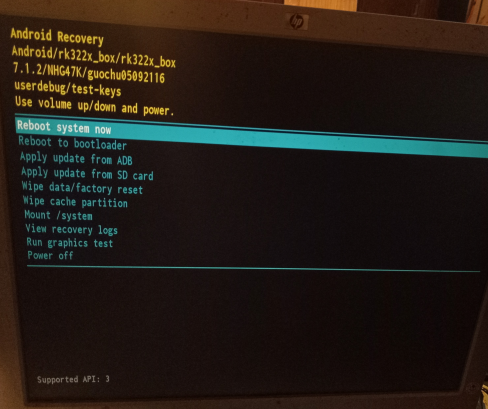
What do I do here? My box has no keys period save the reset button. I searched for the issue in this thread and didn't find anything, or in the internet at large. I have no remote for it (And it doesn't have bluetooth to start with) and usb devices didn't work, so that's not it either.
-
The Orange Pi CM4 isn’t as widely supported in Armbian as some other boards yet, so support can be a bit limited depending on what you’re trying to do. Your best bet is to check the Armbian download page or forums for any community builds, as some users have shared working images or tweaks. Otherwise, you may need to use the official Orange Pi OS or adapt an existing Armbian image with some manual configuration.
-

CSC Armbian for RK3318/RK3328 TV box boards
usual user replied to jock's topic in Rockchip CPU Boxes
I haven't looked at this use case for a very long time. I can no longer remember since when it has worked out-of-the-box for me. Since decoder support has been part of the GStreamer framework for a very long time, hardware-supported video decoding works for all browsers that use this framework with the standard packages of the distribution of my choice. When v4lrequest support was still implemented with the out-of-tree patches using the stateful method, it also worked with Firefox out-of-the-box. Just an accordingly patched FFmpeg framework was required. This is likely no longer going to work with the current patches for the FFmpeg framework and requires an additional implementation in Firefox. I suspect, however, that this will only happen after the official inclusion of v4lrequest support in the FFmpeg framework, as is also the case with MPV. To what extent patches for Firefox are already available is unknown to me. For the distribution of my choice, I have in any case rebuilt the FFmpeg and MPV packages with the corresponding patches. I have to confess that I usually use Firefox and the video decoding works flawlessly for my use cases. However, I cannot say whether this is actually hardware-accelerated, because the SBCs I use with a graphical Desktop are powerful enough to function sufficiently even with only software decoding. I'm just taking the lazy way here and waiting for it to end up in Manline. For SBCs that need hardware acceleration, I simply use a browser that uses the GStreamer framework. -
For some reason, the CPU frequency in Ubuntu is set to 1416000 while the hardware can reach 1512000, which is an improvement of about 6 and a half in CPU performance. I would appreciate a change or explanation. Thank you very much for everything.
-
Hi Tparys Sorry for the last reply, it has been a couple of busy days. > If they are exactly the same software, it sounds like a hardware issue. Yes that was my initial thought, and therefore I validated with the HardKernel images on one of broken nodes and since the PWM fan was a normal. It seems to be a software problem instead. > If the HardKernel images works as expected, perhaps you've updated all 3, but not rebooted the working one yet? After the second node broke have a turn all devices off each night and the healthy node has worked every day. > Can you post logs of both working and not working boards? Node 1 (Healthy): https://paste.armbian.com/ibofokalis Node 2 (Unhealthy): https://paste.armbian.com/ifihodukoj I am reinstalled armbian 26.2.1 Noble and here is the PWM not working. I am capable of setting a PWM but it doesn't respond to it. It was on this node I have tested the HardKernel Image Node 3 (Unhealthy): https://paste.armbian.com/kemesojuva I have done some additional debug on this node. The hwmon2/pwm1_enable is set to 1 for manual mode and pwm1 is zero even if the fan is speeding at full speed. If I disable the fancontrol service and manually control the pwm1, it is possible to set the pwm to a different speed and the fan will respond but after a split sensor would the value of pwm1 be reset to 0 instead of the assigned value.
-
My bad I didn't specify. On Windows. I lost 4h on it. I needed to use dd on a Mac to create a bootable SD card. Arbian Imager didn't help, it killed my Window stuck on storage finding and couldn't be killed. on Mac made a bad job of flashing, didn't even started boot. Btw on Windows, all methods I used (Raspberry Imager, Etcher, Rufus) all made like 50ish small 0 bite partitions and one big unallocated. Somehow it started booting, Armbian logo on, but then it failed.
-

HDMI audio and analog audio do not work on Opi5Plus
JFL replied to ずっと一人's topic in Orange Pi 5 Plus
Hi, Just an update on this issue. Upgraded to kernel-7.0.0-edge-rockchip64-26.2.0-trunk.733, still no audio output on Analog Headphone/Audio Jack. - Last week
-
Hey there, I try to install Armbian on my Arduino UNO Q (2 GB), but it fails with all three images Armbian_community_26.2.0-trunk.703_Arduino-uno-q_trixie_edge_6.19.0_minimal.tar.xz Armbian_community_26.2.0-trunk.703_Arduino-uno-q_noble_edge_6.19.0_gnome_desktop.tar.xz Armbian_community_26.2.0-trunk.703_Arduino-uno-q_noble_edge_6.19.0_kde-neon_desktop.tar.xz The error message: .\arduino-flasher-cli.exe flash .\Armbian_community_26.2.0-trunk.703_Arduino-uno-q_trixie_edge_6.19.0_minimal.tar.xz WARNING: flashing a new Linux image will erase any existing data that you have on the board. Do you want to proceed and flash .\Armbian_community_26.2.0-trunk.703_Arduino-uno-q_trixie_edge_6.19.0_minimal.tar.xz on the board? (yes/no) yes Unzipping Debian image arduino-images/ arduino-images/disk-sdcard.img.esp arduino-images/disk-sdcard.img.root arduino-images/flash/ arduino-images/flash/imagefv.elf arduino-images/flash/zeros_1sector.bin arduino-images/flash/multi_image.mbn arduino-images/flash/gpt_main0.bin arduino-images/flash/gpt_backup2.bin arduino-images/flash/featenabler.mbn arduino-images/flash/boot.img arduino-images/flash/prog_firehose_ddr.elf arduino-images/flash/tz.mbn arduino-images/flash/xbl.elf arduino-images/flash/rawprogram0.xml arduino-images/flash/gpt_both0.bin arduino-images/flash/gpt_empty0.bin arduino-images/flash/gpt_backup1.bin arduino-images/flash/xbl_feature_config.elf arduino-images/flash/rawprogram0.nouser.xml arduino-images/flash/gpt_main2.bin arduino-images/flash/km4.mbn arduino-images/flash/gpt_backup0.bin arduino-images/flash/zeros_33sectors.bin arduino-images/flash/gpt_main1.bin arduino-images/flash/abl.elf arduino-images/flash/rpm.mbn arduino-images/flash/storsec.mbn arduino-images/flash/devcfg.mbn arduino-images/flash/cdt.bin arduino-images/flash/hyp.mbn arduino-images/flash/qupv3fw.elf arduino-images/flash/patch0.xml arduino-images/flash/uefi_sec.mbn panic: runtime error: index out of range [0] with length 0 goroutine 1 [running]: github.com/arduino/arduino-flasher-cli/internal/updater.Flash({0x7ff7f72e8c08, 0xc0000e9e50}, 0xc000288130, {0xc0000a8060, 0x54}, 0x1?, 0x0, {0x0, 0x0}, 0x0) D:/a/arduino-flasher-cli/arduino-flasher-cli/internal/updater/flasher.go:95 +0x757 github.com/arduino/arduino-flasher-cli/cmd/arduino-flasher-cli/flash.runFlashCommand({0x7ff7f72e8c08, 0xc0000e9e50}, {0xc000288110, 0x1?, 0x1?}, 0x0, 0x0, {0x0, 0x0}) D:/a/arduino-flasher-cli/arduino-flasher-cli/cmd/arduino-flasher-cli/flash/flash.go:117 +0x349 github.com/arduino/arduino-flasher-cli/cmd/arduino-flasher-cli/flash.NewFlashCmd.func1(0xc00002c908, {0xc000288110, 0x1, 0x1}) D:/a/arduino-flasher-cli/arduino-flasher-cli/cmd/arduino-flasher-cli/flash/flash.go:74 +0x94 github.com/spf13/cobra.(*Command).execute(0xc00002c908, {0xc0002880e0, 0x1, 0x1}) C:/Users/runneradmin/go/pkg/mod/github.com/spf13/cobra@v1.9.1/command.go:1019 +0xae7 github.com/spf13/cobra.(*Command).ExecuteC(0xc00002c608) C:/Users/runneradmin/go/pkg/mod/github.com/spf13/cobra@v1.9.1/command.go:1148 +0x465 github.com/spf13/cobra.(*Command).Execute(...) C:/Users/runneradmin/go/pkg/mod/github.com/spf13/cobra@v1.9.1/command.go:1071 github.com/spf13/cobra.(*Command).ExecuteContext(...) C:/Users/runneradmin/go/pkg/mod/github.com/spf13/cobra@v1.9.1/command.go:1064 main.main() D:/a/arduino-flasher-cli/arduino-flasher-cli/cmd/arduino-flasher-cli/main.go:71 +0x3f0 .\arduino-flasher-cli.exe flash latest works as expected, so it seems to be an issue with these images. Or do I use the wrong installation method? The problem is reproducible under Windows 11 and Linux. Installation over Armbian Imager also fails https://paste.armbian.com/fowidugipo https://paste.armbian.com/ogekaqalaq
-

Request for archived RK3318 image (legacy 4.4.213 kernel)
Sharkam replied to stive ali's topic in Rockchip CPU Boxes
Hi, did you find any legacy rk3318 image? -

Amlogic S905X -- Cannot install Armbian to internal eMMC
chairman replied to pochopsp's topic in Amlogic CPU Boxes
Yeah, I’ve looked into the patch file. It doesn’t work with latest u-boot at all. It looks for dtb file, whereas latest u-boot includes mostly dtbi files. I think I’ll have to look into slightly newer than 2020.07 u-boot. I’m guessing it would be easier to port that patch. -
Thank you very much for your reply, Werner - and indeed for all the tremendous work you do! The drive is listed as an /dev/nvme0n1p1, so I think I did choose the right overlay. Rootfs UUID is correct. I tested SPI/MTD boot with Armbian 26.2.1, rootfs on NVMe. I erased and reflashed the SPI flash manually: ``` shell sudo flash_eraseall /dev/mtd0 sudo dd if=/usr/lib/linux-u-boot-vendor-orangepi5/u-boot-rockchip-spi.bin \ of=/dev/mtdblock0 bs=1M conv=fsync status=progress sync ``` I then verified that the running system was still using /boot from the SD card: ``` shell findmnt /boot ``` which returned: ``` shell /boot /dev/mmcblk1p1[/boot] ``` I mounted the NVMe rootfs and compared /boot on SD vs NVMe: ``` shell sudo mkdir -p /mnt/nvme sudo mount /dev/nvme0n1p1 /mnt/nvme ls -la /boot ls -la /mnt/nvme/boot ``` The NVMe /boot contents were older/stale compared with the SD /boot, so I synchronized them: ``` shell sudo rsync -aHAX --delete /boot/ /mnt/nvme/boot/ sync ``` I then powered the board off completely, removed the SD card, and tested booting from SPI + NVMe again but it still won't boot without the SD card. I watched your video on UART debugging, but unfortunately, my serial cable is too slow, so I'll get one of those you recommend and try again. Thanks again!
-
@tiobily no worries. you can still interrupt u-boot. In u-boot shell you can try calculating crc32 of memory regions to test memory. memtester tool does not seem to be working.
-
 moved
moved -
BitNet-style ternary brings LLM inference to ExecuTorch via its Vulkan backend, enabling much smaller, bandwidth-efficient models with portable GPU execution on edge devices. Presented at PyTorch Conference Europe 2026. View the full article
-
 @MMGen First, thanks for a great tutorial! I have a question about gpt. I maintain shrink-backup and I use dd to copy "boot sector" and rsync the rest (VERY easily described) But I do not distinguish any difference between if it's mbr or gpt when using dd, I just copy everything before root partition with dd (and a few MiB extra) then format root, rsync, yadayadayada... (not important) So I got curious why you skip the first 64 512b blocks in the dd for gpt? (for others reading, the 512 is because fdisk ALWAYS returns 512b blocks, even though gpt is actually 4k blocks) dd if=$(echo *.img) of=/dev/sda bs=512 skip=64 seek=64 count=32704 Can you explain why? I tried to find something online referencing the first 64 512b blocks of a gpt partition table, but could not find anything. I would really appreciate you educating me, or some links where I can read up on the reason. Thank you!
 -

Hardware video acceleration with recent armbian/mainline kernel (Kodi)
Joe K replied to XXXBold's topic in Orange Pi 5
Hi Igor, Thank you for your reply. I build an Image for Mekotronics R58V2, but I leaned today we dont have the R58S2 (yet) our current device is the R58s, with a build provided by Mekotronics and the HW decoding works with QT-Multimedia as playback back-end, This is this build: v26.02 rolling for Mekotronics R58S running Armbian Linux 6.1.84-vendor-rk35xx. This device is not yet supported, at least I could not find it here. I will discuss with Mekotronics to get also at least Standard support from Armbian in future. I do have also Mekototronics R58X and R58HD devices we want to use also in ffuture the have better support level here as well. I could not find any Forums related to Mekotronics devices and seams can not open one or add threads to the Rockchip rk35xx section, there loads of OragePi stuff but I could not see that officially you support any of them, anyway I gave up with them cause they are ...lets say below expectations ;-). Please give me a hint. As Iam new here please excuse if you get sometimes strange question, but Iam working with arm boards already for a while. Using CLI is not an option, we actually install LX-Qt together with the application. Thanks for helping! -
 A friendlier, faster, snap-free desktop install in armbian-configIf you've installed a desktop environment with armbian-config over the last few months, you may have noticed things feel different: there's a tier you can pick, the browser actually works on every arch, uninstall doesn't take half your system with it, and there's no snap pop-up surprising you on Ubuntu builds. That's not by accident — the desktop submodule has been quietly rebuilt from the ground up. Here's what landed, why we did it, and what it means for you. Pick the desktop you want — at install, and afterThree tiers, instead of one all-or-nothing install: minimal — DE + display manager + a terminal. About 500 MB. Perfect for headless boards with an occasional HDMI session, or anyone who'd rather curate apps themselves.mid — adds a WWW browser, file manager, image viewer, media player, calculator, archive tool, torrent client, and the SD-card flasher. About 1 GB. The "everyday desktop" sweet spot.full — adds LibreOffice, GIMP, Inkscape, Audacity, Thunderbird, and VS Code. About 2.5 GB. Workstation-shaped.And — because changing your mind is allowed — you can move between tiers any time without a reinstall. armbian-config --api module_desktops upgrade de=xfce tier=full computes the delta and only adds what's missing. The reverse path, downgrade, only removes packages from the original install manifest, never anything you added on your own. Snap-free Chromium, Firefox, and ThunderbirdOn Ubuntu, the apt names chromium, firefox, and thunderbird are snap-transitional packages — installing them silently pulls in snapd, runs the apps in a snap sandbox, and gives you a slow start, broken hardware acceleration, and a confusing menu of "two Chromiums" if you ever want the real thing. Armbian images don't ship snapd, so we now route those names to real, native .debs hosted on apt.armbian.com. The desktop install path writes an apt pin priority file at /etc/apt/preferences.d/armbian-desktops that forces our packages to win over the snap-shims — even on systems where the snap version is technically newer. The result: apt install chromium gives you a real, native Chromium. No snapd. No surprise pop-ups. On amd64 systems, the browser slot maps to Google Chrome (also from apt.armbian.com); on RISC-V Ubuntu builds you get real Firefox. Debian releases keep using upstream chromium / firefox-esr — those have always been real .debs and need no help. One desktop, every supported distro and archEach DE — XFCE, GNOME, KDE Plasma, KDE Neon, MATE, Cinnamon, i3-wm, xmonad, Enlightenment, Budgie, Deepin — is now a single declarative YAML file in the configng repo. The engine works out which packages exist on which release on which arch, substitutes per-platform replacements where needed, and silently drops broken ones. Same XFCE definition runs on Debian bookworm/trixie/forky and Ubuntu noble/resolute across arm64 / amd64 / armhf / riscv64. Adding a new desktop environment is a YAML edit and a smoke test — no per-distro shell scripts, no codepaths to chase. Clean uninstall, every timeEvery desktop install records a manifest of exactly which packages it added — under /etc/armbian/desktop/<de>.packages. Removal undoes only those. Packages that were already on your system before you installed the desktop stay put. No more "I uninstalled XFCE and lost half my system." The little stuff that's easy to missAuto-login that doesn't trash your config. Enable / disable autologin for gdm3, sddm, or lightdm via in-place sed edits — your WaylandEnable=false and other tweaks survive.Container-aware. Same code path works inside Docker without trying to start a display manager. CI builds and scripted installs work without special-casing.U2F security keys. Plug in your Yubikey and WebAuthn just works — the udev rules ship via libfido2-1 on resolute, libu2f-udev on older releases.Printer panel works. GNOME Settings → Printers no longer says "some settings cannot be unlocked" — cups-pk-helper ships with every desktop install now.VS Code from us, not Microsoft's repo. Installing code no longer prompts you to add Microsoft's apt source — we host the real package, the prompt is suppressed, the pin keeps Microsoft from sneaking in over the top.A weekly self-audit catches driftA scheduled Claude AI supported GitHub Actions workflow scans the YAML matrix against armbian/build's supported releases and the live Debian/Ubuntu archives — flags releases not yet covered, flags packages that no longer exist upstream — then opens a PR with proposed YAML fixes. Dead packages and missing releases stop accumulating silently. Try itOn any modern Armbian install: sudo armbian-config # or scripted: sudo armbian-config --api module_desktops install de=xfce tier=full sudo armbian-config --api module_desktops upgrade de=xfce tier=full sudo armbian-config --api module_desktops downgrade de=xfce tier=mid sudo armbian-config --api module_desktops remove de=xfce Supported desktops today: XFCE, GNOME, KDE Plasma, KDE Neon (Ubuntu noble only), MATE, Cinnamon, i3-wm and xmonad, Enlightenment, Budgie and Deepin experimental. Supported targets: Debian bookworm / trixie / forky and Ubuntu noble / resolute on every Armbian arch. View the full article
 -
 A friendlier, faster, snap-free desktop install in armbian-configIf you've installed a desktop environment with armbian-config over the last few months, you may have noticed things feel different: there's a tier you can pick, the browser actually works on every arch, uninstall doesn't take half your system with it, and there's no snap pop-up surprising you on Ubuntu builds. That's not by accident — the desktop submodule has been quietly rebuilt from the ground up. Here's what landed, why we did it, and what it means for you. Pick the desktop you want — at install, and afterThree tiers, instead of one all-or-nothing install: minimal — DE + display manager + a terminal. About 500 MB. Perfect for headless boards with an occasional HDMI session, or anyone who'd rather curate apps themselves.mid — adds a WWW browser, file manager, image viewer, media player, calculator, archive tool, torrent client, and the SD-card flasher. About 1 GB. The "everyday desktop" sweet spot.full — adds LibreOffice, GIMP, Inkscape, Audacity, Thunderbird, and VS Code. About 2.5 GB. Workstation-shaped.And — because changing your mind is allowed — you can move between tiers any time without a reinstall. armbian-config --api module_desktops upgrade de=xfce tier=full computes the delta and only adds what's missing. The reverse path, downgrade, only removes packages from the original install manifest, never anything you added on your own. Snap-free Chromium, Firefox, and ThunderbirdOn Ubuntu, the apt names chromium, firefox, and thunderbird are snap-transitional packages — installing them silently pulls in snapd, runs the apps in a snap sandbox, and gives you a slow start, broken hardware acceleration, and a confusing menu of "two Chromiums" if you ever want the real thing. Armbian images don't ship snapd, so we now route those names to real, native .debs hosted on apt.armbian.com. The desktop install path writes an apt pin priority file at /etc/apt/preferences.d/armbian-desktops that forces our packages to win over the snap-shims — even on systems where the snap version is technically newer. The result: apt install chromium gives you a real, native Chromium. No snapd. No surprise pop-ups. On amd64 systems, the browser slot maps to Google Chrome (also from apt.armbian.com); on RISC-V Ubuntu builds you get real Firefox. Debian releases keep using upstream chromium / firefox-esr — those have always been real .debs and need no help. One desktop, every supported distro and archEach DE — XFCE, GNOME, KDE Plasma, KDE Neon, MATE, Cinnamon, i3-wm, xmonad, Enlightenment, Budgie, Deepin — is now a single declarative YAML file in the configng repo. The engine works out which packages exist on which release on which arch, substitutes per-platform replacements where needed, and silently drops broken ones. Same XFCE definition runs on Debian bookworm/trixie/forky and Ubuntu noble/resolute across arm64 / amd64 / armhf / riscv64. Adding a new desktop environment is a YAML edit and a smoke test — no per-distro shell scripts, no codepaths to chase. Clean uninstall, every timeEvery desktop install records a manifest of exactly which packages it added — under /etc/armbian/desktop/<de>.packages. Removal undoes only those. Packages that were already on your system before you installed the desktop stay put. No more "I uninstalled XFCE and lost half my system." The little stuff that's easy to missAuto-login that doesn't trash your config. Enable / disable autologin for gdm3, sddm, or lightdm via in-place sed edits — your WaylandEnable=false and other tweaks survive.Container-aware. Same code path works inside Docker without trying to start a display manager. CI builds and scripted installs work without special-casing.U2F security keys. Plug in your Yubikey and WebAuthn just works — the udev rules ship via libfido2-1 on resolute, libu2f-udev on older releases.Printer panel works. GNOME Settings → Printers no longer says "some settings cannot be unlocked" — cups-pk-helper ships with every desktop install now.VS Code from us, not Microsoft's repo. Installing code no longer prompts you to add Microsoft's apt source — we host the real package, the prompt is suppressed, the pin keeps Microsoft from sneaking in over the top.A weekly self-audit catches driftA scheduled Claude AI supported GitHub Actions workflow scans the YAML matrix against armbian/build's supported releases and the live Debian/Ubuntu archives — flags releases not yet covered, flags packages that no longer exist upstream — then opens a PR with proposed YAML fixes. Dead packages and missing releases stop accumulating silently. Try itOn any modern Armbian install: sudo armbian-config # or scripted: sudo armbian-config --api module_desktops install de=xfce tier=full sudo armbian-config --api module_desktops upgrade de=xfce tier=full sudo armbian-config --api module_desktops downgrade de=xfce tier=mid sudo armbian-config --api module_desktops remove de=xfce Supported desktops today: XFCE, GNOME, KDE Plasma, KDE Neon (Ubuntu noble only), MATE, Cinnamon, i3-wm and xmonad, Enlightenment, Budgie and Deepin experimental. Supported targets: Debian bookworm / trixie / forky and Ubuntu noble / resolute on every Armbian arch. View the full article
 -
@ioncube Were you able to use VPU with Jellyfin?
-
 If anybody needs a simple way to check text on the web or extract text from online PDFs on low‑spec SBCs, here is surf.py. It’s a tiny Python‑based terminal browser designed for boards like Orange Pi Zero, so you’re not completely blind internet‑wise even without a full browser. Starts with: ./surf.py domain.com Dependencies outside standard library: requests, PyPDF2. surf.py
 -

H96 Max RK3528 - Cannot boot Armbian from TF/SD card
jock replied to Alexander Polko's topic in Rockchip CPU Boxes
Hello, you can only boot from sdcard with that device if you follow the rockchip boot sequence, ie: you have to pack u-boot and trust.img using loaderimage tool from rockchip rkbin repository. That tools decorates the uboot/trust.img binaries with some signature and checksum, then you have to put on specific positions on your sdcard and the miniloader, residing in the emmc, will boot from sdcard once it validates correctly the binaries you supplied. You may take a look to my multitool github project for some reference. I have you same box and it boots on mine. Unfortunately on this particular box, the manufacturer disabled the sdcard boot at SoC/hardware level: this means that the trick to erase the internal flash to boot from sdcard, which worked fine for older SoCs, does not always work with rk3528-based (and probably other rk35xx) boards