Active threads
Showing topics posted in for the last 365 days.
- Past hour
-
I'm not sure I follow. You have the factory OS (debian IIRC) on EMMC still and it is stable?? But Armbian on M2 does not boot and/or is unstable? My setup has U-Boot loading systemd-boot via UEFI which then loads kernel. I also use Standard Boot so my entire bootcmd is simpy "bootflow scan -b". No complicated scripting. No loading things and calculating memory addresses. Moving away from all of that mess is really the primary motivation for building the firmware for this device in the first place. It is really nice--the only time I ever have to interact with u-boot is when I need to flash the firmware.
- Today
-
Tried building a trixie image with this tee and still locks at the same spot
-

networking in bpi-m5 with new 26.03.1 release.
gene1934 replied to gene1934's topic in Software, Applications, Userspace
Ambian-imager requires a glibc 3 versions newer that this bookworm amd64 has, won't run at all. restricting dd to bs=512 gets only 2something megabytes a second, glacially slow. The more usual bs=4096 is 50x faster, niether of which reports any write errors. And its booted and configured. time about a month off. I run ntpsec on this machine so I'll follow the /etc/chrony/README and assign a source address by number. but ip a shows only an active ipv6 address while ip r returns nothing. hostname is bananapi-m5 which is unk on the local net. IOW its booted but network is only ipv6 & no route of either flavor is assigned. Is this exactly how it was spun to be? I've brought the card back to my reader, and will edit the /etc/hostname to match its ID for 192,168,71,2 in the /etc/hosts file I'll install. And reboot it. but the card won't mount despite the fact that it boots. from this bash xfc4 terminal: root@coyote:/etc# mount -t ext4 /dev/sdc1 /mnt/sdc1 mount: /mnt/sdc1: wrong fs type, bad option, bad superblock on /dev/loop0, missing codepage or helper program, or other error. dmesg(1) may have more information after failed mount system call. dmesg however has no additional info. only this: [1618874.568139] sd 37:0:0:0: [sdc] 249737216 512-byte logical blocks: (128 GB/119 GiB) [1618874.568944] sdc: detected capacity change from 0 to 249737216 [1618874.569933] sdc: sdc1 [1619402.494452] loop0: detected capacity change from 0 to 12943360 [1619402.494871] EXT4-fs (loop0): VFS: Can't find ext4 filesystem [1619458.923461] loop0: detected capacity change from 0 to 12943360 [1619458.923910] EXT4-fs (loop0): VFS: Can't find ext4 filesystem as I made two attempts to mount it. it loads and boots normally when installed in the bpi-m5. So other than the extra server line I just put in /etc/chrony/sources.d/ which doesn't work because no ipv4 net is even available AND the nearest ipv6 enabled anything is a minimum of 125 miles from me, its about as useful as the teats on a bore hog. Neither is the thought of editing on that tiny screen, the 40 or so lines of /etc/hosts that make up my /etc/hosts file. Doubly frustrating is the fact that the mouse speed is measurable fraction of C speed and totally disappears when inside the xfce4 terminal borders. But installed in the bpi-m5 it boots normally. back in my reader: root@coyote:/etc# e2fsck /dev/sdc e2fsck 1.47.0 (5-Feb-2023) ext2fs_open2: Bad magic number in super-block e2fsck: Superblock invalid, trying backup blocks... e2fsck: Bad magic number in super-block while trying to open /dev/sdc The superblock could not be read or does not describe a valid ext2/ext3/ext4 filesystem. If the device is valid and it really contains an ext2/ext3/ext4 filesystem (and not swap or ufs or something else), then the superblock is corrupt, and you might try running e2fsck with an alternate superblock: e2fsck -b 8193 <device> or e2fsck -b 32768 <device> Found a dos partition table in /dev/sdc ???????????? wtf??????????? And I get the same result for /dev/sdc1 obviously something is screwed. So I unpackedca new 200mb writeable sandisk u-sd & wrote the new image to it. fdisk then says its a dos partition table. Can a "dos" table be used at all on a 128gb card? I've heard not but don't know where the failure is. ipa shows only ipv6, ip r shows nothing. The only thing that could be used for net config is armbian.config which I think is NetworkManager . but that's by now known not to work. So whats left????? IOW what the hell is being used to configure network NOW with a 6.18 kernel ???? And how do I use the new tools if any, to set it up for a network address on 192.168.71.2, an ipv4 address THAT WORKS FOR EVERYTHING??????? Or do I go back to the soon to expire Armbian_25.5.1_Bananapim5_noble_current_6.12.28_xfce_desktop.img which I am using 2 more times here in front of klipper driven 3d printers. And which if asked to apt update, now want around 430 new files to do the update but failing in the make a new initrd stage. Start by putting a gpt partition table in the xz with a respin. And stop assuming that the whole planet has ipv6 connectivity, central WV is not the only ipv4 island on this planet so blessed. -
Hello! How to download nightly build with 6.18 kernel? I've got 404 error when trying to download via link.
-
ok. I have 5 cubieboard 1. Not possible memory card for every one.
-
Great! I will start to tinker around with armbian.
-

Games Compatible With Armbian on Pinebook Pro
LivingLinux replied to Katsujinken's topic in Pinebook Pro
My PBP died, so I can no longer test it myself. You can start by testing the PPSSPP aarch64 AppImage. https://github.com/hrydgard/ppsspp/releases A couple of years ago I had performance issues with the PPSSPP Flatpak on my Phytium D2000, so I built it on Ubuntu 22.04. I'm not sure if I followed the instructions for Qt, or for Linux. So you need to install the prerequisites and I guess it doesn't hurt to install the additional packages mentioned for Ubuntu. https://github.com/hrydgard/ppsspp/wiki/build-instructions#building-with-cmake-other-platforms-eg-linux -

Teclast T60 AI rooting + armbian possibility Allwinner A733
Werner replied to Taz's topic in Allwinner CPU Boxes
moved to tvboxes -
Hi @BOFFBOY, have you managed to make it work? Having similar issue : tried with two different orange pi 5 , two different nvme SSDs, three different Power supplies up to 5V/5A and three armbian kernels: 5.10 | 6.1 and 6.18
-
Okay I think you are right they are shifting the RAM GB numbers so 8 GB is actually 4 GB as the price suggests. Now now, what I ended up doing is I bought a Teclast T60 AI tablet(for 100 euro shipped in EU) with Allwinner A772 which is supported by armbian and comes with 6GB RAM. I do not know if I will be trying to boot armbian on it soon but I was able to root it with Magisk. It did went on quite a journey to get it rooted as I kind of soft bricked it at first. Deepseek was giving me little wrong information but we got there. I think I might need a more competent AI agent like Gemini pro to get display, touch, wifi, bluetooth etc. working with armbian. Perhaps I post about the rooting process elsewhere at some point. Here is some of the gear I have if people are interested: https://www.aliexpress.com/item/1005009330391341.html DUX DUCIS Foldable Bluetooth 5.0 Keyboard with Touchpad & Phone Holder For Phones Tablets PC iOS Android Windows Mac https://www.aliexpress.com/item/1005011827691576.html https://www.aliexpress.com/item/1005009419399930.html HGFRTEE 3840*2160 13.3inch 4K Portable Monitor All in all pretty pleased with it so far, not exactly Surface pro 5/7 which I also have and they all weight about 1000 grams but then on the other hand this tablet did not cost me hundreds of $ so I can be little less nervous about someone stealing it.
-

CSC Armbian for RK3318/RK3328 TV box boards
andrey.lobov replied to jock's topic in Rockchip CPU Boxes
@jock Thank you, I will try. -
After more than six successful years with Helios4, I have to say goodbye to this platform and the highly valued, helpful, and knowledgeable Armbian forum. With 32-bit, it’s no longer feasible to continue using it in the future. I have installed the 4 8TB hard drives from the NAS into an Odroid H4+ (Intel, 64-bit), installed OMV8, and on top of that, Nextcloud-AIO Hub 26 Winter and AdGuardHome. Thank you very much for your support over the past few years. btw. The Helios4 hardware (excluding the hard drives) is still available.
-
 @mrdeathjr Mainline Linux support for the A733 is still in its early stages. I currently have a Armbian build using a collection of patches sourced from the kernel mailing lists. However, I’m getting a lot of errors and haven't managed to boot to a login prompt. https://oftc.catirclogs.org/linux-sunxi/2026-03-23 13:07 <indy> hi all, is there any a733 upstreaming effort? 13:29 <apritzel> indy: effort is underway: pinctrl is WIP (patches have been on the list), and the clock patches have recently been posted 13:30 <apritzel> RTC and AXP are on the list as well, that would conclude the basic necessities to get a DT merged that wouldn't break in the future 15:25 <indy> apritzel_, is it targeted for 7.0? 15:29 <apritzel> indy: no, that's way too late, v7.0 is due to be released in like three weeks already. It's even too late now for v7.1. 15:30 <apritzel> and it's the usual bottleneck: reviews ... I hope I find some time soon to look at the clock patches With @alexc hard work porting the v1.4.8 BSP driver to kernel 6.18, I was able to create a working Armbian build for the Radxa A7Z. https://github.com/NickAlilovic/build/tree/Radxa-mainline-WIP
 - Yesterday
-
 Hi.. I need de original firmware for android box Q17 Allwinner h313.. Someone can help me?
 -
I'd like to add my observations. The current version is 7.0.0-rc6-edge-sunxi64. The wireless interface is available, but if Ethernet is connected, it's impossible to connect to either interface via SSH. However, as soon as the Ethernet speed is set to 100, both interfaces become operational. Maybe this will help revive the hardware.
-
Hi Iuri, I had a similar issue for the rock3a, but I'm using a BigTreeTech 5" DSI display for use on a 3d printer. I've been dabbling in device drivers for 3 years with limited success, but I can say I recently got the 5" dsi display to work. All of my work is here: https://github.com/saltydog101/rock3a_dsi I had to load a new kernel module and then I was able to create a working dtbo for it. It was definitely more than I expected. That being said, when a vendor like Rockchip, Radxa or BigTreeTech decided to make a modification to the linux kernel and not have it committed to mainline, I don't think this is Armbian's issue at all. The engineers and community here do amazing work getting linux running on so many devices. You would normally have better luck looking at Radxa's discord and/or their documentation.
-
bellow the conclusion of 4 days of investigations and it works create dts file in tmp directory root@bananapim5:/home/gerard# cat meson-sm1-bananapi-m5-i2c0.dts /dts-v1/; /plugin/; / { compatible = "amlogic,meson-sm1"; fragment@0 { target-path = "/soc/bus@ffd00000/i2c@1d000"; __overlay__ { status = "okay"; clock-frequency = <100000>; pinctrl-names = "default"; pinctrl-0 = <&i2c2_pins>; }; }; fragment@1 { target-path = "/soc/bus@ff600000/bus@34400/pinctrl@40"; __overlay__ { i2c2_pins: i2c2_pins { mux { groups = "i2c2_sda_x", "i2c2_sck_x"; function = "i2c2"; bias-disable; drive-strength-microamp = <3000>; }; }; }; }; fragment@2 { target-path = "/soc/bus@ffd00000/i2c@1d000"; __overlay__ { #address-cells = <1>; #size-cells = <0>; rtc@68 { compatible = "maxim,ds3231"; reg = <0x68>; }; }; }; }; compile the dts on a tmp directory root@bananapim5:/home/gerard# dtc -@ -I dts -O dtb -o meson-sm1-bananapi-m5-i2c0.dtbo meson-sm1-bananapi-m5-i2c0.dts Copy the output to the /boot environnement root@bananapim5:/home/gerard# cp meson-sm1-bananapi-m5-i2c0.dtbo /boot/dtb-6.18.15-current-meson64/amlogic/overlay/meson-sm1-bananapi-m5-i2c0.dtbo modify the boot file /boot/armbianEnv.txt to setup the overlay root@bananapim5:/home/gerard# cat /boot/armbianEnv.txt verbosity=1 console=both overlay_prefix=meson fdtfile=amlogic/meson-sm1-bananapi-m5.dtb rootdev=UUID=d5516764-cadb-4a54-9453-6c500b56656c rootfstype=btrfs overlays=sm1-bananapi-m5-i2c0 usbstoragequirks=0x2537:0x1066:u,0x2537:0x1068:u root@bananapim5:/home/gerard# then a bad surprise the utility hwclock was not in the distro get the package util-linux-extra_2.39.3-9ubuntu6.3_arm64.deb and install it root@bananapim5:/home/gerard# wget http://launchpadlibrarian.net/801453777/util-linux-extra_2.39.3-9ubuntu6.3_arm64.deb --2026-04-03 10:46:26-- http://launchpadlibrarian.net/801453777/util-linux-extra_2.39.3-9ubuntu6.3_arm64.deb Resolving launchpadlibrarian.net (launchpadlibrarian.net)... 2620:2d:4000:1009::3b8, 2620:2d:4000:1009::13e, 185.125.189.229, ... Connecting to launchpadlibrarian.net (launchpadlibrarian.net)|2620:2d:4000:1009::3b8|:80... connected. HTTP request sent, awaiting response... 200 OK Length: 122602 (120K) [application/x-debian-package] Saving to: ‘util-linux-extra_2.39.3-9ubuntu6.3_arm64.deb’ util-linux-extra_2.39.3-9ubuntu6.3_arm64.deb 100%[=========================================================================================================================================>] 119.73K --.-KB/s in 0.05s 2026-04-03 10:46:26 (2.42 MB/s) - ‘util-linux-extra_2.39.3-9ubuntu6.3_arm64.deb’ saved [122602/122602] root@bananapim5:/home/gerard# dpkg -i util-linux-extra_2.39.3-9ubuntu6.3_arm64.deb Selecting previously unselected package util-linux-extra. (Reading database ... 25343 files and directories currently installed.) Preparing to unpack util-linux-extra_2.39.3-9ubuntu6.3_arm64.deb ... Unpacking util-linux-extra (2.39.3-9ubuntu6.3) ... Setting up util-linux-extra (2.39.3-9ubuntu6.3) ... Processing triggers for man-db (2.12.0-4build2) ... root@bananapim5:/home/gerard# you can reboot the module for rtc is download automaticly no need load any module boot and hwclock command to test with the version and build used on my bpi m5 v26.2.1 for Banana Pi M5 running Armbian Linux 6.18.15-current-meson64 Packages: Ubuntu stable (noble) IPv4: (LAN) 192.168.1.243 IPv6: xxxxxxx Performance: Load: 19% Uptime: 1m Memory usage: 7% of 3.67G CPU temp: 41°C Usage of /: 5% of 14G Tips: Flash Armbian from macOS, Windows, and Linux https://tinyurl.com/mryujx5u Commands: Configuration: armbian-config Monitoring : htop Last login: Fri Apr 3 09:54:29 2026 from 192.168.1.101 root@bananapim5:~# hwclock -r -f /dev/rtc1 2026-04-03 11:15:15.211101+02:00 root@bananapim5:~# root@bananapim5:~# Story not finished I try to integrate rtc1 as a fallback to ntp and chrony unfortunatly i was not able to install chrony on this distro (the last one avalaible for m5) so I try apt update and apt upgrade surprise upgrade downgrade from 6.18.15 to 6.18.10 the system but install util-linux-extra and allow chrony installation After that I create the necessary service to boot with rtc1 then start chrony and update system clock with ntp or rtc1 depending of availablility of internet root@bananapim5:/etc/systemd/system# cat sync-* ds3231-rtc.service [Unit] Description=Synchronize RTC1 with system or NTP fallback After=chronyd.service [Service] Type=oneshot ExecStart=/usr/rtc/sync-rtc1.sh [Unit] Description=Run RTC1 sync every hour [Timer] OnBootSec=5min OnUnitActiveSec=5min Unit=sync-rtc1.service [Install] WantedBy=timers.target [Unit] Description=Synchronize system time from DS3231 RTC DefaultDependencies=no Before=sysinit.target [Service] Type=oneshot ExecStart=/sbin/hwclock -s -f /dev/rtc1 RemainAfterExit=yes [Install] WantedBy=sysinit.target root@bananapim5:/etc/systemd/system# cat /usr/rtc/sync-rtc1.sh #!/bin/bash # sync-rtc1.sh # Synchronisation RTC1 <-> système avec logging # Vérifie si Chrony a des sources NTP actives NTP_OK=$(chronyc tracking | grep 'Reference ID' | grep -v '0.0.0.0') if [ -n "$NTP_OK" ]; then # Chrony OK, mettre RTC1 à jour depuis l’heure système hwclock -w -f /dev/rtc1 logger -t sync-rtc1 "NTP actif : mise à jour RTC1 depuis l'heure système" else # NTP indisponible, remettre l’heure système depuis RTC1 hwclock -s -f /dev/rtc1 logger -t sync-rtc1 "NTP indisponible : mise à jour de l'heure système depuis RTC1" fi root@bananapim5:/etc/systemd/system# end of story. log of the result 2026-04-03T13:24:30.009238+02:00 bananapim5 sync-rtc1: NTP indisponible : mise à jour de l'heure système depuis RTC1 2026-04-03T13:24:30.013803+02:00 bananapim5 systemd[1]: sync-rtc1.service: Deactivated successfully. 2026-04-03T13:24:30.014705+02:00 bananapim5 systemd[1]: Finished sync-rtc1.service - Synchronize RTC1 with system or NTP fallback. 2026-04-03T13:29:35.005855+02:00 bananapim5 systemd[1]: Starting sync-rtc1.service - Synchronize RTC1 with system or NTP fallback... 2026-04-03T13:29:36.001355+02:00 bananapim5 systemd-resolved[1433]: Clock change detected. Flushing caches. 2026-04-03T13:29:36.010529+02:00 bananapim5 sync-rtc1: NTP indisponible : mise à jour de l'heure système depuis RTC1 2026-04-03T13:29:36.016160+02:00 bananapim5 systemd[1]: sync-rtc1.service: Deactivated successfully. 2026-04-03T13:29:36.016473+02:00 bananapim5 systemd[1]: Finished sync-rtc1.service - Synchronize RTC1 with system or NTP fallback. 2026-04-03T13:30:01.478054+02:00 bananapim5 CRON[2521]: (root) CMD (/usr/lib/armbian/armbian-truncate-logs) 2026-04-03T13:34:44.331407+02:00 bananapim5 systemd[1]: Starting sync-rtc1.service - Synchronize RTC1 with system or NTP fallback... 2026-04-03T13:34:45.001445+02:00 bananapim5 systemd-resolved[1433]: Clock change detected. Flushing caches. 2026-04-03T13:34:45.010331+02:00 bananapim5 sync-rtc1: NTP indisponible : mise à jour de l'heure système depuis RTC1 2026-04-03T13:34:45.015243+02:00 bananapim5 systemd[1]: sync-rtc1.service: Deactivated successfully. 2026-04-03T13:34:45.016212+02:00 bananapim5 systemd[1]: Finished sync-rtc1.service - Synchronize RTC1 with system or NTP fallback. 2026-04-03T13:36:55.097288+02:00 bananapim5 chronyd[1725]: chronyd exiting 2026-04-03T13:36:55.098535+02:00 bananapim5 systemd[1]: Stopping chrony.service - chrony, an NTP client/server... 2026-04-03T13:36:55.106444+02:00 bananapim5 systemd[1]: chrony.service: Deactivated successfully. 2026-04-03T13:36:55.107444+02:00 bananapim5 systemd[1]: Stopped chrony.service - chrony, an NTP client/server. 2026-04-03T13:36:55.130493+02:00 bananapim5 systemd[1]: Starting chrony.service - chrony, an NTP client/server... 2026-04-03T13:36:55.296466+02:00 bananapim5 chronyd[2559]: chronyd version 4.5 starting (+CMDMON +NTP +REFCLOCK +RTC +PRIVDROP +SCFILTER +SIGND +ASYNCDNS +NTS +SECHASH +IPV6 -DEBUG) 2026-04-03T13:36:55.297080+02:00 bananapim5 chronyd[2559]: Loaded 0 symmetric keys 2026-04-03T13:36:55.298281+02:00 bananapim5 chronyd[2559]: Frequency -22.284 +/- 4.769 ppm read from /var/lib/chrony/chrony.drift 2026-04-03T13:36:55.298541+02:00 bananapim5 chronyd[2559]: Using right/UTC timezone to obtain leap second data 2026-04-03T13:36:55.302159+02:00 bananapim5 chronyd[2559]: Loaded seccomp filter (level 1) 2026-04-03T13:36:55.308879+02:00 bananapim5 systemd[1]: Started chrony.service - chrony, an NTP client/server. 2026-04-03T13:37:00.601703+02:00 bananapim5 chronyd[2559]: Selected source 2620:2d:4000:1::41 (ntp.ubuntu.com) 2026-04-03T13:37:00.602025+02:00 bananapim5 chronyd[2559]: System clock TAI offset set to 37 seconds 2026-04-03T13:37:01.826456+02:00 bananapim5 chronyd[2559]: Selected source 2001:41d0:2:c837::123 (2.ubuntu.pool.ntp.org) 2026-04-03T13:40:11.651555+02:00 bananapim5 systemd[1]: Starting sync-rtc1.service - Synchronize RTC1 with system or NTP fallback... 2026-04-03T13:40:12.008233+02:00 bananapim5 sync-rtc1: NTP actif : mise à jour RTC1 depuis l'heure système 2026-04-03T13:40:12.011630+02:00 bananapim5 systemd[1]: sync-rtc1.service: Deactivated successfully. 2026-04-03T13:40:12.012299+02:00 bananapim5 systemd[1]: Finished sync-rtc1.service - Synchronize RTC1 with system or NTP fallback. 2026-04-03T13:45:01.529270+02:00 bananapim5 CRON[2593]: (root) CMD (/usr/lib/armbian/armbian-truncate-logs) 2026-04-03T13:45:12.987841+02:00 bananapim5 systemd[1]: Starting sync-rtc1.service - Synchronize RTC1 with system or NTP fallback... 2026-04-03T13:45:14.008414+02:00 bananapim5 sync-rtc1: NTP actif : mise à jour RTC1 depuis l'heure système 2026-04-03T13:45:14.012561+02:00 bananapim5 systemd[1]: sync-rtc1.service: Deactivated successfully. 2026-04-03T13:45:14.012904+02:00 bananapim5 systemd[1]: Finished sync-rtc1.service - Synchronize RTC1 with system or NTP fallback. 2026-04-03T13:45:14.013548+02:00 bananapim5 systemd[1]: sync-rtc1.service: Consumed 1.028s CPU time. 2026-04-03T13:45:37.968500+02:00 bananapim5 chronyd[2559]: Selected source 2620:2d:4000:1::40 (ntp.ubuntu.com) root@bananapim5:/etc/systemd/system#
-
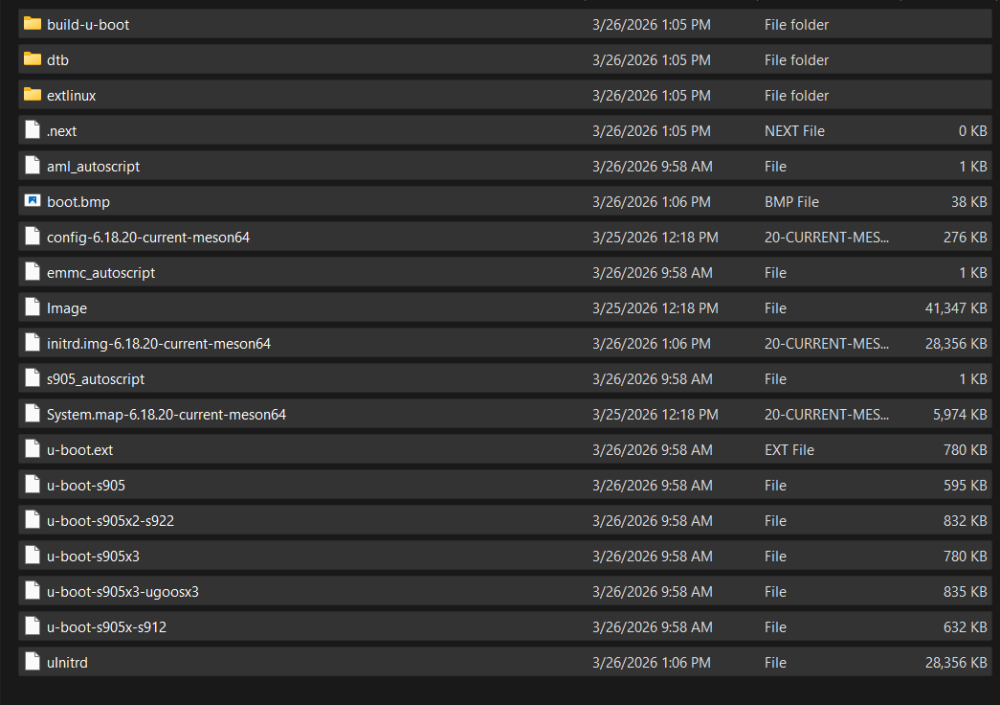
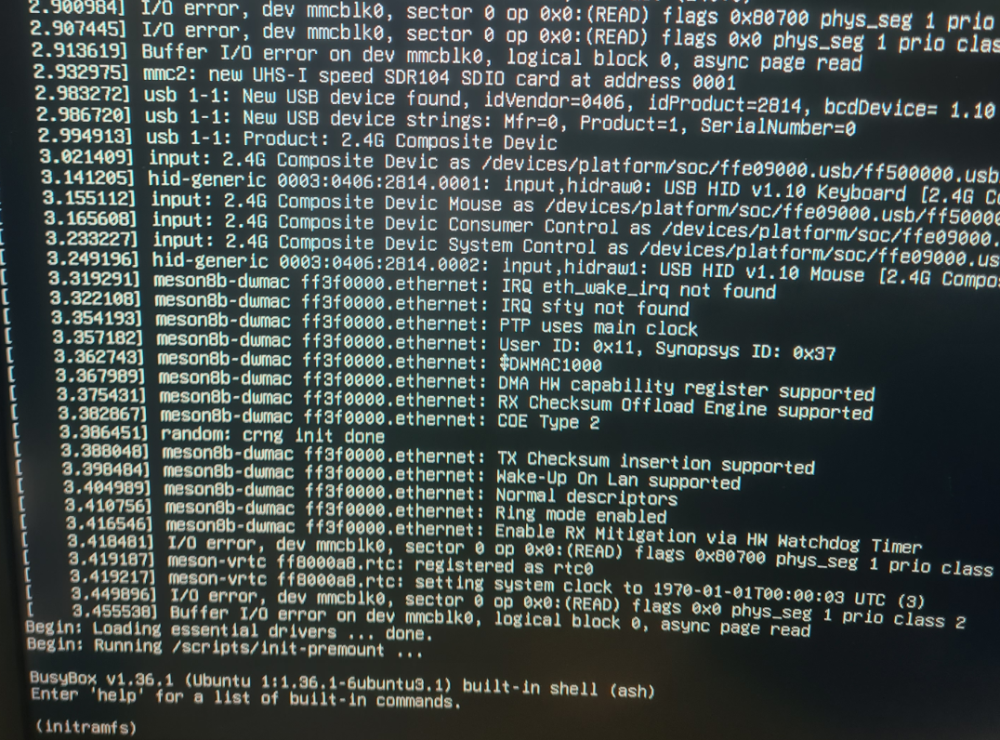
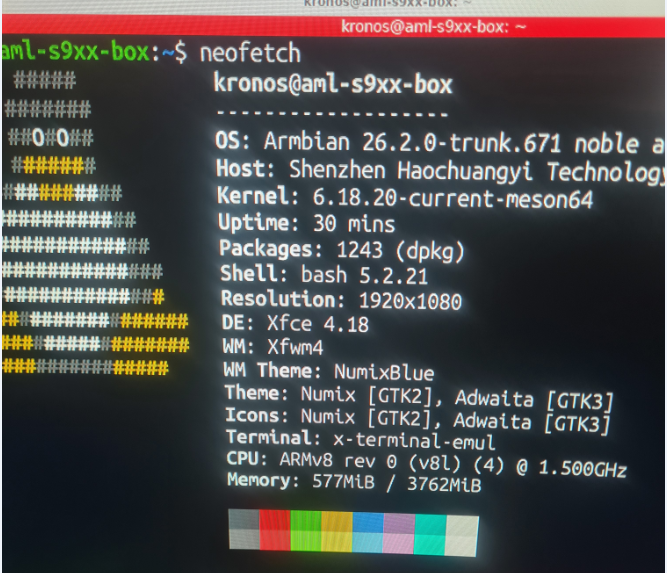
i will get that information for you.Sorry i did not give it sooner Box: H96 model x3 cpu-s905x3 rom 64gb the config file is kernel /Image initrd /uInitrd fdt /dtb/amlogic/meson-sm1-h96-max.dtb append root=UUID=54072e2a-0ddf-4b60-930c-f13cc5fc51b1 rootflags=data=writeback console=ttyAML0,115200n8 console=tty0 rw no_console_suspend consoleblank=0 fsck.fix=yes fsck.repair=yes net.ifnames=0 splash plymouth.ignore-serial-consoles I will post a neofetch of the usb flash that armibian works from on the same box strange enough when i take the sd card out the port on the box and place it in a usb card reader then boot armbian boots up ok and works(except the wifi) WHen i place the sd card back into the slot i get no errors but get stuck on initram
- Last week
-
 Collabora presents "Bringing BitNet to ExecuTorch via Vulkan" at PyTorch Conference Europe in Paris (April 7-8) and attends ICLR in Rio de Janeiro (April 23-27). Connect with our team to discuss machine learning and open source innovation! View the full article
 -
Open source projects like ours operate with very limited resources, and infrastructure such as mirrors is maintained on a best-effort basis. We’re aware that things are not always perfect, but addressing this properly requires dedicated maintainers - something we never had. If you’d like to help improve the situation, we’d genuinely welcome someone stepping in to take ownership of this part of the infrastructure. Improving scripts to make this information correct and other things that are missing ... Perhaps contanting mirror owner would already be a solution. I understand - but our mirror system isn’t a standard Debian-style setup. The “empty mirrors” you’re seeing are a cosmetic problem. Only status isn’t automatically pruned yet, so entries can remain listed after they’re no longer active. This does not affect users: traffic is routed through apt.armbian.com and dl.armbian.com, which only serve from working mirrors. What’s missing is automation to keep the public listing in sync - not mirror functionality itself. One of those https://actions.armbian.com/?repo=armbian.github.io needs further development. Our rsync server works: rsync -av rsync://rsync.armbian.com/dl/ I have no clue as this mirror is not under our direct control. Edit: I sent email to administrator of AARNet.
-
@Octavio Cuatrochio I just noticed your link in the first post. The board in the link is a FAKE Allwinner H313. If your board does not have a small AXP### chip then it's not an Allwinner H313.
-

How you can help test upcoming Armbian 26.02 images?
Walter Zambotti replied to Igor's topic in Advanced users - Development
The last update installed a broken firmware package which prevents the system from rebooting and there is no heartbeat. This is the tail end of the upgrade: Preparing to unpack .../40-libnss-myhostname_255.4-1ubuntu8.14_arm64.deb ... Unpacking libnss-myhostname:arm64 (255.4-1ubuntu8.14) over (255.4-1ubuntu8.12) ... Errors were encountered while processing: /tmp/apt-dpkg-install-QRewUS/02-armbian-firmware_26.2.1_all.deb E: Sub-process /usr/bin/dpkg returned an error code (1) Since the install is on the internal eMMc that pretty much prevents any recovery So just retested. Brand new download and reburnt image to eMMc. Booted completed install setup. Performed a sudo apt update and sudo apt upgrade and it immediately breaks and becomes non bootable. -
closed for off-topic
-
.thumb.jpg.20ed26dd68aaee94a94b227bf670a8eb.jpg)
HDMI audio and analog audio do not work on Opi5Plus
SuperKali replied to ずっと一人's topic in Orange Pi 5 Plus
LLM has most likely read the patch I merged into Armbian -

Hardware video acceleration with recent armbian/mainline kernel (Kodi)
maka replied to XXXBold's topic in Orange Pi 5
For lazy people like me clapper from flathub is a solution.