Active threads
Showing topics posted in for the last 365 days.
- Past hour
-
Due to the shortage of memory chips these days, Radxa is using different emmc models in their boards. For example, I recently ordered a big batch of Rock S0 boards, but they had to be delivered with Sandisk iNAND 32GB emmc drives instead of the typical 8GB option. The problem is that Armbian did not reliably boot on these new boards. It randomly gets stuck during initialization with the onboard LED endlessly blinking. Some boards works, some did not, some only works sometimes. Long story short, in case other people also have this problem: I found the solution. I believe it is caused by Armbian's Rock S0 device tree enabling the HS200 high speed mode for the emmc device. (source) I guess not all emmc chips reliably support this. To fix it, I had to remove the line in the device tree linked in the source above. Actually this should probably be done with a proper device tree modification, but in my case, just to test, I modified the boot scripts. In /boot/boot.cmd, add these lines near the bottom, but ABOVE the "booti ..." line: fdt rm /mmc@ff490000 mmc-hs200-1_8v fdt set /mmc@ff490000 max-frequency <0x02faf080> Then recompile in terminal with: mkimage -C none -A arm -T script -d /boot/boot.cmd /boot/boot.scr If you update the kernel/armbian distro these script will probably get overwritten, hence why it should preferably done with a custom device tree instead. But in my case I have frozen updates, and either way this will serve as a starting point for others having the same issue. Actually, I cannot see this troublesome patch on the 6.18 distro source, so maybe this is old news and no longer a problem on modern images anyway. But my image is still on 6.12, so I figured I'd share anyway.
-
@Sand_DeathDid you extract the image and use BalenaEtcher? It works fine on my Radxa Cubie A7A board.
-
https://github.com/sicXnull/armbian-build/releases MXQ-PRO H313 https://github.com/sicXnull/armbian-build/archive/refs/tags/mxqpro.zip Summary: compile from source halts with error. Traceback (most recent call last): [🔨] File "/home/e***o/Downloads/armbian-build-mxqpro/lib/tools/patching.py", line 491, in <module> [🔨] raise exit_with_exception [🔨] Exception: Failed to apply 2 patches. Log uploaded and available at https://paste.armbian.com/dimokofipe Thanks in advance
- Today
-

Armbian with preinstalled Home Assistant supervised
ebin-dev replied to Igor's topic in Software, Applications, Userspace
The installation of Home Assistant through armbian-config ends with a reboot in order to enable AppArmor. No modification. If that installation does not work out of the box I will leave it for now as it would not provide a solid basis for the automation of an entire home. -

Teclast T60 AI rooting + armbian possibility Allwinner A733
Nick A replied to Taz's topic in Allwinner CPU Boxes
@Taz Radxa's u-boot won’t load the kernel image. So I used vmlinux. -
 Ok, just wanted to know if you used the flatpak since they indicate on their wiki that could be troublesome. When you say "none of them can start automatically", what methods did you use to configure autostart? As they state at the top of the wiki/setup: "Distribution may provides some specific tool for autostart Fcitx and usually also set up environment variable together." Take notice of the word MAY. Seems Armbian does not. So what does im-config do as described on the next line after that on the wiki page? Does it fail or give you some hints of why autostart is not working? https://fcitx-im.org/wiki/Special:MyLanguage/Setup_Fcitx_5#im-config_(Debian/Debian-based/Ubuntu) This question is more fitting to ask the devs of the application, not the operating system. If you have problems with an application on windows for example, you generally don't ask microsoft for help but rather the developers of the application. But if you provide good enough information, we might be able to help you figure it out on this forum...
 -

Enable ethernet port on expansion board for OrangePi zero 2w
Werner replied to Golecom's topic in Allwinner sunxi
none which doesn't break other boards. -
 Armbian has limited resources. And given that there are hundreds of different boards out there, generally that means that new boards only get supported either because the company behind them is willing to contribute to Armbian (and Orange Pi has made if very clear that they don't do anything to support their boards software after the fact as it would reduce sales for new boards they are constantly introducing), or some volunteer from the community steps up to volunteer their time to add support. Most boards under Armbian are community supported. So it relies on volunteers like you to do the work.
 -
Embedded Recipes returns to Nice for its second standalone edition, along with Linux Media Summit, PipeWire, libcamera, GStreamer Spring Hackfest, and new Display Next Hackfest & BlueZ F2F. Visit our table for Tyr, ML video analytics & Flipper One prototype! View the full article
-
Hi everyone, I have a ZQ01-v1.51 board (a clone of the MXQ Pro 5G—way to go, China!) with an RK3228A chip and Kingston eMCP memory. I’ve tried the Armbian and Educabox images, as well as LibreELEC 10, 11, and 12, and they all have a common issue: the system boots up to the login screen. The screenshots I’m sharing now are from Armbian 23.08.0 Edge 6.5.5 Minimal. The problem is that at a certain point during the boot process, the screen starts flickering, and then when I finally reach the login screen, the image lasts a few seconds before the screen goes black. However, the screen doesn’t turn off—there’s simply no image, the red LED stays lit, and nothing else happens. I don't have an SD card, so I'm using Lubuntu and Rkdeveloptool for flashing.
-
zfs on Bookworm depends on unavailable libc6 version
bedna replied to Salamandar's topic in Software, Applications, Userspace
Are you using the rolling release? Otherwise you should not use "full-upgrade" but rather just "upgrade". Not saying that is the reason for missing deps, but it definitely could be. -
@Giunti & @samlevy0515 It would be helpful to the community if you responded to the developer trying to fix this issue rather than state a workaround. Thank you.
-

Games Compatible With Armbian on Pinebook Pro
LivingLinux replied to Katsujinken's topic in Pinebook Pro
Did you try Yamagi Quake 2 with OpenGL ES1? A developer optimized it, and I assume it will also be a lot faster on a PBP, but it might be that certain mods don't work with GLES1. You have to build it like this: make -j4 WITH_SDL3=no with_gles1 Select OpenGL ES1 in the Video Settings. If you don't see blood particles (or they are squares), go to the game console and disable a certain module: gl1_pointparameters 0 Restart the game and have fun! -
R76S migrated to use only uboot mainline, tested on real hardware, wait the next releases that's at the end of this month.
-
Collabora is proud to share that we've partnered with Flipper Devices to work together on building an open Linux platform for hardware hackers. The long-awaited Flipper One will be built on the Rockchip RK3576! View the full article
- Yesterday
-
Got the same board running Armbian with ChatGPT. Because we performed a lot of experiments, here are summary of how we actually got it running tl.tr: upgrade_tool is wonderful, but running it on my board destroyed everything and I had to recover from backups. We backuped board completely, then intentionally corrupted android bootloader from adb and managed to get U-Boot running via modification of boot.scr Here is a chat-gpt generated summary:
-
To help others, here is the solution to my problem: I downloaded some firmware versions available here (https://xdaforums.com/t/help-with-a-s805x-box-official-firmware-update-borked-it.4646963/post-89791881) and used Android's Recovery mode to return the version. I clicked on "Apply update from" and used the .zip file for this. With this, the restart loop problems were resolved and now I can run Armbian directly from the pendrive. I'm trying to install it directly on the eMMC and I hope it works, I'll come back here with news.
-
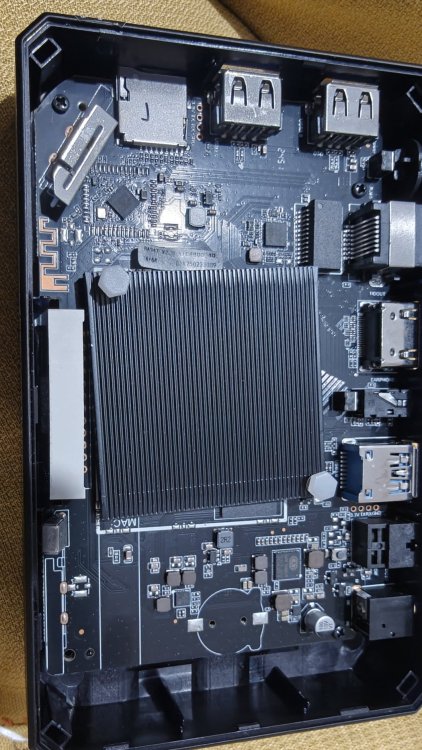
Hello everyone , i tried flashing the slimboxtv using phoenix app , but failed in the middle of it and the device wont boot and wont go into bootloader mode anymore . Driver was installed successfully , but what i did that was not mentioned on the tutorial was plugging the usb cable after the power cable whipe holding the reset button as it didnt detect it via usb cable alone . Any way to unbrick ? Anyhelp would be appreciated
-
 Orangepi4pro is pure shit. A lot of marketing and no support at all. No driver to install nvme, I ruined the SPI trying to install Assist, and now I have a unuseful expensive brick.
 -
Yes. I just came to armbian-config and there I select en_US as default, but it does not change Mate to en_US. It change are only on cli.
-
 @iav Thank you for the detailed reponse. I was not blaming the overlay or your build; I know the cpu voltages don't impact on this seperate issue. I have seen this before with the 6.18 kernel on the Helios64 which is why for the moment I am sticking with the 6.12 kernel with the opp microvolt patch which seems to be stable for me at least. I assume something has changed in the underlying PCIe architecture or drivers between 25.11.2 with 6.12.58 and 26.5.0 with 6.18.30 which results in this issue on my hardware. It is interesting that the build works on your hardware though. I will investigate the PCIe issue further when time allows and raise a issue.
 -
 Unfortunately "apt-file" stopped working for packages in the Armbian repos, which seems to be due to the absence of "Contents" files. Can this please be fixed, or is it intentional for some reason?
 -
the issue is fixed with edge kernel, with armbian u-boot included in 26.2.1 speed is now at gigabit level # uname -r 6.19.0-edge-rockchip64 # grep -a --null-data U-Boot /dev/mtd0ro U-Boot SPL 2026.01_armbian-2026.01-S127a-Pc2e6-H706e-Vab81-B2eb2-R448a (Feb 10 2026 - 04:37:42 +0000) # iperf3 -R -c odroidm1.lan Connecting to host odroidm1.lan, port 5201 Reverse mode, remote host odroidm1.lan is sending [ 5] local 192.168.1.192 port 45834 connected to 192.168.1.195 port 5201 [ ID] Interval Transfer Bitrate [ 5] 0.00-1.00 sec 110 MBytes 919 Mbits/sec [ 5] 1.00-2.00 sec 110 MBytes 919 Mbits/sec [ 5] 2.00-3.00 sec 111 MBytes 928 Mbits/sec [ 5] 3.00-4.00 sec 110 MBytes 927 Mbits/sec [ 5] 4.00-5.00 sec 110 MBytes 922 Mbits/sec [ 5] 5.00-6.00 sec 110 MBytes 919 Mbits/sec [ 5] 6.00-7.00 sec 111 MBytes 928 Mbits/sec [ 5] 7.00-8.00 sec 110 MBytes 925 Mbits/sec [ 5] 8.00-9.00 sec 110 MBytes 925 Mbits/sec [ 5] 9.00-10.00 sec 110 MBytes 921 Mbits/sec - - - - - - - - - - - - - - - - - - - - - - - - - [ ID] Interval Transfer Bitrate Retr [ 5] 0.00-10.00 sec 1.08 GBytes 926 Mbits/sec 110 sender [ 5] 0.00-10.00 sec 1.08 GBytes 923 Mbits/sec receiver
-
This device is currently an outcast here, and until someone with understanding sets out to fix at least the main problems, welcome to the official image on the 5.15 kernel.
- Last week
-
Hello @jock, thank you for the quick reply! Indeed, the drivers for the 8723cs have been disabled in the rockchip64 version, as confirmed by my config file: grep -i "8723" /boot/config-$(uname -r) # CONFIG_RTL8723CS is not set # CONFIG_RTW88_8723CS is not set I found 2 GitHub repos with the uncompiled drivers for the 8723cs chipset: - https://github.com/VictorIstratii151/rtl8703bs_rtl8723cs_linux_driver - https://github.com/TinkerBoard-Android/rockchip-android-external-wifi_driver/tree/android14-rockchip I tried to compile them natively on my machine but without success. They relies on Android-specific headers that are missing in Armbian. Regarding the rockchip armhf family you mentioned, do I need to completely reinstall Armbian on my board using a different image (the 32-bit armhf one)? Do I have to use the Armbian build framework to achieve this? Or is there a way/tool to cross-compile this specific module for my current 64-bit setup? Thanks again for your help!




.thumb.jpg.20ed26dd68aaee94a94b227bf670a8eb.jpg)