Active threads
Showing topics posted in for the last 365 days.
- Past hour
-
@KV1 I'm happy I'm able to help. I got a lot of help originally from @Pali and by the time we sorted out that the bootloader was the problem it seems that people have largely given up on these devices. It is a shame because they are actually quite good routers (except the wifi). You are actually the first person with an Ultra to reach out. OK, that's looking good. It means the bootloader image works for you and you should be safe to flash it if you want. The messages you posted above are indeed kernel output. To be clear, you don't have to have a more recent kernel to get the device to boot, but DVFS (frequency scaling) may not work without the patch to enable 1.2Ghz clock speed. If you run a kernel without that patch, everything will still work it will just run at full speed all the time which isn't very energy efficient. You are now at the stage where you have to consider how Armbian configures and packages the kernel for this device and ensure that your U-Boot configuration is using a supported boot flow. For example, U-Boot can support loading the kernel as an UEFI image directly (EFISTUB) among many other variations. The messages you posted above suggest that the device tree that is getting loaded may be incorrect/old and I would probably start by examining that. I don't know much about Armbian, but @Igor may also be able to point you in the right direction. Feel free to post your u-boot configuration here too as that could provide some insight into the boot process being used.
- Today
-
I've been an apt/Debian user long enough to have a reasonable idea how mirrors work, what I don't understand is why you have a mirror still listed that a few days ago had a copy of all packages and now it's an empty directory. Perhaps more to the point, is this a temporary technical glitch or permanent removal of Armbian packages? In any case I posted the next best option for those in Australia.
-

Games Compatible With Armbian on Pinebook Pro
LivingLinux replied to Katsujinken's topic in Pinebook Pro
PSP emulation with PPSSPP should work for a lot of games. It's a pity we never got a fully working Vulkan driver. God of War is probably too much. At least it was when I tested it many years ago. -
 @Octavio Cuatrochio I just noticed your link in the first post. The board in the link is a FAKE Allwinner H313. If your board does not have a small AXP### chip then it's not an Allwinner H313.
 -

How you can help test upcoming Armbian 26.02 images?
Walter Zambotti replied to Igor's topic in Advanced users - Development
The last update installed a broken firmware package which prevents the system from rebooting and there is no heartbeat. This is the tail end of the upgrade: Preparing to unpack .../40-libnss-myhostname_255.4-1ubuntu8.14_arm64.deb ... Unpacking libnss-myhostname:arm64 (255.4-1ubuntu8.14) over (255.4-1ubuntu8.12) ... Errors were encountered while processing: /tmp/apt-dpkg-install-QRewUS/02-armbian-firmware_26.2.1_all.deb E: Sub-process /usr/bin/dpkg returned an error code (1) Since the install is on the internal eMMc that pretty much prevents any recovery So just retested. Brand new download and reburnt image to eMMc. Booted completed install setup. Performed a sudo apt update and sudo apt upgrade and it immediately breaks and becomes non bootable. -
closed for off-topic
-
.thumb.jpg.20ed26dd68aaee94a94b227bf670a8eb.jpg)
HDMI audio and analog audio do not work on Opi5Plus
SuperKali replied to ずっと一人's topic in Orange Pi 5 Plus
LLM has most likely read the patch I merged into Armbian -

Hardware video acceleration with recent armbian/mainline kernel (Kodi)
maka replied to XXXBold's topic in Orange Pi 5
For lazy people like me clapper from flathub is a solution. -
@alexc Thanks for all your hard work! I’ve put together an Armbian build using your kernel—you can check it out here: https://github.com/NickAlilovic/build/tree/Radxa-mainline-WIP
-
So, I went through this recently on an NVidia device, and device tree overlays really aren't that hard. But there's a few things you'll need to get set up first, and not having an M5 to check, you'll probably have to do some reading / verification. I make no claim this will work out of the box for you. But I imagine this will save you a lot of reading. There's an example .dtbo at https://github.com/KF0ARE/i2c0-rtc.dtbo/blob/main/i2c0-rtc.dtbo you should look at, and you can decompile it with the following: dtc -O dts -o i2c0-rtc.dts i2c0-rtc.dtbo Which contains a fragment you'll be interested in, explicitly for the DS3231 ... /dts-v1/; / { compatible = "brcm,bcm2708"; ... snip ... fragment@3 { target = <0xffffffff>; __dormant__ { #address-cells = <0x01>; #size-cells = <0x00>; status = "okay"; ds3231@68 { compatible = "maxim,ds3231"; reg = <0x68>; status = "okay"; phandle = <0x04>; }; }; }; ... snip ... }; But you can't use this directly, because "compatible" doesn't include your M5, and "target" doesn't point anywhere useful in your DT. But it does call out the ds3231, and that it's at I2C address 0x68, so you can use that to find where the kernel thinks your RTC is. Take a look at where your I2C buses are (/dev/i2c-*) and just scan each of them like this to see if you can find it: tparys@pebble:~$ sudo i2cdetect -y -r 0 # NOTE: I2C bus #0 is /dev/i2c-0 0 1 2 3 4 5 6 7 8 9 a b c d e f 00: -- -- -- -- -- -- -- -- 10: UU -- -- -- -- -- -- -- -- -- -- -- -- -- -- -- 20: -- -- -- -- -- -- -- -- -- -- -- -- -- -- -- -- 30: -- -- -- -- -- -- -- -- -- -- -- -- -- -- -- -- 40: -- -- -- -- -- -- -- -- -- -- -- -- -- -- -- -- 50: -- -- -- -- -- -- -- -- -- -- -- -- -- -- -- -- 60: -- -- -- -- -- -- -- -- -- -- -- -- -- -- -- -- 70: -- -- -- -- -- -- -- -- In the above, address 0x10 is unusable as there's something else bound at that register. But check your buses to see if you can find 0x68. If you see something other than "--" or "UU" there, that's probably it. If you can't find it, double check that it's connected, powered on, and that your I2C bus has been enabled (might need to enable via DTB). Once you find it, you should be able to register it by doing something similar to the below as root (driver and I2C bus may be different): echo ds3231 0x68 > /sys/bus/i2c/devices/i2c-0/new_device If that works, and creates a /dev/rtc0 device, test that it's working with "hwclock". Once it's working, it's time to make your .dtbo. You'll probably want to dump your main .dtb with the same dtc command above, and look for i2c-0 (or whatever other bus you found), as well as a .dtbo or two for your M5 to find text to enter for "compatible". And you'll end up with something like this, saved as "m5-ds3231.dts" (or whatever): /dts-v1/; /plugin/; / { compatible = "brcm,bcm2708"; // <---- Change this fragment@0 { target = "i2c-0"; // <---- Change this __overlay__ { #address-cells = <0x01>; #size-cells = <0x00>; status = "okay"; ds3231@68 { compatible = "maxim,ds3231"; reg = <0x68>; status = "okay"; phandle = <0x04>; }; }; }; }; And you'll compile it like this: dtc -@ -O dtb -o m5-ds3231.dtbo m5-ds3231.dts And check it against your M5's DTB like below. Note that "target" or "target-path" has some odd syntax requirements. Quotes with a leading slash is a full path to your I2C device. Quotes without a leading slash is an alias. And angle brackets with an ampersand is a label (not everything has an explicit label). Worst case scenariou, call out the whole path in "target-path" with a leading slash, and call it a day. I beat my head against a wall for a while here before I realized I could test this without rebooting ... fdtoverlay -i /path/to/your/used.dtb -o modified.dtb m5-ds3231.dtbo And then add it to your overlay directory (/boot/dtb/CHIPNAME/overlays), enable it armbianEnv.txt, and give it a go? There's also two kernel build configs that may be of interest as well: CONFIG_RTC_HCTOSYS_DEVICE="rtc0" CONFIG_RTC_SYSTOHC_DEVICE="rtc0" The first triggers the kernel to load time from a given RTC when it first shows up. The second will tell the system to update RTC when locked against NTP. FYI, it seems that you can change these only with a new kernel build.
- Yesterday
-
@andrey.lobov try to upgrade the kernel or pick a fresh image from the github repository. The tm16xx driver has been reenabled recently after having being disabled due to partial kernel upstream.
-
 After I closed the lid of my chromebook Armbian decided to die even across reboots. https://drive.google.com/file/d/1gkEzVoY5QkNcWq3MOKYUSc8nkFYg91p-/view?usp=sharing Video of what I see https://drive.google.com/file/d/17yhnIjzkiYkkVohFrLf7MKDtYyb0xfOL/view?usp=sharing
 -
Welcome to the latest Armbian Newsletter: your source for the latest developments, community highlights, and behind-the-scenes updates from the world of open-source ARM and RISC-V computing. The past two months have been particularly active for the embedded ecosystem. At EMBEDDED WORLD 2026, developers, hardware vendors, and open-source communities gathered to showcase the latest innovations shaping the future of embedded computing. In parallel, the Armbian project continues to evolve with new releases, expanded board support, and ongoing improvements to the build framework driven by the contributions of its global community and the growing demand for reliable Linux on ARM and RISC-V platforms. SPONSORED Join us in making open source better! Every donation helps Armbian improve security, performance, and reliability — so everyone can enjoy a solid foundation for their devices. Github HighlightsThis week in Armbian development saw a significant expansion of hardware support, including new board images and compatibility for devices such as the Ariaboard Photonicat 2, SpacemiT MUSE Book, NanoPC T6 Plus, and Mekotronics R58S2. Kernel patches were updated across multiple platforms, notably for Rockchip and Sunxi families, enhancing stabilityArmbian blogMichael RobinsonMy First embedded world and I Already Can’t Wait for the NextI’d been putting this off for years. Every March, I’d read someone else’s embedded world recap, tell myself “next year”, and go back to my terminal. This year I actually went and I’m still processing everything I saw. First things first: the team Before I talk about any stand orArmbian blogDaniele BriguglioArmbian Q1 2026: Technical Milestones and the Road to Embedded WorldThe first quarter of 2026 has been a period of significant technical consolidation for the Armbian project. Driven by the v26.02 (Goa) release cycle, the project has focused on three core pillars: aggressive framework refactoring, the stable rollout of the Linux 6.18 LTS kernel, and the maturation ofArmbian blogMichael RobinsonView the full article
-
 The first quarter of 2026 has been a period of significant technical consolidation for the Armbian project. Driven by the v26.02 (Goa) release cycle, the project has focused on three core pillars: aggressive framework refactoring, the stable rollout of the Linux 6.18 LTS kernel, and the maturation of the Armbian Imager utility. Core Framework RefactoringA primary objective this quarter was the reduction of technical debt within the armbian/build repository. The development team initiated a systematic cleanup to improve build reliability and maintenance. Toolchain Optimization: Through a series of pull requests, including #9218, #9252, and #9256, significant "dead code" was removed from the internal toolchain. This refactoring simplifies the logic required to support a diversifying array of ARM and RISC-V architectures.mmdebstrap Transition: The framework has officially transitioned to mmdebstrap as the exclusive engine for rootfs creation (#9512). By deprecating the legacy debootstrap method, the project ensures faster, more consistent, and reproducible builds across varied host environments.Bash Modernization: Internal build scripts have been transitioned from POSIX to Bash syntax to leverage modern shell features and enhance overall script reliability.Kernel and Hardware IntegrationQ1 marked the broad adoption of the Linux 6.18 LTS kernel series, providing improved driver support and hardware abstraction for tier-1 platforms. Linux 6.18 LTS Rollout: Stable support for the 6.18.y kernel was merged for major families, including meson64, rockchip64, and UEFI targets (#9069, #9086).Hardware Support Expansion:SpacemiT MusePi Pro: Full integration and kernel patching were completed (#9422).Orange Pi RV2: Initial support and nightly build availability were established for this RISC-V target.Radxa Rock 4D & ODROID M2: These boards were elevated to the stable support tier within the 26.02 release.Firmware Updates: U-Boot was bumped to v2026.01 for several platforms. Notably, boot delays on the Orange Pi 5 series were addressed via updated U-Boot candidates (#9450).Ecosystem Tools: Armbian ImagerThe Armbian Imager has transitioned from a utility to a cornerstone of the project’s user experience, with a focus on security and onboarding efficiency. Cross-Platform Security: Code signing was implemented for both macOS and Windows artifacts to reduce installation friction for non-Linux users (imager#87).Performance Improvements: The utility now features optimized image decompression and enhanced device disconnect detection (imager#28).Automated Reporting: A new AI Actions Report workflow (armbian.github.io#165) was implemented to automate development highlights, providing greater transparency into the commit history for the community.Strategic Industry AlignmentThe technical trajectory of Q1 was intentionally aligned with Armbian’s presence at Embedded World 2026 in Nuremberg. By showcasing the framework and Imager as guests of Seeed Studio, the project demonstrated its readiness for industrial-scale deployment. The shift toward mainline kernel and U-Boot support—specifically targeting the retirement of vendor-specific bootloaders—remains a priority for long-term security and professional-grade stability. Contributors & Credits The progress in Q1 2026 is the result of sustained contributions from the Armbian Dev team and the wider community. Detailed changelogs and commit histories are available at github.com/armbian/build. View the full article
 -
I'd been putting this off for years. Every March, I'd read someone else's embedded world recap, tell myself "next year", and go back to my terminal. This year I actually went and I'm still processing everything I saw. First things first: the teamBefore I talk about any stand or chip, I need to tell you what made this trip different from anything I've done before. There were five of us from the Armbian team at the show: Igor, Werner, Meko, amazingfate, and me. Five people. Four countries. Some of us had worked together for years and never met in person. You know how it is in open-source, you collaborate through GitHub, you argue about patches on the mailing list, you review each other's code at odd hours. But you don't always know the face behind the username. Meeting those people for real, shaking their hand, having a coffee together, that's something no pull request can replicate. And honestly, it was worth the trip on its own. The show itself: I wasn't ready for thisArriving at the Nuremberg Messe for the first time is a genuine shock. I knew embedded world was big. I did not know it was this big. Enormous halls, thousands of exhibitors, tens of thousands of attendees. On day one I got genuinely lost between the pavilions spent a solid half hour wandering with no idea where I was. I'm told this is a rite of passage. What surprised me most about the atmosphere is how concrete everything felt. This isn't a conference where people pitch vaporware from behind polished booths. Engineers and developers everywhere, talking about real problems, showing real hardware. You can walk from a giant like Qualcomm to a small team doing something fascinating with a handful of sensors and both conversations feel equally substantive. What we saw on the floorRockchip was a mandatory stop for us, and they didn't disappoint. On their stand: the RK3572 EVB an evaluation board we hadn't seen in person before. Reading specs in a datasheet is one thing. Seeing the board running, understanding its real-world size, its connectors, how it behaves, that's a completely different kind of knowledge. The kind you can only get by showing up. Rockchip Employees (Most left and right) and Jianfeng Liu, Mecid Urganci & Igor PecovnikSeeed Studio had live demos of AI Vision and AI Sound, and the one that genuinely impressed me was their AI camera with a built-in NPU doing real-time object recognition. I'm not talking about laggy, stuttering inference, it was smooth. Fluid. The kind of performance that makes you stop walking and just stare for a minute. Seeing that level of real-time AI running on a compact edge device was one of those moments where the future stops feeling abstract. Seedstudio x Armbian (Maximilian Riedl , Igor Pecovnik, Jianfeng Liu, Daniele Briguglio)Qualcomm brought the Arduino Ventuno Q, and this is where things got interesting and a little funny. meko had already run his benchmarks on the board when amazingfate noticed something: Chromium's hardware acceleration wasn't enabled. So he enabled it. Right there. Directly on the board. In front of the stand staff. The reaction from the Qualcomm team? Complete, genuine astonishment. They didn't see it coming. That's what happens when you bring a group of Armbian developers to a trade show, we don't just look at things, we poke at them. Armbian at the Foundries.io boothCollabora was present at the show, and amazingfate got to meet some of the team. Their kernel and GPU driver work is always relevant to what we do, so that conversation mattered even if I wasn't there for it personally. The moment that hit hardest: Armbian on the BeagleBadgeDuring a meeting with the BeagleBoard.org team inside the show, they showed us their brand new project: the BeagleBadge. Launched right there at embedded world 2026, it won Best in Show in the Wearables category; a Linux-powered wearable badge with a 4.2" ePaper display, dual-core ARM Cortex-A53, Wi-Fi 6, LoRa, and more sensors than I can list here. Built around the Texas Instruments AM62L32, manufactured by Seeed Studio. Impressive hardware. But here's the part that actually stopped me in my tracks: Armbian was running on it. There's an official "Armbian BeagleBadge demo for EW2026" image — Debian Trixie, Linux 6.12 — listed right on the BeagleBoard.org site. Our OS. On a Best-in-Show winning badge. At the world's biggest embedded show. That's not a small thing. That's the community's work showing up exactly where it matters. What embedded world taught me about where this industry is goingThree days of walking, talking, and observing gives you a pretty clear picture of the currents moving through the embedded world right now. Edge AI is not a trend anymore, it's infrastructure. Every major vendor had something running inference locally, without cloud, on modest hardware. This is real, it's shipping, and it's going to reshape what we expect embedded systems to do. Open-source has earned its seat at the table. I half-expected it to be the hobbyist corner of the show. It wasn't. Companies are building on Linux, on open stacks, on ecosystems maintained by communities like ours. That's not charity, it's strategy. And it means the work we do in Armbian matters more than we sometimes give ourselves credit for. The line between prototype and product is razor thin. At most stands you'd see a mix: shipping products, reference designs, things that will exist in six months. That gap is where the interesting information lives; what's coming, which platforms are getting serious investment, which vendors are committed to mainline Linux support. You don't learn that from a datasheet. You learn it by being there. Would I go back?Without a second thought. If you're an Armbian community member who's been putting this off the same way I was stop putting it off. The technical exposure is valuable. The networking is real. And meeting the people you build things with, face to face, is something that doesn't have a substitute. The show runs every year in Nuremberg. I'll be there. See you in 2027. 🇩🇪 View the full article
-
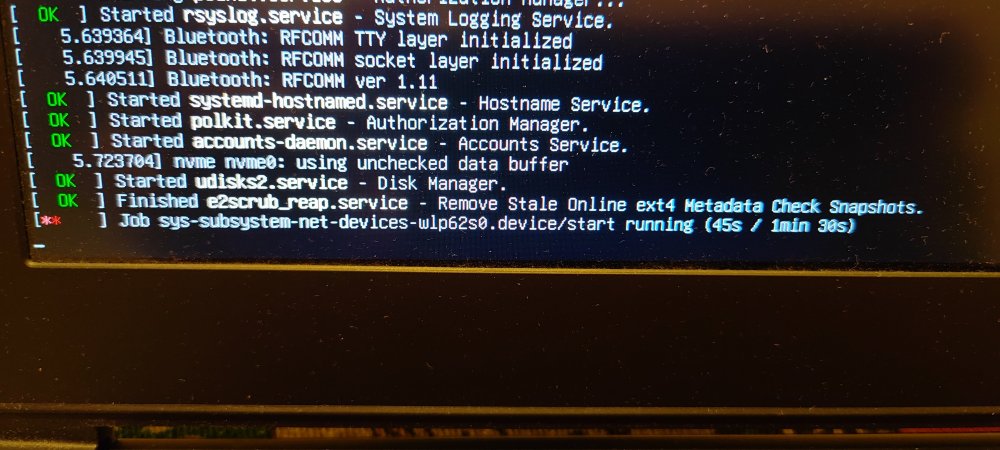
I know this might get ignored, but honestly, I don’t really mind. I just want to report something I noticed a few days ago, which I initially thought was caused by my previous setup. I was running a Radxa CM5 with a Waveshare CM4 Nano-C board, using an Armbian image for the Rock 5A. This was the only way I could get it working with mainline support. I’m aware this setup is far from standard I’m essentially using the wrong image but that’s because the Radxa CM5 IO board isn’t compatible with the Waveshare Nano board. On top of that, Armbian doesn’t officially support the CM5 RPi-CM4 IO board provided by Radxa (which does work with the Waveshare Nano, but their image is extremely unstable updating it to Trixie bricks the system). The main issue I noticed was with Wi-Fi (using a USB Wi-Fi AC dongle). By default, it’s broken. I managed to restore it using armbian-config and network setup, but even then, the system doesn’t show any Wi-Fi options in Network Manager, despite being connected and working. I didn’t report this earlier because my setup is quite unusual, and I couldn’t be sure if the issue was specific to me. However, today I tested something else. I revived my MSI GS73VR (a 2017 x86 laptop with a GTX 1060) and tried several Linux distributions. I ended up installing Armbian UEFI (the x86 version of Armbian Trixie). As a side note, the Trixie download link on the website is broken you have to dig through the internal download pages to find it. After installing it on an NVMe drive and completing the setup, everything initially worked fine. But after one reboot, I encountered the same Wi-Fi issue: freezing and inconsistent behavior. This time, I hadn’t used armbian-config or any network tweaks. The system doesn’t properly detect or display Wi-Fi in GNOME settings, even though it is actually connected and working in the background. So this seems to be a broader issue, not just related to my ARM setup. I don’t know exactly what’s wrong with Armbian, but my main criticism has always been Wi-Fi support—especially for USB dongles. It feels poorly maintained and lacks consistency. I was told years ago that mainline support would resolve these issues, but Armbian UEFI on x86 should already be at that stage, shouldn’t it? Something clearly isn’t right here. It’s frustrating because this feels like the last missing piece for an otherwise solid system. Despite my criticism, I’ll admit Armbian has grown on me. On x86, there are better alternatives like Fedora, but on ARM, Armbian is still one of the best options. Anyway, apologies if this is posted in the wrong place. The official channels require logs, and I don’t feel like rebuilding my old broken setup just to gather them. If no logs means no help, then so be it. Maybe I’m the only one experiencing this—but I doubt it. Most people probably just plug in Ethernet and avoid dealing with Wi-Fi altogether. It is what it is.
-
The flashing guide points to a github repo which mentions only xiaomi but not oneplus. Can I follow that?
- Last week
-
After upgrade to 7.0.0-rc6-edge-sunxi64 wlan is shown in interfaces. Gigabit Ethernet does not work yet.
-
Based on Debian 13 (Trixie), Apertis v2026 delivers updated system libraries, development tools, compilers, and core services, alongside a new default Wayland compositor, a reworked SDK, and smarter packaging pipelines. View the full article
-
Just a quick update for those who are following this thread, looks like there was a pull request for U-Boot with this fix (2026-02-02): https://github.com/armbian/build/pull/9333 Waiting for the U-Boot update i guess (i'm using `linux-u-boot-odroidm1-edge/sid` currently).
-
 Usual User, the information you linked about Linux 6.19 seems like there's progress for Rockchip. However, is there any indication that Allwinner H618 could get H265/HEVC decoding acceleration working too?
 -
 I maintain it and can take a look this week. Just need to find a spare nvme somewhere
 -

I need a Linux system that runs on an x98h device
Werner replied to Mohammad Adel's topic in Allwinner CPU Boxes
duplicate -
@m1zfs I am willing to test as i have an m1 odroid with 4GB ram. What do i need to do ? I tried your dkms package installed it and rebooted but system never turned up after reboot.
-
It seems that the problem with the computer not booting on first boot returned with kernel 6.18.x. I have to restart the computer twice (power cycle) to get it to boot. The computer always started on first boot on Armbian 26.x with kernel 6.12.x, but after updating ArmBin when the 6.18.x kernels were released, the problem returned: OZPI v1 doesn't always start on the first try, and I have to turn it off and on again. Of course, when there's a kernel update, I run amrmbian-install, but that doesn't solve the recurring problem.