Active threads
Showing topics posted in for the last 365 days.
- Past hour
-
 Hello everyone, I’m trying to flash a firmware on a generic Android TV Box and I’m stuck at a hardware/bootloader compatibility issue. Device technical details: - SoC: Allwinner H618 - Board / PCB: FX-H618-D4_V10 - RAM: 4GB DDR4 - Storage: eMMC (unknown size, likely 32GB) - USB FEL ID: VID_1F3A PID_EFE8 - Original OS: BigdroidOS (Android generic) - Commercial name: Transpeed 8K618-T Current situation: - Device enters FEL mode correctly (VID_1F3A PID_EFE8) - PhoenixSuit detects the device but firmware upgrade hangs at “Beginning Firmware Upgrade” - Tried multiple PCs (Windows 10 and 11), different USB ports and cables - Allwinner FEL driver installed correctly - SD card flashing with PhoenixCard (Startup mode) is ignored, device boots normally to Android - Reset timing variations tested (short press / long press / no reset) Tested firmware: - sbx_transpeed_h618_atv_12_11.img - H618.apollo-p3.T-H618_100M_12_FD650.2023.09.13.1720.img Both firmwares show similar behavior (FEL detected but no successful flash). I believe the issue is bootloader / DDR4 initialization mismatch. I’m specifically looking for: - A firmware confirmed to work with board FX-H618-D4_V10 - Or the original BigdroidOS firmware dump for this board - Or confirmation whether this board requires a specific boot0/boot1 Any help, working firmware, or dump from the same board would be greatly appreciated. Thank you! Allwinner H618, FX-H618, DDR4, PhoenixSuit, FEL, Transpeed
 -
moved
- Today
-
 No need to reply in a PM; just run standard Debian tool: sudo tasksel and select what you want and follow the steps.
 -

Gaming experience with Orange Pi 5 (RK3588) on Armbian
晓飞丁 replied to KhanhDTP's topic in Orange Pi 5
It is Tomb Raider 1~3 remastered Gog version
-
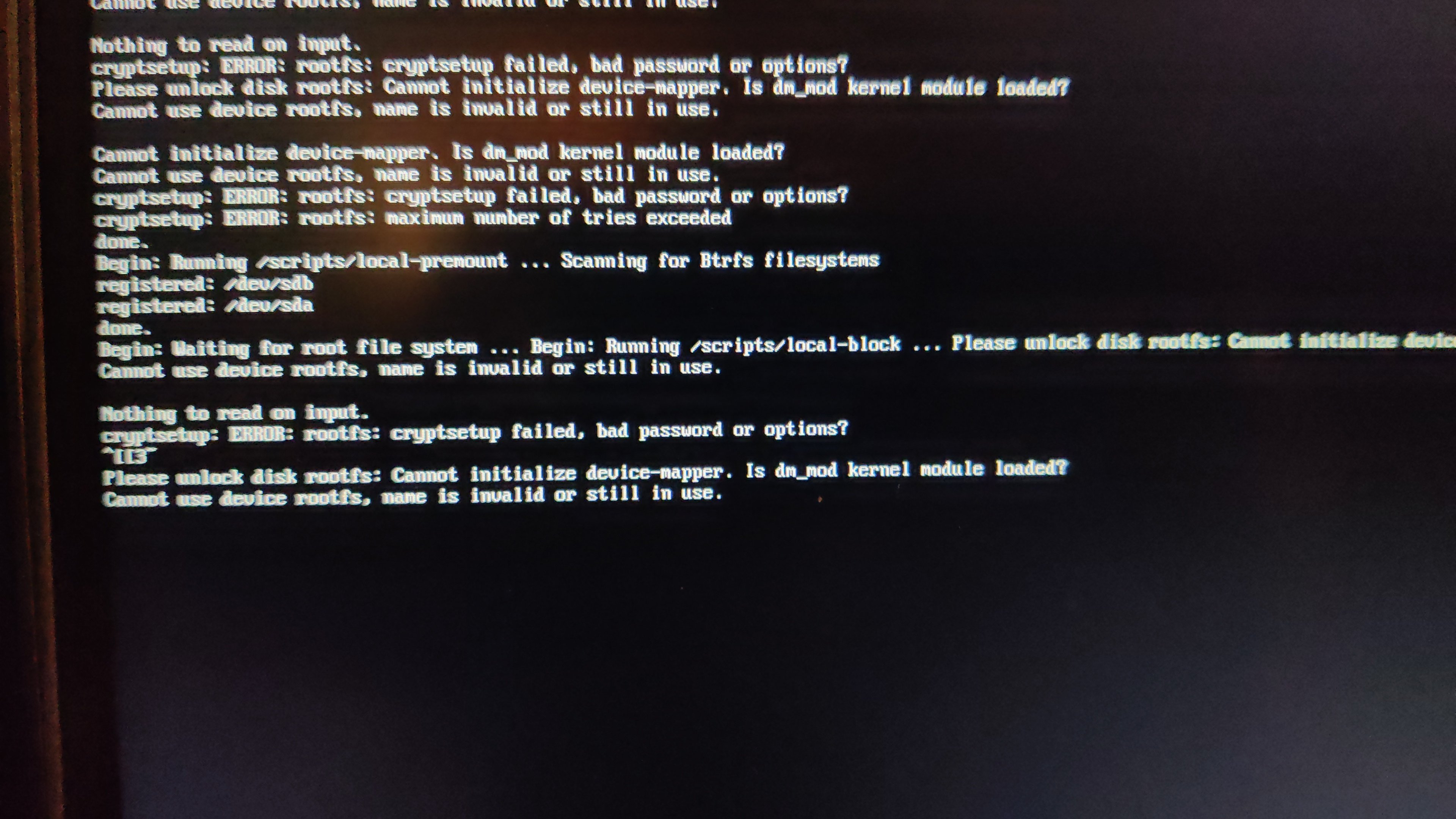
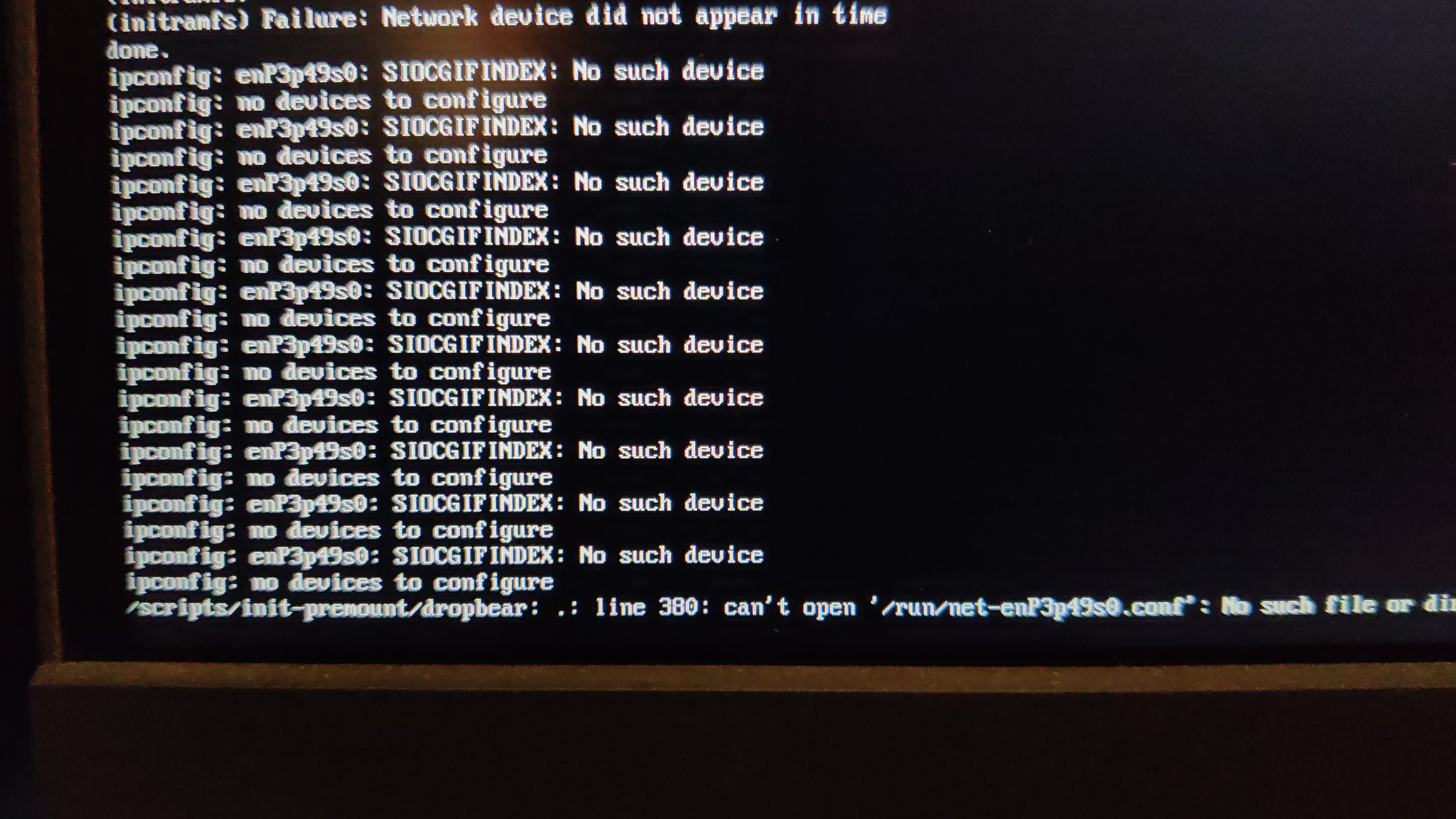
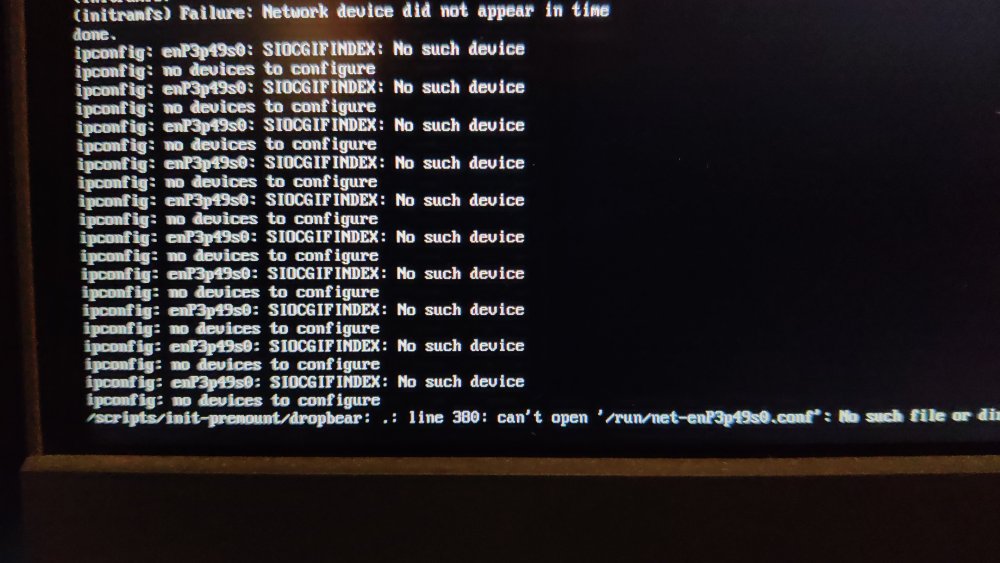
 After my last update on my radxa5-ITX, apart from the name changes of the NIC (related?), I remarked that I could not cryptroot-unlock the root partition because of dm_mod apparently missing from initramfs. To give some context, this is how I set things up some while ago and things went pretty smooth until recently. Too bad armbian does not keep the previous kernel (though I get the reason why). Inspecting the boot partition, cat config-6.1.115-vendor-rk35xx | grep DM_CRYPT CONFIG_DM_CRYPT=m the kernel seems to have been compiled with the proper option and lsinitramfs initrd.img-6.1.115-vendor-rk35xx | grep 'usr.*cryptsetup' usr/lib/aarch64-linux-gnu/libcryptsetup.so.12 usr/lib/aarch64-linux-gnu/libcryptsetup.so.12.9.0 usr/lib/cryptsetup usr/lib/cryptsetup/askpass usr/lib/cryptsetup/functions usr/sbin/cryptsetup and initramfs seems properly linked to the relevant libraries so I do not understand why device mapper remains unavailable. At this point, I have no hypothesis except a very unlikely one An unlikely hypothesis Could failure to initialize the device mapper have nothing to do with dm_mod availability but be solely the side effect of Because I always unlocked the root part either from console or from a dropbear session, I understood device mapper init as an anterior step, independent from NIC availability. But is it really the case. What am I missing?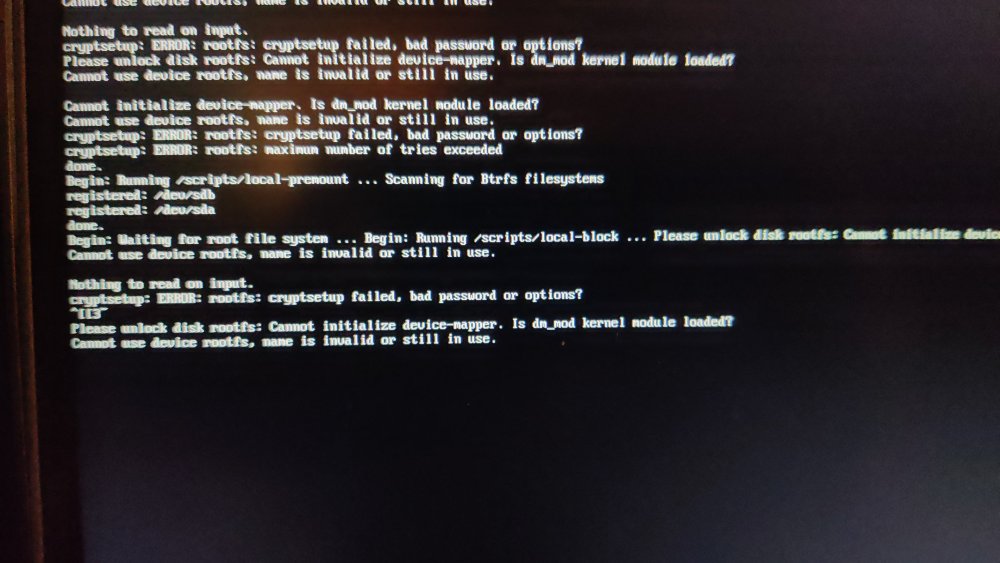
-
@Igor wrote about upcoming Muse Pi Pro (a SpacemiT K1 board). Orange Pi RV2 features a "Ky X1" SoC which may be a variant of the SpacemiT SoC and at least similar to the already compile-able Banana Pi F3 board. However, Xunlong seems to be serious about the differences, since the published patch sets on github.com/orangepi-xunlong to kernel and u-boot have a GPL-2 copyright notice, stating I expect my RV2 arriving tomorrow. Thus, it would be very appreciated if support for this board pops up in time 😉 Otherwise I may try my luck with adding Armbian support on my own (without expecting success soon). For clarification, I compiled a list of RISC-V64 boards currently available: Banana Pi F3, runs on SpacemiT K1 8-core X60 RISV-V@1.5? (2 TOPS NPU, 2x1 Gbit, M.2@m, mPCIe, eMMC@soldered, SD/TF) Orange Pi RV, runs on StarFive JH 7110 4-core RISC-V@1.5 (1x1 Gbit, M.2@m, SD/TF, SPI-flash) Orange Pi RV2, runs on Ky X1, 8-core RISC-V@1.5, variant of SpacemiT K1? (2 TOPS NPU, 2x1 Gbit, M.2@m2280, M.2@m2230, SD/TF, eMMC@socket, SPI-flash) Muse Pi Pro runs on overclocked SpacemiT K1 8-core X60 RISC-V@1.8 (2 TOPS NPU, 1x1 Gbit, M.2@m, mPCIe, eMMC@soldered, SPI-flash) Best // Sven-Ola
-
moved
-
With the help of Claude I generated a config with both. Compiling now. Hopefully it boots this time. If it does, I may then do a PR.
- Yesterday
-
Actually, hope is not all lost. The image downloaded for the 4c from Armbian. Has the sources set to beta. So, I changed them and was able to install armbian-config. Although it isn't officially supported on the version I'm using. It does the job. Disabled kernel and firmware updating. Also, add Radxa's Bookworm repo. Ran a upgrade and all is well. Should last me a few years. Until the day I decide I want to throw a bunch of my time at an other SBC.
-
 @John Taylor I finally had some time to test this today and it is working fine for me. I built a fresh image on an ubuntu laptop, copied the image to a SD card, it mounted fine on ubuntu, where I edited the extlinux.conf file and then used the SD card to boot on an amlogic based TV box. You mention etcher as your sd card tool. Etcher in recent versions (recent being the last two years or so) is known to have problems. It is no longer recommended for use with Armbian images. I have noticed that in particular if Etcher is burning a compressed image it doesn't work for me. But I have had some success if the image is uncompressed first. But others have reported that it fails in general.
 -

Efforts to develop firmware for H96 MAX V56 RK3566 8G/64G
GmP replied to Hqnicolas's topic in Rockchip CPU Boxes
First of all, thank you to @Hqnicolas and all the members for this great effort. Just bought an H96 rk3566, having this hardware configuration: BOARD LABEL: HCY-RK3566-1X32-V20 2023-01-13 SOC RK3566 PMIC RK809-5 LAN RTL8211F DISPLAY FD6551 WIFI AIC8800D40 eMMC H26M74002HMR - SK Hynix eMMC 5.1 NAND Flash 64Gb. It seems to be a mix of the other versions described in this topic, although very close to the one of @WINEDS (thanks for the hints). Everything seems to work so far. Installed using rockchip dev tools, as advised. here its: _ _ _ _ _ /_\ _ _ _ __ | |__(_)__ _ _ _ __ ___ _ __ _ __ _ _ _ _ (_) |_ _ _ / _ \| '_| ' \| '_ \ / _` | ' \ / _/ _ \ ' \| ' \ || | ' \| | _| || | /_/ \_\_| |_|_|_|_.__/_\__,_|_||_|_\__\___/_|_|_|_|_|_\_,_|_||_|_|\__|\_, | |___| |__/ v26.2 rolling for h96-tvbox-3566 running Armbian Linux 6.12.61-current-rockchip64 Packages: Debian stable (trixie) Support: for advanced users (rolling release) IPv4: (LAN) 192.168.111.228, 192.168.111.91 (WAN) xxxxxxxxxxx Containers: big-bear-photoprism-db Performance: Load: 8% Uptime: 46 minutes Memory usage: 6% of 7.50G CPU temp: 38°C Usage of /: 31% of 57G To enable Bluetooth I have used this small overlay in /boot/overlay-user/ (which enables SPDIF as well): /dts-v1/; /plugin/; /* &{/serial@fe650000} */ &uart1 { status = "okay"; dma-names = "tx\0rx"; bluetooth { status = "disabled"; }; }; &spdif { clock-names = "mclk\0hclk"; status="okay"; }; The followings are the drivers used for wifi-bluetooth wget https://github.com/radxa-pkg/aic8800/releases/download/4.0%2Bgit20250410.b99ca8b6-3/aic8800-firmware_4.0+git20250410.b99ca8b6-3_all.deb wget https://github.com/radxa-pkg/aic8800/releases/download/4.0%2Bgit20250410.b99ca8b6-3/aic8800-sdio-dkms_4.0+git20250410.b99ca8b6-3_all.deb dpkg -i aic8800-firmware_4.0+git20250410.b99ca8b6-3_all.deb dpkg -i aic8800-sdio-dkms_4.0+git20250410.b99ca8b6-3_all.deb Service to enable bluetooth : [Unit] Description=Bluetooth HCI Attach (AIC8800) After=systemd-modules-load.service Requires=systemd-modules-load.service After=dev-ttyS1.device Requires=dev-ttyS1.device [Service] Type=oneshot # Load AIC module ExecStartPre=/sbin/modprobe aic8800_btlpm_sdio # Just a small delay ExecStartPre=/bin/sleep 2 # Attach HCI ExecStart=/usr/bin/hciattach -s 1500000 /dev/ttyS1 any 1500000 flow nosleep To re-enable display in Linux 6.12 another small overlay is required: (the display itself it is not scrolling and available at: /sys/class/leds/display/value ) /dts-v1/; /plugin/; &{/i2c-aux-display} { compatible = "i2c-gpio"; #address-cells = <0x01>; #size-cells = <0x00>; display@24 { compatible = "fdhisi,fd6551"; reg = <0x24>; #address-cells = <0x01>; #size-cells = <0x00>; tm16xx,digits = [04 03 02 01]; tm16xx,segment-mapping = [00 01 02 03 04 05 06]; led@0,0 { reg = <0x00 0x00>; function = "alarm"; }; led@0,1 { reg = <0x00 0x01>; function = "usb"; linux,default-trigger = "usb-host"; }; led@0,2 { reg = <0x00 0x02>; function = "pause"; linux,default-trigger = "mmc2"; }; led@0,3 { reg = <0x00 0x03>; function = "play"; linux,default-trigger = "mmc0"; }; led@0,4 { reg = <0x00 0x04>; function = "colon"; }; led@0,5 { reg = <0x00 0x05>; function = "lan"; linux,default-trigger = "stmmac-0:00:link"; }; led@0,6 { reg = <0x00 0x06>; function = "wlan"; linux,default-trigger = "mmc1"; }; digits { status = "disabled"; }; leds { status = "disabled"; }; }; }; rk3566-bt-fix.dtso rk3566-led-fix.dtso -
 My solution is to compile the image like this: ./compile.sh INSTALL_HEADERS=yes Then scp the driver on the machine, and execute echo "obj-m += panel-mtf0397swi.o" > Makefile make -C /lib/modules/`uname -r`/build M=$PWD cp panel-mtf0397swi.ko /lib/modules/$(uname -r)/kernel/drivers/gpu/drm/panel/ depmod -a
 -
Hi @eselarm, thanks for the detailed response. I've checked my boot.cmd and boot.scr is ancient ( from Aug 2023 ). I'm going to try to set the variables beforehand, as I see in the output they are blank ( devtype, devnum, prefix ). When I succeed I guess the next step will be to set these variables in U-Boot, but nowadays there's no gpt partition table in SPI with the uboot_env, so I guess will need to figure it out later ( via env or find the boot.scr in the NVMe ), first I want to try to boot from NVMe manually. Thanks again
-
Hello everyone,does anyone have working armbian for rockchip 3228a with lpddr3 for x96q V20?
-
Hello, im trying to flash back Android in the nand, but i can't seem to be able to put the motherboard in maskrom mode. any help would be appreciated.
-
Hello there. I have more or less the same request as @tmb I bought Helios64 when it came out and had to stop using it when the core team shut down in 2021. Since 2021, all storage has been managed by my Proxmox server. But I'm currently thinking about upgrading the hardware of my PC and my Proxmox server. And my Helios64 is still there, not being used for anything, which is a shame. Do you think that in 2025, we will be able to use the Helios64 as a NAS server for “family” storage and homelab storage needs ? If so, with which OS / App? Lastest Armbian / Openmediavault ? Thank you.
-
Thank you for testing!
-
Hey there! I’ve been running Home Assistant Supervised on Armbian for a while, but lately I keep seeing a repeat issue after system upgrades (Docker or kernel updates). After upgrading, some HA containers stop unexpectedly, for example: odroid-c2-homeassistant:2025.12.2 exits with code 137 aarch64-addon-configurator:5.8.0 exits with code 143 My current setup runs on Helios64/RK3399 · kernel 6.12.58-current-rockchip64 · Docker CE 29.1.3 (f52814d). After digging a bit, I noticed this line in dmesg right after the failures -> apparmor="DENIED" operation="signal" profile="hassio-supervisor" signal=kill I also found the small watchdog script (supervisor_fix.sh) that restarts the Supervisor when it reports unhealthy, but the upgrade breakage seems to slip through. I’m just thinking out loud here, but maybe something like a post-upgrade AppArmor refresh, or some other small adjustment, could help ? Not sure what makes the most sense, so any input would be really appreciated. Thanks for your time and for all the work you put into Armbian!
-
The one time I used my iPad autocorrect comes to bite me
-

Efforts to develop firmware for Lemfo HK1 RBOX K8S 4G/64G
leXia replied to Panda's topic in Rockchip CPU Boxes
For this device, ttyS2 is used for BT, but the problem was that the system was trying to use it for logging. After modifying that part in boot.cmd and rebooting, the firmware came up. -
 Works just fine on last version. Thanks a lot !!! <pre> $ zcat /proc/config.gz | grep DP| grep ROCK CONFIG_ROCKCHIP_ANALOGIX_DP=y CONFIG_ROCKCHIP_CDN_DP=y CONFIG_ROCKCHIP_DW_DP=y CONFIG_PHY_ROCKCHIP_DP=y CONFIG_PHY_ROCKCHIP_DPHY_RX0=m CONFIG_PHY_ROCKCHIP_INNO_CSIDPHY=m CONFIG_PHY_ROCKCHIP_INNO_DSIDPHY=m CONFIG_PHY_ROCKCHIP_SAMSUNG_HDPTX=m CONFIG_PHY_ROCKCHIP_USBDP=m CONFIG_PHY_ROCKCHIP_DP=y </pre>
 - Last week
-
Armbian doesnt seem to see sata harddrives.
Popolon replied to DontMindMe's topic in Radxa Rock 5 ITX
SCSI works fine with linux Mainline at least (6.16, 6.17 & 6.18) since few month now. -
my Rupa 88 Pro 20, wifi/bt chip is cdtech 208821c (rtl8821cs), with real 4g32 had no bluetooth with mmie4jbcu's dtb or the included box-demo.dtb. with a lil help from claude.ai, i mix mmie4jbcu's dtb with x96x6.dtb from another thread here. et voilá bluetooth is working after apt install armbian-firmware-full rk3566-box-X88PRO20.dtb
-
So, here's what I had to do to successfully build the image. First, I corrected my board file in the config/board/orangepizero3.csc directory. The processor value was incorrect, it was 616, so I set it to 618. Menuconf suggested selecting a board with a 618 chip, but in the board file it was listed as family 616. Later, I copied my board file to the userpatches directory and added the value CONFIG_DRM_PANEL_MIPI_DBI=m. Then I ran the image build script with the menuconf viewer. I was surprised that the CONFIG_DRM_PANEL_MIPI_DBI parameter already had the value "m"; previously, it was empty. After all these manipulations, the build went smoothly. Thank you so much for your support.
-
Hi I was able to build an image with the panel-mipi-dbi module enabled. My previous image had the module disabled, so it took me a couple of days to figure it out. As I found out, for my version of the board, which uses the 618 chip, I needed to adjust a line in the bootconfig to build my board. It specified the 616 chip. But that's probably not the reason for the success. After I built the image, applied the binary, and dts, the screen was still white after rebooting. user@orangepizero3:~/v0_ips_touch_display$ cd user@orangepizero3:~$ sudo modinfo panel-mipi-dbi filename: /lib/modules/6.16.8-edge-sunxi64/kernel/drivers/gpu/drm/tiny/panel-mipi-dbi.ko license: GPL author: Noralf Trønnes description: MIPI DBI compatible display panel driver alias: of:N*T*Cpanel-mipi-dbi-spiC* alias: of:N*T*Cpanel-mipi-dbi-spi alias: spi:panel-mipi-dbi-spi depends: drm_mipi_dbi,backlight intree: Y name: panel_mipi_dbi vermagic: 6.16.8-edge-sunxi64 SMP preempt mod_unload aarch64 user@orangepizero3:~$ dmesg | grep spi [ 2.466658] sun6i-spi 5010000.spi: Error applying setting, reverse things back [ 2.467167] sun6i-spi 5011000.spi: cannot register SPI host [ 2.474140] sun6i-spi 5010000.spi: Error applying setting, reverse things back [ 2.474558] sun6i-spi 5011000.spi: cannot register SPI host [ 3.584770] panel-mipi-dbi-spi spi1.0: supply power not found, using dummy regulator [ 3.603713] panel-mipi-dbi-spi spi1.0: supply io not found, using dummy regulator [ 3.603960] panel-mipi-dbi-spi spi1.0: Direct firmware load for panel-mipi-dbi-spi.bin failed with error -2 [ 3.603975] panel-mipi-dbi-spi spi1.0: No config file found for compatible 'panel-mipi-dbi-spi' (error=-2) [ 3.603983] panel-mipi-dbi-spi spi1.0: probe with driver panel-mipi-dbi-spi failed with error -2 [ 12.001666] OF: /soc/spi@5011000/ads7846@1: Read of boolean property 'ti,swap-xy' with a value. [ 12.001860] ads7846 spi1.1: supply vcc not found, using dummy regulator [ 12.004761] ads7846 spi1.1: touchscreen, irq 77 [ 12.007680] input: ADS7846 Touchscreen as /devices/platform/soc/5011000.spi/spi_master/spi1/spi1.1/input/input10 [ 12.018707] spi-nor spi0.0: supply vcc not found, using dummy regulator [ 12.018953] spi-nor spi0.0: supply vdd not found, using dummy regulator