Active threads
Showing topics posted in for the last 365 days.
- Past hour
-
picocom v3.1 port is : /dev/tty.usbserial-A5069RR4 flowcontrol : none baudrate is : 1500000 parity is : none databits are : 8 stopbits are : 1 escape is : C-a local echo is : no noinit is : no noreset is : no hangup is : no nolock is : no send_cmd is : sz -vv receive_cmd is : rz -vv -E imap is : omap is : emap is : crcrlf,delbs, logfile is : none initstring : none exit_after is : not set exit is : no Type [C-a] [C-h] to see available commands Terminal ready ?DDR 9fa84341ce typ 24/09/06-09:51:11,fwver: v1.18 ch0 ttot6 ch1 ttot6 ch2 ttot6 ch3 ttot6 ch0 ttot7 LPDDR5, 2400MHz channel[0] BW=16 Col=10 Bk=16 CS0 Row=16 CS=1 Die BW=16 Size=2048MB ch1 ttot7 channel[1] BW=16 Col=10 Bk=16 CS0 Row=16 CS=1 Die BW=16 Size=2048MB ch2 ttot7 channel[2] BW=16 Col=10 Bk=16 CS0 Row=16 CS=1 Die BW=16 Size=2048MB ch3 ttot7 channel[3] BW=16 Col=10 Bk=16 CS0 Row=16 CS=1 Die BW=16 Size=2048MB Manufacturer ID:0xff DQS rds:h1,l0, CH0 RX Vref:26.7%, TX Vref:20.0%,0.0% DQ rds:h7 l0 h2 l0 l0 h1 h1 l0 , h2 h1 l0 h1 h4 h3 h2 h1 DQS rds:h1,h1, CH1 RX Vref:26.7%, TX Vref:20.0%,0.0% DQ rds:h4 h3 h1 h3 l0 h2 h1 h1 , h2 h5 h3 h1 h7 l0 h5 h2 DQS rds:h1,h1, CH2 RX Vref:26.3%, TX Vref:21.0%,0.0% DQ rds:h2 h3 h1 h4 h6 h1 h4 h7 , h1 h1 h4 h1 h5 h6 h4 h3 DQS rds:l0,l0, CH3 RX Vref:28.5%, TX Vref:21.0%,0.0% DQ rds:h1 h2 h3 l0 h3 h2 h1 h1 , h1 h2 h1 h1 h4 l0 h6 h1 stride=0x2, ddr_config=0x2 hash ch_mask0-1 0x20 0x40, bank_mask0-3 0x0 0x2400 0x44800 0x89000, rank_mask0 0x0 change to F1: 534MHz ch0 ttot6 ch1 ttot6 ch2 ttot6 ch3 ttot6 change to F2: 1320MHz ch0 ttot8 ch1 ttot8 ch2 ttot8 ch3 ttot8 change to F3: 1968MHz ch0 ttot6 ch1 ttot6 ch2 ttot6 ch3 ttot6 change to F0: 2400MHz ch0 ttot7 ch1 ttot7 ch2 ttot7 ch3 ttot7 out U-Boot SPL board init U-Boot SPL 2017.09 (Feb 16 2026 - 04:05:08) Trying to boot from MMC1 Trying fit image at 0x4000 sector ## Verified-boot: 0 ## Checking atf-1 0x00040000 ... sha256(7612223b82...) + OK ## Checking uboot 0x00200000 ... sha256(31ad8d4f92...) + OK ## Checking fdt 0x003495b0 ... sha256(0195fe7e17...) + OK ## Checking atf-2 0xff100000 ... sha256(70505bb764...) + OK ## Checking atf-3 0x000f0000 ... sha256(b2af21b504...) + OK Jumping to U-Boot(0x00200000) via ARM Trusted Firmware(0x00040000) Total: 353.110 ms INFO: Preloader serial: 2 NOTICE: BL31: v2.3():v2.3-868-g040d2de11:derrick.huang, fwver: v1.48 NOTICE: BL31: Built : 15:02:44, Dec 19 2024 INFO: spec: 0x13 INFO: code: 0x88 INFO: ext 32k is valid INFO: ddr: stride-en 4CH INFO: GICv3 without legacy support detected. INFO: ARM GICv3 driver initialized in EL3 INFO: valid_cpu_msk=0xff bcore0_rst = 0x0, bcore1_rst = 0x0 INFO: l3 cache partition cfg-0 INFO: system boots from cpu-hwid-0 INFO: enable memory repair INFO: idle_st=0x21fff, pd_st=0x11fff9, repair_st=0xfff70001 INFO: dfs DDR fsp_params[0].freq_mhz= 2400MHz INFO: dfs DDR fsp_params[1].freq_mhz= 534MHz INFO: dfs DDR fsp_params[2].freq_mhz= 1320MHz INFO: dfs DDR fsp_params[3].freq_mhz= 1968MHz INFO: BL31: Initialising Exception Handling Framework INFO: BL31: Initializing runtime services WARNING: No OPTEE provided by BL2 boot loader, Booting device without OPTEE initialization. SMC`s destined for OPTEE will return SMC_UNK ERROR: Error initializing runtime service opteed_fast INFO: BL31: Preparing for EL3 exit to normal world INFO: Entry point address = 0x200000 INFO: SPSR = 0x3c9 U-Boot 2017.09 (Feb 24 2026 - 17:20:14 +0000) Model: RK3588 Orange Pi 5 Pro PreSerial: 2, raw, 0xfeb50000 DRAM: 8 GiB Sysmem: init Relocation Offset: eda2d000 Relocation fdt: eb9f9268 - eb9fecb8 CR: M/C/I Using default environment mmc@fe2c0000: 0, mmc@fe2e0000: 1 Bootdev(atags): mmc 0 MMC0: Legacy, 52Mhz PartType: EFI DM: v2 boot mode: None Model: RK3588 Orange Pi 5 Pro CLK: (sync kernel. arm: enter 1008000 KHz, init 1008000 KHz, kernel 0N/A) b0pll 24000 KHz b1pll 24000 KHz lpll 24000 KHz v0pll 24000 KHz aupll 24000 KHz cpll 1500000 KHz gpll 1188000 KHz npll 24000 KHz ppll 1100000 KHz aclk_center_root 702000 KHz pclk_center_root 100000 KHz hclk_center_root 396000 KHz aclk_center_low_root 500000 KHz aclk_top_root 750000 KHz pclk_top_root 100000 KHz aclk_low_top_root 396000 KHz Net: No ethernet found. Hit key to stop autoboot('CTRL+C'): 0 switch to partitions #0, OK mmc0 is current device Scanning mmc 0:1... Found U-Boot script /boot/boot.scr 4149 bytes read in 11 ms (368.2 KiB/s) ## Executing script at 00500000 Boot script loaded from mmc 0:1 286 bytes read in 10 ms (27.3 KiB/s) 15612135 bytes read in 1264 ms (11.8 MiB/s) 47405568 bytes read in 3810 ms (11.9 MiB/s) 244832 bytes read in 479 ms (499 KiB/s) 325 bytes read in 201 ms (1000 Bytes/s) Applying kernel provided DT overlay rockchip-rk3588-orangepi-5-pro-disable-leds.dtbo Trying kaslrseed command... Info: Unknown command can be safely ignored since kaslrseed does not apply to all boards. Unknown command 'kaslrseed' - try 'help' Fdt Ramdisk skip relocation ## Loading init Ramdisk from Legacy Image at 0a200000 ... Image Name: uInitrd Image Type: AArch64 Linux RAMDisk Image (gzip compressed) Data Size: 15612071 Bytes = 14.9 MiB Load Address: 00000000 Entry Point: 00000000 Verifying Checksum ... OK ## Flattened Device Tree blob at 0x0a100000 Booting using the fdt blob at 0x0a100000 reserving fdt memory region: addr=a100000 size=a2000 'reserved-memory' ramoops@110000: addr=110000 size=e0000 Using Device Tree in place at 000000000a100000, end 000000000a1a4fff Adding bank: 0x00200000 - 0xf0000000 (size: 0xefe00000) Adding bank: 0x100000000 - 0x200000000 (size: 0x100000000) Adding bank: 0x2f0000000 - 0x300000000 (size: 0x10000000) Total: 6405.175 ms Starting kernel ... [!p]104[?7h[6n[32766;32766H[6n[40;1H[!p]104[?7h[6n[32766;32766H[6n[40;1H Armbian_community 26.2.0-trunk.493 Trixie ttyFIQ0 orangepi5pro login:
-
 wrong image. you cannot simply use an image for board X and assume it works on board Y
 - Yesterday
-
 smb shares and samba usermgmt is rudimentary implemented
 -
Hi, install SD card -> Armbian_community_26.2.0-trunk.493_Radxa-cubie-a5e_trixie_edge_6.18.13_minimal.img.xz Login armbian and install newer Armbian U-boot "2026.01-S127a-P544c-H560c-Va7f1-B61c5-R448a" to SPI memory. sudo dd if=/usr/lib/linux-u-boot-edge-radxa-cubie-a5e/u-boot-sunxi-with-spl.bin of=/dev/mtdblock0 I hope this helps.
-
Can someone pull request this to have it working myself as well please?
-

warm reboot fails to boot (boot device not found)
pquiring replied to Peter Quiring's topic in Libre Sweet Potato
The reboot issue seems to be fixed with latest Armbian 26.2.1 Thanks! -
I managed to disable heartbeat. I am running HA based on debian trixie and my it was only led i could change to off echo 0 | sudo tee /sys/class/leds/state-led/brightness
-
I can't install mpd on Armbian v26.2 rolling for NanoPi Air running Armbian Linux 6.12.76-current-sunxi Packages: Ubuntu stable (noble) user@nanopiair:~$ sudo apt install mpd Reading package lists... Done Building dependency tree... Done Reading state information... Done Some packages could not be installed. This may mean that you have requested an impossible situation or if you are using the unstable distribution that some required packages have not yet been created or been moved out of Incoming. The following information may help to resolve the situation: The following packages have unmet dependencies: mpd : Depends: libavcodec61 (>= 7:7.0) but it is not installable Depends: libavfilter10 (>= 7:7.0) but it is not installable Depends: libavformat61 (>= 7:7.0) but it is not installable Depends: libavutil59 (>= 7:7.0) but it is not installable Depends: libflac14 (>= 1.5.0) but it is not installable Depends: libfmt10 (>= 10.1.1+ds1) but it is not installable Depends: libicu76 (>= 76.1-1~) but it is not installable Depends: libiso9660-12 (>= 2.2.0) but it is not installable Depends: libsidplayfp6 (>= 2.12.0) but it is not going to be installed Depends: libjs-sphinxdoc (>= 8.1) but it is not going to be installed Depends: sphinx-rtd-theme-common (>= 3.0.2+dfsg) but it is not going to be installed E: Unable to correct problems, you have held broken packages. What is the issue with missing packages ? Edit: Solved by adding trixie repositories.
-

Vontar KK MAX / HK1 RBOX R2 / R3 - RK3566 4GB/32GB(or 64GB)
Deoptim replied to Deoptim's topic in Rockchip CPU Boxes
Continuing to dig into this. Updated the Armbian images - available via the same links above (md5sum mismatch): How to add the module to an already working system (so you don't have to reinstall from scratch): 1. Download the archive ws2801-1.0.tar.gz with the dkms source code for the ws2801 module. 2. Extract the source folder to /usr/src/ : sudo tar -xzvf ~/ws2801-1.0.tar.gz -C /usr/src/ (here ~/ is the /home directory of my user) 3. Install the module step-by-step via dkms: sudo dkms add ws2801/1.0 sudo dkms build ws2801/1.0 sudo dkms install ws2801/1.0 4. To avoid rebooting, you can load the module immediately: sudo modprobe ws2801 By default, Red should start blinking as a "heartbeat" trigger. Description of dts and demo: - Last week
-

NanoPi Neo2 V1.1 / how to control OTG port power with GPIO 354?
mdrmdr replied to mdrmdr's topic in Allwinner sunxi
A long time ago, that I started the question, but a few days ago, I started again to solve it. And with the help of several AI, I found a working solution. This is the working overlay: /dts-v1/; /plugin/; /* * NanoPI Neo2 H5 - OTG USB with switchable VBUS * Allows SD-Card as USB device on OTG port with GPIO-controlled power * * Key points: * - fragment 0: dr_mode "otg" enables dual-role (host+device detection) * - fragment 1: Removing usb0_id_det-gpios prevents "External vbus detected" error * - fragment 2: Removing gpio property from regulator keeps GPIO 354 (PR2) free for manual control * - fragment 3: GPIO 354 is controlled via usb.sh script (echo 1/0 to /sys/class/gpio/gpio354/value) * * GPIO 354 (PR2) state: * 1 = VBUS ON (USB device recognized) * 0 = VBUS OFF (USB device disconnected) */ / { compatible = "allwinner,sun50i-h5"; fragment@0 { target = <&usb_otg>; __overlay__ { dr_mode = "otg"; status = "okay"; }; }; fragment@1 { target = <&usbphy>; __overlay__ { usb0_id_det-gpios; }; }; fragment@2 { target-path = "/usb0-vbus"; __overlay__ { gpio; status = "okay"; }; }; fragment@3 { target = <&r_pio>; __overlay__ { usb0_vbus_pin: usb0_vbus_pin { pins = "PR2"; function = "gpio_out"; output-high; }; }; }; }; This allows the standard GPIO controls using sysfs in /sys/class/gpio. I'm using the kernel Linux nanopineo2 6.6.75-current-sunxi64 on Armbian 25.11.2 bookworm (32 bit userland). Hope this helps everybody trying to achive the same 😉 -
Added the respective PR: https://github.com/armbian/build/pull/9496
-

How to use OrangePi 5 Plus's NPU for Image Generation?
usual user replied to Johson's topic in Beginners
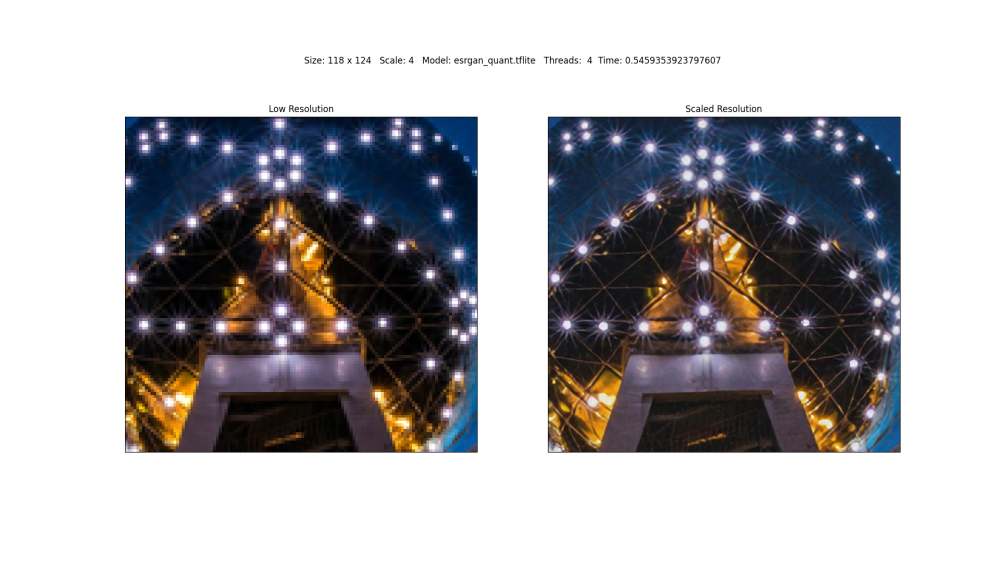
Since the hardware support for Rockchip SoCs in the mainline kernelis generally already very outstanding and their further development is also being actively pursued, I only have SBCs with integrated NPUs that are based on them. Among them are ODROID-M2, NanoPC-T6, and ROCK-5-ITX. But since the NPU is an integral part of the SoC, the board manufacturer and the design of the SBC are not necessarily of importance. As far as I understand, edge-class NPUs are best suited for computer vision tasks. I am therefore engaged in object detection: and super-resolution: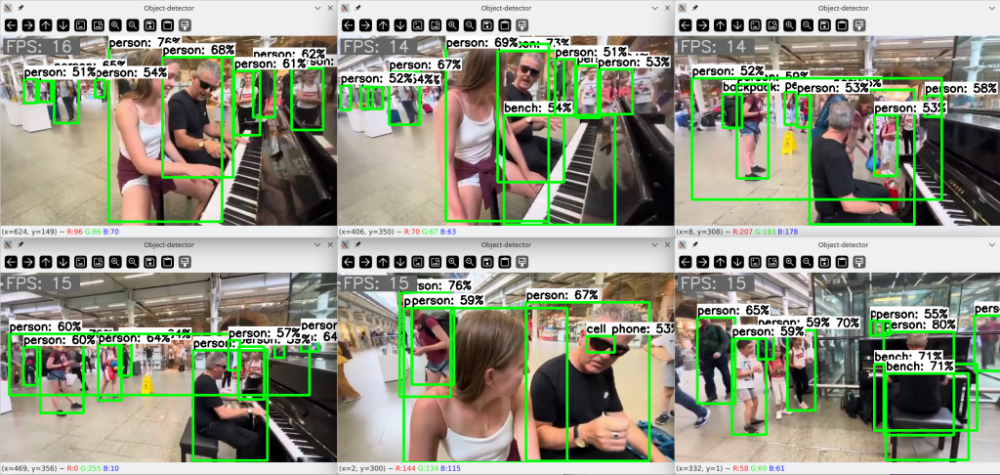
-
I'm having a problem with my Raspberry Pi 5, which I describe below. I have a DVR connected to it via Ethernet. If I connect both at the same time, dmesg reports a failure and I can't ping the DVR to establish a connection; I have to run `ifconfig eth0 down` and `ifconfig eth0 up`. Can anyone help or know if there's a bug in the kernel version? I'm using Ubuntu 22.04. jammy root:~# dmesg | grep eth0 [ 1.312167] macb 1f00100000.ethernet eth0: Cadence GEM rev 0x00070109 at 0x1f00100000 irq 108 (2c:cf:67:81:d6:2a) [ 3.237493] systemd[1]: Found device /sys/subsystem/net/devices/eth0. [ 3.453483] systemd[1]: Started ifup for eth0. [ 3.573655] macb 1f00100000.ethernet eth0: PHY [1f00100000.ethernet-ffffffff:01] driver [Broadcom BCM54213PE] (irq=POLL) [ 3.573668] macb 1f00100000.ethernet eth0: configuring for phy/rgmii-id link mode [ 6.441950] macb 1f00100000.ethernet eth0: Link is Up - 100Mbps/Full - flow control off [ 11.560707] macb 1f00100000.ethernet eth0: Link is Down [ 13.605678] macb 1f00100000.ethernet eth0: Link is Up - 100Mbps/Full - flow control off root:~# ping 192.168.200.201 PING 192.168.200.201 (192.168.200.201) 56(84) bytes of data. ^C --- 192.168.200.201 ping statistics --- 6 packets transmitted, 0 received, 100% packet loss, time 13305ms root:~# ifconfig eth0 down root:~# ifconfig eth0 up root:~# dmesg | grep eth0 [ 1.312167] macb 1f00100000.ethernet eth0: Cadence GEM rev 0x00070109 at 0x1f00100000 irq 108 (2c:cf:67:81:d6:2a) [ 3.237493] systemd[1]: Found device /sys/subsystem/net/devices/eth0. [ 3.453483] systemd[1]: Started ifup for eth0. [ 3.573655] macb 1f00100000.ethernet eth0: PHY [1f00100000.ethernet-ffffffff:01] driver [Broadcom BCM54213PE] (irq=POLL) [ 3.573668] macb 1f00100000.ethernet eth0: configuring for phy/rgmii-id link mode [ 6.441950] macb 1f00100000.ethernet eth0: Link is Up - 100Mbps/Full - flow control off [ 11.560707] macb 1f00100000.ethernet eth0: Link is Down [ 13.605678] macb 1f00100000.ethernet eth0: Link is Up - 100Mbps/Full - flow control off [ 147.034711] macb 1f00100000.ethernet eth0: Link is Down [ 151.855860] macb 1f00100000.ethernet eth0: PHY [1f00100000.ethernet-ffffffff:01] driver [Broadcom BCM54213PE] (irq=POLL) [ 151.855871] macb 1f00100000.ethernet eth0: configuring for phy/rgmii-id link mode [ 152.869842] macb 1f00100000.ethernet eth0: Link is Up - 100Mbps/Full - flow control off root:~# ping 192.168.200.201 PING 192.168.200.201 (192.168.200.201) 56(84) bytes of data. 64 bytes from 192.168.200.201: icmp_seq=1 ttl=64 time=1.01 ms 64 bytes from 192.168.200.201: icmp_seq=2 ttl=64 time=1.01 ms ^C --- 192.168.200.201 ping statistics --- 2 packets transmitted, 2 received, 0% packet loss, time 1001ms rtt min/avg/max/mdev = 1.007/1.007/1.007/0.000 ms
-
On RK3568 the Panfrost driver needs the clk-scmi kernel module to be loaded. But is not build in 6.18 / 6.19 otherwise we get [ 13.370681] panfrost fde60000.gpu: get clock failed -517 [ 13.370717] panfrost fde60000.gpu: clk init failed -517 [ 13.485723] panfrost fde60000.gpu: get clock failed -517 [ 13.485761] panfrost fde60000.gpu: clk init failed -517 [ 13.503876] panfrost fde60000.gpu: get clock failed -517 [ 13.503918] panfrost fde60000.gpu: clk init failed -517 Thanks !
-
use the images in this thread
-
 I started down this path and realized that the patches are applied to downloaded linux kernel source. Normally, the kernel source is "cleaned" even if the build fails. I then found the sakura pi github page and the page has more recent commit than the Rock-s0, incorporates the kernel.dtsi while adhering the the u-boot requirements for rockpi's. U-boot for Rockpi. I'd like to base my build on the more up-to-date code. The easist way to do this is set CLEAN_LEVEL="" but I'm running into issues with the patches in GitHub: Sakura-Pi failing to apply. Essentially, I would iike to have the patches apply, not necessarily build and have the files generated by the patches remain. I have a large dtb file, extracted from Sovol's OEM firmware, that I would like to copy/paste into the generated *.dtb file, rename the *csc file and the defconfig file, and then generate a patch against clean source. Conceptually, this should work and I'm suprised it is this difficult to generate a new board for an existing family. Alternatively, a script could generate a file from a highlited portion of a patch and generate a file. Or is is possbile to run ./compile.sh a step at a time? It would be helpful in this setting, very instructive about the process and would narrow down build failures. Am I on the right path? Any step-by-step examples and or links to helpful scripts?
 -
 As champions of open source development in the embedded community, Collabora will be at Booth 4-404 with an impressive lineup of live demonstrations spanning graphics, machine learning, continuous testing, and real-world applications. View the full article
 -
Thank you very much. Unfortunately, Trixie won't start. BootROM - 1.73 Booting from MMC BootROM: Bad header at offset 00000200 … BootROM: Bad header at offset 02E00000 BootROM: Bad h Trying Uart
-

Efforts to develop firmware for H96 MAX V56 RK3566 8G/64G
Hqnicolas replied to Hqnicolas's topic in Rockchip CPU Boxes
I need you to understand something very important: the manufacturer is infecting the boards with Java botnet software. All the software you should use is developed by the Armbian community. Welcome to the Armbian community! Now that you are a member, you must develop software that schedules the board's power-on. -

Which armhf version should I choose?
eselarm replied to Humboldt's topic in Software, Applications, Userspace
Maybe see https://wiki.postmarketos.org/wiki/Medion_Chromebook_S2015_(google-veyron-mighty) It is RK3288, so an Armbian Rockchip kernel might do something, but I have no clue about DeviceTree and/or bootloader. Alpine is quite different from Armbian/Debian but maybe with that bootloader+kernel+DTB and Armbian rootfs it might do something, but make sure you have seril debug cable. In general might need to find solder points on motherboard/PCB or some specific resistor value on OTG ID pin. -
Try to build from this PR: https://github.com/armbian/build/pull/9381 - use CURRENT branch - enable additional DEBUT if it doesn't proceed - leave u-boot as is or try with most recent
-
The issue was that these variables in the kernel config were set to 10. Setting them to 12 allowed uart10 to initilaize. CONFIG_SERIAL_8250_NR_UARTS=12 CONFIG_SERIAL_8250_RUNTIME_UARTS=12
-
 Hello everyone Just would like to start a discussion about the current state of video acceleration (decoding only, h.265/h.264/av1). The soc (rk3588) recently got mainline support for these features in 7.0: https://gitlab.collabora.com/hardware-enablement/rockchip-3588/notes-for-rockchip-3588/-/blob/main/mainline-status.md Has anyone tested this on a OPI5 already, especially using Kodi? Does this work ootb there now? Regards, XXXBold
 -
Hi! I have an OrangePi3 (not Zero!) running Armbian (H6), with a TFT ILI9486 display connected via the 26-pin header. The screen works fine, but the XPT2046 touch controller does not initialize. Here’s the situation: CS0 on PH5, DC on PD16, RESET on PD21. XPT2046 (CS1) on PL8, IRQ on PD24. I tried adding XPT2046 to the overlay with all parameters configured (ti,x/y-min/max, pressure, swap-xy, etc.). The overlay compiles successfully, but when loading the module it says: ads7846 spi0.1: probe with driver ads7846 failed with error -22 I also tried loading the ads7846 module with parameters via modprobe — all parameters are ignored because the driver only supports configuration via Device Tree. Here is my current overlay: /dts-v1/; /plugin/; / { compatible = "allwinner,sun50i-h6"; fragment@0 { target = <&spi1>; __overlay__ { status = "okay"; cs-gpios = <&pio 7 3 0>; display: display@0 { compatible = "ilitek,ili9341"; reg = <0>; pinctrl-names = "default"; spi-max-frequency = <20000000>; txbuflen = <65536>; rotate = <90>; bgr = <0>; fps = <30>; buswidth = <8>; regwidth = <16>; height = <480>; width = <320>; dc-gpios = <&pio 3 16 0>; reset-gpios = <&pio 3 21 1>; debug = <3>; init = <0x10000b0 0x00 // Interface Mode Control 0x1000011 // Sleep Out 0x20000ff // Delay (255ms) 0x10000C0 0x0D 0x0D // Power Control 1 0x10000C1 0x43 // Power Control 2 0x10000C5 0x00 0x48 0x80 // VCOM Control 1 0x10000C7 0x00 // VCOM Control 2 0x1000036 0x28 // Memory Access Control (Rotação) 0x100003A 0x55 // Pixel Format Set (16bit) 0x10000B1 0xB0 0x11 // Frame Rate Control 0x10000F0 0x01 // Enable Extended Comand Set 0x10000F6 0x00 0x01 0x32 // SPI ilInterface Control 0x1000026 0x01 // Gamma Set 0x10000E0 0x0F 0x31 0x2B 0x0C 0x0E 0x08 0x4E 0xF1 0x37 0x07 0x10 0x03 0x0E 0x09 0x00 // Positive Gamma Correction 0x10000E1 0x00 0x0E 0x14 0x03 0x11 0x07 0x31 0xC1 0x48 0x08 0x0F 0x0C 0x31 0x36 0x0F // Negative Gamma Correction 0x10000B6 0x02 0x02 0x3B // Display Function Control 0x1000011 // Sleep Out 0x20000ff // Delay (255ms) 0x1000029>; // Display ON }; /* --- ADS7846 (XPT2046) --- */ ads7846: ads7846@1 { compatible = "ti,ads7846"; reg = <1>; pinctrl-names = "default"; spi-max-frequency = <1000000>; interrupt-parent = <&pio>; interrupts = <3 24 2>; pendown-gpio = <&pio 3 24 1>; cs-gpios = <&pio 11 8 0>; /* OPTIONS */ ti,x-min = /bits/ 16 <0>; ti,y-min = /bits/ 16 <0>; ti,x-max = /bits/ 16 <0xFFF>; ti,y-max = /bits/ 16 <0xFFF>; ti,pressure-min = /bits/ 16 <0>; ti,pressure-max = /bits/ 16 <0xFFF>; ti,x-plate-ohms = /bits/ 16 <400>; ti,swap-xy = <1>; }; }; }; }; Could anyone advise how to properly connect XPT2046 so that PD24 is used as IRQ? Is there a working example overlay for TFT ILI9486 + XPT2046 on OrangePi3 / H6? Or has anyone managed to use the touch controller via a module without overlay? Or is that simply impossible on this kernel? I would really appreciate any working examples or advice!
-
hi. Please tell me, I installed the image and bootloader on the emmc (armbian) on the radxa 5t and now I can't install another one because the board doesn't want to start from the CD card. what should I do? Im try this but doesnt work https://docs.radxa.com/en/rock5/rock5t/low-level-dev/maskrom/erase