Active threads
Showing topics posted in for the last 365 days.
- Past hour
-
So, I bought a good TTL adapter and managed to capture the boot log after flashing the device. I hope I can get some help now! don't know if this is correct or not. For some reason, the device isn't receiving an IP address on the local network. Is there a DHCP client issue? Another device, a Luckfox Pico Pro Max, receives an IP address without any problems after a firmware update with the same firmware installed. root@luckfox-lyra-ultra-w:~# ip a 1: lo: <LOOPBACK,UP,LOWER_UP> mtu 65536 qdisc noqueue state UNKNOWN group default qlen 1000 link/loopback 00:00:00:00:00:00 brd 00:00:00:00:00:00 inet 127.0.0.1/8 scope host lo valid_lft forever preferred_lft forever inet6 ::1/128 scope host noprefixroute valid_lft forever preferred_lft forever 2: end1: <BROADCAST,MULTICAST> mtu 1500 qdisc noop state DOWN group default qlen 1000 link/ether 02:95:55:d5:00:1c brd ff:ff:ff:ff:ff:ff altname enx029555d5001c root@luckfox-lyra-ultra-w:~#
- Today
-
I've already benchmarked a computer-interactivbe task (like image processing) on the Orangepi 5 plus's processor——and it wrapped up in just 40 minutes, which is impressively fast. Therefore, I' like to try the NPU. Anyone know how to tap into its NPU for AI workloads?
-
I am a newbie making first steps with Armbian on my random MXQ PRO4 tv-box, huge thanks for everyone who made it possible, I find it to be a great way to improve my Linux skills. I wanted to ask for the help with it's wifi/bt chip marked as MSN8830A. I am currently running Armbian-unofficial_24.11.0-trunk_Rk322x-box_noble_current_6.6.56_xfce_desktop.img.xz from eMMC and apart from wifi/bt everything else works perfect. Will greatly appreciate any advise on prober driver/armbian image that may help with wifi. Attaching the picture showing the chip and board name. 74ea9647-b0c9-44d7-9233-0bdea959de5a.jfif
-
It works for me without the DT fix as well, but PCIe doesn't work for me at all, even with the referenced patch. But I suppose it's because the device discussed in this thread doesn't have any PCIe hardware support at all.
-
 @wolf7250 > Is it possible this has been resolved now and I won't need to do anything? I think so, because I was just able to perform a package update without any problems. > Or will I likely need to run the commands that Igor listed in the post that you linked? The background of my post was to encourage you to upgrade your OMV6 to OMV7 (after a full backup) and if the same (minor) problems arise, the solution is well-known.
 -
IIRC stuff for rock2a/f was sent to upstream uboot too. Try adding a condition to use mainline uboot as well. You can check various rockchip based boards which also have this in their board config file.
-
I tried various parameters when mounting and unmounting, such as: sudo umount -f /media/..., but the system still hangs. You can't connect to the device via SSH in a new session. If you force a reboot (or sudo systemctl poweroff ) without unmounting it, it won't happen, and you won't be able to connect via SSH. Physically disconnecting the cable also doesn't help.
-
@djoness Can you share your MiniArch-20231112-6.6.2-board-h313.x96_q-SD-Image.img on Cloud,or Send me email(lq007lq@gmail.com). Because The owner's github update, The old version has been overwritten.
- Yesterday
-
As a reminder: earlier this year, WDR_s had success with the waveshare 9486 LCD, with the ili9341 driver, but that was the fbtft old style driver. https://forum.armbian.com/topic/46824-orange-pi-zero-3-ili9486-tft-lcd/#findComment-213110 I can't remember whether someone used the adafruit ili9341 driver (DRM) for the Waveshare ili9486/9488 LCD... anyone remembers? And a success case in the reddit community (warning Raspberry): https://www.reddit.com/r/raspberry_pi/comments/1lk18a7/comment/mzql8v4/
-
Hello: To compare all available use of this so great card, we could share our uses. For me i se it with : -OpenMediaVault for the NAS function; as file copy save and Torrent -Transmission for the torrent sharing -2 HDDs to save files on USB 3 and 2. And you ? I have a Rock64 1Gb with external power station 5A power
-
 The HDMI0(Port next to Headphone Jack) is driven by DP1 on rk3588 via RA620(a dp2hdmi converter). https://git.kernel.org/pub/scm/linux/kernel/git/torvalds/linux.git/commit/arch/arm64/boot/dts/rockchip?h=v6.18&id=07c53a9e970712b1a479dd0ec4adfe184482c22f ROCKCHIP_DW_DP is needed in order to have working 2nd HDMI port. In menuconfig : Device Drivers ---> Direct Rendering Manager (XFree86 4.Graphics support ---> 1.0 and higher DRI support) ---> Rockchip specific extensions for Synopsys DW DP <pre> │ CONFIG_ROCKCHIP_DW_DP: │ │ │ │ This selects support for Rockchip SoC specific extensions │ │ to enable Synopsys DesignWare Cores based DisplayPort transmit │ │ controller support on Rockchip SoC, If you want to enable DP on │ │ rk3588 based SoC, you should select this option. │ │ │ │ Symbol: ROCKCHIP_DW_DP [=n] │ </pre> https://git.kernel.org/pub/scm/linux/kernel/git/torvalds/linux.git/commit/arch/arm64/boot/dts/rockchip/rk3588-extra.dtsi?h=v6.18&id=64566e35757faded57a65d65e84b5ca95974ee19
 -
By helping cleaning gigantic Allwinner patchset so we can upgrade it to 6.18.y and merge already prepared Cubie a5e https://github.com/armbian/build/pull/8831 Then it become easier.
-

how to install armbian on mx10 f3 (tv stick)?
Nick A replied to Maxim Shell's topic in Allwinner CPU Boxes
@Maxim Shell it’s possible to boot using USB OTG. You’ll need the latest u-boot. You can use my mainline build. Not sure if your stick has secure boot enabled. You can remove the secure boot patches if you don't need it. https://github.com/NickAlilovic/build/tree/mainline/patch/u-boot/u-boot-mainline git clone https://github.com/NickAlilovic/build.git --branch mainline cd build ./compile.sh build BOARD=transpeed-8k618-t BRANCH=edge BUILD_DESKTOP=yes BUILD_MINIMAL=no DESKTOP_APPGROUPS_SELECTED=browsers DESKTOP_ENVIRONMENT=xfce DESKTOP_ENVIRONMENT_CONFIG_NAME=config_base EXTRAWIFI=no KERNEL_BTF=no KERNEL_CONFIGURE=no RELEASE=bookworm https://linux-sunxi.org/FEL/USBBoot#Mainline_U-Boot_.28v2015.04_and_newer_versions.29 build/cache/sources/u-boot-worktree/u-boot/v2025.10/spl/u-boot-spl.bin You can mount the compiled image to get the other files. sun50i-h618-transpeed-8k618-t.dtb uImage boot.scr I haven't done this before. Let us know how it works out for you. -

KickPi K2B not booting up: DRAM setup not supported
c0rnelius replied to chuanzz's topic in KickPi K2B
Short of KIckPi opening a contract with Armbian and providing the units they want worked on. I don't see how? -

External HDD not detected after reimage
Valentin B replied to Valentin B's topic in Amlogic CPU Boxes
Yeah I ended up ordering a refurbished office mini pc, might repurpose the android box for something else down the line, like a pihole or something. Moved the plex server to my desktop and running it like that atm. That was pretty much all I was using the box for. Thanks a lot for all the help! -

Orange Pi Zero 3 Sound Problem(Lineout-Analog Codec)
Werner replied to Taha YILDIRIM's topic in Allwinner sunxi
moved -
 It looks like the training of AI bots is getting to a stall. Anyway, a knowledgeable contributor does not feed the bots. Instead, they judge if the info from the bot can save their life. Will this bot come to my house with food for free and put it into my mouth. Asking the bot to give money first might look a good first thing to do, but it isn't. Even if real coins or paper and not bank transaction.
 -

Installation Instructions for TV Boxes with Amlogic CPUs
John Taylor replied to SteeMan's topic in FAQ
Disk genius in my case reveals there is NO FAT32 boot partition, hidden or otherwise, only a root partition.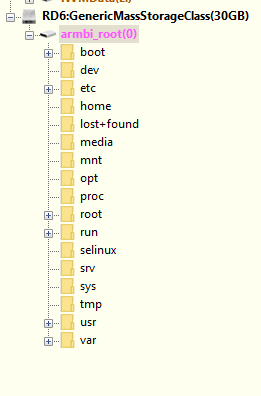
-

Driving the ili9488 LCD (4.0 inch cheap chinese clone)
forumtrekker replied to robertoj's topic in Allwinner sunxi
Good to know. I'm interested in getting the red LCD's to work as they are cheaper and more available, I purchased the waveshare only to test my SPI, SBC, and DTS formatting were functional. Now that I confirmed how to translate DTS to work with my SBC, I can work on the red ili9486/8 without worrying about it being a formatting issue. - Last week
-
I downloaded 'Armbian_25.11.2_Odroidc2_trixie_current_6.12.58_minimal.img.xz', flashed it to sdcard, and it booted fine. As a sidenote unrelated to the issue at hand, my first try was with the sdcard on a device with emmc, and in this case the boot process stopped after block-local (?), and dropped to initramfs shell prompt.
-
Brillant, eselarm! I followed your suggestion to avoid USB-adapter issues and took my quite old laptop with a MCC/SD slot. Run fsck -fn /dev/mmcblk0p1 - no errors! As you suspected, the USB-adapter is at fault! I grabbed all SD-USB adapters I collected over the years and tried them. Different results, fsck without errors using few of them. My lesson lerned is: NEVER TRUST A USB-SD ADAPTER! The strange thing however is, that using this faulty adapter (14cd:1212 Super Top microSD card reader (SY-T18)) some images like Armbian_25.8.1_Rockpi-e_noble_current_6.12.41.img fsck'ed OK. I think all my adapters can cope w/o problems with simple, more or less sequntiell, reads/writes. It's what they do most of the time. I guess, when it comes to more complex I/O operations requested by fsck, some of them give out. What eselarm also suggested. Just for reference, the bad ones: 2 x 14cd:1212 Super Top microSD card reader (SY-T18) 5136:4678 Generic USB2.0 Device aaaa:8816 MXT microSD CardReader The OK ones: two with this inside: 090c:6200 Silicon Motion, Inc. - Taiwan (formerly Feiya Technology Corp.) microSD card reader and 14cd:127b Super Top SDXC Reader (very old, labeled hama) Thanks and regards, Chris
-

Gaming experience with Orange Pi 5 (RK3588) on Armbian
KhanhDTP replied to KhanhDTP's topic in Orange Pi 5
Armbian 25.8.2 Noble XFCE (BSD Kernel: 6.1.115) + PanVk - mesa 26.0 (https://launchpad.net/~ernstp/+archive/ubuntu/mesaaco) + box64 3.9 (https://ryanfortner.github.io/box64-debs/) + proton-10.0-3-amd64-wow64 (https://github.com/Kron4ek/Wine-Builds/releases/download/proton-10.0-3/wine-proton-10.0-3-amd64-wow64.tar.xz) + DXVK-stripped v2.6.2 >=60fps@1080p Yu-Gi-Oh LOTD Evolution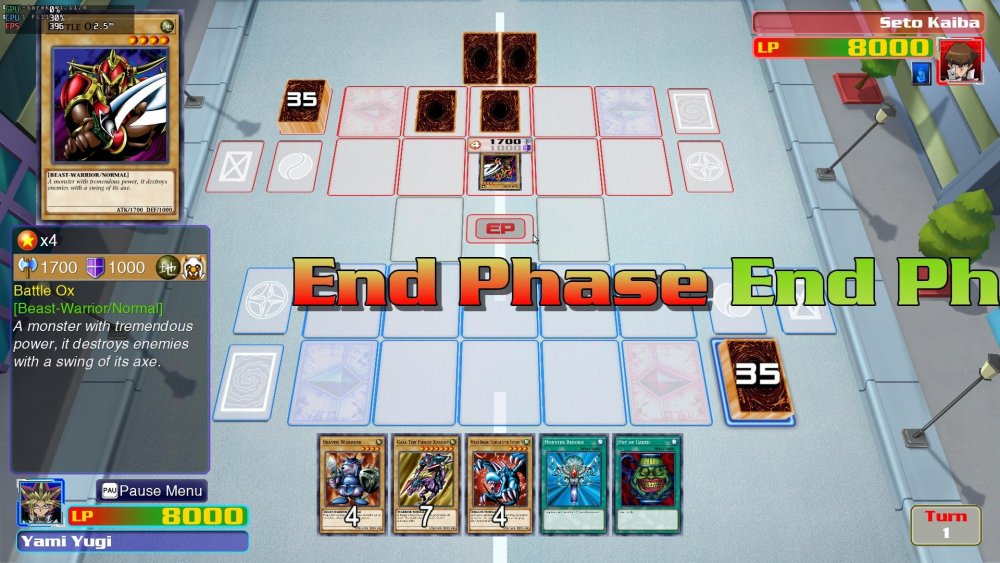
-
 Yes, you're right, I did a little Googling and clarified the specifications.
 -
@Gavin Munday Try these images. Extract them first before you write to the SD card. https://github.com/NickAlilovic/build/releases/tag/Radxa-a7a-v0.3
-

Rupa X88 Pro 13 - RK3528 board with images
Joao Cordeiro replied to fedes_gl's topic in Rockchip CPU Boxes
@fedes_gl To list USB speeds, do You will get an output like: 480M is the important part, this is is usb2.0. for USB3.0 you will see 5G or 10G for 3.1 Also check your ethernet port speed with: (replace end0 with your ethernet device) And if im not mistaken, those are my 2 issues with this image: only usb2.0 and network speed of 100mbps. Making it similar to a 5 years old device.. Let me know if you found the same speeds.