Active threads
Showing topics posted in for the last 365 days.
- Past hour
-

Armbian for H313 X96-Q LPDDR3 TV-Box
Morales Morales replied to sicxnull's topic in Allwinner CPU Boxes
@Nick A Hi, I was wondering if you plan to update your distro since it hasn't been updated since 2025. - Today
-
 yet still giving enough to write a answer. flaming over LPEs (or any vulnerability) does not solve any issues. I suggest to read the license again to get a clue who's responsible about fixing things in general: https://github.com/armbian/build/blob/5e60c0183d035bfd5179373e1eac284790e08904/LICENSE#L265-L268 Both parties also shall read the terms of use again, the very first bullet point in particular. I will not give this hint a second time. fixes will land upstream, stable builds will adapt four times a year. For everyone wants things faster, options were provided.
 -
@Levy Barbosa I was able to boot and install! Instructions Download Armbian from: https://www.armbian.com/boards/aml-s9xx-box Use: - Debian 13 (Trixie) Minimal - Current kernel (6.18.26) Create bootable USB with Rufus/Balena Etcher. S805X-P241 Specific Changes After writing the image, before booting: 1. Set correct DTB - Open armbi_boot partition - Edit extlinux/extlinux.conf - On line 4, change DTB to: meson-gxl-s805x-p241.dtb 2. Set correct u-boot - In armbi_boot, copy u-boot-s905x-s912 - Rename copy to u-boot.ext 3. Boot - Insert USB into USB2 port (closest to power input) - Hold reset button (between USB ports) while applying power - Release after 15 seconds First Login Username: root Password: 1234 Change password when prompted. Notes - Wi-Fi works - Ethernet is 100 Mbps
-
 TV Box Name: Intelbras IzyPlay Board name: DV8038 CPU: Amlogic S805X (GXL Meson, Rev D) Armbian build file name: Armbian_community_26.2.0-trunk.821_Aml-s9xx-box_trixie_current_6.18.26_minimal.img.xz DTB file used: meson-gxl-s805x-p241.dtb Kernel Version: 6.18.26-current-meson64 Distribution Installed: Debian 13 (Trixie) Working Ethernet: Yes Max Ethernet Speed that works: 100 Mbps Does wifi work: Yes Does bluetooth work: No Does HDMI audio work: Not tested (headless setup) Additional Comments: - Board has 1GB RAM (908MB available) and 7.3GB eMMC - HDMI output works (tested on a DELL P2219H) - Reset button is between USB1 and USB2 ports - USB2 port is required for booting (closest to power input) - To boot from USB: hold reset button while applying power, release after 15 seconds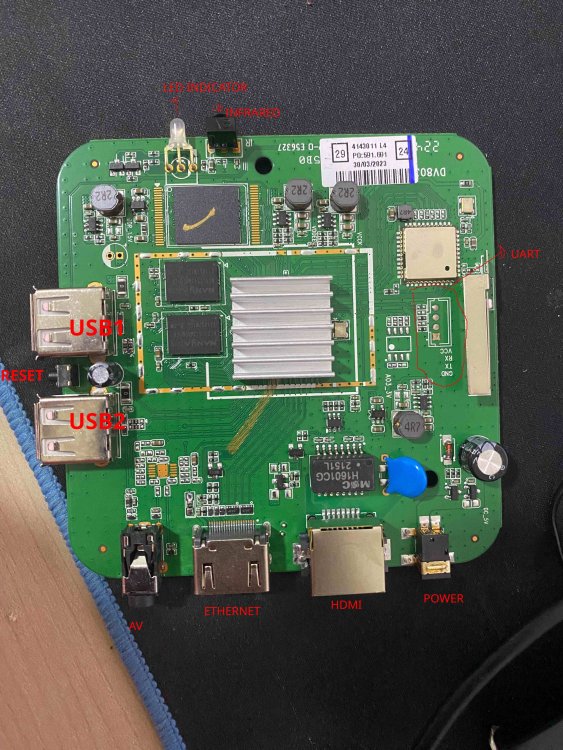
-

Helios64 - Armbian Trixie with linux 6.18 (incl. opp-microvolt patch)
BipBip1981 replied to ebin-dev's topic in Rockchip
Thank @iav -
@guenter I have resolved the NVMe SSD detection issue. The updated device tree access path is listed below. https://github.com/Arthur97172/Armbian-Community-Build/blob/main/patch/kernel/archive/rockchip64-6.18/dt/rk3568-yy3568.dts
-
https://github.com/hillac/jetson-nano-armbian-build/blob/main/jetson-armbian-26.md I got a 26 trixie image with the 6.18.29 kernel booting headless. No hdmi. Boot logs over uart were showing 'tegra-pmc 7000e400.pmc: failed to get resets for venc: -517' so I just removed the problem reset from venc in the dtb. This reset was in the dtb for the working 23.8.1 image, so it's not the root cause, but at least it boots properly.
- Yesterday
-
You shouldn't be getting into android recovery. How did you burn the image to the SD card? On what platform? The fact that I'm seeing things like "System Volume Information" and "box-config" which aren't directories that should exist on an Armbian image, it looks like something strange has happened to your SD card image.
-
It works. I am just showing you an easy way to connect to the board if you don't have UART or display output, even if temporarily.
-
 See how Tyr moves beyond MCU firmware boot to build the group, queue, VM, submission, and completion paths needed to run real Vulkan workloads on Mali CSF GPUs. View the full article
 -

Rupa X88 Pro 13 - RK3528 board with images
sr4armbian replied to fedes_gl's topic in Rockchip CPU Boxes
@Joao Cordeiro Thanks for your reply. You are right, Amlogic S905X3 seems to be a good hardware without much issue for running Linux servers. -
Glad that you got it fixed and figured out a way to set this up. 🙌. I went with similar method, used USB Male to Male cable, Factory Flash Tool and maskrom pins to load the image that I have mentioned in above post, However I am still stuck with no HDMI and LED Display is not showing the clock, but a script which shows the IP address. This was part of the image created by the one who complied it. If you could share steps to get the one that is working (HDMI, Clock, Etc.,) for you would be helpful.
-
You have the lspci verbose output so you can work back to get the non-verbose output as well. Should I have anything connected to the PCI lane or not? I know my USB devices work, at least with the internal controller, the question was about what exactly is the output/situation you need me to test.
-
I see it is this board, quite new: http://www.orangepi.org/html/hardWare/computerAndMicrocontrollers/details/Orange-Pi-4A.html You can see at https://github.com/armbian/build/commits/main/config/boards/orangepi-4a.csc that no manintainer is defined, so up to yourself to figure out what is wrong. You need to start with attaching a serial debug cable (see 3 pins next to power key) Also I see this board has SPI-flash, there might be an old U-Boot variant in there that does not work together with mainline based 7.0.x kernel.
-

Have Armbian for Tanix TX1 QHZIW_H313_TX1_EMCP_V2.0?
Juan Esteban replied to Lesano's topic in Allwinner CPU Boxes
To my knowledge, there are two versions of this device: the "old" version and the new version, which has a 6031 Wi-Fi chip. Here are the two DTS files extracted from the original android tv firrmware for each hardware version. Hope it helps. Tanix_TX1_6031_DTS.txt Tanix_TX1_DTS.txt -

Teclast T60 AI rooting + armbian possibility Allwinner A733
YODAI replied to Taz's topic in Allwinner CPU Boxes
Hi guys 1: First, I'm happy to register on your forum. 2: I needed to root my TECLAST T60 IA tablet to test it with some software, and I found this post on your forum. 3: My problem is: #: I followed the rooting steps up to step 5. #: Thinking it was better to install the new firmware first and then proceed with rooting. #: My big mistake was starting the firmware update with PhoenixSuit and the bootloader unlocked. After a while, I got a firmware error, and after restarting, I got this message. 4: I tried to enter fastboot mode by pressing the power button, volume down button, and volume up button, but I can't get into fastboot mode. I hope you can help me figure out how to enter fastboot mode, install the firmware, and then try to root the device.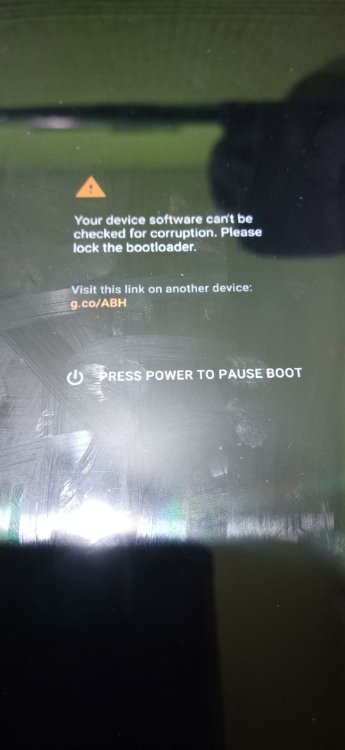
-
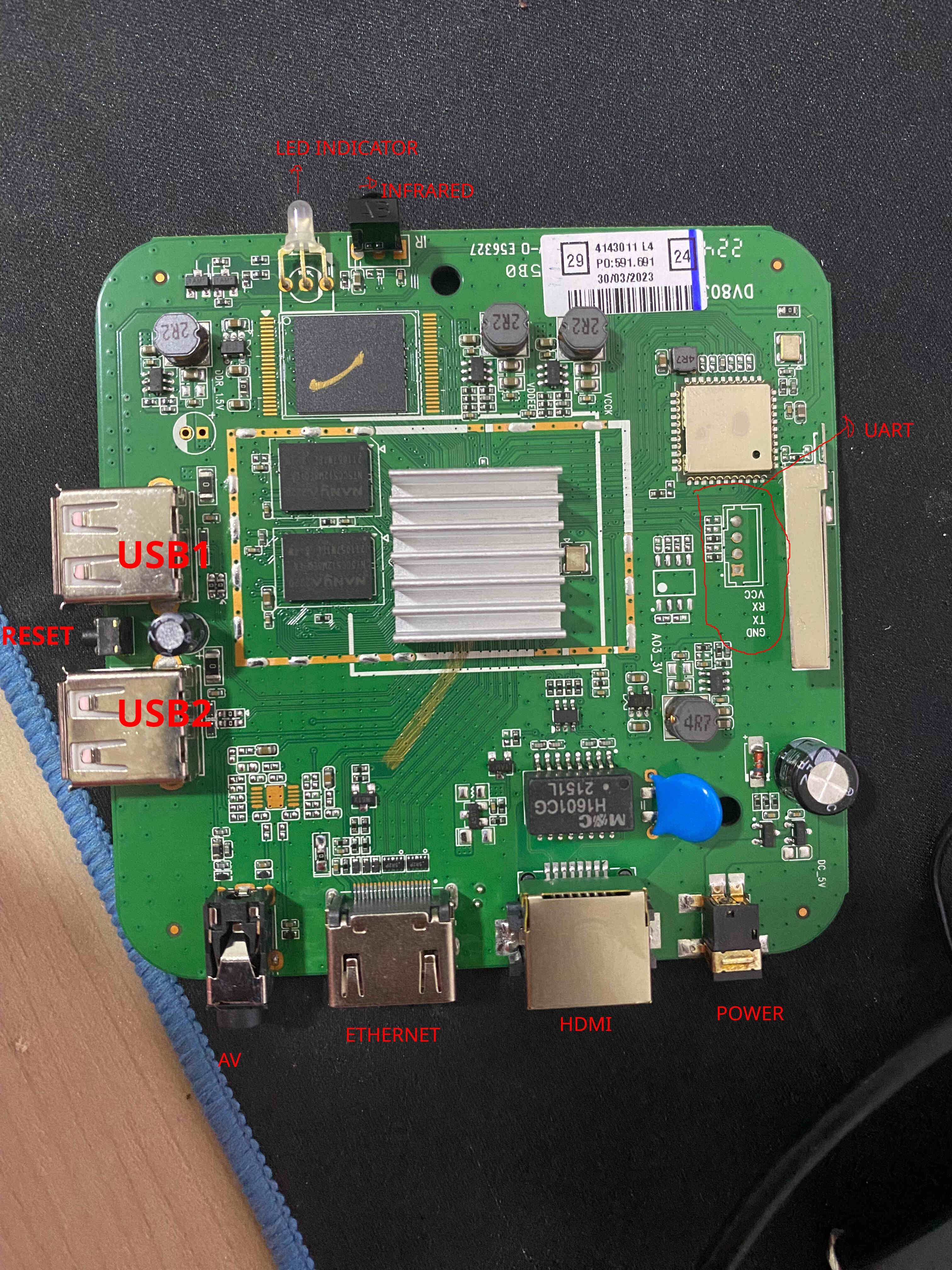
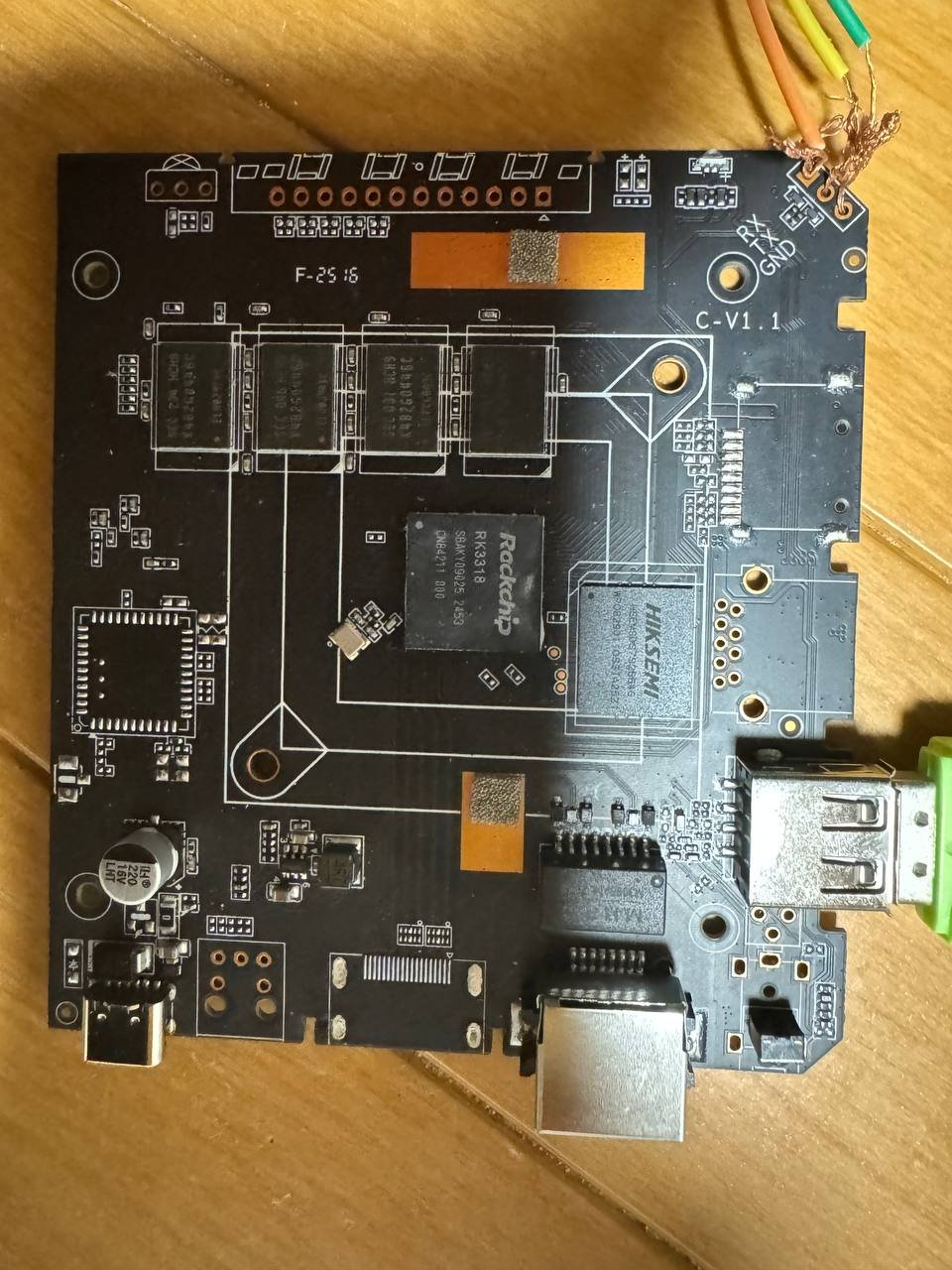
Hi everyone. I have this RK3318 chip box running Ubuntu, but I can't enable SSH to reinstall it. It doesn't have a display output port. Is there any way to reinstall the OS without desoldering the eMMC to reflash it? (I don't know how to put it back if I take it off). I've already tried flashing via USB and the RX/TX/GND lines, but neither worked. Model: AROP-01 CPU: Quad-core ARM processor Memory: 2GB System Storage: 64GB eMMC Network Interface: 1 × Ethernet USB Interface: 1 × USB Type-C Power: 5V/2A Dimensions: 103 × 103 × 20 mm Package Contents: 1 × Manual, 1 × Ethernet Cable, 1 × Power Cable Thank you.
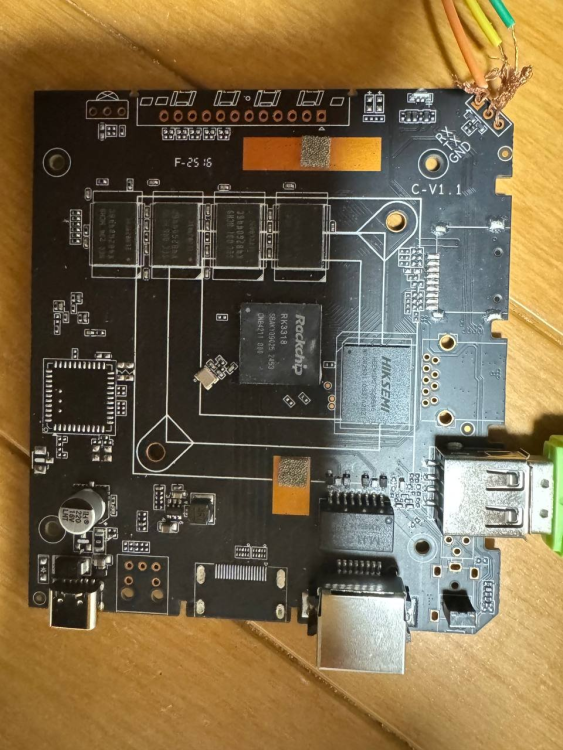
-

What hardware will comfortably run Waydroid?
samlevy0515 replied to dreamlayers's topic in Software, Applications, Userspace
Great question — I’d really like to know too! Have you tried a lightweight Android image like LineageOS-microG inside Waydroid, or tweaked the GPU rendering settings? - Last week
-
 Hi, I am assuming that you have a standard Q1 TV Box (Allwinner H313 based). 1) Download Armbian Imager here; 2) Install the version for your operating system; 3) After installing, choose "Manufacturer=ALLWINNER", Board="X96Q TV BOX", Operating system="minimal Trixie current" and Storage ( I suggest a good quality Class 10 SD card); 4) After writing the image, insert the SD card into the available SD slot; 5) Insert a wooden toothpick or a Q-tip into AV/Reset input; 6) Click (kindly) and hold the toothpick and connect the TV Box power supply to the power entry; 7) Release the toothpick after 8-10 seconds. if the HDMI connector is plugged you should see the Armbian initial boot process Note: some TV Boxes don't need items 5, 6 and 7. I hope it helps.
 -
Hi. I've also been having issues with my Orange Pi 5. It seems the problem is that the module was removed from the kernel, but I haven't looked into it in detail yet. The folks at NixOS seem to have solved this issue https://github.com/waydroid/waydroid/issues/2094 I have this specific problem waydroid show-full-ui [22:49:14] Starting waydroid session [22:49:14] RuntimeError: Command failed: % /usr/lib/waydroid/data/scripts/waydroid-net.sh start vnic is waydroid0 sudo /usr/lib/waydroid/data/scripts/waydroid-net.sh start modprobe: FATAL: Module ip_tables not found in directory /lib/modules/6.18.10-current-rockchip64 iptables v1.8.11 (legacy): can't initialize iptables table `filter': Table does not exist (do you need to insmod?) Perhaps iptables or your kernel needs to be upgraded. Failed to setup waydroid-net. My system user@orangepi5:~$ uname -a Linux orangepi5 6.18.10-current-rockchip64 #2 SMP PREEMPT Wed Feb 11 12:42:01 UTC 2026 aarch64 GNU/Linux I'm not a network expert, so I hope someone can help. Are you having the same problem?
-
Oh Thanks, I'll give a try this way.
-
Join us next week in Utrecht for RustWeek! We'll be running a SuperTuxKart tournament to showcase Tyr, the Rust driver for Arm Mali GPUs. Come and see if you've got what it takes! View the full article
-
 Hi, I have the same problem on a specially built debian image for the Raspberry Pi. Did you ever solve this problem?
 -
@armfan you start mixing instructions from Xunlong, SpacemiT, and Armbian. That will not work probably. The SoC is able to boot from SD, eMMC, and MTD (in that order). With Armbian started, you can use armbian-install to write u-boot to MTD (which is Memory Technology Device aka the kernel device for SPI flash and other flash mem). That Armbian u-boot is able to indirectly boot from NVME. Or via USB but only with manual u-boot commands you can type into the UART console, see discussion on OpiR2S booting in this thread.
-
https://github.com/MaverickLong/MLIR-TIM-VX This is an MLIR-based lowering path from the TOSA v1 dialect to TIM-VX, VeriSilicon's OpenVX-based GPU/NPU ML Framework. It includes the lowering from TOSA v1 to a custom timvx dialect (mirrors the TIM-VX C++ semantics) and a full lowering to C++ source. It is currently on par in inference speed with the vendor ACUITY compiler pipeline while still giving you full control on the graph level. In my own testing, on a Radxa Cubie A7Z \w Allwinner A733, ResNet-50 takes 8.0ms to inference, while the ACUITY-compiled baseline takes 7.3ms according to Radxa. It all starts with Radxa/VeriSilicon's false advertisement of the NPU supporting MLIR, but turns out we just don't have it yet, so I made my own. I have only tested the pipeline on the A733, but it should be able to be extended to any other VIP9000 variants as well.