Active threads
Showing topics posted in for the last 365 days.
- Past hour
-

Help wanted to test a new OpenVFD alternative
Jean-Francois Lessard replied to Jean-Francois Lessard's topic in Amlogic meson
@blackc fwnode_for_each_available_child_node_scoped has been mainstreamed in 6.18 (see Commit 448097b). When compiling out-of-tree from jefflessard/tm16xx-display, tm16xx_compat.h should provide backward compatibility (see Line 102). It looks like the Makefile is not picking up the include. You can try to manually add #include "tm16xx_compat.h" to tm16xx_core.c. -
I have only recently been able to get my LaFrite 512, no EMMC to boot armbian. My errors were legion. Might I suggest: 1. write the spi update image with the dd command, I had used etcher to no avail 2. make sure you use the USB port nearer the gpio pins 3. connect the hdmi output on the board to a monitor or use the serial header pins so that you'll have visual confirmations of what is going on 4. if the spi update image is newer than the board's image the update should be applied. My board was out of date and the image was applied. I've no idea what happens if the board has the same or newer image. I wasn't patient or thorough enough to check. 5. Use etcher to write any of the currently posted minimal images to a usb drive of 8, 16, or 32 GB - don't use a larger usb drive. Do not use the Ubuntu server image - the apt sources are bad on that one. 6. put the usb drive with the linux image in the usb port further from the gpio pins -- the opposite of what is needed for the spi update. Again make user you can see what is going on when you boot - hdmi to monitor is fine. Plug a usb keyboard in the other usb port to make things easy. 7. Power on the board. I used an el-cheapo power supply and it worked just fine. If you have a good usb drive the board should boot fairly quickly. There shouldn't be any or many failures on the way up. Again let me reiterate -- a small usb drive. Every 64GB and larger drive I tried failed during the boot process. You may have better luck, but start small to see it things work. I had decided some months ago that my board was defective, it wasn't, my brain was (or is). Hopefully some of my experiences will help. BTW make sure you use the forky rolling release for your Radxa-2F, because unless Armbian has fixed the older releases, your wireless card's drivers will be deleted on an apt upgrade or an Armbian-upgrade. Hope this helps.
- Today
-
I've noticed that since yesterday the `server` Armbian images disappeared from the product pages. Example: https://www.armbian.com/radxa-rock-5-itx/ I can no longer see them. Is it a bug, or something expected from now on. I also noticed the https://armbian.chi.auroradev.org/dl/rock-5-itx/ folder is empty.
-

Gaming experience with Orange Pi 5 (RK3588) on Armbian
晓飞丁 replied to KhanhDTP's topic in Orange Pi 5
I try FEX today and it is the same. I will try hangover tomorrow -
I've been using the Helios64 since launch, still going strong 👍 A couple of years back I had to limit the CPU frequency to avoid crashes until the last clean install of bulleyes. Since then stock clock and no custom dtb. Looking forward to my next holidays, planning on a clean install of Trixie. I'm planning on keeping using it as long as this thing wants to stay alive. An really nice piece of hardware, and I'm too cheap to move to something else 😄
-

DM_CRYPT module unavailable in initramfs after update to 6.1.115
IBV replied to David Zarebski's topic in Beginners
Nothing to read on input. Maybe this is the real error, the keyboard input or console has issues. The console param on boot remained unchanged after update ? -
 use system resolver instead of default:https://github.com/armbian/build/blob/60e869c42c03af0428d9983750eb766a7a846d43/config/templates/config-example.conf.template#L25
 -
If this is something with languages: I remember Armbian has a preferences option in apt config somewhere 'no languages'. Is old memory, maybe changed nowadays. Maybe a hint where to look and what to try. It would actually be a Cinnamon issue then.
-
@PH Ph Can I have your recovery and super?
-

Efforts to develop firmware for H96 MAX V56 RK3566 4G/32G
WINEDS replied to Hqnicolas's topic in Rockchip CPU Boxes
The WiFi is easy. Just : wget https://github.com/radxa-pkg/aic8800/releases/download/4.0%2Bgit20250410.b99ca8b6-3/aic8800-firmware_4.0+git20250410.b99ca8b6-3_all.deb wget https://github.com/radxa-pkg/aic8800/releases/download/4.0%2Bgit20250410.b99ca8b6-3/aic8800-sdio-dkms_4.0+git20250410.b99ca8b6-3_all.deb dpkg -i aic8800-firmware_4.0+git20250410.b99ca8b6-3_all.deb dpkg -i aic8800-sdio-dkms_4.0+git20250410.b99ca8b6-3_all.deb You will need the Linux kernel headers installed though. -
There we go https://github.com/armbian/build/pull/9106
-
Thank you @Nick A
- Yesterday
-
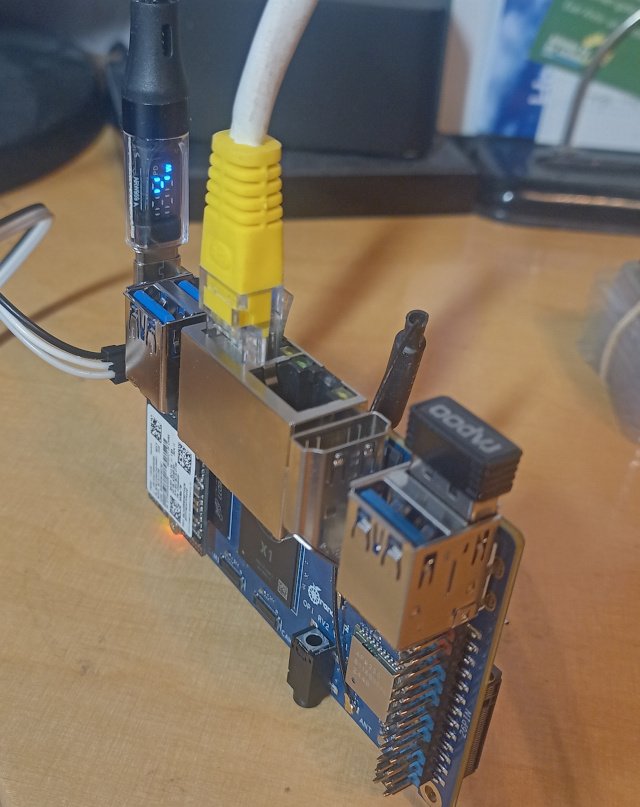
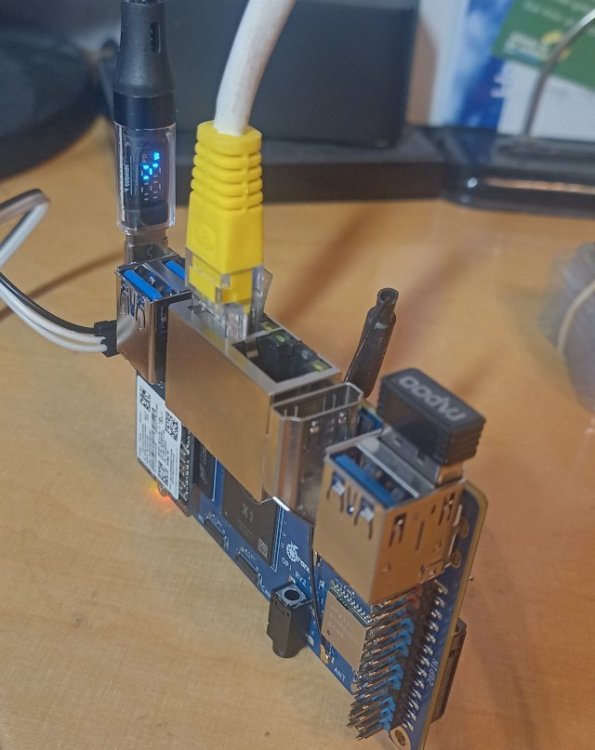
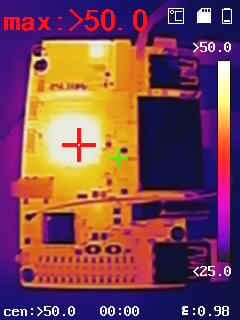
In the meantime, I spotted the pending MR from https://github.com/tmshlvck for this in the Pull Request Backlog. There are a number of issues with that, besides that it's very similar. Adding *.deb from xunlong without review is (mmm), better stay away from this. I'm not sure if the camera *.json is required. Not anything from the xunlong tree needs to be copied probably. I cleaned out my version (see https://github.com/sven-ola/armbian-build/tree/orangepi-rv2), but while this is open since October, I postpone to trigger another MR on that issue. My goal is: boot from upper 2230 SSD and use lower M.2 for Wifi (there are cheap Mediatek 3-band Wifi cards with 2280 adapter). If anyone wants similar setup, just checkout my branch from the link above and: ./compile.sh BOARD=orangepirv2 BRANCH=current RELEASE=trixie KERNEL_CONFIGURE=no BUILD_MINIMAL=yes KERNEL_GIT=shallow Write output/images/*.img to SD and boot with that. Use armbian-install to copy boot cfg on MTD. Again copy that *.img to /dev/nvme0n1. Remove SD card, reboot board. While investigating, there are a number of hints that the Ky X1 is in fact a SpacemiT K1 variant. Maybe stripped down, since the RCPU firmware (esos.elf) is much smaller. I have noticed, that Xunlong is not exactly welcome here. Chinese difficulties with the words upstream and donation probably. I think the hard work is to maintain / port the kernel and u-boot code drops with future versions. On the other hand: this board is cheap, offers a way to practice with a new CPU arch, and has the expected minimum number of M.2 slots. I'm currently compiling a kernel on that board. ETA 3 hours or so, board is not very fast. Anyhow, temp stays below 80°C if operated upright (above foto). No unusual hotspots, board and RAM seems stable, wifi and ethernet works. HTH and LG // Sven-Ola
-
What is booted also depends on boot scripts (and what is in armbianEnv.txt). This might have changed. And also the U-Boot code on the SD-card (sits invisible between partition table and 1st partition, usually sector 34-32767) might be newer and assume other defaults, I don't know. You need serial console cable and loglevel set to 7 so you can see what is happening after power-on. But maybe something else is wrong, at least make sure you post relevant info here on the forum. You can look in /usr/lib/u-boot/platform_install.sh to see where U-Boot is written. Also if you look there you can find some version string, likely in your mtd0/SPI is older than on the SD-card.
-
Duplicate
-

Efforts to develop firmware for H96 MAX V56 RK3566 8G/64G
secondstar replied to Hqnicolas's topic in Rockchip CPU Boxes
Could anyone advise the simple example on how to play media files using hardware decoding on VPU? I use actual version of Armbian with Edge kernel user@h96-tvbox-3566:~$ uname -a Linux h96-tvbox-3566 6.18.0-rc7-edge-rockchip64 #1 SMP PREEMPT Sun Nov 23 22:53:16 UTC 2025 aarch64 aarch64 aarch64 GNU/Linux and seems that rkvdec is available user@h96-tvbox-3566:~$ v4l2-ctl --list-devices rockchip,rk3328-vpu-dec (platform:fdea0000.video-codec): /dev/video2 /dev/media1 rockchip,rk3568-vepu-enc (platform:fdee0000.video-codec): /dev/video3 /dev/media2 rockchip-rga (platform:rga): /dev/video1 rkvdec (platform:rkvdec): /dev/video0 /dev/media0 then I've installed MPV player from Armbian repository using apt command, but it seems that it doesn't support hardware decoding. I tried to use different hwdec options (rkvdec, rga, rkmpp, hantro....) but got "Unsupported hwdec" each time. user@h96-tvbox-3566:~$ mpv -hwdec=rkvdec --vo=gpu big_buck_bunny_1080p_h264.mov (+) Video --vid=1 (*) (h264 1920x1080 24.000fps) (+) Audio --aid=1 --alang=eng (*) (aac 6ch 48000Hz) Unsupported hwdec: rkvdec AO: [pulse] 48000Hz 5.1 6ch float VO: [gpu] 1920x1080 yuv420p Exiting... (Quit) -
I think I've found it here.
-
moved. Has nothing to do with opi4a. Remove heatsink to get an idea which SoC hides beneath
-
That's great. Thanks for sharing.
-
Thank you ill go look
- Last week
-
yeah, this is quite helpful, although the best solution is to wait at least until 6.19. But now I can see that the board was not abandoned, which I was a bit worried about. It seems to be a nice entry-level option and compatibility of both boards with rpi5 HATs due to the exposed PCIe is a great feature. I found the A53 cores quite speedy on Rock 2F and also not to produce much heat. That's why I might have been a bit impatient (I want to be able to use the pcie with mainline fixes).
-
 Hi, Board: Radxa ROCK 5T SoC: RK3588 Armbian image: Armbian 25.11.2 for Rock 5T Kernel: 6.1.115-vendor-rk35xx Userspace: Debian stable (trixie) U-Boot package: linux-u-boot-rock-5t-vendor 25.11.2 (arm64) u-boot-tools: 2025.01-3 Boot device: NVMe (/dev/nvme0n1), Armbian 25.11.2 for Rock 5T https://paste.armbian.com/opokufetux Summary On ROCK 5T, a normal reboot performs a clean shutdown (all services stopped, filesystems unmounted) but the board does not restart. After reaching Reached target reboot.target - System Reboot., the system hangs for some time and then repeatedly prints an interrupt/IRQ table (GICv3/ITS) on the console. A hardware power cycle is required to recover. Reboot is therefore unreliable / effectively broken. Poweroff hangs in the same way as reboot (clean shutdown, then IRQ table on screen, board does not actually power down). Configuration details Relevant /boot/armbianEnv.txt (current state): verbosity=1 bootlogo=false console=both extraargs=cma=256M reboot=warm sysrq_always_enabled=1 overlay_prefix=rockchip-rk3588 fdtfile=rockchip/rk3588-rock-5t.dtb rootdev=UUID=fbf76c4c-167a-49b2-81a4-e1b0220e8cac rootfstype=ext4 overlays= usbstoragequirks=0x2537:0x1066:u,0x2537:0x1068:u /proc/cmdline confirms the kernel parameters are applied: root=UUID=fbf76c4c-167a-49b2-81a4-e1b0220e8cac rootwait rootfstype=ext4 splash=verbose console=ttyS2,1500000 console=tty1 consoleblank=0 loglevel=1 ubootpart= usb-storage.quirks=0x2537:0x1066:u,0x2537:0x1068:u cma=256M reboot=warm sysrq_always_enabled=1 cgroup_enable=cpuset cgroup_memory=1 cgroup_enable=memory androidboot.fwver=ddr-v1.18-9fa84341ce,bl31-v1.48,uboot-rmbian-201-09/01/2025 Observed behavior Run sudo reboot. Systemd performs an orderly shutdown: services are stopped, all filesystems (including NVMe root) are unmounted or remounted ro, shutdown target is reached: Reached target reboot.target - System Reboot Instead of resetting and returning to U‑Boot, the board hangs. After some time, the HDMI console repeatedly prints a tall table of interrupts (GICv3/ITS entries, many zeros, some counters for PCIe/NVMe, USB, etc.), and never actually reboots. Only cutting power recovers the board. The system otherwise runs stably under load; NVMe, PCIe, network, and filesystem are all healthy. Workaround As a workaround, the reboot target was overridden to trigger a SysRq hard reset after a brief delay, so that services can shut down cleanly first: /etc/systemd/system/systemd-reboot.service.d/override.conf: [Service] ExecStart= ExecStart=/bin/sh -c 'sleep 5; echo 1 > /proc/sys/kernel/sysrq; echo b > /proc/sysrq-trigger' TimeoutStartSec=0 With this override in place: sudo reboot now: does a normal orderly shutdown, waits ~5 seconds at the end, then does SysRq + b to force a full reset, the board reliably returns to U‑Boot and boots again. This confirms that: clean shutdown works, a forced hardware reset works, but the normal reboot path used by the vendor RK3588 stack on ROCK 5T leaves the SoC in a bad state (seen as GIC/interrupt dump on screen) instead of performing a full reset. What I think is wrong It looks like the firmware/bootloader + vendor kernel combination on ROCK 5T does not properly implement the reboot sequence (PSCIs / PMIC / reset controller), so after Linux hands control over, the hardware stays in some half‑reset state and keeps generating spurious interrupts instead of resetting GIC/PCIe/etc. completely. The fact that SysRq + b from a fully running system does give a clean hardware reset suggests there is a working reset path, but the normal reboot path used by systemd / kernel is not using it correctly. Could you: Confirm whether this is a known issue for: Rock 5T specifically, or the 6.1.115-vendor-rk35xx kernel / current U‑Boot/BL31 bundle for rk3588 on Armbian? Advise whether there is: a newer U‑Boot / ATF / device‑tree combination that fixes reboot on Rock 5T, or a recommended kernel parameter / DT change (e.g. different PSCI reset mode, watchdog reset, etc.) to get a reliable soft reboot without the hard SysRq fallback? If needed, provide debug instructions (extra bootargs, specific logs around PSCI/reset) so the issue can be characterized better. I can provide: full dmesg from a normal boot, photos or serial logs of the IRQ table that appears after reboot hangs (GICv3/ITS dump on HDMI), U‑Boot version / environment if required. Thanks in advance for looking into this.
 -
In fact, image boot very well with minimal change. (dtb change and something about virtual console) It' s after 🥲
-
They are not empty. You need to go one level deeper: https://armbian.nardol.ovh/dl/tinkerboard/archive/ BTW, try https://github.com/armbian/imager It will be much easier.
-
Well, I finally used some disk drives to move the btrfs data live, repartition with GPT using a vFAT and btrfs partition with 16MB offset of u-boot before the first partition, so with this boots automatically, and I guess more mainline. Thanks @eselarm for your comments, I'll these variables later.