Active threads
Showing topics posted in for the last 365 days.
- Past hour
-
I started to have similar issue with recent rolling release (after 26.2.1) mainline kernels: 6.18.2x, 7.0.x, 7.1.0-rc. https://paste.armbian.com/yobewudugo The log seems having all previous boot logs of this board and 6.18.10, 6.18.8 and 6.1.115 can enumerate NVMe SSD but others can't. I did a PCI rescan with 7.1.0-rc2 after booting the board and NVMe SSD was found and corresponding kernel log can be found in the 1st kernel log. I have Armbian image on SD card, btw. sudo bash -c "echo 1 > /sys/bus/pci/rescan"
- Today
-
There is no such device. The only device with E and W suffix I know exist are the Radxa Zero 3W and 3E. Double-check what hardware you actually have.
-
No, probably not. CI takes days to catch up. Best is to use the build framework to create an up-to-date image/kernel This happens automatically after a few days.
-
It should be available on any armbian installation oob. You can also get it here: https://github.com/armbian/build/blob/main/packages/bsp/common/usr/sbin/armbian-add-overlay
-
 @Gwainer If you haven't bought a TV box yet, stay where you are. Direct your resources to supporting companies that keep open source running. Here is a list of where you should spend your resources. https://armbian.com/partners
 -
this is my [fix plan](https://github.com/icecreamzhao/rock5b-plus-fan-fix)
-
@humanus I thought Nick was referring to version 6.6, but I must have misunderstood. Since I knew 6.18 was still in development, I assumed he meant 6.6. Turns out he was actually talking about 6.18.
-
Hello everyone, I urgently need help, as I am on the verge of throwing my Khadas out the window. I bought a used Khadas Vim3L HTPC Kit (S905D3) and want to use it for Navidrome and Audiobookshelf. The FLAC files are located on an external 2.5" WD Elements hard drive, first I intended to format this hard drive to ext4 and set it up in the setup process but it doesnt work and the first thing now is to setup the system,i will add the hd later. Currently, the Vim boots into CoreELEC (which appears to be installed on the internal storage of the vim). Im a total noob and thats my first vim / Board. I just can't seem to get it to work; no matter what I do, it always boots into CoreELEC. I have flashed the recommended Debian 13 (Trixie) → Minimal / CLI image (Armbian_25.11.1_Khadas-vim3l_trixie_current_6.12.58_minimal.oowow.img.xz) using balenaEtcher—onto two different SD cards as well as a USB stick, and I am attempting to boot from them. I have tried various key combinations, but nothing works. For example, when I attempt the method suggested by ChatGPT: Recovery Button Method Unplug the power supply Insert the SD card Hold down the FUNCTION button Briefly press RESET Continue holding the FUNCTION button for another 2–3 seconds I briefly see the Khadas logo, and then it reboots; this process then gets stuck in a loop. I tried using three different power adapters and usb-c cables, thinking that might be the issue... but it was always the same result. I tried a different SD card and various USB sticks and different formats always the same outcome. As a test, I even selected a different image just to see if it would progress any further, but again, I just saw the Khadas logo followed by a boot loop. As soon as I remove the SD card or USB stick, it boots back into CoreELEC from the internal storage. Now I’ve read on another site that I shouldn't use BalenaEtcher, but instead format the SD card/USB stick to FAT32 and place the image in the root directory. I did exactly that and tested it on both the USB 3.0 and 2.0 ports and with the SD because it boots before usb ?!?. Then: disconnect the power supply. Insert the USB stick. Connect HDMI + keyboard. Hold down the FUNCTION button. Plug in the power supply. Immediately press RESET briefly. Continue holding FUNCTION for another 3–5 seconds. And once again, I only see the Khadas logo for a sec and am stuck in a boot loop. Could someone please give me a direct link or the name of the correct image, and tell me the right key combination I need to press or let me know what I'm doing wrong? A step by step guide for an idiot would be great and sorry if the question is stupid, i watched youtube videos, read in the forum etc. but i dont get it, i need really your help. Thank you
-
 @ebin-dev good idea, I can try that. For the moment I seem to have a stable system running 25.11.2 with the 6.12.58 kernel and the l2-cache and op1-opp patches loaded as kernel overlays. My use case for the Helios64 is as a NAS with OMV8 and ZFS. Who is the maintainer of this board now ? I'm happy to test images on my hardware and it would be good if the latest builds worked out of the gate without having to patch them.
 -
 I have just cleaned-up / changed (again) things w.r.t. network names for my Nanopi-R6C. Same as Nanopi-R4S, it has 'wan' and 'lan', where wan is on-chip ethernet and lan is external PCIe connected. Double check for the R4S, but I am almost sure. So a mainline kernel in principle just numbers them eth<x> depending on timing and other things. New kernel behavior is that the on-chip gets named end0 and for my Nanopi-R6C the external gets named enP3p49s0, as that represents how it is HW connected via PCI-e. That is 7.0.<x-flavor> generic distro kernel. Then Armbian has 2 udev rules to rename to wan? and lan?. That is where the problem was and is for me as I use various different bootloader/firmware. I removed those udev rules as I run standard main distros as well and I need the names for bridges and vlans etc future proof and I don't care about names wan and lan (not using it as router). But if you want to keep that naming, check bootloader version (U-Boot I guess for you) and also udev rules and maybe other patches for RK3399 and/or R4S.
 - Yesterday
-
I prefer to stay on stable release. I updated an old version because of copy fail CVE . It's very strange that i'm the only one with this bug. Can I update only the uboot part?
-
 Today I realized a higher version of zfs-dkms(2.4.1) was actually offered in the Armbian repository. So I entered the command below to upgrade zfs-dkms to 2.4.1 and it was successful:
 -
Maybe because it's a "zombie" system with systemd removed and the monitor tools fails to address Here's the dmesg of current system blank
-
 Seems like the same "issue" like here. tl;dr: upstream uses "otg" to allow user to change the usb port behaviour as they like. https://forum.armbian.com/topic/59094-usb-2-port-not-available/#comment-237191
 -
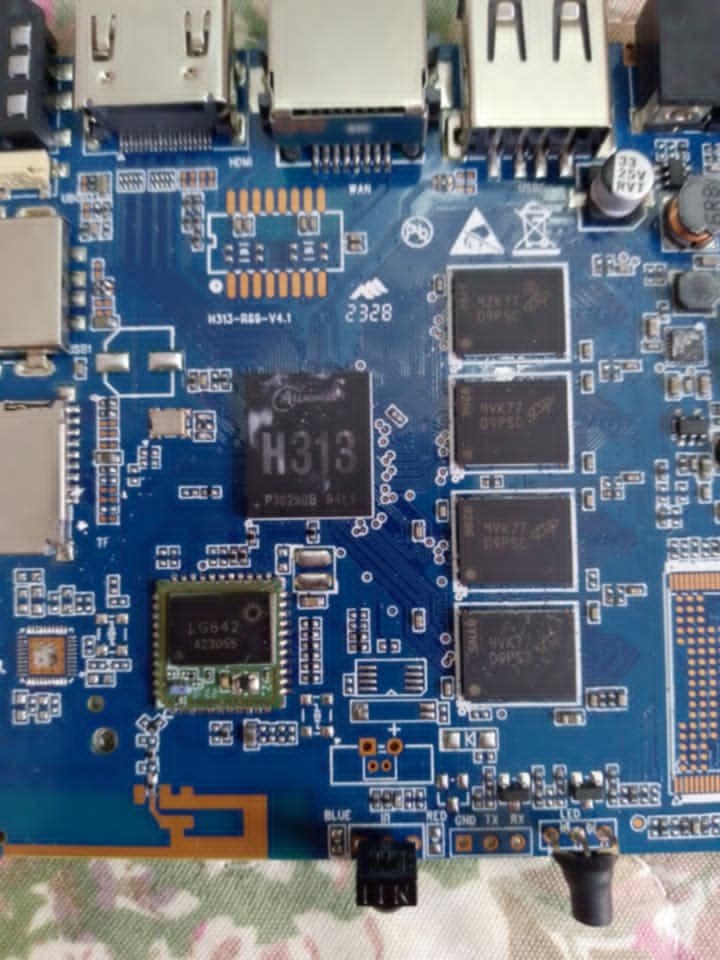
 Search root for this motherboard. The device is tvbox Fobem Duo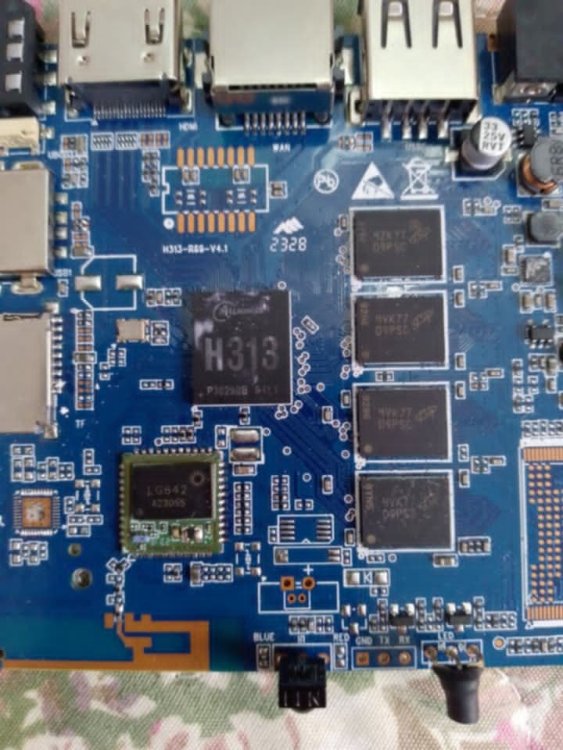
-
Bleedingedge Kernel 7.1 rc2 fixed it [ 12.686942] panfrost fde60000.gpu: clock rate = 594000000 [ 12.686994] panfrost fde60000.gpu: bus_clock rate = 500000000 [ 12.710029] panfrost fde60000.gpu: mali-g52 id 0x7402 major 0x1 minor 0x0 status 0x0 [ 12.710053] panfrost fde60000.gpu: features: 00000000,00000df7, issues: 00000000,00000400 [ 12.710062] panfrost fde60000.gpu: Features: L2:0x07110206 Shader:0x00000002 Tiler:0x00000209 Mem:0x1 MMU:0x00002823 AS:0xff JS:0x7 [ 12.710070] panfrost fde60000.gpu: shader_present=0x1 l2_present=0x1
-
 Hello! I noticed that x96q lpddr v1.3 is now an official (or something close to that) release, as it appears on the main page when searching. I used to use @sicxnull fork but now I have the impression that his changes were incorporated and he is the official maintainer of this device. I installed the Armbian 26.02 in an SD card and tested it in my X96Q lpddr v1.3 device and it works great! The problem is when I installed it to the internal eMMC, it will not boot anymore. I have the serial cable attached and I can see that very very early in the boot process u-boot cannot read from flash and the boot hangs. I know this has been discussed to some extent in another thread but I wanted to start fresh on this one since now we're talking about the Armbian official release and not the fork anymore. My intent with this thread is focus exclusively on fixing eMMC on the official release. My tests: Test 1 Download latest release, from here, more specifically this one. Direct link to the image here (name: Armbian_community_26.2.0-trunk.858_X96q_resolute_current_6.18.27_xfce_desktop.img.xz). Write to SD card using balena etcher, boot in my x96q device. It works well, boots through the initialization process, create user account, etc. The, run armbian-install and install it to internal eMMC. Remove SD card. Reboot. It will not boot, with the following error: Trying to boot from MMC2 MMC Device 1 not found spl: could not find mmc device 1. error: -19 SPL: failed to boot from all boot devices ### ERROR ### Please RESET the board ### Booting from SD card again, re-running the installer and forcing to update the eMMC bootloader does not help. Test 2 I swapped only u-boot for the one from miniarch/minimyth2 project, compiled for the same hardware. Miniarch project can be found here. An image that works on this hardware (in my specific device) can be found here, more specifically this one. This image works well, and it also works well when installed to eMMC. The reason I don't use it is that I prefer Ubuntu over Arch, which I can get with Armbian instead. Download that image, and extract the file u-boot-sunxi-with-spl.bin from the first partition of that image. I used unxz + losetup + loopback mount the image's first partition in linux, but it may be easier for you to just write that image to an SD card, then copy the file from it. It is in the first partition in the path /bootloader/u-boot-sunxi-with-spl.bin. Copy it to a usb stick and plug it into the x96q device or scp it directly. Now, boot the x96q with the SD card, go through all initial setup. Run armbian-install, and install it to eMMC. Finish the installer (quit). Copy the file you extracted from miniarch to the booted system in x96q (using the usb stick or scp'ing it directly). Overwrite the file with the same name at /usr/lib/linux-u-boot-current-x96q/u-boot-sunxi-with-spl.bin with the new one. Run the armbian-install command again, this time chose to update the bootloader in the eMMC. Mount the eMMC temporarily at /mnt and edit the /mnt/boot/armbianEnv.txt file, add this line: fdtfile=allwinner/sun50i-h313-x96q-lpddr3.dtb This is because the hardcoded path for the DTD file in miniarch is different from the one from armbian, so you need to override it. It can also be done in realtime on the u-boot boot prompt if you have serial cable attached. Reboot, remove the SD card and let it boot from the eMMC. It should work, now you have a working Armbian on the eMMC. This will get undone if the bootloader is updated again with the original one (and is not meant as a permanent fix). Thoughts Miniarch uses 2025.04 u-boot while Armbian x96q board is using 2024.01 but I'm not sure this is really relevant. My guess is that the difference is in some of the patches they apply and not in the improvements of this new version of u-boot itself. But I could be wrong. You can find the list of patches that miniarch applies over to stock u-boot here. Many of those patches do not exist in Armbian. I wonder if it is any of those that is making the difference. Question to @sicxnull: do you have a good idea of what is going on and have any direction for further testing? I wanted to ask before I start applying the extra patches one by one, that would take quite some time. Thanks!
 -
Is it possible on a Banana Pi M4 Zero to reboot Armbian running from SD card, so that the next time it boots from the internal storage, without removing the SD card? (and without modifying sdcard boot sector) I want to create an automatic backup internal storage - so that the system (booted from emmc) reboots, starts from the SD card, backs up content emmc to sdcard, and then reboots again, booting from emmc. Is it possible some how?
-

H96 Max RK3528 - Cannot boot Armbian from TF/SD card
jock replied to 0KTAV1US's topic in Rockchip CPU Boxes
@epost.deb Hmmm, I am a bit skeptical about that; mainly because the SoC (on my board <-- this is important!) does not peek for sdcard at all during boot, thus u-boot is not involved; moreover if I read the SARADC2 from userland, I get it in the range of the eMMC-only boot configuration. I emphasize this is on my board, because the manufacturer can chose the boot configuration placing a pair of resistors on the board. The manufacturer of my board choose the eMMC-only boot configuration. If I find the two resistors, and remove the "pull-down" one, my board would try booting from all the options. -
Efforts to develop firmware for H96 MAX V56 RK3566 8G/64G
Hqnicolas replied to Hqnicolas's topic in Rockchip CPU Boxes
somehow I'm in troble to run the armbian build into 24.04 localhost. cd build ./compile.sh BOARD=h96-tvbox-3566 BRANCH=edge BUILD_DESKTOP=no BUILD_MINIMAL=yes KERNEL_CONFIGURE=no RELEASE=resolute [💥] Problem detected [ Docker installed but not usable ] [💥] Exiting in 10 seconds [ Press <Ctrl-C> to abort, <Enter> to ignore and continue ] [🔨] E: Unable to correct problems, you have held broken packages. [💥] error! [ Failed to install host packages; make sure you have a sane sources.list. ] [💥] Exiting with error 43 [ at /home/nicolas/Downloads/build/lib/functions/logging/traps.sh:1 so let's try docker, cd build ./compile.sh docker BOARD=h96-tvbox-3566 BRANCH=edge BUILD_DESKTOP=no BUILD_MINIMAL=yes KERNEL_CONFIGURE=no RELEASE=resolute then also docker: Failed to update binfmts [ update-binfmts --enable qemu-aarch64 ] ... arm64: not supported on this machine/kernel how to fix: sudo apt update sudo apt install -y qemu-user-static binfmt-support sudo systemctl restart systemd-binfmt update-binfmts --display qemu-aarch64 docker run --privileged --rm tonistiigi/binfmt --install all docker run --rm --platform linux/arm64 arm64v8/ubuntu uname -m now, run the build inside the docker shell: cd build newgrp docker ./compile.sh docker-shell ./compile.sh BOARD=h96-tvbox-3566 BRANCH=edge BUILD_DESKTOP=no BUILD_MINIMAL=yes KERNEL_CONFIGURE=no RELEASE=resolute Now let's prepare this board for kernel 7 -
 I have attached both the dtbs for linux 6.6 and 6.12 to this message in the forum.
 -
Okay, here's the error I'm getting from the serial console: DDR Version 1.25 20210517 In channel 0 CS = 0 MR0=0x18 MR4=0x1 MR5=0x1 MR8=0x10 MR12=0x72 MR14=0x72 MR18=0x0 MR19=0x0 MR24=0x8 MR25=0x0 channel 1 CS = 0 MR0=0x18 MR4=0x1 MR5=0x1 MR8=0x10 MR12=0x72 MR14=0x72 MR18=0x0 MR19=0x0 MR24=0x8 MR25=0x0 channel 0 training pass! channel 1 training pass! change freq to 416MHz 0,1 Channel 0: LPDDR4,416MHz Bus Width=32 Col=10 Bank=8 Row=16 CS=1 Die Bus-Width=16 Size=2048MB Channel 1: LPDDR4,416MHz Bus Width=32 Col=10 Bank=8 Row=16 CS=1 Die Bus-Width=16 Size=2048MB 256B stride channel 0 CS = 0 MR0=0x18 MR4=0x1 MR5=0x1 MR8=0x10 MR12=0x72 MR14=0x72 MR18=0x0 MR19=0x0 MR24=0x8 MR25=0x0 channel 1 CS = 0 MR0=0x18 MR4=0x1 MR5=0x1 MR8=0x10 MR12=0x72 MR14=0x72 MR18=0x0 MR19=0x0 MR24=0x8 MR25=0x0 channel 0 training pass! channel 1 training pass! channel 0, cs 0, advanced training done channel 1, cs 0, advanced training done change freq to 856MHz 1,0 ch 0 ddrconfig = 0x101, ddrsize = 0x40 ch 1 ddrconfig = 0x101, ddrsize = 0x40 pmugrf_os_reg[2] = 0x32C1F2C1, stride = 0xD ddr_set_rate to 328MHZ ddr_set_rate to 666MHZ ddr_set_rate to 928MHZ channel 0, cs 0, advanced training done channel 1, cs 0, advanced training done ddr_set_rate to 416MHZ, ctl_index 0 ddr_set_rate to 856MHZ, ctl_index 1 support 416 856 328 666 928 MHz, current 856MHz OUT U-Boot SPL 2022.07-armbian (Jun 30 2024 - 19:41:33 +0000) Trying to boot from SPI Trying to boot from MMC1 Card did not respond to voltage select! : -110 spl: mmc init failed with error: -95 Trying to boot from MMC2 NOTICE: BL31: lts-v2.8.8(release):armbian NOTICE: BL31: Built : 19:41:23, Jun 30 2024 INFO: GICv3 with legacy support detected. INFO: ARM GICv3 driver initialized in EL3 INFO: Maximum SPI INTID supported: 287 INFO: plat_rockchip_pmu_init(1624): pd status 3e INFO: BL31: Initializing runtime services INFO: BL31: Preparing for EL3 exit to normal world INFO: Entry point address = 0x200000 INFO: SPSR = 0x3c9 U-Boot 2022.07-armbian (Jun 30 2024 - 19:41:33 +0000) SoC: Rockchip rk3399 Reset cause: POR DRAM: 3.9 GiB PMIC: RK808 Core: 339 devices, 31 uclasses, devicetree: separate SF: Detected w25q128 with page size 256 Bytes, erase size 4 KiB, total 16 MiB MMC: mmc@fe320000: 1, mmc@fe330000: 0 Loading Environment from MMC... *** Warning - bad CRC, using default environment In: serial Out: serial Err: serial Model: Helios64 Revision: 1.2 - 4GB non ECC Net: dw_dm_mdio_init: mdio node is missing, registering legacy mdio busNo ethernet found. scanning bus for devices... Hit any key to stop autoboot: 0 Card did not respond to voltage select! : -110 switch to partitions #0, OK mmc0(part 0) is current device Scanning mmc 0:1... Found U-Boot script /boot/boot.scr 3906 bytes read in 17 ms (223.6 KiB/s) ## Executing script at 00500000 Boot script loaded from mmc 0:1 179 bytes read in 13 ms (12.7 KiB/s) 20409746 bytes read in 1952 ms (10 MiB/s) 39770624 bytes read in 3781 ms (10 MiB/s) 90994 bytes read in 79 ms (1.1 MiB/s) 2825 bytes read in 173 ms (15.6 KiB/s) Applying kernel provided DT fixup script (rockchip-fixup.scr) ## Executing script at 09000000 Trying kaslrseed command... Info: Unknown command can be safely ignored since kaslrseed does not apply to all boards. Unknown command 'kaslrseed' - try 'help' Moving Image from 0x2080000 to 0x2200000, end=48b0000 ## Loading init Ramdisk from Legacy Image at 06000000 ... Image Name: uInitrd Image Type: AArch64 Linux RAMDisk Image (gzip compressed) Data Size: 20409682 Bytes = 19.5 MiB Load Address: 00000000 Entry Point: 00000000 Verifying Checksum ... OK ## Flattened Device Tree blob at 01f00000 Booting using the fdt blob at 0x1f00000 Loading Ramdisk to f4b66000, end f5edcd52 ... OK Loading Device Tree to 00000000f4ae7000, end 00000000f4b65fff ... OK Starting kernel ... ERROR: rockchip_plat_sip_handler: unhandled SMC (0x82000003) ERROR: rockchip_plat_sip_handler: unhandled SMC (0x82000003) ERROR: rockchip_plat_sip_handler: unhandled SMC (0x82000003) ERROR: rockchip_plat_sip_handler: unhandled SMC (0x82000003) ERROR: rockchip_plat_sip_handler: unhandled SMC (0x82000003) ERROR: rockchip_plat_sip_handler: unhandled SMC (0x82000003) ERROR: rockchip_plat_sip_handler: unhandled SMC (0x82000003) ERROR: rockchip_plat_sip_handler: unhandled SMC (0x82000003) ERROR: rockchip_plat_sip_handler: unhandled SMC (0x82000003) ERROR: rockchip_plat_sip_handler: unhandled SMC (0x82000003) ERROR: rockchip_plat_sip_handler: unhandled SMC (0x82000003) ERROR: rockchip_plat_sip_handler: unhandled SMC (0x82000003) ERROR: rockchip_plat_sip_handler: unhandled SMC (0x82000003) ERROR: rockchip_plat_sip_handler: unhandled SMC (0x82000003) ERROR: rockchip_plat_sip_handler: unhandled SMC (0x82000003) ERROR: rockchip_plat_sip_handler: unhandled SMC (0x82000003) ERROR: rockchip_plat_sip_handler: unhandled SMC (0x82000003) ERROR: rockchip_plat_sip_handler: unhandled SMC (0x82000003) ERROR: rockchip_plat_sip_handler: unhandled SMC (0x82000003) ERROR: rockchip_plat_sip_handler: unhandled SMC (0x82000003) ERROR: rockchip_plat_sip_handler: unhandled SMC (0x82000003) ERROR: rockchip_plat_sip_handler: unhandled SMC (0x82000003) ERROR: rockchip_plat_sip_handler: unhandled SMC (0x82000003) ERROR: rockchip_plat_sip_handler: unhandled SMC (0x82000003) ERROR: rockchip_plat_sip_handler: unhandled SMC (0x82000003) ERROR: rockchip_plat_sip_handler: unhandled SMC (0x82000003) ERROR: rockchip_plat_sip_handler: unhandled SMC (0x82000003) ERROR: rockchip_plat_sip_handler: unhandled SMC (0x82000003) ERROR: rockchip_plat_sip_handler: unhandled SMC (0x82000003) ERROR: rockchip_plat_sip_handler: unhandled SMC (0x82000003) ERROR: rockchip_plat_sip_handler: unhandled SMC (0x82000003) ERROR: rockchip_plat_sip_handler: unhandled SMC (0x82000003) ERROR: rockchip_plat_sip_handler: unhandled SMC (0x82000003) ERROR: rockchip_plat_sip_handler: unhandled SMC (0x82000003) ERROR: rockchip_plat_sip_handler: unhandled SMC (0x82000003) ERROR: rockchip_plat_sip_handler: unhandled SMC (0x82000003) ERROR: rockchip_plat_sip_handler: unhandled SMC (0x82000003) ERROR: rockchip_plat_sip_handler: unhandled SMC (0x82000003) ERROR: rockchip_plat_sip_handler: unhandled SMC (0x82000003) ERROR: rockchip_plat_sip_handler: unhandled SMC (0x82000003) ERROR: rockchip_plat_sip_handler: unhandled SMC (0x82000003) ERROR: rockchip_plat_sip_handler: unhandled SMC (0x82000003) ERROR: rockchip_plat_sip_handler: unhandled SMC (0x82000003) ERROR: rockchip_plat_sip_handler: unhandled SMC (0x82000003) ERROR: rockchip_plat_sip_handler: unhandled SMC (0x82000003) ERROR: rockchip_plat_sip_handler: unhandled SMC (0x82000003) ERROR: rockchip_plat_sip_handler: unhandled SMC (0x82000003) ERROR: rockchip_plat_sip_handler: unhandled SMC (0x82000003) ERROR: rockchip_plat_sip_handler: unhandled SMC (0x82000003) ERROR: rockchip_plat_sip_handler: unhandled SMC (0x82000003) ERROR: rockchip_plat_sip_handler: unhandled SMC (0x82000003) ERROR: rockchip_plat_sip_handler: unhandled SMC (0x82000003) ERROR: rockchip_plat_sip_handler: unhandled SMC (0x82000003) ERROR: rockchip_plat_sip_handler: unhandled SMC (0x82000003) ERROR: rockchip_plat_sip_handler: unhandled SMC (0x82000003) ERROR: rockchip_plat_sip_handler: unhandled SMC (0x82000003) ERROR: rockchip_plat_sip_handler: unhandled SMC (0x82000003) ERROR: rockchip_plat_sip_handler: unhandled SMC (0x82000003) ERROR: rockchip_plat_sip_handler: unhandled SMC (0x82000003) ERROR: rockchip_plat_sip_handler: unhandled SMC (0x82000003) ERROR: rockchip_plat_sip_handler: unhandled SMC (0x82000003) ERROR: rockchip_plat_sip_handler: unhandled SMC (0x82000003) ERROR: rockchip_plat_sip_handler: unhandled SMC (0x82000003) ERROR: rockchip_plat_sip_handler: unhandled SMC (0x82000003) ERROR: rockchip_plat_sip_handler: unhandled SMC (0x82000003) ERROR: rockchip_plat_sip_handler: unhandled SMC (0x82000003) ERROR: rockchip_plat_sip_handler: unhandled SMC (0x82000003) ERROR: rockchip_plat_sip_handler: unhandled SMC (0x82000003) ERROR: rockchip_plat_sip_handler: unhandled SMC (0x82000003) ERROR: rockchip_plat_sip_handler: unhandled SMC (0x82000003) ERROR: rockchip_plat_sip_handler: unhandled SMC (0x82000003) ERROR: rockchip_plat_sip_handler: unhandled SMC (0x82000003) ERROR: rockchip_plat_sip_handler: unhandled SMC (0x82000003) ERROR: rockchip_plat_sip_handler: unhandled SMC (0x82000003) ERROR: rockchip_plat_sip_handler: unhandled SMC (0x82000003) ERROR: rockchip_plat_sip_handler: unhandled SMC (0x82000003) ERROR: rockchip_plat_sip_handler: unhandled SMC (0x82000003) ERROR: rockchip_plat_sip_handler: unhandled SMC (0x82000003) ERROR: rockchip_plat_sip_handler: unhandled SMC (0x82000003) ERROR: rockchip_plat_sip_handler: unhandled SMC (0x82000003) ERROR: rockchip_plat_sip_handler: unhandled SMC (0x82000003) ERROR: rockchip_plat_sip_handler: unhandled SMC (0x82000003) ERROR: rockchip_plat_sip_handler: unhandled SMC (0x82000003) ERROR: rockchip_plat_sip_handler: unhandled SMC (0x82000003) ERROR: rockchip_plat_sip_handler: unhandled SMC (0x82000003) ERROR: rockchip_plat_sip_handler: unhandled SMC (0x82000003) ERROR: rockchip_plat_sip_handler: unhandled SMC (0x82000003) ERROR: rockchip_plat_sip_handler: unhandled SMC (0x82000003) ERROR: rockchip_plat_sip_handler: unhandled SMC (0x82000003) ERROR: rockchip_plat_sip_handler: unhandled SMC (0x82000003) ERROR: rockchip_plat_sip_handler: unhandled SMC (0x82000003) ERROR: rockchip_plat_sip_handler: unhandled SMC (0x82000003) ERROR: rockchip_plat_sip_handler: unhandled SMC (0x82000003) ERROR: rockchip_plat_sip_handler: unhandled SMC (0x82000003) ERROR: rockchip_plat_sip_handler: unhandled SMC (0x82000003) ERROR: rockchip_plat_sip_handler: unhandled SMC (0x82000003) ERROR: rockchip_plat_sip_handler: unhandled SMC (0x82000003) ERROR: rockchip_plat_sip_handler: unhandled SMC (0x82000003) ERROR: rockchip_plat_sip_handler: unhandled SMC (0x82000003) ERROR: rockchip_plat_sip_handler: unhandled SMC (0x82000003) ERROR: rockchip_plat_sip_handler: unhandled SMC (0x82000003) ERROR: rockchip_plat_sip_handler: unhandled SMC (0x82000003) ERROR: rockchip_plat_sip_handler: unhandled SMC (0x82000003) ERROR: rockchip_plat_sip_handler: unhandled SMC (0x82000003) ERROR: rockchip_plat_sip_handler: unhandled SMC (0x82000003) ERROR: rockchip_plat_sip_handler: unhandled SMC (0x82000003) ERROR: rockchip_plat_sip_handler: unhandled SMC (0x82000003) ERROR: rockchip_plat_sip_handler: unhandled SMC (0x82000003) ERROR: rockchip_plat_sip_handler: unhandled SMC (0x82000003) ERROR: rockchip_plat_sip_handler: unhandled SMC (0x82000003) ERROR: rockchip_plat_sip_handler: unhandled SMC (0x82000003) ERROR: rockchip_plat_sip_handler: unhandled SMC (0x82000003) ERROR: rockchip_plat_sip_handler: unhandled SMC (0x82000003) ERROR: rockchip_plat_sip_handler: unhandled SMC (0x82000003) ERROR: rockchip_plat_sip_handler: unhandled SMC (0x82000003) ERROR: rockchip_plat_sip_handler: unhandled SMC (0x82000003) ERROR: rockchip_plat_sip_handler: unhandled SMC (0x82000003) ERROR: rockchip_plat_sip_handler: unhandled SMC (0x82000003) ERROR: rockchip_plat_sip_handler: unhandled SMC (0x82000003)
-
 (I am not part of Armbian other than the community, and have donated money, so I feel no obligation to be "professional") Ok, if you want to act like a clown, I'll treat you like a clown: Don't click unknown links, don't download unknown scripts or applications and you are fine. You know, use common sense. I'm sorry you feel "wronged" by this free and open source project because it doesn't focus the tiny amount of assets they have to manually remove something that pretty much is a nothing burger (and will be solved in the next update), unless you make yourself vulnerable by infecting yourself with with an RCE malware/virus or give physical access to people you can't trust. If you think making a text on their website would "protect" people, when this exploit has been mentioned by more or less every single linux outlet in existence, I don't know what to say. You are not doing this to "protect others", you do it for ego reasons. (Sorry mods, I won't respond more with the risk of starting a war, but if being mentioned in the way op did, I WILL defend myself.) Also, a link about Dirty Frag: https://thehackernews.com/2026/05/linux-kernel-dirty-frag-lpe-exploit.html Mitigation:
 -
For those who want to follow the linux-sunxi mailing list but not as plain emails but in patchwork format, feel free to use https://patchwork.armbian.eu/project/patchwork/list/
-
Efforts to develop firmware for H96 MAX M9 RK3576 TV Box 8G/128G
Hqnicolas replied to Hqnicolas's topic in Rockchip CPU Boxes
to be able to help you, I need you to run: sudo armbianmonitor -u This collects system logs, including the last 250 lines of dmesg, and provides a URL to a pasteboard for easy sharing with the community for help.