All Activity
- Past hour
-
@JamesCl Sorry, It's ok with 100m, but 1000m also doesn't receive an ip with dhcp. Guess it is a dtb problem or maybe uboot
-
Hi ... Thanks @Evgeniy evotronik. Yesterday I downloaded the image "Armbian_community_26.2.0-trunk.886_Orangepi-4a_trixie_edge_7.0.5_minimal.img.xz", but the Ethernet and eMMC issues are still present. I will apply the Ethernet patch. Thanks again.
-
to start ethernet #!/bin/bash echo -n "4510000.ethernet" > /sys/bus/platform/drivers/dwmac-sun55i/unbind 2>/dev/null echo 271 > /sys/class/gpio/export 2>/dev/null echo out > /sys/class/gpio/gpio271/direction 2>/dev/null echo 0 > /sys/class/gpio/gpio271/value 2>/dev/null sleep 0.1 echo 1 > /sys/class/gpio/gpio271/value 2>/dev/null sleep 0.3 echo 271 > /sys/class/gpio/unexport 2>/dev/null echo -n "4510000.ethernet" > /sys/bus/platform/drivers/dwmac-sun55i/bind 2>/dev/null just systemd it [Unit] Description=Fix ethernet PHY on cold boot After=multi-user.target [Service] Type=oneshot ExecStart=/usr/local/bin/fix-eth.sh RemainAfterExit=yes [Install] WantedBy=multi-user.target
- Yesterday
-

CSC Armbian for RK322x TV box boards
Vinicius Guastala replied to jock's topic in Rockchip CPU Boxes
Hi @Tavares R You should definetly check the "Media framework installer v0.1" by Jock, on this link -> https://forum.armbian.com/topic/34923-csc-armbian-for-rk322x-tv-box-boards/page/10/#comment-102655 Also, this other link contains a repo to install some patched libs to at least use decoded video -> https://forum.armbian.com/topic/32449-repository-for-v4l2request-hardware-video-decoding-rockchip-allwinner/ Hope it helps, but reality check is the rk3229 is just too weak to properly handle a full DE running a modern browser... Something also worth trying is to enable the "cpu-hs" overlay. it will "overclock" the rk3229 from 1200Mhz to 1400Mhz, giving some extra performance, but keep low expectations... PS: Are you brazillian by any means? Tavares is a very common last name in Brazil.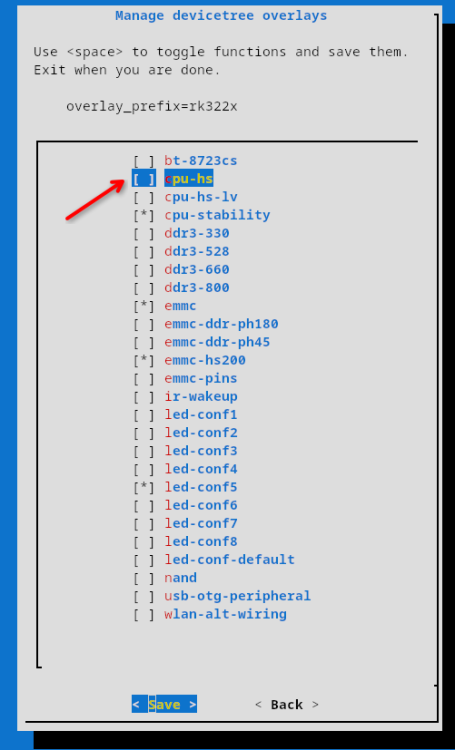
-
CSC Armbian for RK322x TV box boards
Vinicius Guastala replied to jock's topic in Rockchip CPU Boxes
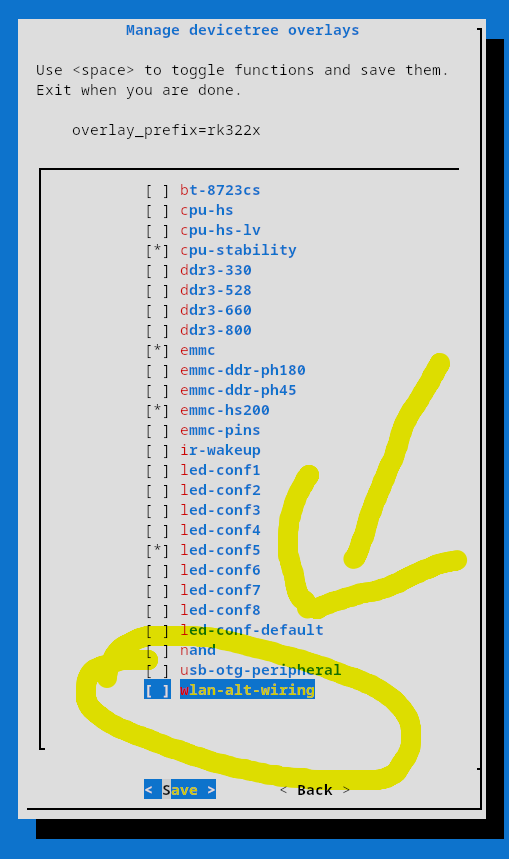
@digital, there is not a lot of info about the 024c:b723 device you mentioned on linux-hardware.org, but there is a lot of people claiming it works on debian 10+. Some boards have alternate pins for wireless chips, hence there is an specific wifi overlay for those scenarios (attached pic). However, I would not recommend to add this overlay for now, until we find the exact wifi chip model from your board... Can you share more details form your board? Brand/Model would be a start, but pictures from the board, and specially the wi-fi chip would be the best. Also, please share the output of the commands below with us: 1- lsusb 2- lshw (install it with sudo apt install lshw) 3- dmesg | grep -iE 'wlan|wifi|wireless|80211' 4 - ip a 5 - nmcli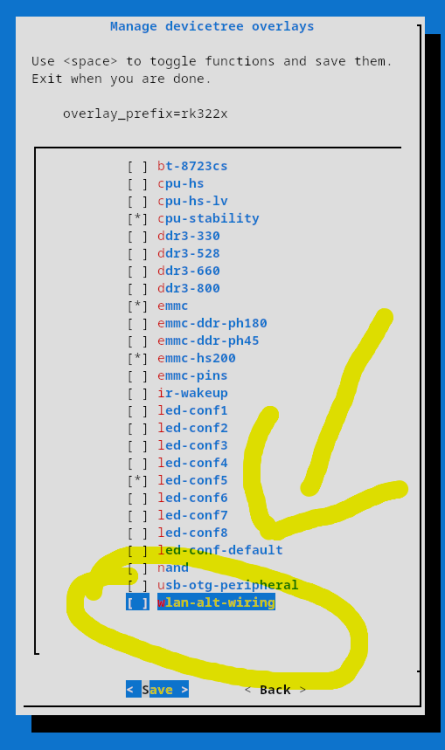
-
CSC Armbian for RK322x TV box boards
Vinicius Guastala replied to jock's topic in Rockchip CPU Boxes
@Cammera, what are you exactly trying to do? Can you share what's your device model? Your screenshot is from the Android main loader, not really related to Armbian... If you are on this screen you already missed the boot window to start armbian... Take a look at the first post on this thread, but usually you should deploy an SD card with multitool or armbian nightly build, and when inserted, the boot screen from armbian will be different from yours... -
@Morales Morales when I have more free time.. busy with work the next couple of months.
-
CSC Armbian for RK322x TV box boards
Vinicius Guastala replied to jock's topic in Rockchip CPU Boxes
@eas07027 depends on the device... but since you are in the rk322x thread, I'm afraid there is no Home-Assistant-ready images for this specific stub, but if you have an arm64 device, it is easy to deploy armbian and then to deploy the Docker Home Assistant version using the official guides from home assistant. What is your device? -
Armbian with Virtualbox and Home Assistant
Vinicius Guastala replied to greg396's topic in Beginners
Hey @greg396, On top of previous answers, I'd like to suggest the read of this link: https://linbit.com/blog/home-assistant-high-availability/ If your home ecosystem grows, you will need high availability. Otherwise, turning lights on with your home assistant server down can become impossible depending your setup. If you have 2 devices, you can then create a cluster, so one can be backup of each other. I'm running this very same setup with 3 Nodes: 1 - Proxmox x64 VM (Main Node) 2- Tanix TXT arm64 Running Armbian (Backup Node) 3 - NanoPi Neo (Quorum Decider), running arm32 armbian. Nodes 1 and 2 are backups of each other and node 3# is a split brain tie-breaker. -

Armbian for H313 X96-Q LPDDR3 TV-Box
Jorge Henrique replied to sicxnull's topic in Allwinner CPU Boxes
I created this account just to thank you, man. Thank you so much, it worked perfectly here. Finally, my old TV box has another use besides collecting dust. -
@Droll, something worth to check out is the SMB version your server is running... They have slightly different authentication, so the mount command differs a bit: SMBV1: sudo mount -t cifs -o vers=1.0,username=your_username,password=your_password //server_ip/share_name /mnt/myshare SMBV2: sudo mount -t cifs -o vers=2.0,username=your_username,password=your_password //server_ip/share_name /mnt/myshare
-
Suggestions will be very appreciated.
-
@Arthur Gu Thank you for the effort and congratulations for your success. I will try it in the next days.
-

Armbian for H313 X96-Q LPDDR3 TV-Box
Morales Morales replied to sicxnull's topic in Allwinner CPU Boxes
@Nick A Hi, I was wondering if you plan to update your distro since it hasn't been updated since 2025. -
 yet still giving enough to write a answer. flaming over LPEs (or any vulnerability) does not solve any issues. I suggest to read the license again to get a clue who's responsible about fixing things in general: https://github.com/armbian/build/blob/5e60c0183d035bfd5179373e1eac284790e08904/LICENSE#L265-L268 Both parties also shall read the terms of use again, the very first bullet point in particular. I will not give this hint a second time. fixes will land upstream, stable builds will adapt four times a year. For everyone wants things faster, options were provided.
 -
@Levy Barbosa I was able to boot and install! Instructions Download Armbian from: https://www.armbian.com/boards/aml-s9xx-box Use: - Debian 13 (Trixie) Minimal - Current kernel (6.18.26) Create bootable USB with Rufus/Balena Etcher. S805X-P241 Specific Changes After writing the image, before booting: 1. Set correct DTB - Open armbi_boot partition - Edit extlinux/extlinux.conf - On line 4, change DTB to: meson-gxl-s805x-p241.dtb 2. Set correct u-boot - In armbi_boot, copy u-boot-s905x-s912 - Rename copy to u-boot.ext 3. Boot - Insert USB into USB2 port (closest to power input) - Hold reset button (between USB ports) while applying power - Release after 15 seconds First Login Username: root Password: 1234 Change password when prompted. Notes - Wi-Fi works - Ethernet is 100 Mbps
-
 TV Box Name: Intelbras IzyPlay Board name: DV8038 CPU: Amlogic S805X (GXL Meson, Rev D) Armbian build file name: Armbian_community_26.2.0-trunk.821_Aml-s9xx-box_trixie_current_6.18.26_minimal.img.xz DTB file used: meson-gxl-s805x-p241.dtb Kernel Version: 6.18.26-current-meson64 Distribution Installed: Debian 13 (Trixie) Working Ethernet: Yes Max Ethernet Speed that works: 100 Mbps Does wifi work: Yes Does bluetooth work: No Does HDMI audio work: Not tested (headless setup) Additional Comments: - Board has 1GB RAM (908MB available) and 7.3GB eMMC - HDMI output works (tested on a DELL P2219H) - Reset button is between USB1 and USB2 ports - USB2 port is required for booting (closest to power input) - To boot from USB: hold reset button while applying power, release after 15 seconds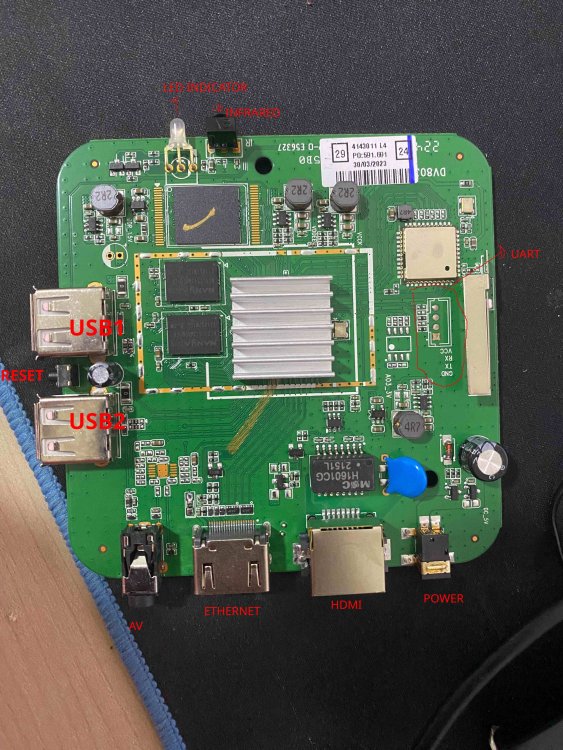
-

Helios64 - Armbian Trixie with linux 6.18 (incl. opp-microvolt patch)
BipBip1981 replied to ebin-dev's topic in Rockchip
Thank @iav -
 @iav Yes, thank you. I'll be able to test the PR for you next week.
 -
@guenter I have resolved the NVMe SSD detection issue. The updated device tree access path is listed below. https://github.com/Arthur97172/Armbian-Community-Build/blob/main/patch/kernel/archive/rockchip64-6.18/dt/rk3568-yy3568.dts
-
@iav Thank you very much !
-
https://github.com/hillac/jetson-nano-armbian-build/blob/main/jetson-armbian-26.md I got a 26 trixie image with the 6.18.29 kernel booting headless. No hdmi. Boot logs over uart were showing 'tegra-pmc 7000e400.pmc: failed to get resets for venc: -517' so I just removed the problem reset from venc in the dtb. This reset was in the dtb for the working 23.8.1 image, so it's not the root cause, but at least it boots properly.
-
Hi @ebin-dev, @SymbiosisSystems, and everyone in this thread, Following the recurring instability reports here and in the older topic ( https://forum.armbian.com/topic/30074-helios64-armbian-2308-bookworm-issues-solved/ ), I've packaged your opp-microvolt workaround as an opt-in DT overlay in the Armbian build framework. PR: https://github.com/armbian/build/pull/9822 — adds the overlay to both Armbian kernel trees: `rockchip64-current` (6.18) and `rockchip64-edge` (7.0). What you get once this lands: - `rockchip-rk3399-helios64-cpu-stability.dtbo` ships inside the regular `linux-dtb-{current,edge}-rockchip64` package. No hand-patching of DTBs, no separate downloads; `apt upgrade` keeps the overlay in sync with whatever DTB your kernel ships. - **Not enabled by default** — for the people whose Helios64 "just works", the mainline OPPs stay untouched. I don't want to push a tree-wide voltage bump onto every user when only some units exhibit the instability. - Activation is the standard Armbian way, either: armbian-config → System → Kernel → Manage device tree overlays → [*] rk3399-helios64-cpu-stability → save → reboot or manually, by adding the overlay name to the `overlays=` line in `/boot/armbianEnv.txt` (the `rockchip-` prefix is implicit, because `overlay_prefix=rockchip` is already set on this board): overlays=rk3399-helios64-cpu-stability Then reboot. Voltages are exactly the ones from your post in this thread — https://forum.armbian.com/topic/58597-helios64-armbian-trixie-with-linux-618-incl-opp-microvolt-patch/?do=findComment&comment=237456 (opp00..opp06 raised to 900 / 900 / 900 / 950 / 1025 / 1100 / 1175 mV; opp07 left at the mainline 1.20 V; `max` everywhere kept at 1.25 V). Frequencies are not touched. End-to-end verified on my Helios64 with both kernels: - current / 6.18.30, Trixie SD-card image - edge / 7.0.7, Trixie SD-card image (locally built) After enabling the overlay and a reboot: for n in 0 1 2 3 4 5 6 7; do od -An -tx4 --endian=big \ /sys/firmware/devicetree/base/opp-table-1/opp0$n/opp-microvolt done opp00 000dbba0 000dbba0 001312d0 opp01 000dbba0 000dbba0 001312d0 opp02 000dbba0 000dbba0 001312d0 opp03 000e7ef0 000e7ef0 001312d0 opp04 000fa3e8 000fa3e8 001312d0 opp05 0010c8e0 0010c8e0 001312d0 opp06 0011edd8 0011edd8 001312d0 opp07 00124f80 00124f80 001312d0 ...which matches your table 1:1. U-boot log line on boot: Applying kernel provided DT overlay rockchip-rk3399-helios64-cpu-stability.dtbo confirms that u-boot picks up the `.dtbo` from `/boot/dtb/.../rockchip/overlay/` and applies it via `fdt apply` before the kernel starts. Ready-to-flash **current/6.18** images, built from the PR branch by the official Armbian builder workflow: https://fi.mirror.armbian.de/incoming/iav/helios64/archive/ - Armbian_26.5.0_Helios64_resolute_current_6.18.30_minimal.img.xz - Armbian_26.5.0_Helios64_resolute_current_6.18.30_xfce_desktop.img.xz - Armbian_26.5.0_Helios64_trixie_current_6.18.30_minimal.img.xz If any of you can grab one of those (or wait for a nightly after the PR is merged) and confirm the workaround applies cleanly through the overlay path on your board, that would help the PR land. Bug reports are welcome too. Attribution lives in the overlay README block (look for the heading `### rk3399-helios64-cpu-stability`), pointing back to forum topics 30074 and 58597, prahal and ebin-dev: https://github.com/armbian/build/blob/feat/helios64-cpu-stability-overlay/patch/kernel/archive/rockchip64-6.18/overlay/README.rockchip-overlays https://github.com/armbian/build/blob/feat/helios64-cpu-stability-overlay/patch/kernel/archive/rockchip64-7.0/overlay/README.rockchip-overlays Thanks!
-
Hi @ebin-dev, @SymbiosisSystems, and everyone in this thread, Following the recurring instability reports here and in the older topic 30074, I've packaged your opp-microvolt workaround as an opt-in DT overlay in the Armbian build framework. PR: **armbian/build#9822** — adds the overlay to both Armbian kernel trees: `rockchip64-current` (6.18) and `rockchip64-edge` (7.0). What you get once this lands: - `rockchip-rk3399-helios64-cpu-stability.dtbo` ships inside the regular `linux-dtb-{current,edge}-rockchip64` package. No hand-patching of DTBs, no separate downloads; `apt upgrade` keeps the overlay in sync with whatever DTB your kernel ships. - **Not enabled by default** — for the people whose Helios64 "just works", the mainline OPPs stay untouched. I don't want to push a tree-wide voltage bump onto every user when only some units exhibit the instability. - Activation is the standard Armbian way, either: armbian-config → System → Kernel → Manage device tree overlays → [*] rk3399-helios64-cpu-stability → save → reboot or manually, by adding the overlay name to the `overlays=` line in `/boot/armbianEnv.txt` (the `rockchip-` prefix is implicit, because `overlay_prefix=rockchip` is already set on this board): overlays=rk3399-helios64-cpu-stability Then reboot. Voltages are exactly the ones from post #237456 (opp00..opp06 raised to 900 / 900 / 900 / 950 / 1025 / 1100 / 1175 mV; opp07 left at the mainline 1.20 V; `max` everywhere kept at 1.25 V). Frequencies are not touched. End-to-end verified on my Helios64 with both kernels: - current / 6.18.30, Trixie SD-card image - edge / 7.0.7, Trixie SD-card image (locally built) After enabling the overlay and a reboot: for n in 0 1 2 3 4 5 6 7; do od -An -tx4 --endian=big \ /sys/firmware/devicetree/base/opp-table-1/opp0$n/opp-microvolt done opp00 000dbba0 000dbba0 001312d0 opp01 000dbba0 000dbba0 001312d0 opp02 000dbba0 000dbba0 001312d0 opp03 000e7ef0 000e7ef0 001312d0 opp04 000fa3e8 000fa3e8 001312d0 opp05 0010c8e0 0010c8e0 001312d0 opp06 0011edd8 0011edd8 001312d0 opp07 00124f80 00124f80 001312d0 ...which matches your table 1:1. U-boot log line on boot: Applying kernel provided DT overlay rockchip-rk3399-helios64-cpu-stability.dtbo confirms that u-boot picks up the `.dtbo` from `/boot/dtb/.../rockchip/overlay/` and applies it via `fdt apply` before the kernel starts. Ready-to-flash **current/6.18** images, built from the PR branch by the official Armbian builder workflow: https://fi.mirror.armbian.de/incoming/iav/helios64/archive/ - Armbian_26.5.0_Helios64_resolute_current_6.18.30_minimal.img.xz - Armbian_26.5.0_Helios64_resolute_current_6.18.30_xfce_desktop.img.xz - Armbian_26.5.0_Helios64_trixie_current_6.18.30_minimal.img.xz If any of you can grab one of those (or wait for a nightly after the PR is merged) and confirm the workaround applies cleanly through the overlay path on your board, that would help the PR land. Bug reports are welcome too. Attribution lives in `patch/kernel/archive/rockchip64-{6.18,7.0}/overlay/README.rockchip-overlays` under `### rk3399-helios64-cpu-stability`, pointing back to topics 30074 and 58597, prahal and ebin-dev. Thanks!
- Last week
-
You shouldn't be getting into android recovery. How did you burn the image to the SD card? On what platform? The fact that I'm seeing things like "System Volume Information" and "box-config" which aren't directories that should exist on an Armbian image, it looks like something strange has happened to your SD card image.