Igor
-
Posts
14697 -
Joined
-
Last visited
Content Type
Forums
Store
Crowdfunding
Applications
Events
Raffles
Community Map
Everything posted by Igor
-
Trouble with SSH client or failed SD card could explain this. We didn't change anything in this regard. SSH settings are Debian / Ubuntu defaults. We are not altering this. I tested latest image on XU4 and - it worked.
-
Auto generated images: https://dl.armbian.com/nightly/orangepirv2/Forky_current_minimal https://dl.armbian.com/nightly/orangepirv2/Noble_current_xfce
-
It is possible but I think it is currently broken / unfinished / does not work (properly) yet.
-

Where's the proper place to discuss armbian-install?
Igor replied to Meestor_X's topic in Software, Applications, Userspace
Actually not as I am human - I need time and focus to be able to understand what the code does. Same as everyone else. BASH is list of commands and if you are average tech person you can interpret those command, one after another to understand what is going on. AI can help. You can, but you can not expect that I will answer them. Perhaps someone else will, perhaps nobody. I show you how you can understand it without destroying my brain - I need to look into the code to answer questions ... Its Friday evening here and I already answered at maximum effort. -
Has anyone had any luck with the Radxa Cubie a5e and Armbian?
Igor replied to Meestor_X's topic in Allwinner sunxi
Radxa images comes with proprietary vendor kernel v5.15, which we won't integrate for this hardware - Armbian is only made with mainline derived v6.18.y / v6.19.y kernel, which is far from completion. Those SW stacks are fundamentally different. We can produce a Bullseye image, but with a kernel 6.18.y only ... which means identical hardware support as on Armbian Trixie. In general https://docs.armbian.com/User-Guide_FAQ/#why-things-stop-working -
Where's the proper place to discuss armbian-install?
Igor replied to Meestor_X's topic in Software, Applications, Userspace
Its BASH, so its easy to interpret: https://github.com/armbian/build/blob/main/packages/bsp/common/usr/bin/armbian-install perhaps by AI: https://chat.z.ai/s/084a9535-9fd8-4078-ab9c-ad85254689cf Refactoring draft: https://github.com/armbian/configng/pull/384 Plan is to write this script from scratch ... but dunno when. This should work in all cases. I hope those tips helps. -
Thank you. Basic functionality, few non critical bugs = release ready. Moving to main download location. Imager will have them after they are moved to primary download location. Test images are not there. We don't provide that. We will only provide images with mainline derived kernel which is hard to compare - its a very different SW stack - with Radxa vendor kernel. Basic (!) functions for headless usage are already working. The rest in next 6-12-> month.
-
Are those ok? https://fi.mirror.armbian.de/incoming/igorpecovnik/radxa-e25/archive/ One current, one vendor.
-
How you can help test upcoming Armbian 26.05 images?
Igor replied to Igor's topic in Advanced users - Development
All are interesting. However, H3, H5 and H6 boards will receive additional fixing to DVFS during this week. After that, I will rebuild them, but those are all CSC, so there are additional tasks: We only generate and test boards with at least "standard support", where a known maintainer is around. If you (or someone else) step up as a maintainer: https://docs.armbian.com/User-Guide_Board-Support-Rules/ following by PR as such https://github.com/armbian/build/pull/8981 boards will automatically be added to automatically generated build lists https://github.armbian.com/release-targets/targets-release-standard-support.yaml and images can be (auto) generated: https://docs.armbian.com/Process_CI/#automation-for-developers-and-maintainers If you wanna cover those steps, report status at release periods, step up. In most cases, boards work but during those tests we usually always found something to fix. And boot loader compilation is checked this way - end user upgrades don't upgrade that by default so you could be running a board for years while freshly build images would have borked uboot ... Perfect - new use case: Armbian QA -
How you can help test upcoming Armbian 26.05 images?
Igor replied to Igor's topic in Advanced users - Development
Once board is tested, its moved to its final destination https://www.armbian.com/nanopi-m4-v2/ I tested it KDE was enabled "as is" / at last moment. I am not familiar with KDE much, so I don't know what to enable. I know that there could be issues between Neon and Ubuntu packages, so we kept this minimal. https://github.com/armbian/build/blob/main/config/desktop/noble/environments/kde-neon/config_base/packages Tested boards are moving to /dl Thank you for help. -
How you can help test upcoming Armbian 26.05 images?
Igor replied to Igor's topic in Advanced users - Development
Here, yes. Thank you! No, but we need to test images made for release. There is another last minute change https://github.com/armbian/build/commit/1890d7f6566a65202f73730b469d024c20f863b8 than can, in theory, make unbootable image. OK. Bugs will be present and we won't be fixing them at this stage. Here - if basic things works - that image boots, have connectivity and video output ... its ready to ship. All other things can be fixed with an update. If / when they are fixed. -
How you can help test upcoming Armbian 26.05 images?
Igor replied to Igor's topic in Advanced users - Development
What was already tested: UEFI x86 KDE Neon, Gnome, Ubuntu minimal MusePI Pro Xfce Odroid M1 KDE Neon Odroid N2 Xfce https://paste.armbian.com/oqegebaqey Orangepi 5 Nanopi M4V2 Odroid M2 Radxa E54 Rock 5C Orangepi 3LTS Odroid C4 Bananapi Rock 3A Orangepi PC2 Nanopi K1plus Khadas Edge 2 Bananapi F3 Nanopi M6 / R6S Rock 2F / 2A / 3A Rpi (all) -
We are opening public testing for upcoming Armbian images. The goal is to verify that the right images are built and that basic functionality works before boards are moved to the main download pages. You don’t need to be a developer. Simple testing and short reports are enough. 1. Download testing images Testing images are available here: https://fi.mirror.armbian.de/incoming/igorpecovnik/ Pick the image matching your board and choose desktop if applicable. Once image is confirmed working, the board will be: Moved to the main download pages Added to Armbian Imager 2. Check that expected images exist Before testing, please verify that: Your board is listed The expected image variants exist If an image (variant) seems to be missing: Check the release target definitions: https://github.com/armbian/armbian.github.io/tree/main/release-targets If the image should exist, check build logs to see if it failed: https://github.com/armbian/os/actions/runs/21642728389 If you are unsure, report it anyway. 3. Flash and boot Flash the image using Armbian Imager: https://imager.armbian.com Boot the board and check whether it reaches: Login prompt (CLI images) Desktop (Desktop images) If the board does not boot, serial output or photos help. 4. What to test Please focus on basic functionality: Boot reliability and reboot Networking (Ethernet, Wi-Fi, Bluetooth) Display and GPU, if applicable Installer and first-boot experience Advanced features can wait. Stability comes first. 5. UEFI ARM64 images If your board might support UEFI on ARM64, please test those images on them. Working UEFI images allow us to reuse targets and reduce the number of generated images. Reference: https://github.com/armbian/armbian.github.io/blob/main/release-targets/reusable.yml 6. Community-supported boards Some boards are currently released as community-supported: https://github.com/armbian/community/releases We want to promote suitable boards to standard support which brings more image variants and much faster download. This requires: Confirmation that basic functionality works Send a PR to change status from .csc to .conf A community member willing to step up as maintainer If you rely on such a board and want it promoted, this is the time to help. 7. Reporting (here in this topic!) When reporting test results, please include: Board model Image name and variant What works and what does not Logs or serial output if available Even short reports like “Board X, image Y, boots and networking works” are useful. Thanks to everyone helping with testing. Early feedback directly improves the release quality!
-
BTF is hungry for memory, yes. KERNEL_BTF=n and it needs less. On 16Gb+ machine you should be fine. If not memory is eaten away by something else.
-
zfs-zed 2.4.0 not available
Igor replied to Marcos Alano's topic in Software, Applications, Userspace
https://github.com/armbian/os/pull/426 Once automation finishes - couple of hours, repo will have a missing package. Workaround: manually install package from https://packages.debian.org/forky/zfs-zed -
Headers are present. https://imola.armbian.com/apt/pool/main/l/linux-headers-current-rockchip64/ Upgrade packages to latest and try again.
-
Some context: https://docs.armbian.com/User-Guide_FAQ/#why-things-stop-working The hardest part and expensive for time is keeping functions working while kernel changes, goes up. Image you are referring too is probably a demo image with some ancient kernel that will never be changed. This is usual way to sell hardware. It is made to work, but you will stay at this very old SW stack without any real option to change or fix anything. All functions on 300+ boards, which on top of extreme diversity, have also different revisions, quality issue ... is already not possible to keep up by entire open source community. Armbian is small part focused into SBCs and we do what we can. Work we are doing is never complete, we (nobody) can't solve bugs and especially not near to (expected) real-time. We (or community open source in total) can address a problem within weeks or months fastest as resources are tiny compared to problems that are constantly found in open source code that somebody else made. We have no option to expand the team / project as users don't care about well being of SW developers. We can only try to keep SW stack operational on a best effort principle. Once this job becomes too expensive (<1% of costs share is on users side), we have to step back and declare support as "community". We will continue to build and ship images as they might still work for some use cases and as downstream projects will provide those Armbian images anyway.
-
Rpi support for whatever of their devices is mainly on the level of RaspberryPi OS. We use their kernels sources as base, add some additional things and release timing is different - not much difference. If they added new device, it should just work. If anyone wants to improve support or fix WiFi -> https://github.com/armbian/build/pulls
-
There is no way. You need a dedicated image for your hardware. https://docs.armbian.com/User-Guide_FAQ/
-
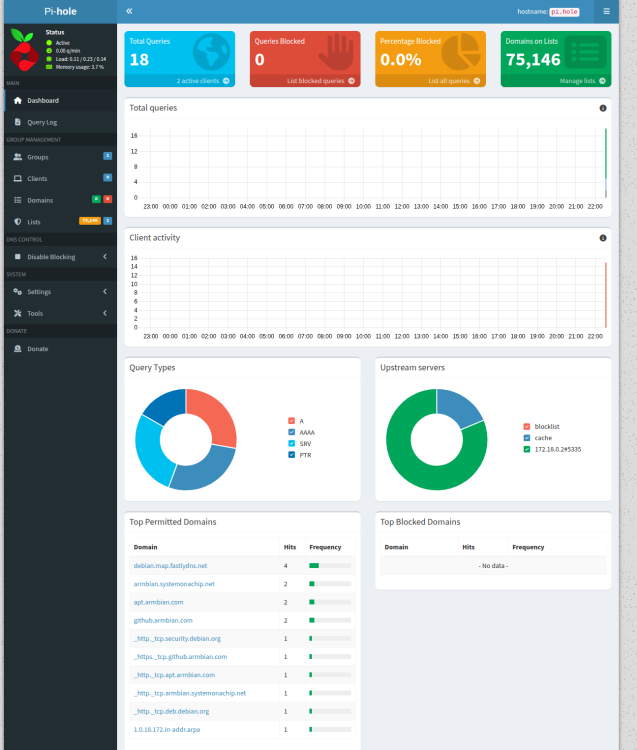
Test automation doesn't detect any issues https://github.com/armbian/configng/actions/runs/21465331853 and since I had freshly build Armbian Trixie on Nanopi R6S (same arch) I run install: Works like charm. Make sure to do apt update + apt upgrade before you start.
-
Did you used most up2date armbian-config? Few days ago some critical bugs were fixed - i tested it several times and it worked ...
-
Probably, my guess, issue with a boot loader - fail to / disabled by mistake power SATA port? We don't have anyone actively maintaining this kind of (10+years) hardware anymore. Support is "community / upstream" maintained "as is". But this forum / community can provide assistance to fix this. I gave a tip - where I think is the problem. Not working feature on particular hardware is not Armbian problem. This is custom hardware world and our work is tooling https://github.com/armbian/build and best effort hardware maintenance on this principle https://docs.armbian.com/User-Guide_Board-Support-Rules/ If we try to fix everything, everyone would be long burned out ...
-
Userspace has nothing to do with hardware features. I don't know what is the case for A20, but for many others, OTG functionality is driven with overlays. If there are no overlays, you need to edit device tree and change its role. If that doesn't help, it is more complex problem. More complex, perhaps days / weeks to debug and fix. Most of (Armbian) kernel developers are long gone from this 10+ years old platform and users can't help. Also look into previous builds. Finding out when this broke is half of the solution https://fi.mirror.armbian.de/oldarchive/ or by finding a kernel that works https://docs.armbian.com/User-Guide_Armbian-Config/System/#alternative-kernels With any userspace (trixie/noble/jammy ...) Probably all A10 and A20 boards share this problem.
-
Feature regressions are sadly something that happens all the time. There are many variants out there and (part of) Armbian OS is different for every board ... First resolve confusion - do you have M1 (we call it just bananapi) or M3. You mention M3 in the text, while title says M1+. Those are totally different boards. Proceed from older images and find out when this feature stopped working: https://fi.mirror.armbian.de/archive/ https://fi.mirror.armbian.de/oldarchive/
-
Ubuntu Noble variant already supports ZFS on 6.18.y while Trixie was added today: https://github.com/armbian/os/pull/425 Testing: Once automation completes, it will be provided via normal apt update.