Active threads
Showing topics posted in for the last 365 days.
- Past hour
-
 (I prepared this spiel before I found this thread, but it still holds) /// Spent the last 2 days on this issue with an ALLWINNER image, not an AMLOGIC image. Back in October I had NO issue configuring this same image (downloaded to my nVME drive) on W11, with the same image, same copy of Balena etcher. PC 1 I flashed an Armbian community image onto an SD card (in a USB SD Card adapter), but was unable to see the FAT32 partition in Windows. I mounted the same USB in a VMware VM, and could only see one partition(!) I reflashed the image using dd (in VMware) and again only one partition was written. The flashed SD card (unconfigured for DTB etc) ran fine on my TV box. The default DTB setup clearly works. I loaded Linux Reader for Windows (LRFW) but had the same result, could not see a FAT32 boot partition. PC 2 I flashed the same image using etcher on a different Windows 11 PC. Same result on that PC, unable to see a FAT32 partition. (Back to) PC1 I Inserted the SD card adapter back into the first computer, and was able to see the root partition, mounted as armbi_root(F:) and also as armbi_root(i), but still no BOOT partition (maybe the LRFW software took a few minutes to start working). It seems to me the only variable is Windows 11 having some driver issue, since that's the only remaining variable I can think of. //// Does any knowledgeable contributor know of any POSSIBLE reason why etcher would now only write ONE partition, whereas previously it would write 2 partitions from the same image? Is anyone having this issue using only Linux as the dev environment? best John
 -
 Yes, I did update… not sure why it’s not picking it up. If I go with the quick workaround, will the correct U-Boot get applied in future updates?
 - Today
-
You can try, worse case it won't boot. What's the problem with that ? Only general. Switch to nightly repository and then switch to edge kernel: https://docs.armbian.com/User-Guide_Armbian-Config/System/#rolling https://docs.armbian.com/User-Guide_Armbian-Config/System/#alternative-kernels but if it won't work, you are on your own to find out why it doesn't work. Also some features won't work. We never supported EDGE kernels due to extreme costs associated with such operation.
-
This is part of https://github.com/armbian/build/pull/8777/files And there are no changes at our end. So I assume the issue was introduced in mainline?
-
@djoness I also have V4.0 Box, have same X96Q-Armbian-H313 V4.0 boot screen, so, I burn "Armbian-unofficial_25.05.0-trunk_X96q-ddr3_bookworm_edge_6.12.11_server.img.xz" which you said to SD Card, My Box not work.Than i press and hold the Av button,The LED.Show Red,and. Screen Black. nothing. i don't press ,it will be inside to Android. what are you do, can make inside to Armbian.Tell me. Thanks a lot.
-
I've been using this setup for a few good weeks without issues, same powered hub and everything, however after accidentally unplugging the server and being unable to boot I decided to reimage the SD Card and now the box refuses to detect my external 1TB 2.5" HDD (powered hub). Currently running latest server Debian (Armbian_community_26.2.0-trunk.22_Aml-s9xx-box_trixie_current_6.12.59) on X96 Mini (Amlogic S905W). I've tried to recreate my setup as close as possible to what I had before, however, now I cannot seem to be able to detect the HDD. The OS is installed on the SD Card. lsblk looks like this: NAME MAJ:MIN RM SIZE RO TYPE MOUNTPOINTS mmcblk0 179:0 0 57.6G 0 disk ├─mmcblk0p1 179:1 0 512M 0 part /boot └─mmcblk0p2 179:2 0 56.6G 0 part /var/log.hdd / mmcblk1 179:32 0 14.7G 0 disk mmcblk1boot0 179:64 0 4M 1 disk mmcblk1boot1 179:96 0 4M 1 disk zram0 252:0 0 960.7M 0 disk [SWAP] zram1 252:1 0 50M 0 disk /var/log zram2 252:2 0 0B 0 disk I can hear a clicking sound coming from the hdd, however it does not want to spin up. The HDD has around 8-9% free space left, and is formatted as EXFAT. Connecting to a windows laptop the HDD spins up and gets detected instantly, even with no external power. I'm completely at a loss regarding this, especially since I did my best recreating my working setup from a few hours ago.
-

Driving the ili9488 LCD (4.0 inch cheap chinese clone)
forumtrekker replied to robertoj's topic in Allwinner sunxi
Good to know. I'm interested in getting the red LCD's to work as they are cheaper and more available, I purchased the waveshare only to test my SPI, SBC, and DTS formatting were functional. Now that I confirmed how to translate DTS to work with my SBC, I can work on the red ili9486/8 without worrying about it being a formatting issue. -

KickPi K2B not booting up: DRAM setup not supported
c0rnelius replied to chuanzz's topic in KickPi K2B
The v2 uses a diff wifi chip: SKW wifi module VS6621S I have a patch for it, which came from KICKPI in the deb builder, but... I don't have a V2 to work any magic on it. chuanzz at one point contacted KICKPI and they sent him an archive that had a bunch of Armbian adds in it, including the patches and board.confs. But the HDD I had the archive on got erased by mistake, so yeah... I don't have the info anymore. I don't see the K2B REV2 getting official support here or by me, as its using a wifi chip that is just to obscure. Here is a u-boot-v2025.07 binary for the K2B REV2 u-boot-sunxi-with-spl.bin - Yesterday
-
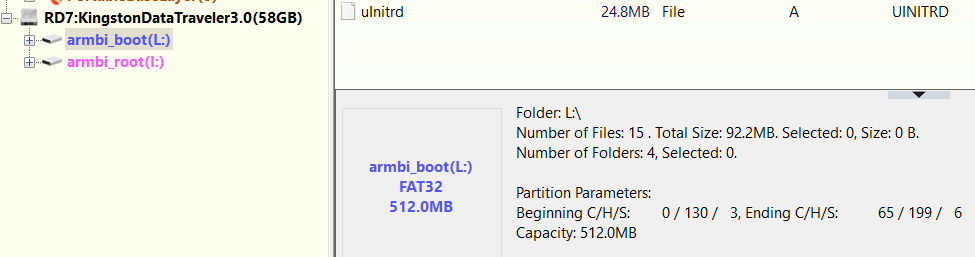
@Maurizio Finesso@John Taylor@SteeMan I've had success using USB stick instead of SD Card (see my post on 1st page), however now the BOOT Fat32 partition was hidden for some reason, I used DiskGenius to unhide it. I didn't test this on the tv box yet. This also goes against what is being said in this thread (that there are no more Fat32 paritions visible in Windows) from this thread: EDIT2: USB stick works, however I'm having trouble with "USB device not recognized" on Windows, and I can' seem to be able to fix it with gparted for example, as it keeps disconnecting, so YMMW.
-
I downloaded 'Armbian_25.11.2_Odroidc2_trixie_current_6.12.58_minimal.img.xz', flashed it to sdcard, and it booted fine. As a sidenote unrelated to the issue at hand, my first try was with the sdcard on a device with emmc, and in this case the boot process stopped after block-local (?), and dropped to initramfs shell prompt.
-
Brillant, eselarm! I followed your suggestion to avoid USB-adapter issues and took my quite old laptop with a MCC/SD slot. Run fsck -fn /dev/mmcblk0p1 - no errors! As you suspected, the USB-adapter is at fault! I grabbed all SD-USB adapters I collected over the years and tried them. Different results, fsck without errors using few of them. My lesson lerned is: NEVER TRUST A USB-SD ADAPTER! The strange thing however is, that using this faulty adapter (14cd:1212 Super Top microSD card reader (SY-T18)) some images like Armbian_25.8.1_Rockpi-e_noble_current_6.12.41.img fsck'ed OK. I think all my adapters can cope w/o problems with simple, more or less sequntiell, reads/writes. It's what they do most of the time. I guess, when it comes to more complex I/O operations requested by fsck, some of them give out. What eselarm also suggested. Just for reference, the bad ones: 2 x 14cd:1212 Super Top microSD card reader (SY-T18) 5136:4678 Generic USB2.0 Device aaaa:8816 MXT microSD CardReader The OK ones: two with this inside: 090c:6200 Silicon Motion, Inc. - Taiwan (formerly Feiya Technology Corp.) microSD card reader and 14cd:127b Super Top SDXC Reader (very old, labeled hama) Thanks and regards, Chris
-

Gaming experience with Orange Pi 5 (RK3588) on Armbian
KhanhDTP replied to KhanhDTP's topic in Orange Pi 5
Armbian 25.8.2 Noble XFCE (BSD Kernel: 6.1.115) + PanVk - mesa 26.0 (https://launchpad.net/~ernstp/+archive/ubuntu/mesaaco) + box64 3.9 (https://ryanfortner.github.io/box64-debs/) + proton-10.0-3-amd64-wow64 (https://github.com/Kron4ek/Wine-Builds/releases/download/proton-10.0-3/wine-proton-10.0-3-amd64-wow64.tar.xz) + DXVK-stripped v2.6.2 >=60fps@1080p Yu-Gi-Oh LOTD Evolution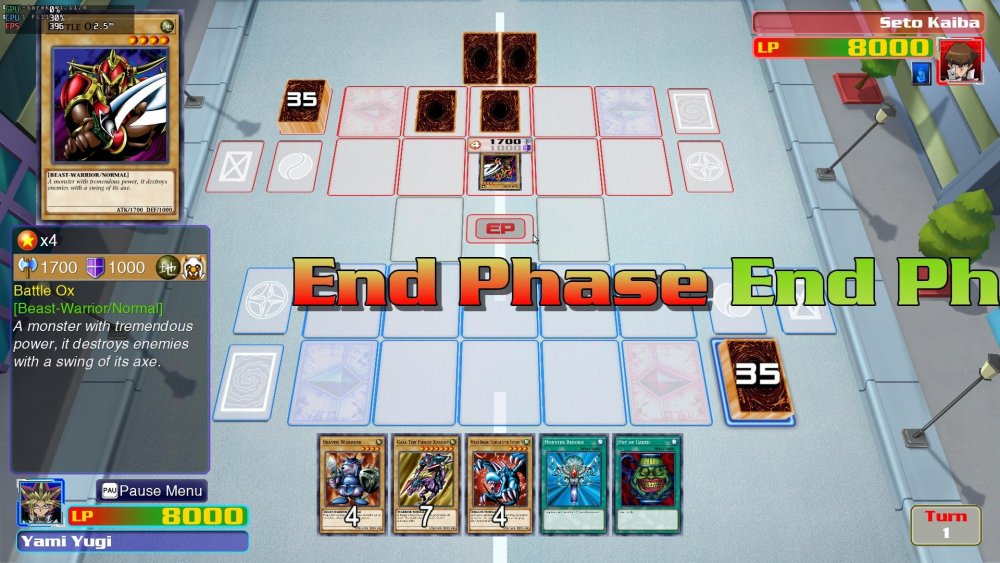
-

how to install armbian on mx10 f3 (tv stick)?
Nick A replied to Maxim Shell's topic in Allwinner CPU Boxes
@Maxim Shell Does it have a SD card slot? If not then it won't be easy to install Armbian. -
 Yes, you're right, I did a little Googling and clarified the specifications.
 -
@Gavin Munday Try these images. Extract them first before you write to the SD card. https://github.com/NickAlilovic/build/releases/tag/Radxa-a7a-v0.3
-
I now see that in your screenshot, a Windows filepath contains rk3588_sp... This Lyra has a rk3506B, that is a much different and only 32-bit SoC. So that seems not OK to me, so no surprise it does not work I think. But up to you to read documentation. And also I would not use Windows, the docs at luckfox assume Linux, so the commandline tool rkdeveloptool.\ I don't use Windows and also don't have this luckfox model, so cannot guess what is wrong actually.
-
I am not using that distro at the moment as its not fulfilling my purpose at the moment so still evaluating. Milk v has a small core for running arduino application and then Linux and arduino can talk, this lets real time task run on small core, which is what i want. That distro is using small core for Image signal processing, which i do not want.
-

Rupa X88 Pro 13 - RK3528 board with images
Joao Cordeiro replied to fedes_gl's topic in Rockchip CPU Boxes
@fedes_gl To list USB speeds, do You will get an output like: 480M is the important part, this is is usb2.0. for USB3.0 you will see 5G or 10G for 3.1 Also check your ethernet port speed with: (replace end0 with your ethernet device) And if im not mistaken, those are my 2 issues with this image: only usb2.0 and network speed of 100mbps. Making it similar to a 5 years old device.. Let me know if you found the same speeds. -
@Phi Hùng Nguyễn that link looks nothing like Armbian. You shouldn’t install it on your tv box. Try my build it's unofficial Armbian but I provided source code. So you know what you are installing on your tv box. You can build it yourself if you want to. https://github.com/NickAlilovic/build/releases/tag/20250306
- Last week
-
Alright. Trust sacrificed. BTW, I am a 71yo real estate developer, which may explain my stupidity with coding, my not being able to ascertain streams of consciousness, nor plumb huge gaps in information. I would like to get some things done with the N2+, and the answer is Armbian is obviously not the way to do them. I have much bigger things to do than bit-twiddling. PS - NTPd doesn't fix time either.
-

20USD 4GRAM RK3528 host (cheap dq08 tvbox)
Hqnicolas replied to fensoft's topic in Rockchip CPU Boxes
Please STOP installing android Stock ROM's in this devices It's full of malware https://www.youtube.com/watch?v=1vpepaQ-VQQ There's no malware, but you need to review all the code before using it. We're talking about Linux, the code is there, review it, don't trust it. -

Amlogic S905X -- Cannot install Armbian to internal eMMC
DerDave replied to pochopsp's topic in Amlogic CPU Boxes
Hi pochopsp - I have the same issue on my Vontar X3. The frustrating thing is that it used in the past and now for some reason it doesn't detect the eMMC installation anymore. I haven't done a deep dive but probably (as the other participants in this thread suggest) it's only solvable with a new u-boot. Have you tried something out there? I guess if we get a new build running that new u-boot could be bundled with the releases to solve this issue for other users as well -
AFAIK this can mean the ROCK3C (and software running on it) failed on interpreting HDMI info from your specific HDMI monitor (too old, buggy, not according spec, strange timing, too new, maybe more). See things w.r.t. EDID. One can set a certain video= statement on the kernel cmdline, you need to read docs etc what the options are. Easier might be to use an newer kernel, rockchip64 edge kernel is 6.18.x, that one much better RK35xx support than the 6.12.x one in the image. See armbian-config for selecting edge/beta kernel. Or change sources.list yourself so that you can just do apt install linux-image-edge-rockchip64
-
 I expect 2x the figure: dmesg | grep PCIe pci 0004:41:00.0: 4.000 Gb/s available PCIe bandwidth, limited by 5.0 GT/s PCIe x1 link at 0004:40:00.0 (capable of 15.752 Gb/s with 8.0 GT/s PCIe x2 link) lspci -vv | grep LnkSta LnkSta: Speed 5GT/s (downgraded), Width x1 (downgraded)
 -
You can remove Xfce from an installation, via apt purge --autoremove options, may just by un-ticking it in tasksel, and systemctl set-default multi-user.target Done that kind of trick to get rid of RPi PiXel DE in the past when they had no -Lite images and/or I wanted to keep my rootfs while upgrading in-place to newer Debian main release. Same Actuallt recently for ROCK3A Armbian Bookworm cloned from NanoPi-R6C to Armbian Trixie just headless/CLI. My last run/config of a Armbian 25.11.1 image was with autologin root and doing 1st run config, the usual I know from Armbian. So the image you use is wrongly generated maybe, but the big question mark is what image? URL+sha256sum enables others to check/confirm without guessing and maybe picking a newer/different 'latest' image or so, else DIY.