Active threads
Showing topics posted in for the last 365 days.
- Past hour
-
 @Sergioclr Those unpopulated pads in the top-left corner are likely the UART (Serial) debug port. Check the underside of the board—are the pads labeled GND, TX, and RX there? The most reliable way to boot Linux on this box is to use a USB-to-UART TTL adapter. Without one, we’re essentially working blind.
 - Today
-
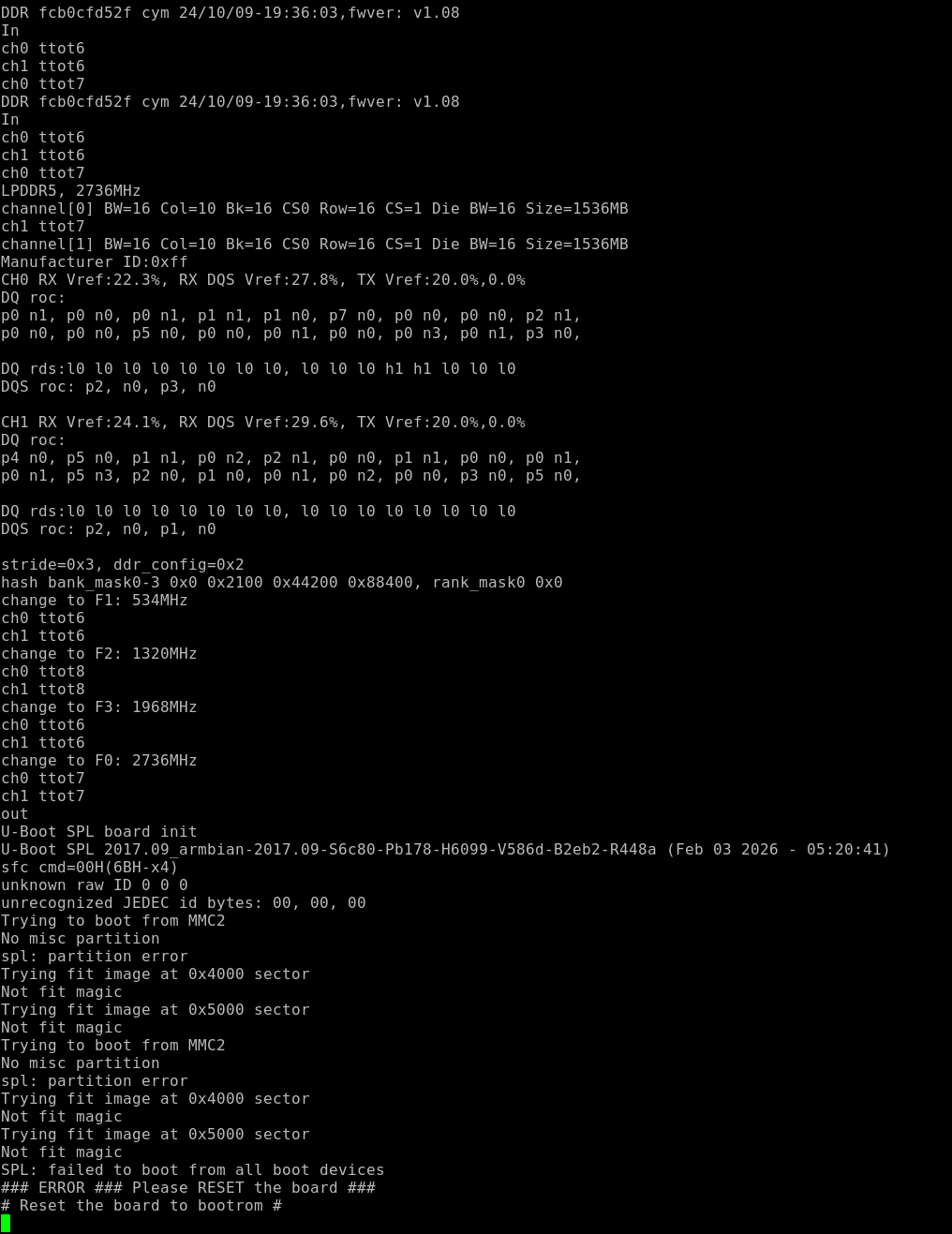
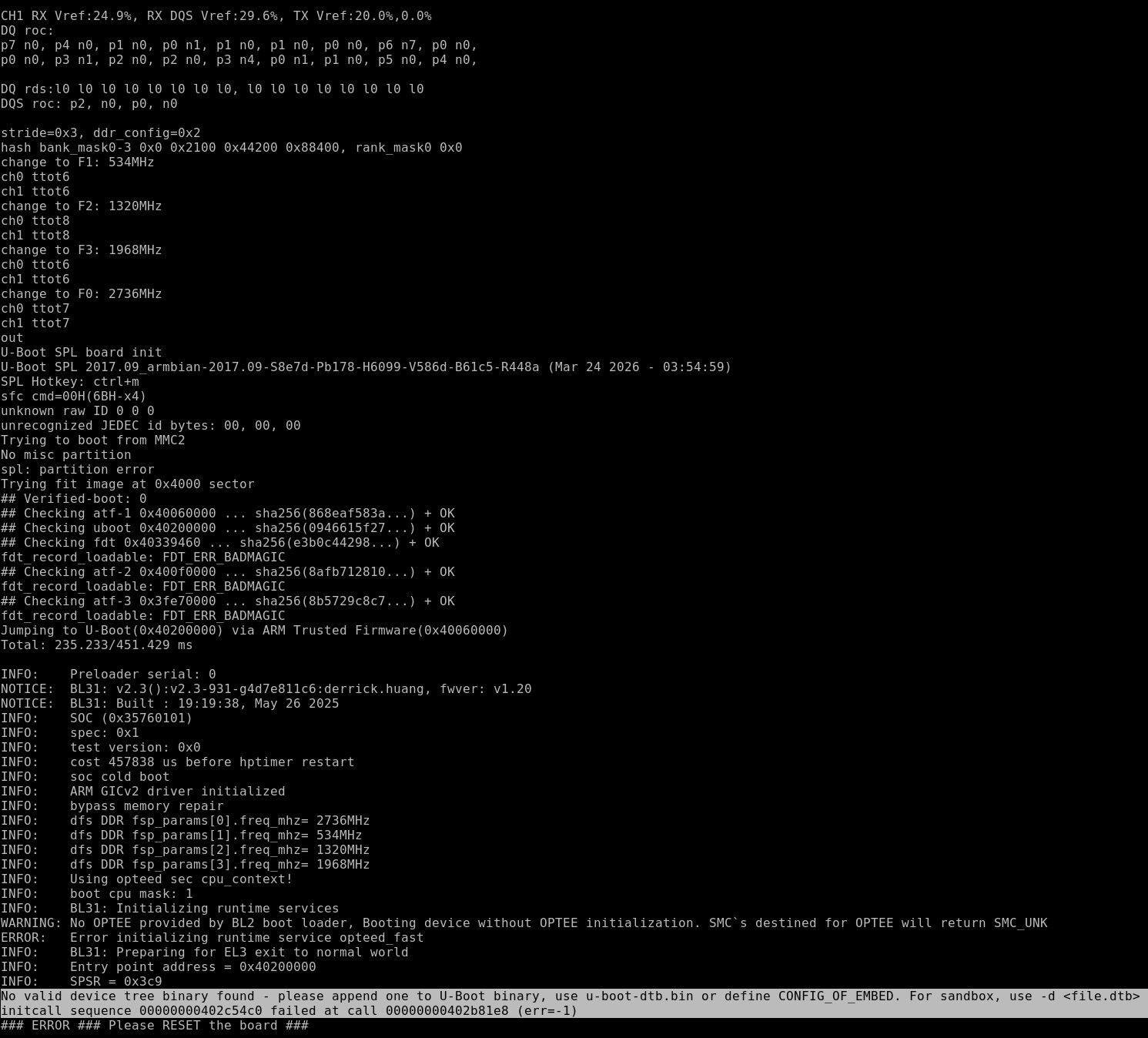
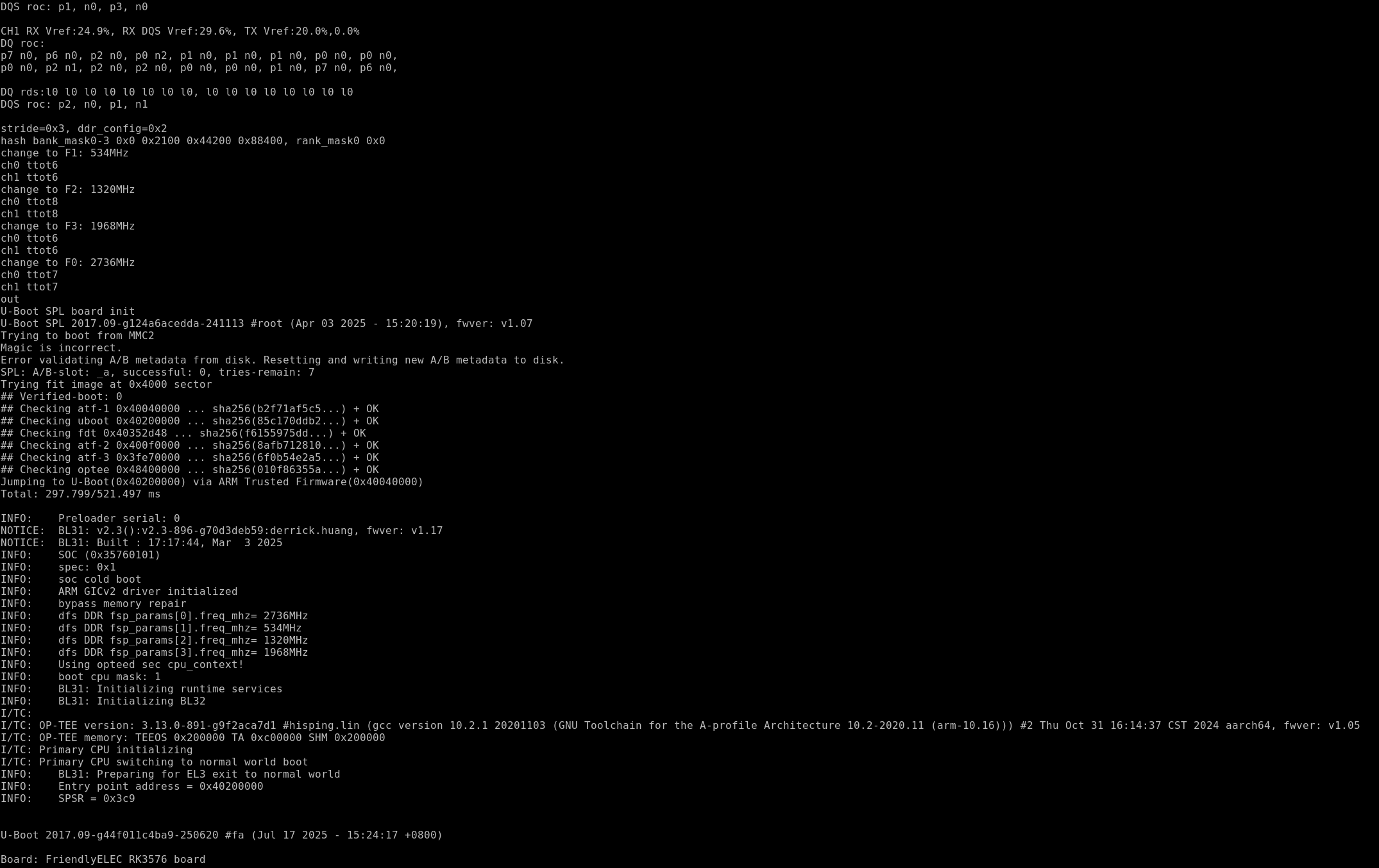
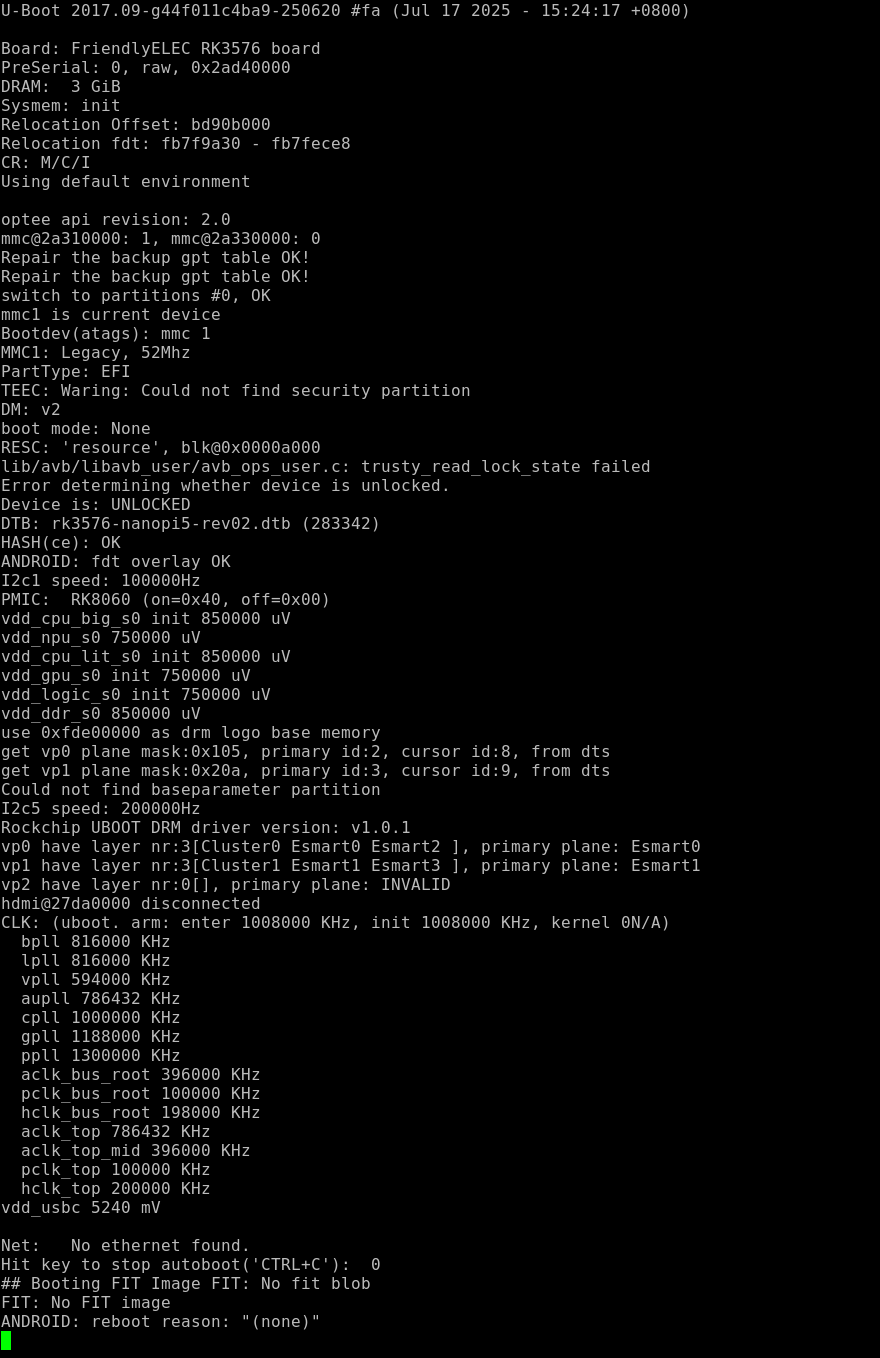
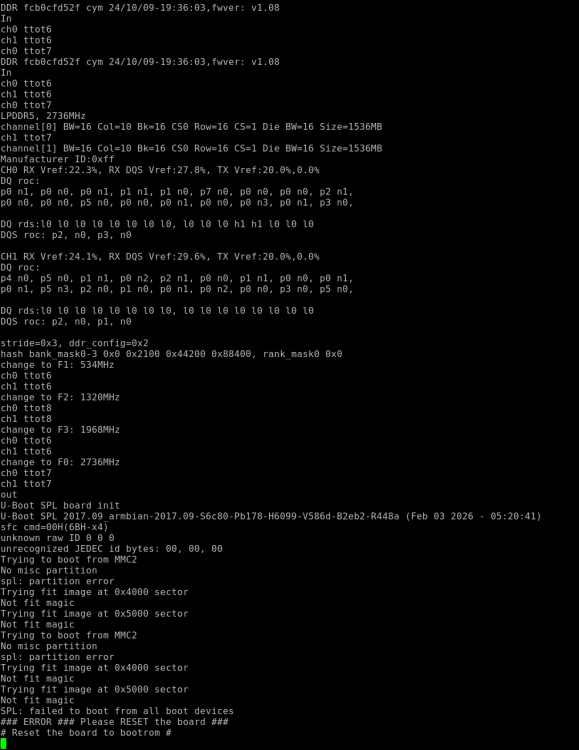
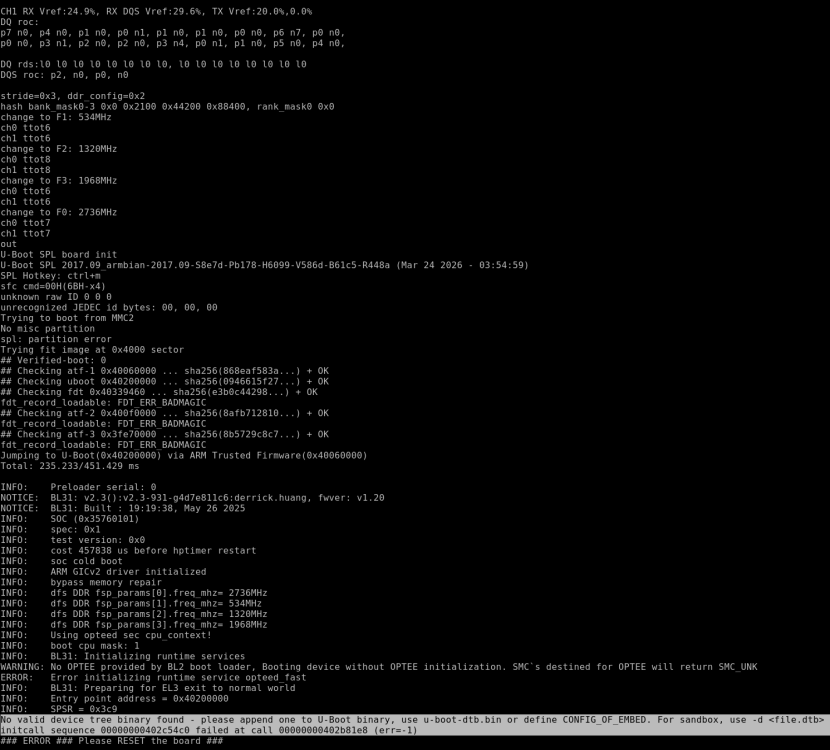
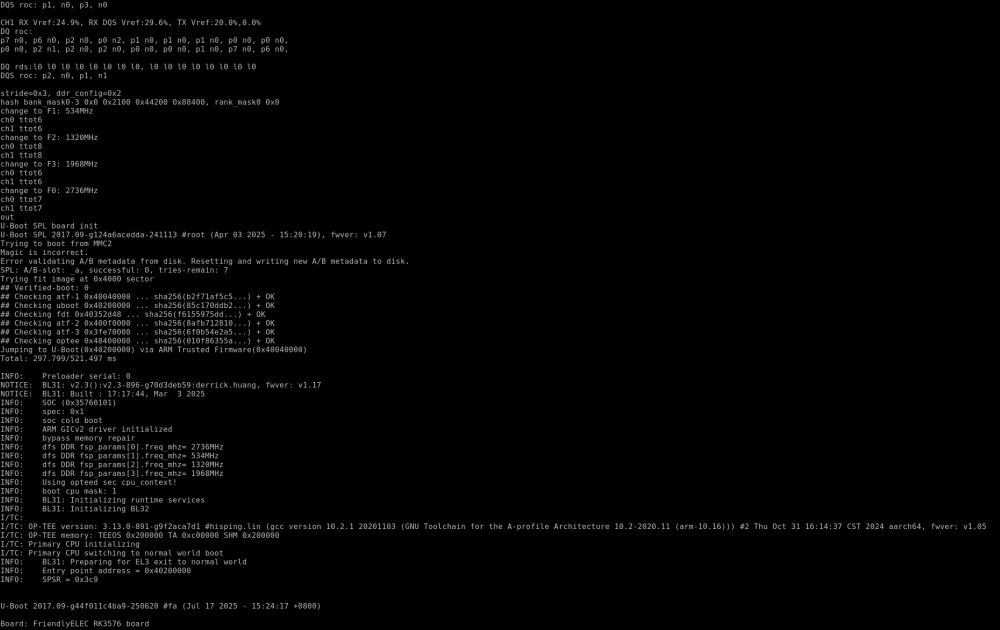
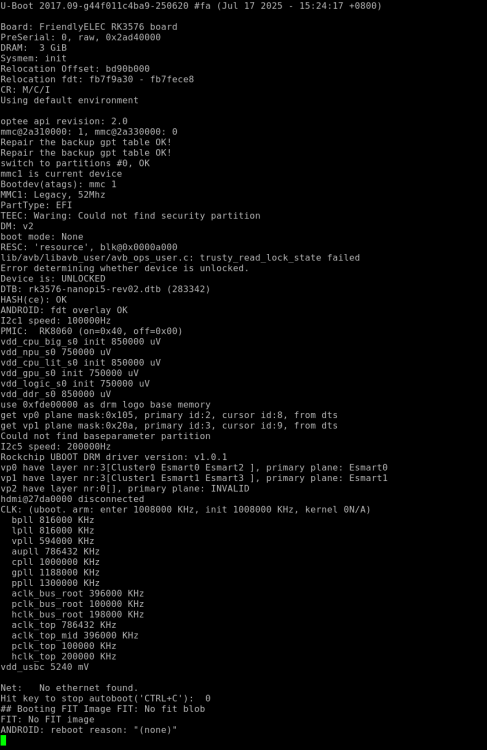
Good afternoon. I bought a NanoPi R76s rev. 2 (3GB RAM + 0 EMMC). It works fine with the manufacturer's firmware. However, it doesn't boot on Armbian (26.02.1). I assume rev. 2 isn't supported. Is it possible to add support? Armbian_26.2.1_Nanopi-r76s_noble_vendor_6.1.115_gnome_desktop.img.xz --- my build from tag 26.02.1: (log https://paste.armbian.com/poduzitifu ) --- vendor ubuntu boot log https://drive.google.com/file/d/1OZqZk48LsbSzFz63fcqMKVp5YkhyNOoT/view?usp=drive_link (rk3576-sd-ubuntu-noble-gnome-desktop-6.1-arm64-20260403.img.gz)
-

SV6256P WiFi Now Working on Linux 6.x (Armbian Tested)
eloirotava replied to Kevin su's topic in Allwinner CPU Boxes
Hey guys and @jock. Thanks for the references. not very fast, but stable and working on a s905w. (guess to be a tx3 mini, but who knows...) kernel 6.18.10 and ssv6051p. Linux aml-s9xx-box 6.18.10-current-meson64 #3 SMP PREEMPT Wed Feb 11 12:42:01 UTC 2026 aarch64 GNU/Linux with speedtest-cli Download: 3.43 Mbit/s Upload: 1.55 Mbit/s yeah, slow. but stable... i guess dmesg [ 11.938463] SSV WLAN driver ssv6200: chip id: RSV6200A0-201311, tag: 2014012420010960 [ 12.006600] SSV WLAN driver ssv6200: attempt to load firmware ssv6051-sw.bin [ 12.021645] SSV WLAN driver ssv6200: firmware upload complete (wrote 80 blocks, verified 80 blocks) [ 12.138546] SSV WLAN driver ssv6200: Firmware version 16380 [ 12.141013] SSV WLAN driver ssv6200: Calibration successful https://github.com/eloirotava/6051 the repo has also the rtl8188fu driver to the same soc/kernel. it is better than the ssv for sure... The trick was tuning the ssv6051-wifi.cfg to disableHT/AMPDU that usually kill the SDIO bus on these SOCs. -
Video here: https://drive.google.com/file/d/1kv2QVMMgRizKrjZIGVVMYK3QxkswTA9K/view?usp=sharing Hi there, I have the following stack: Model: ROC-RK3588S-PC V12 (Linux) SoC: Rockchip RK3588 GPU: Mali-G610 (Panfrost/Panfork) Kernel: 6.1.0-1025-rockchip OS: Ubuntu 24.04.1 LTS (Joshua-Riek image v2.4.0) Mesa: Panfork 23.0.5 (git221210 — December 2022) Chromium: 114.0.5735.35 (rkmpp7 from jjriek/rockchip-multimedia PPA) Display: HDMI-1, 1920x1080@60Hz The problem: I'm running a kiosk application in Chromium that plays video fullscreen. The display is physically mounted in portrait mode (9:16), so I need to rotate the output 270°. When rotation is applied, a visible vertical line artifact appears running from top to bottom, approximately 5cm from the right edge of the screen. Without rotation, the image is perfectly clean — no artifacts at all. What I've tried (all failed to fix the issue): CSS rotation (current method): Using transform: rotate(270deg) on the body element. The line artifact appears consistently. xrandr rotation: xrandr --output HDMI-1 --rotate left — same vertical line artifact appears. Kernel DRM rotation: Added video=HDMI-A-1:1920x1080@60,rotate=270 to kernel cmdline in extlinux.conf. Parameter is visible in /proc/cmdline but has no effect — Rockchip DRM driver does not support the rotate parameter. Chromium flags (tested individually and in combinations): --disable-gpu-compositing — moved the line to the center of the screen --disable-gpu-rasterization / --disable-gpu-vsync — made it worse --use-gl=egl — no effect --enable-gpu-rasterization --enable-zero-copy — no effect --default-tile-width=1920 --default-tile-height=1080 — no effect --gpu-rasterization-msaa-sample-count=0 — no effect --force-device-scale-factor=1 — no effect --use-gl=angle --use-angle=gles-egl --use-cmd-decoder=passthrough — crashed Chromium CSS GPU optimization properties: Tested translateZ(0), backface-visibility: hidden, will-change: transform on the rotation container — no effect on the artifact. Chromium 132 upgrade: Installed chromium 132.0.6834.159-1~deb12u1+rkmpp from liujianfeng1994/chromium PPA. The vertical line remained, and video playback became unstable (freezing). Reverted to Chromium 114. Mesa upgrade to Ubuntu noble-updates 25.2.8: Removed Panfork PPA and installed standard Ubuntu Mesa 25.2.8. GPU fell back to llvmpipe (software rendering) — no Panfrost support for Mali-G610 in standard Mesa. Display showed tearing in the center. Reverted to Panfork 23.0.5. Conclusion: The artifact appears with any rotation method (CSS, xrandr, kernel) and persists across Chromium versions and various GPU flags. This strongly suggests the issue is in the Panfork Mesa / Panfrost compositing layer when handling rotated output on Mali-G610. Has anyone encountered this issue? Is there a known fix or workaround? Would upgrading to Panthor (with kernel 6.10+ or the 6.1 backport) potentially resolve this? Any help would be greatly appreciated.
-

status of armbian-configng?
Igor replied to jimg's topic in Framework and userspace feature requests
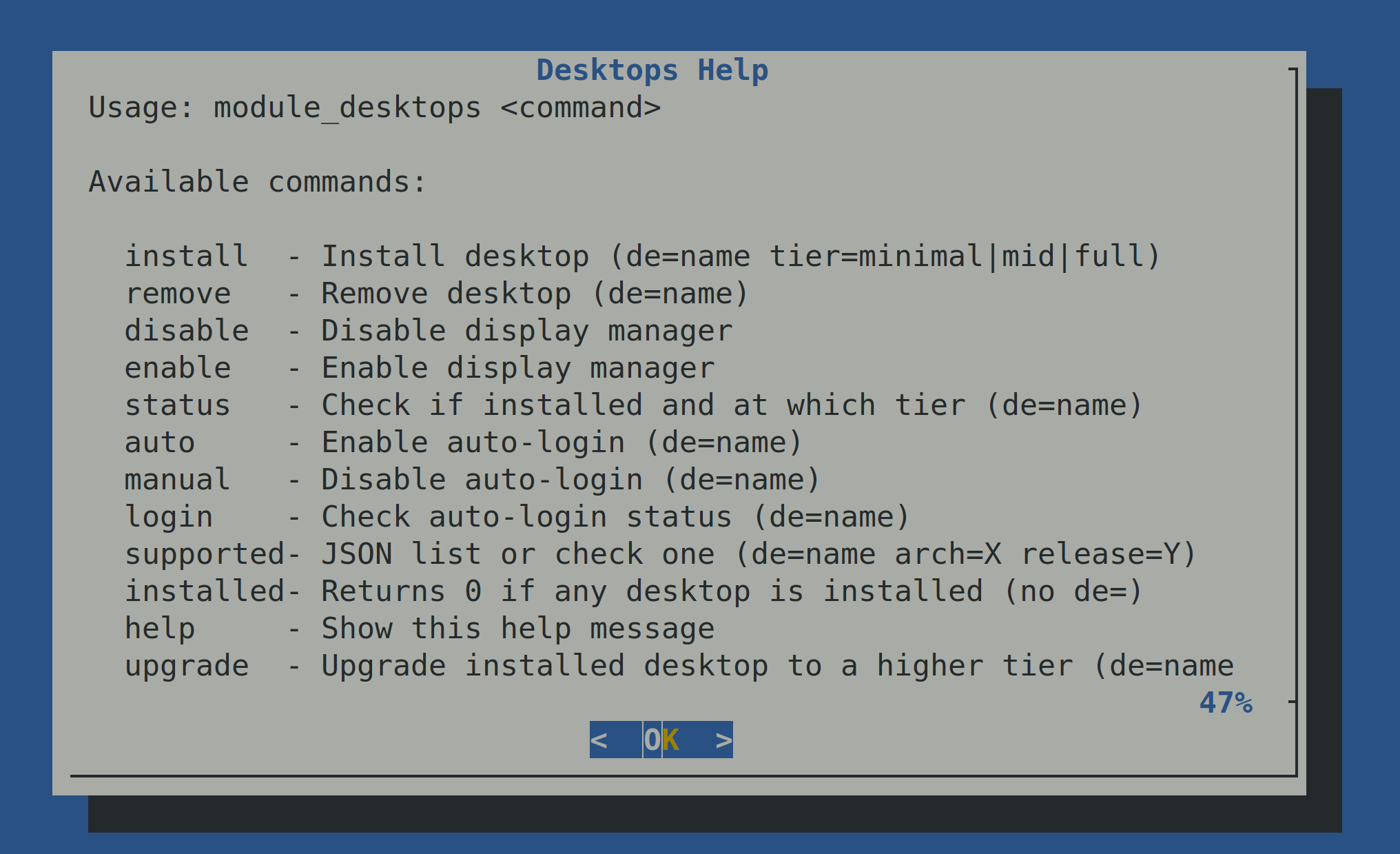
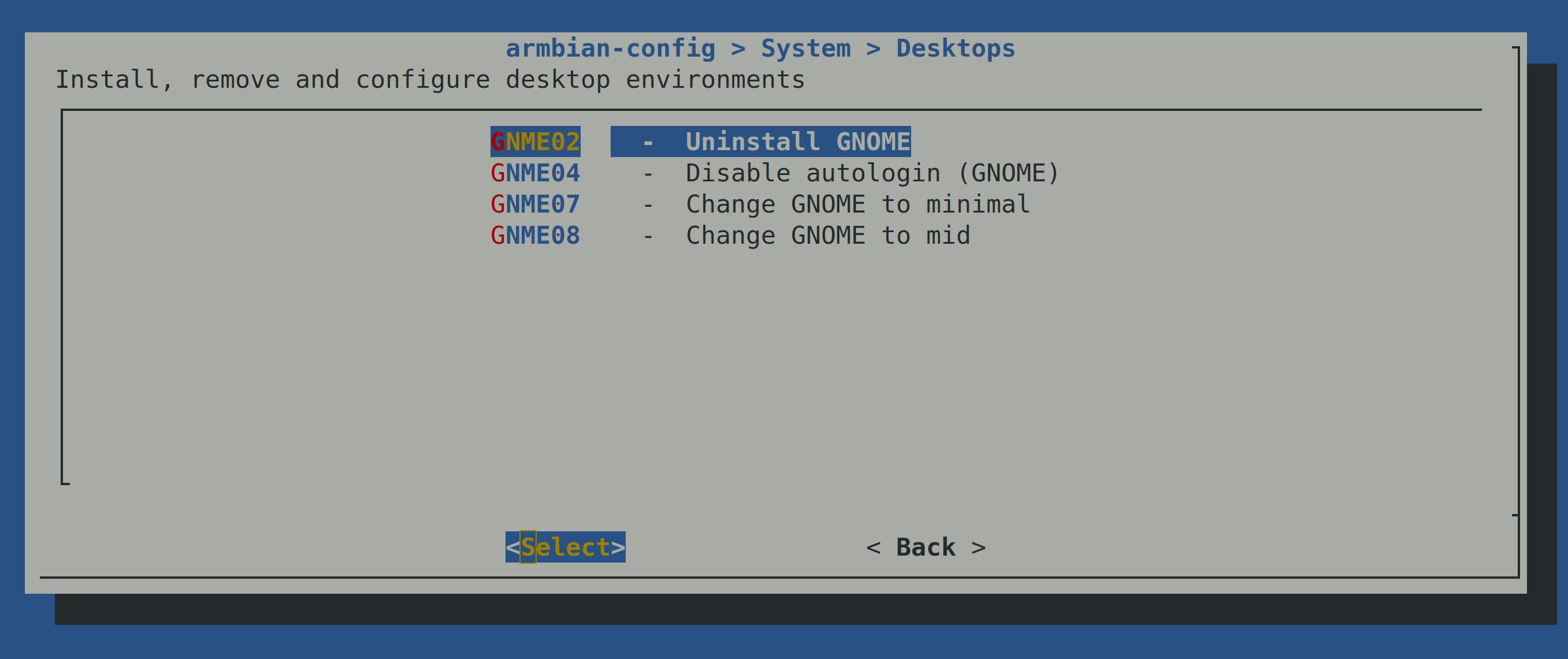
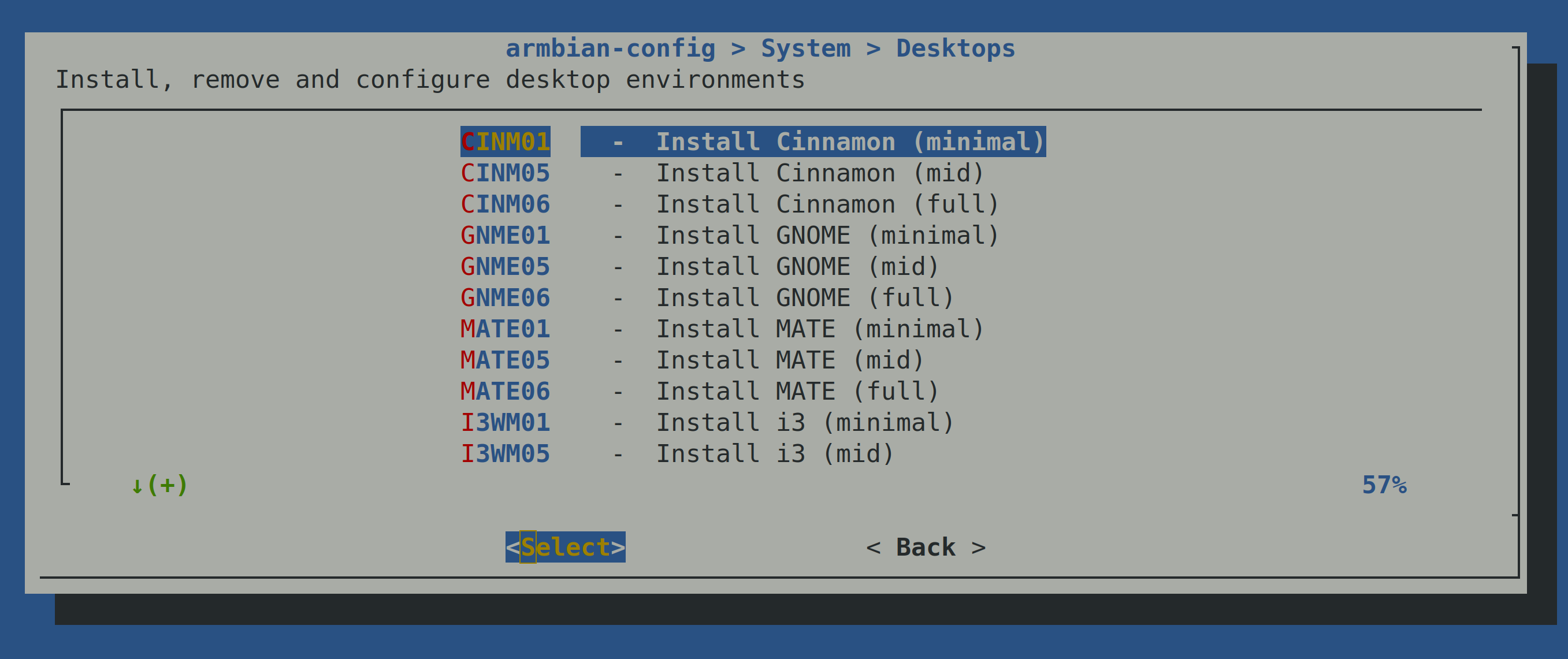
What's new in armbian-config desktops Pick how much desktop you want — at install time and after Three tiers (minimal / mid / full) instead of one monolithic install. Minimal = DE + display manager + a terminal (~500 MB). Mid adds a browser and everyday apps (~1 GB). Full adds office + creative tools (~2.5 GB). And you can move between tiers later — armbian-config knows the delta and only adds or removes what changed, no reinstall. Clean uninstall, every time Every install records a manifest of exactly which packages it added. Removal undoes only those — packages that were already on the system before you installed the desktop stay put. No more "I uninstalled XFCE and lost half my system." One YAML per desktop, no per-distro hacks Each DE is a single declarative file in tools/modules/desktops/yaml/. Adding or maintaining a desktop no longer means editing scripts; you describe what you want and the engine figures out releases, arches, browsers, and overrides. Adding a new desktop is a YAML edit and a parser smoke test, not a hunt through bash. Same desktop, every supported distro and arch Per-release and per-arch overrides handle the awkward edges: missing packages on armhf, the riscv64 ports that lag behind, the package that got renamed in Ubuntu noble. Same YAML works on Debian bookworm/trixie and Ubuntu noble across amd64 / arm64 / armhf / riscv64. Smart browser selection The literal token browser resolves to the right package per platform automatically — Chromium where it exists, Epiphany on platforms where Chromium is broken, Firefox-ESR on Debian riscv64. No more bug reports about "Chromium won't install on RISC-V." Custom vendor archives, done right Optional repo: block per DE with full support for: signed-by GPG keyring (no apt-key), per-release suite paths (e.g. SpacemiT's per-snapshot bianbu archive), multi-suite fan-out (one archive, six deb lines for security/updates/customization channels), wider component lists than main, and APT pin preferences in the same place. Removed cleanly on uninstall. Auto-login that doesn't trash your config Enable / disable autologin for gdm3, sddm, or lightdm via in-place sed edits — your WaylandEnable=false and other customizations stay intact. Branches on ID=ubuntu from /etc/os-release, so it writes to the right file (Debian's daemon.conf vs Ubuntu's custom.conf) without guessing from the codename. A weekly AI driven self-audit catches drift A scheduled workflow scans the YAML matrix against armbian/build's supported releases and the live Debian/Ubuntu archives — flags releases not yet covered, flags packages that no longer exist upstream — then opens a draft PR with proposed YAML fixes. Dead packages and missing releases stop accumulating silently. armbian-config --api module_desktops User documentation: https://docs.armbian.com/User-Guide_Armbian-Config/System/#desktop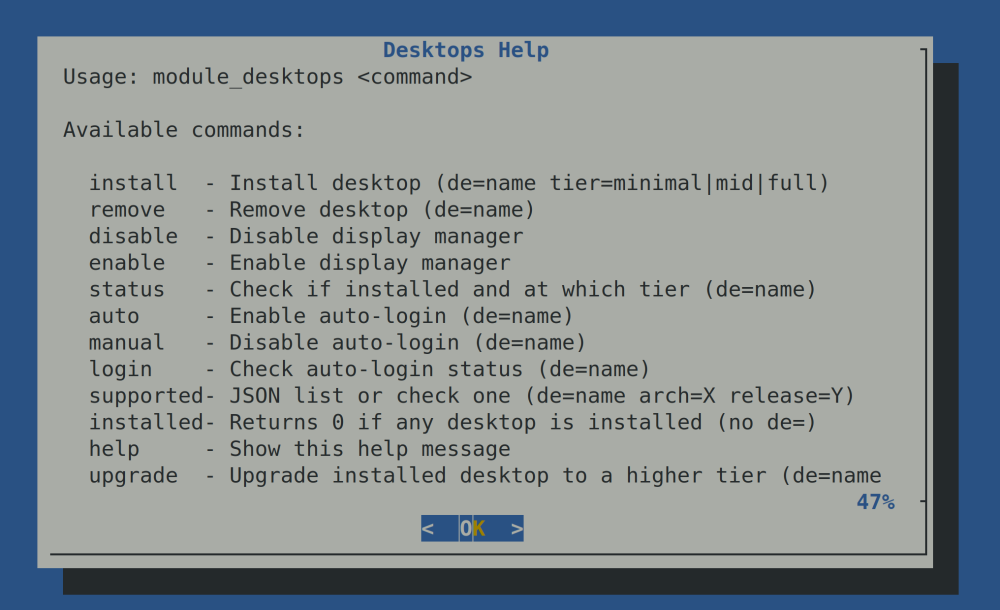
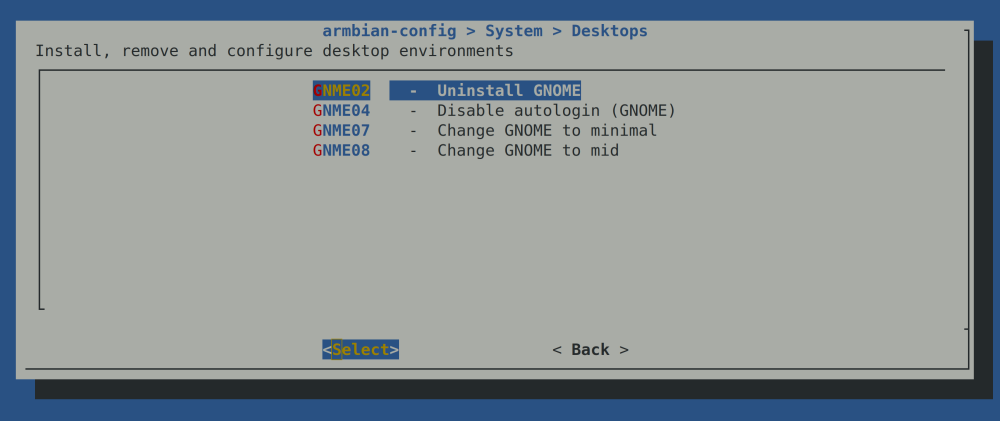
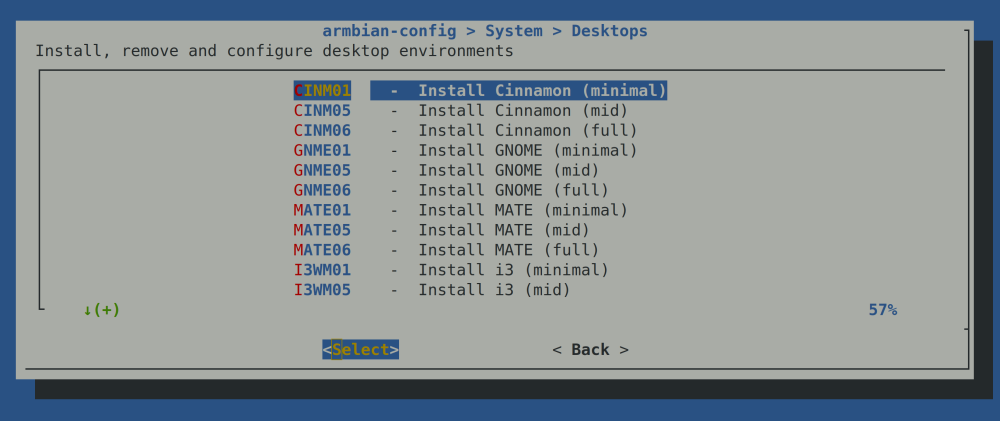
-
 This was discussed some time ago. Everybody has the same problem with the 2.5Gb interface. The best you can do is to switch to linux 6.6.xx, replace the dtb, update the firmware in /lib/firmware/rtl_nic and run a script in /etc/rc.local (see here).
 -

Cannot run ARMbian on my tv box (TX10 PRO)
erebus041 replied to erebus041's topic in Allwinner CPU Boxes
use balena etcher or rufus, would work just fine! also you can use Hqnicolas have provided earlier, use a USB to TTL converter. works great if nothing works -
Hello, I have installed the Armbian 26.2 minimal IOT image based on Debian 13 Trixie - with the 6.18.x kernel - and I noticed the USB2 port (the single, vertical port next to the Ethernet port) is not working. Is this a limitation of the mainstream kernel (6.18.x) - i.e. does this work only with the vendor kernel (6.1.x) ? NB: I upgraded to 6.19 using the 'edge' kernel, but I'm seeing the same behavior. Here's the armbianmonitor outpur - https://paste.armbian.com/raw/udefojuxuk
-
 After over five years of development and collaboration across the Open Source community, mainline Linux support for Rockchip RK3588's video capture hardware has finally landed. View the full article
 - Yesterday
-
 @Jugo Slaven it seems you are running Android not Armbian. These forums are for Armbian Linux not Android. You should ask your question at a site that deals with Android.
 -

Rock 5C with 2.5G Router Hat gets hot with Armbian image.
Werner replied to JakobL's topic in Radxa Rock 5C
Providing logs with armbianmonitor -u helps with troubleshooting and significantly raises chances that issue gets addressed. -
The only thing I could manage to get information from was this: I had to rewrite the SPI-flash and now I see: Not sure if this helps: Btw, this is the output when I was using the official OrangePI Ubuntu distro:
-

Remote power button for Banana Pi M1
John Felstead replied to John Felstead's topic in Allwinner sunxi
Problem solved. Rather than using an electrical connection I overcame the issue mechanically. When the board was mounted in the box I drilled a hole directly opposite the switch and inserted an old self propelling biro which I cut down to the right length. I left the spting in place but removed the latching mechanism in the lid. Pressing the top of the biro activated the switch🤪 - Last week
-
Looks like you are right. Did not want to modify uboot to make it understand f2fs , so i had to move /boot to ext4 and keep rest of / on f2fs. Now it boots. Thx for help.
-
 Hello, good afternoon. I'm using a translator, so I apologize if it's not clear. I have an Orange Pi 5 Plus SBC which I have Android installed on the m2 drive. I install Armbian on a microSD card. I don't remember what problem I was having, but I had to format the SPI Flash. After that, the Armbian version worked fine. Also, after formatting the SPI Flash, my microphone stopped working on Android (it works on Armbian). Could this be due to formatting the SPI Flash? Thank you.
 -
@qq20739111 I'll add it soon. 6.18 might take awhile.
-

Raspberry Pi 5 missing video decode hardware acceleration in chromium
LivingLinux replied to otte's topic in Raspberry Pi
It will only work for h265, as that is the only hardware decoder available in the Pi 5. So it won't help you with for instance YouTube, as they use VP9 and AV1 (or you can force h264 with a browser plugin). You can try Firefox. https://bugzilla.mozilla.org/show_bug.cgi?id=1833354 Or change some of the flags in Chromium, but it feels as if they keep changing, so you might find other suggested flags all over the internet. You can set the mentioned flags in: chrome://flags/ https://bbs.archlinux.org/viewtopic.php?id=244031 -
@sven-ola it works with official ubuntu image and with debian 13 image from romanrm, so this ssd is 100% works
-
Then it should not be an issue to find somebody from the community to come up with support. From official POV we do not add new boards without some sort of funding. Our resources are simply too limited.
-
hey i seem ho have same exact issues have you found any fix yet!
-

Armbian_24.11.2_Orangepi5_noble_current_6.12.0-kisak NPU driver version
usual user replied to thanh_tan's topic in Rockchip
From an OS's point of view, only a Mesa build with Teflon and Rocket driver support is needed (available since Mesa 25.3). Inferences can then be executed with ai-edge-litert. I have been experimenting with this for some time on all my devices equipped with Rockchip RK3588/RK3588s. -
@Rajiv Singh where is this dkms package? thank you!
-
@HenricoLegal https://forum.armbian.com/topic/57960-sv6256p-wifi-now-working-on-linux-6x-armbian-tested/
-
3D Graphics Acceleration on T95N (A98X Jackbox) - RK3229 with 2GB RAM / 16GB eMMC - Educational Project for Schools Hi, I’m working on a project using a specific TV Box model (A98X Jackbox) to repurpose these boxes as low-cost computers for schools. The goal is to provide students with a platform to use AI tools and basic productivity, but I need better browser rendering. Hardware Specs (Confirmed via board teardown and logs): Board ID: T95N-RK3229_512X4_V1.5 CPU: Rockchip RK3229 RAM: 2GB (Confirmed via free -m) Storage: 16GB eMMC (SanDisk SDIN9DS2-16G) OS: Armbian 21.08.8 Bullseye (Legacy Kernel 4.4.194-rk322x) What I have done so far: Installed the Minimal image and set up LXDE with LightDM. Optimized the system (Governor set to performance, swappiness set to 10). Ran glxinfo -B which confirms it's currently using llvmpipe (Accelerated: no). Tried searching for Mali drivers via apt, but armbian-config is not available in the repositories for this specific build/architecture. Verified Wi-Fi functionality (working fine with LED config 2 via rk322x-config). The system is stable and surprisingly fast thanks to the 2GB RAM, but the CPU is struggling with 100% spikes during browser rendering (Epiphany WebKit) because it lacks GPU acceleration. Question: Is there a way to enable Mali-400 MP2 drivers for X11 on this Legacy 4.4 kernel? Are there any specific packages, blobs, or workarounds to get hardware acceleration working and replace llvmpipe? I’m available to run any tests or provide further logs if needed. Thanks for this amazing project!
-
Hi, First of all i'd like to thanks thanks all of you for your job or questions that help me to rescue from trash rk3318 based devices. I recover from a friend a X88 pro 10 (4G/128G), witch is a really chip old android-box. I looking for making a media center running kodi and and minimal web browser for unsupported kodi streaming services. I successfully install armbian_community trunk (Rk3318-box_noble_current_6.xx.xx_xfce_desktop.img.xz) using multitool. _ _ _ _ _ /_\ _ _ _ __ | |__(_)__ _ _ _ __ ___ _ __ _ __ _ _ _ _ (_) |_ _ _ / _ \| '_| ' \| '_ \ / _` | ' \ / _/ _ \ ' \| ' \ || | ' \| | _| || | /_/ \_\_| |_|_|_|_.__/_\__,_|_||_|_\__\___/_|_|_|_|_|_\_,_|_||_|_|\__|\_, | |___| |__/ v26.2 rolling for RK3318 Box running Armbian Linux 6.18.21-current-rockchip64 Packages: Ubuntu stable (noble) Support: for advanced users (rolling release) IPv4: (LAN) 192.168.xxx.xxx (WAN) xxx.xxx.xxx.xxx Performance: Load: 2% Uptime: 1d 22h 21m Memory usage: 14% of 3.87G CPU temp: 45°C Usage of /: 6% of 114G RX today: 1 MiB Tips: Becoming a sponsor? https://github.com/sponsors/armbian I run rk3318-config and choose this config: RK3318 (max 1.1Ghz...) no selection on eMMC additional speed options rk3318-box-led-conf2 X88_PR_B_boards Reboot and Install kodi and codec with : sudo apt install ffmpeg mpv kodi kodi-repository-kodi --install-recommends I have some issues : xfce menu is quite slow when I navigate for choosing app. chromium is very very slow and video on youtube are too lagy when decoding Kodi works on xfce but can't decode video, i try on standalone (choose on connection window), still can't decode. I looking on this post without success and this one, same issue. If anyone have a idea to help me to save this device and make me able to use it as a media center. Thanks