Active threads
Showing topics posted in for the last 365 days.
- Past hour
-
 Here your debugging activity will need to start. There is an awful lot of things unknown, to other on this forum but more important, also to yourself. I could already be tha your server (Armbian) has nothing to do with it, but that is the info in your router even caching stuff) has refreshed, simply because you probably restarted, so something was not 'reset proof'. I have seen many of such things myself in my house/home networking and in conjunction with various ISP's (also mobile4G). Which made me use my own (open-source) router instance for example, so I can at least check all what is needed in such case as you have. But it might be simple, you can use wget (do 'man wget' first to see all options) to mimic browser behavior and that should already say something. If docker etc is involved, make sure you understand all (virtual) networking, can get very complex. I haven't seen potentially disturbing things from Armbian 26.2.1, but I removed/blocked also several things, like no netplan.io, that at least works on Debian Trixie based installs.
 - Today
-
Perfect! It seems to be working well. ### lsblk: NAME FSTYPE SIZE MOUNTPOINT UUID mmcblk0 29.1G └─mmcblk0p1 ext4 28.8G / 53bf3b54-4988-4318-bf78-9ff6f0b851e5 mmcblk0boot0 4M mmcblk0boot1 4M zram1 ext4 50M /var/log 921565d0-0680-469e-ac03-555369d9549f zram2 0B nvme0n1 238.5G ├─nvme0n1p1 ntfs 529M 80DE33D8DE33C566 ├─nvme0n1p2 vfat 100M 5A34-53D4 ├─nvme0n1p3 16M └─nvme0n1p4 ntfs 237.8G 220438F50438CD93
-
Hello, I have a Tanix TX6-A TV box and I’ve tried many Armbian builds, including the ones from https://armbian.com/boards/tanix-tx6 and ophub. However, the onboard Wi-Fi does not work on any of them. Has anyone found an Armbian image that works properly with the Tanix TX6-A, including Wi-Fi support?
-

Rupa X88 Pro 13 - RK3528 board with images
fedes_gl replied to fedes_gl's topic in Rockchip CPU Boxes
I own the one of the 1st post and I managed to run Kodi desktop within Armbian. Just did few tests as I don't know how to set up remote control and many other things. HDMI works fine but no hardware acceleration for H265 videos (or at least doesn't work smooth enough as in the Android FW). LAN also works but is HW limited to 100mbps as stated by Joao -
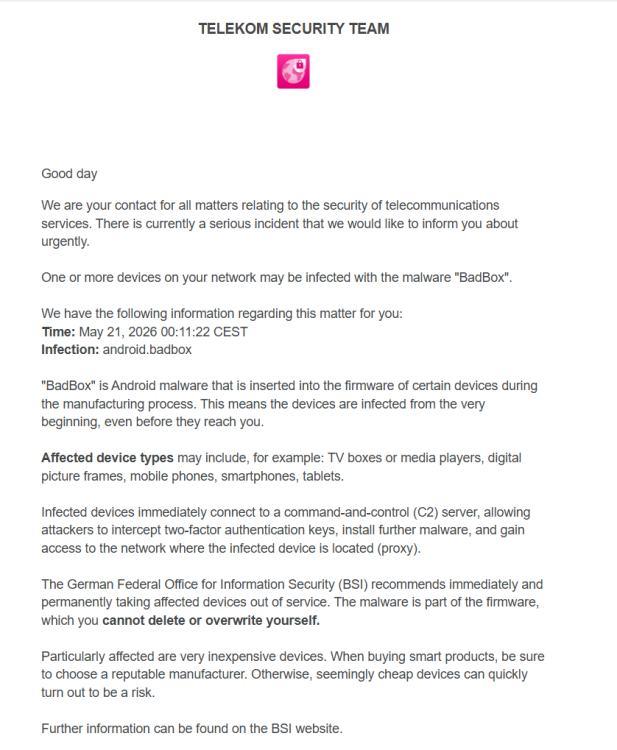
I know it was already written here in some of the messages that these devices are not secure. But now I got a message from Telekom that they detected a Chineese spyware connection: The timeframe is exactly when I have switched the device on with an Android on board.
- Yesterday
-
You'd better upgrade the kernel to 6.18 and keep Debian Bookworm, because Trixie has an mpv version which is not exactly friendly with hardware video decoding because some things are in the middle of a transition
-
OK, it looks like the BSP PCIe driver might have some issues related to power management. I’m not entirely sure of the root cause yet, but when I connected an NVMe drive, it got extremely hot and failed to initialize properly. The NVMe dmesg output suggested adding the following kernel parameters: nvme_core.default_ps_max_latency_us=0 pcie_aspm=off This resolved the NVMe issues on my side. I’ll try to dig deeper into the root cause, but @humanus please give it a try as well.
-
 Thank you @greg396 for this sum-up on how to upgrade to 6.12 Since last months, have you experience any issue with this version ? I'm on 6.6.8 based on kernel 23.08.0. Stable so far...
 -
Hi @OverNautt! Sorry not replying in time. Great that you found a solution to your issue and provided feedback!
-

Armbian with preinstalled Home Assistant supervised
Igor replied to Igor's topic in Software, Applications, Userspace
Me neither. This is my primary intention, just currently overwhelmed with things. I did some changes on top on official: https://github.com/armbian/supervised-installer -
For mate IIRC they use gnome's gnome-language-selector (start it in a terminal if you are missing the icon in settings), but it was a while since I used that desktop-env so I could be wrong. My old notes says the setting should be in: System > Control Center > Language Support For your information (as a fellow Swedish person): there is a locale called en_DK.UTF-8 that you might want to use instead. That way you get the correct settings for Scandinavian (like date/clock format for example) but the language is English. Or you can probably do it in terminal altogether: sudo dpkg-reconfigure locales # select en_DK.UTF-8 here, or whatever locale you want to use, I will use the dk version in this example localectl set-locale LANG=en_DK.UTF-8 sed -i "s/sv_SE/en_DK/" ~/.dmrc
-
Hello @vlw, Pull latest from build framework, compile and retry, we migrate R76S to use mainline uboot due a issue with uboot vendor. Let's update us.
-
This is a work-in-progress resource for bare-metal bringup for Rockchip devices. Source code: https://github.com/petabyt/rk https://danielc.dev/rk/
-
 The issue has been resolved. It turns out that the official release has already configured the necessary documents or files before distribution. When I used im‑config, it gave me no response at all. Following the XDG Autostart manual, I copied /usr/share/applications/org.fcitx.Fcitx5.desktop to ~/.config/autostart; after that, fcitx5 starts automatically and works normally when I reboot or log out and back in. Thanks
 -
@sven-ola Sorry, this was indeed a mystery problem with my SSD. I replaced it, and now everything works like a charm (I just need the CLI server; Wi-Fi or GPU isn’t necessary). By the way, when is the stable release planned?
- Last week
-
@Sergioclr remove those two Failing patches you don’t need them anyways.
-
@SecLyzer U-Boot can boot from a FAT32 or Linux file system. You can change this in your board configuration file.
-
Due to the shortage of memory chips these days, Radxa is using different emmc models in their boards. For example, I recently ordered a big batch of Rock S0 boards, but they had to be delivered with Sandisk iNAND 32GB emmc drives instead of the typical 8GB option. The problem is that Armbian did not reliably boot on these new boards. It randomly gets stuck during initialization with the onboard LED endlessly blinking. Some boards works, some did not, some only works sometimes. Long story short, in case other people also have this problem: I found the solution. I believe it is caused by Armbian's Rock S0 device tree enabling the HS200 high speed mode for the emmc device. (source) I guess not all emmc chips reliably support this. To fix it, I had to remove the line in the device tree linked in the source above. Actually this should probably be done with a proper device tree modification, but in my case, just to test, I modified the boot scripts. In /boot/boot.cmd, add these lines near the bottom, but ABOVE the "booti ..." line: fdt rm /mmc@ff490000 mmc-hs200-1_8v fdt set /mmc@ff490000 max-frequency <0x02faf080> Then recompile in terminal with: mkimage -C none -A arm -T script -d /boot/boot.cmd /boot/boot.scr If you update the kernel/armbian distro these script will probably get overwritten, hence why it should preferably done with a custom device tree instead. But in my case I have frozen updates, and either way this will serve as a starting point for others having the same issue. Actually, I cannot see this troublesome patch on the 6.18 distro source, so maybe this is old news and no longer a problem on modern images anyway. But my image is still on 6.12, so I figured I'd share anyway.
-

Teclast T60 AI rooting + armbian possibility Allwinner A733
Nick A replied to Taz's topic in Allwinner CPU Boxes
@Taz Radxa's u-boot won’t load the kernel image. So I used vmlinux. -

Enable ethernet port on expansion board for OrangePi zero 2w
Werner replied to Golecom's topic in Allwinner sunxi
none which doesn't break other boards. -
 Armbian has limited resources. And given that there are hundreds of different boards out there, generally that means that new boards only get supported either because the company behind them is willing to contribute to Armbian (and Orange Pi has made if very clear that they don't do anything to support their boards software after the fact as it would reduce sales for new boards they are constantly introducing), or some volunteer from the community steps up to volunteer their time to add support. Most boards under Armbian are community supported. So it relies on volunteers like you to do the work.
 -
Embedded Recipes returns to Nice for its second standalone edition, along with Linux Media Summit, PipeWire, libcamera, GStreamer Spring Hackfest, and new Display Next Hackfest & BlueZ F2F. Visit our table for Tyr, ML video analytics & Flipper One prototype! View the full article
-

zfs on Bookworm depends on unavailable libc6 version
bedna replied to Salamandar's topic in Software, Applications, Userspace
Are you using the rolling release? Otherwise you should not use "full-upgrade" but rather just "upgrade". Not saying that is the reason for missing deps, but it definitely could be. -
@Giunti & @samlevy0515 It would be helpful to the community if you responded to the developer trying to fix this issue rather than state a workaround. Thank you.
-

Games Compatible With Armbian on Pinebook Pro
LivingLinux replied to Katsujinken's topic in Pinebook Pro
Did you try Yamagi Quake 2 with OpenGL ES1? A developer optimized it, and I assume it will also be a lot faster on a PBP, but it might be that certain mods don't work with GLES1. You have to build it like this: make -j4 WITH_SDL3=no with_gles1 Select OpenGL ES1 in the Video Settings. If you don't see blood particles (or they are squares), go to the game console and disable a certain module: gl1_pointparameters 0 Restart the game and have fun!






.thumb.jpg.20ed26dd68aaee94a94b227bf670a8eb.jpg)