Active threads
Showing topics posted in for the last 365 days.
- Past hour
-
Hi, thank, I forget this method. new result... same with 6.18.37: With 6.18.10-current-rockchip64 and rk3399-kobol-helios64.dtb-6.18.18-opp dtb file, Ok With 6.18.37-current-rockchip64 and overlay helios64 patch with armbian-config, Ko With 6.18.37-current-rockchip64 and k3399-kobol-helios64.dtb-6.18.18-opp dtb file, Ko more information: On "Cold Boot": System blink red After "Reset": Same crash like without DTB on previous Kernel like 6.18.10... Back to 6.18.10 and freeze with this kernel for this time, I don't have time to investigate more at this time. I try edge with 7.1 kernel maybe soon Have a nice day
- Today
-
Thank you very much. Thanks to your detailed guide—as well as the one by "Chiều Nhạt Nắng"—I successfully installed Armbian on my TV box. I had struggled for a long time previously, following outdated instructions without fully understanding them; I kept unplugging and replugging the power cable, which ended up damaging the power IC (so now I have to use the USB port for power). However, thanks to your specific guidance (user 0757), I followed the steps and finally succeeded. Thank you!
.thumb.JPG.05ddb51c0d29f118a52c779675eb8905.JPG)
-
Honestly, I've already forgotten what the problem was there. Most likely, I used the Armbian installer and specified where to install the distribution in the automatic image download mode. Before that, I had tried writing it manually. Besides that, I found an important nuance — if you install software through armbian-config, for example GNOME and Chromium, the Plymouth splash screen will be automatically configured at boot, and hardware video decoding will be enabled in the browser, which for some reason does not get enabled when installing manually.
-
 moved to off-topic neither a supported device nor about Armbian.
 -
Totally agree, too little or niche market! I 'm thinking about soldering simcard directly on these cheap minipci lte modem and use a regular usb2.0 cable, what a joke!
-

How to install correct linux-headers?
ErinBong replied to Stanislav Chizhik's topic in Software, Applications, Userspace
One thing that helped me in a similar situation was checking that the running kernel version matched the headers exactly with uname -r. A mismatch there can be really confusing. If you've recently upgraded the kernel, a reboot before installing the headers is worth trying too. -
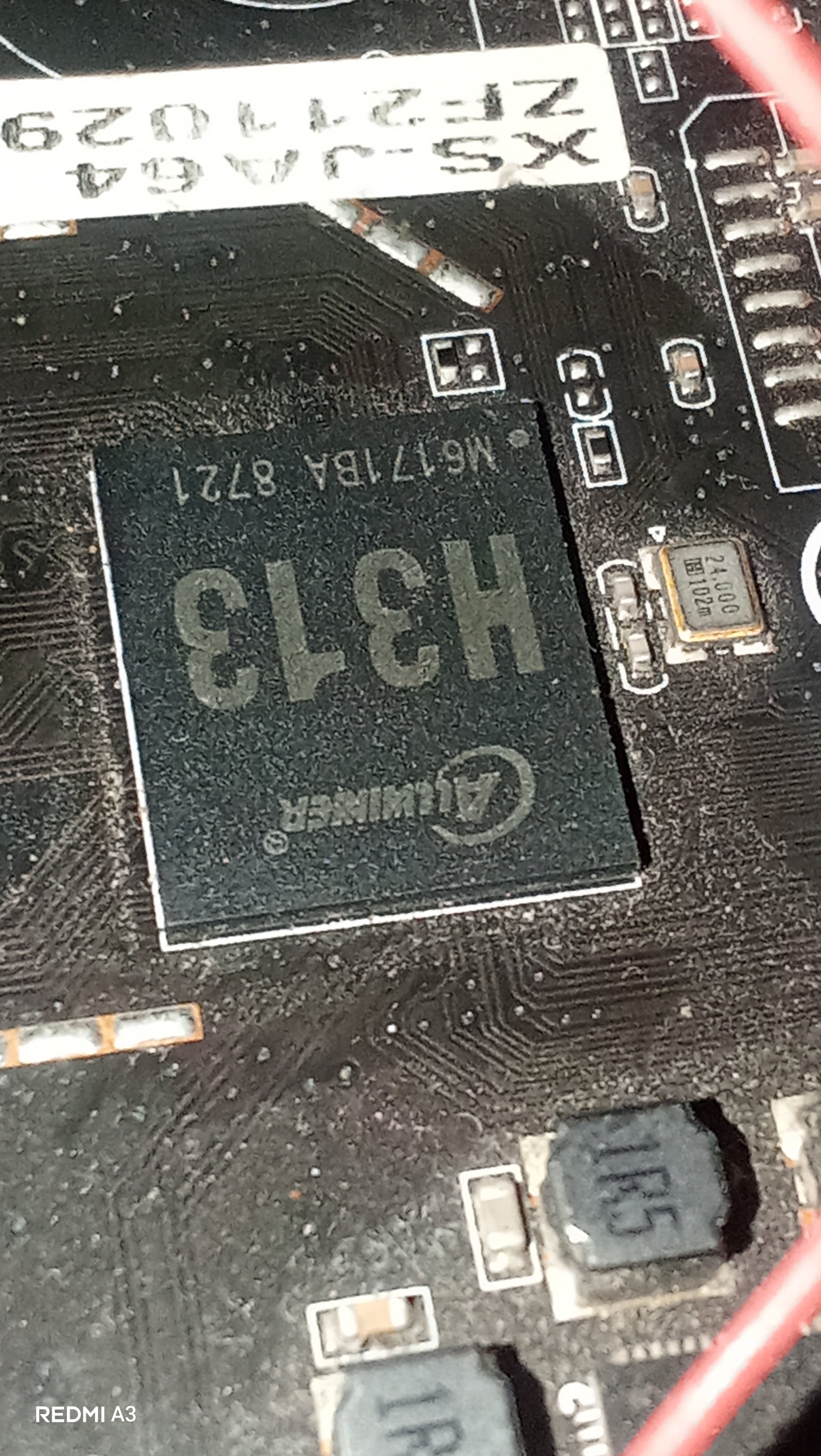
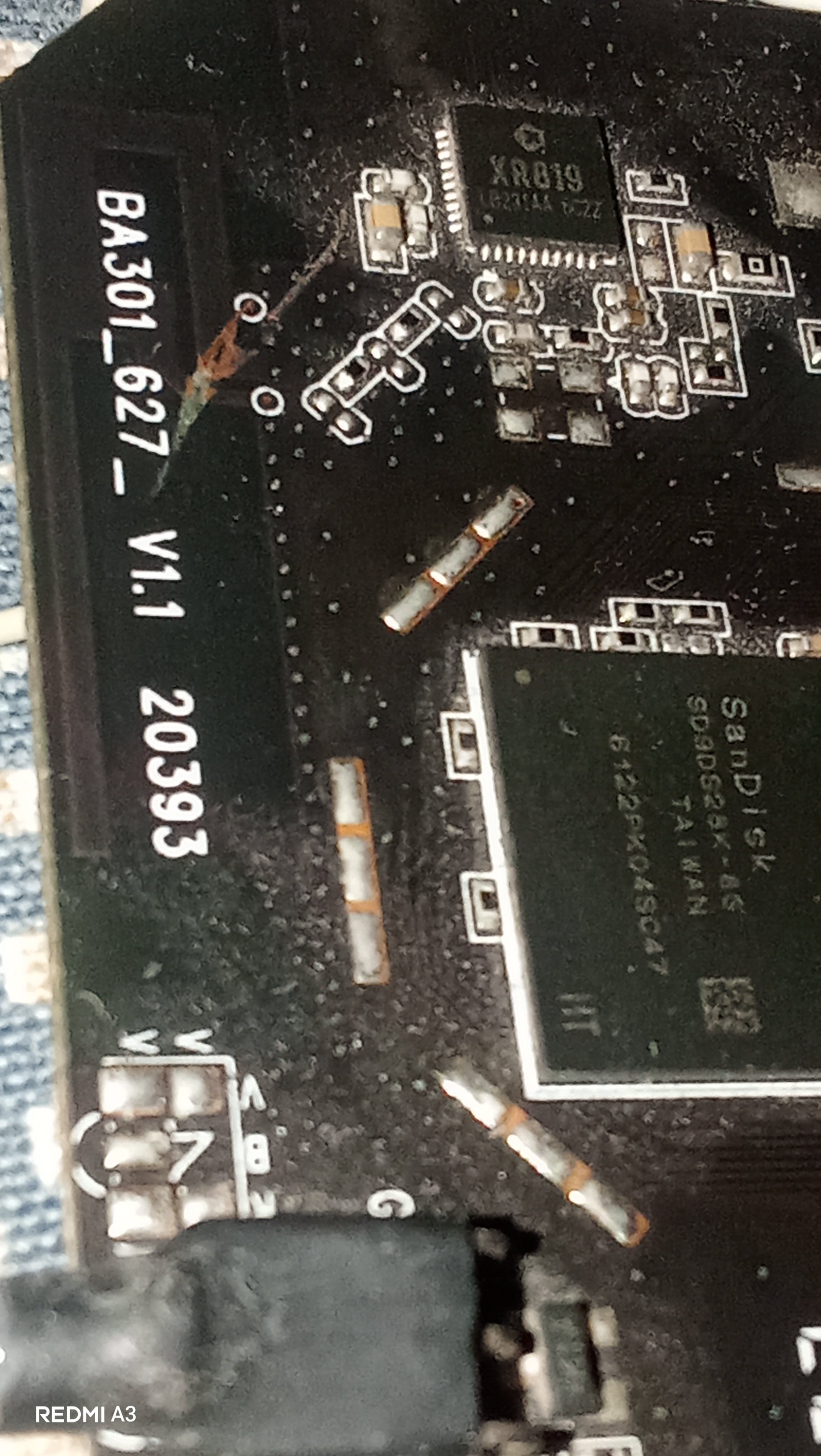
Hey guys, I just wanted some help from you regarding my X96Q. It is a 1+8GB Model with PCB Revision V1.1. It has a H313 processor but sunxi-fel reports H616. A few weeks ago I repaired the USB port of this box and I was successful in it and everything worked perfectly after that(the device booted up to android and worked perfectly) but Then I started to play with that Hidden button in AV port and I randomly clicked it and I thought it would be harmless but after that the device stuck in Red LED and didn't booted anything(possibly an EMMC Corruption). I tried Phoneix Suit first but it stuck on ram init. Then I brought a CP2102 Adapter to read the serial logs, and it turned out to be a Dram calibration errors where: Boot0 starts > Initializes The Emmc, the Board and the CPU -> Then the PMU(reported as AXP806 but physically AXP305) sets ram voltage to 1500mV -> Then it tries to Dram training -> fails and throws [...] "Read calibration error" multiple times —> keeps retrying until it gives up with "[...] Restraining final error." I investigated further and found that my emmc chip's critical sectors are corrupted. I used sunxi-fel to read the emmc and found that it fails to read after 16MB mark, means emmc got corrupted when I repeatedly pressed the AV port button. Now I tried a Armbian via sd card and it says: [...] Your Current DRAM Config isnt supported... Retrying... And keeps doing In a endless retry loop. Same for Miniarch, Armbian and many other builds... Any idea what's the problem with my box?
-
lsusb? Aic8800 is on USB or PCI in radxa 2f?
-
how do i do that? i just apt-hold marked the packages for the time being.
- Yesterday
-

Gaming experience with Orange Pi 5 (RK3588) on Armbian
Alex Ling replied to KhanhDTP's topic in Orange Pi 5
@KhanhDTP, I used Mangohud and it showed the GPU did go up to 1GHz in most of the time (though not all the time) and the GPU usage is ~100%. Maybe I need to test more games I did see a ~7% boost for vkmark score to ~4400 -
The one from MR / my previous message
-
So I received my USB-PD trigger board, set it to 15V and it does nothing, the situation is still the same. I also ordered a USB tester to see the voltage and amperage, basically the board never draw more than 3 to 4W With Aarch64 UEFI image with EDK2 on the SPI flash, Linux starts to boot but then fails and I get a black screen
-
I am encountering similar issue in Allwinner-H618 based Kickpi-K2B board. Over the time, the video play stops with frozen frame display. The freeze is caused by the audio clock drifting from the video clock over time — and that drift happens during the video segments. have you (anyone) found the solution for this?
-

SATA hard drives on Odroid-HC4 (OpenMediaVault works!)
BigHeadMode replied to BigHeadMode's topic in Odroid C4
I tried editing /boot/boot.cmd and recompiling. my changes did persist (I saw 'echo' worked) but it doesn't seem like my scsi scan trick worked. interrupting boot and just going straight into the above steps worked. so i think I need to edit boot.cmd to skip all the boot code for hc4 and just 'scan' then 'boot'. https://docs.armbian.com/User-Guide_Advanced-Configuration/ - Last week
-
 Try this google AI search instead: create overlay on armbian orangepione for Nokia 5110 / PCD8544 LCD You might also need to add to armbianEnv.txt after enabling spi-spidev root@orangepione:~# more /boot/armbianEnv.txt verbosity=1 bootlogo=false console=both disp_mode=1920x1080p60 overlay_prefix=sun8i-h3 rootdev=UUID=f39623a3-f9cf-4fa1-be36-6854d244c378 rootfstype=ext4 overlays=spi-spidev param_spidev_spi_bus=0 usbstoragequirks=0x2537:0x1066:u,0x2537:0x1068:u root@orangepione:~# On successful startup of spi you should have a device: root@orangepione:~# ls /dev/spidev0.0 /dev/spidev0.0 root@orangepione:~#
 -

Teclast T60 AI rooting + armbian possibility Allwinner A733
Taz replied to Taz's topic in Allwinner CPU Boxes
So the wifi works on my tablet and to get it working you need to compile dkms package from https://github.com/radxa-pkg/aic8800/releases i used aic8800-sdio-dkms_5.0+git20260123.5f7be68d-5_all.deb i got the firmware files from stock firmware. You'd want to do this on x86 machine you are preparing the image because you need internet probably for it. -
Use Armbian Imager to create SDcard with curent Release. Connect HDMI Monitor and USB Keyboard. Put Sdcard into sdcard Slot and Power the Box. Follow instruction on Monitor
-
 I ran memtester and found memorie errors, which is probably the cause of the problem I report med earlies. Hopefully this can be solved by changing voltage er timing settings.
 -
Let me know. I had hopes the commiter would provide upstreaming effort proof but nothing there yet.
-

IMX708/ Pi Cam 3 not initializing on Pi Zero 2W
Stuart Watt replied to Stuart Watt's topic in Raspberry Pi
That's very useful. I'm nowhere near as practiced with this, so it'll take some time to digest and plan a way forward. It does fit with what seemed to be the case, though: it's device-level issues. I'll start poking around in the specific device differences and see what shows. The great hint you've found is that this is likely affecting all CSI cameras, not just the IMX708. That's most useful. I'm not at all worried about networkmanager, because the only tweak I made in the custom build was to use systemd-networkd, which (for me, anyway) is more straightforward for embedded/minimal/CLI usage. What I haven't yet done, and probably should, is switch to debugging this in something more vanilla, like a Pi 4. At least then I can compile libcamera and friends directly on the device. The Zero 2W should be the same -- he says, hopefully. -
Greetings ### [Follow-up Update] Boot Deep-Dive via Cubie-A5E DTB Masking Following up on my previous boot freeze post, I (with some assistance from Gemini - who formatted this post) managed to force the Armbian kernel to initialize by masking the sister chip profile (`sun55i-a523-cubie-a5e.dtb`) over the broken `sun55i-t527-orangepi-4a.dtb` target and injecting `clk_ignore_unused` / `irqpoll` parameters. This got us past the initial handoff hang and successfully spawned the 8-core CPU array initialization and initramfs launch (`Run /init as init process`), but the system eventually hit a permanent deadlock during the device probe phase. I don't think I can get this to go any further without some many hours spent looking at how these things work and its currently 35 degrees C here in the UK so time for a beer methinks! #### Full Boot Log Paste Link: - this is the log before using irqpoll parameter (which eventually caused a deadlock) - I can post the irqpoll logs although i wouldn't have thought irqpolling is the way to go ? https://pastebin.com/TvxTxdbp ### Either way - having just read that this post refers to irqpoll then this is the boot logfile with irqpoll added an an extraparm https://pastebin.com/TNS3DDTC #### Key Technical Takeaways from the Log Dump: 1. **PMIC / I2C Communication Failures:** The kernel initializes the AXP717 and AXP323 power chips but encounters standard timeout errors right away: ```text axp20x-i2c 0-0034: AXP20x variant AXP717 found axp20x-i2c 0-0034: Failed to set masks in 0x40: -6 axp20x-i2c 0-0034: failed to add irq chip: -6 ``` 2. **MMC / Storage Controller Deadlock:** Because the AXP717 framework drops out and the Cubie pin definitions do not line up with the Orange Pi 4A's physical board wiring, the kernel enters an endless loop waiting for internal voltage rails (`cldo3` and `bldo1`) to power up the storage controller: ```text platform 4020000.mmc: deferred probe pending: platform: wait for supplier /soc/i2c@7081400/pmic@34/regulators/cldo3 platform 4021000.mmc: deferred probe pending: platform: wait for supplier /soc/i2c@7081400/pmic@34/regulators/bldo1 ``` This prevents the storage device slot from spinning up, trapping the system right as it attempts to mount the root filesystem. Hopefully this helps isolate the unaligned power configuration loops and clock tables in the current `armbian-imager` source profile for the OPi 4A!
-
Kraid is a new Rust-based compiler for Panfrost that replaces the aging Bifrost-rooted compiler stack with a cleaner, more flexible design for modern Mali GPUs, improving IR structure, register allocation, hardware testing, and long-term maintainability. View the full article
-
I usually make a quick backup before running bigger updates, especially on systems that are already working well. It also helps to reboot after the update and check armbianmonitor -u if anything seems off afterward. That can provide useful information if you need to troubleshoot.
-
Hello experts and members, Any possibility of multi booting armbian via petitboot from microsd card or usb or emmc in odroid n2 among other OSs.
-
 Hi ! I have a FriendlyElec NanoPi M5 and I want to play movies with it. But I want to squeeze everything out of this SBC ! So, I need hardware acceleration. I tested first with a OS image downloaded from FriendlyElec and mpv and (almost) everything works well. The mpv working configuration is: hwdec=rkmpp, vo=gpu, gpu-api=opengl. But I don't like that OS for other reasons, so I switched to Armbian. I installed the image "Armbian 26.5.1 KDE Wayland (Ubuntu 26.04 - vendor 6.1.115)", then I installed mpv, but when I try to play movies, it says: marus@nanopi-m5:/mnt/NAS/WDRed1/Samples/FullHD$ mpv --hwdec=rkmpp --vo=gpu --gpu-api=opengl H265.8bit.FullHD.1920x816.24fps.10Mbps.SDR.mkv ● Video --vid=1 --vlang=eng 'Carlito's Way 1993' (hevc 1920x816 23.976 fps) [default] ● Audio --aid=1 --alang=eng 'DDP 5.1 ch 640 Kb/s' (eac3 6ch 48000 Hz) [default] Unsupported hwdec: rkmpp AO: [pipewire] 48000Hz 5.1(side) 6ch floatp VO: [gpu] 1920x816 yuv420p AV: 00:00:14 / 00:01:59 (12%) A-V: 0.000 Cache: 104s/146MB Exiting... (Quit) It seems that this mpv doesn't know about rkmpp's existence... Strange ! What can I do ? Has anyone managed to play movies with mpv and full hardware acceleration on NanoPi M5 and Armbian OS?


.JPG.fec77220f9a63c4cc0df11329be1a995.JPG)