Active threads
Showing topics posted in for the last 365 days.
- Past hour
-
Does it simply stop after that line or is the output incomplete?
-
@Marvin-03 It is past the bootloader. I only tested the build on XFCE, which boots fine. GNOME failing to boot properly might be due to the PowerVR or KMScon install script. If you need GNOME. Try removing the function post_family_tweaks__install_powervr_desktop(). https://github.com/NickAlilovic/build/blob/Radxa-mainline-WIP-test/config/sources/families/sun60iw2.conf#L467
- Today
-
 Great job I don't have time to replicate this, but I would like to see more photos, screenshots, and what you can do with so many SDRs It's perfect to use an older kernel, if you don't need anything from a newer Linux (for example more stable Wifi, and resistive LCDs with Wayland)... In your writeup, you could have included the dmesg or journalctl messages, just prior to the crash. Sometimes, there's a confict between a new or changed kernel module and the module you want to use, and it causes crashes, or not being able to start Linux. Then you deactivate the module that gives you the problem. Which services were disabled with sudo systemctl mask systemd-networkd-wait-online ? It sounds like you never want to start a network service automatically on boot. I hope that the SoapySDR developers can fix the root issue, so that you don't need to lock a library .SO like that I made a thread showing how to control GPIO with Python gpiod https://forum.armbian.com/topic/33800-orange-pi-zero-3-gpio/#findComment-181191 Instead of using Opi.GPIO, which relies of sysfs (deprecated, and you can't use it in newer Linux)
 -
How Orange Pi Zero 3W use Mainline Armbian Kernel with Vendor U-Boot?
robertoj replied to Yeely's topic in Allwinner sunxi
I had no idea that there's an OpiZ3W Just in case, it is nothing at all like the Orange Pi Zero 3, which has a lot in common with the OpiZ2W. Yeely: what are your first impressions about this board? Are there demos for the NPU? Are the video encoders and decoders working with the Orange Pi Linux OS? Bring up verifiable (open source) examples of AI generated code, making an improved program. -

Gaming experience with Orange Pi 5 (RK3588) on Armbian
Alex Ling replied to KhanhDTP's topic in Orange Pi 5
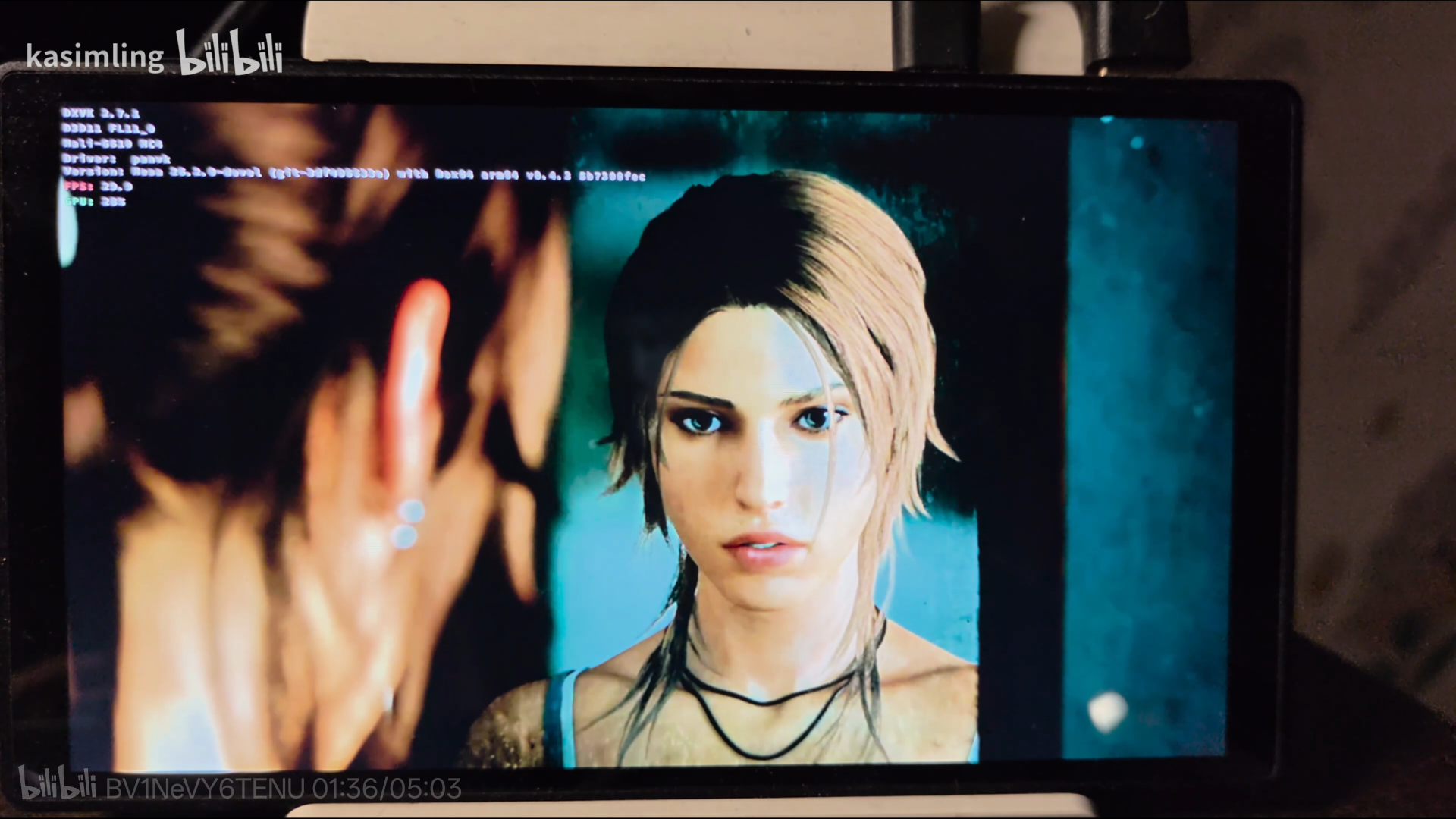
Tomb Raider (2013) Armbian 26.05-trunk (Linux kernel 7.0.10-edge-rockchip64) + Panvk: Mesa 26.2.0-devel (git-3df406633e) + DXVK 2.7.1-stripped (https://github.com/khanh-it/dxvk/releases) + Wine: wine-11.9-staging-tkg-amd64-wow64 (https://github.com/Kron4ek/Wine-Builds/releases) + box64: box64-rk3588_0.4.3+20260529.5b7308f-1 (https://github.com/ryanfortner/box64-debs/) ~30fps@720p (default settings)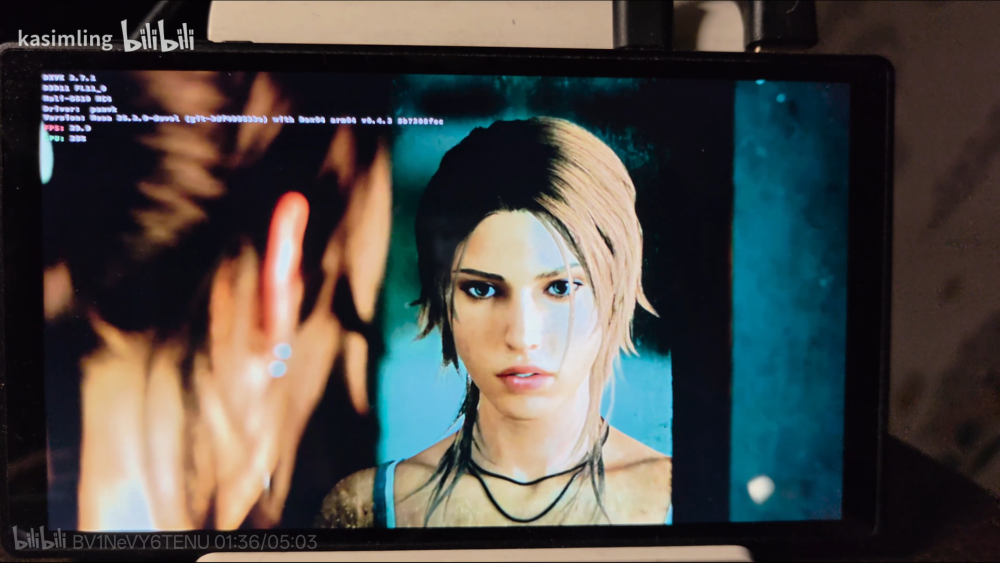
-
Ok thanks my apologies. Oh thanks, I missed that point. This box should've been ewaste long ago I gotbthe bright idea.of using it as a low power 'digital sign' driver for my wife's store . I started with ohub bookworm server for the board. I couldn't get the boot toothpick to read cards or usb. It wasn't until I flashed CoreELEC to a card and was trying to see if it was a distro issue that I realized the box was trying to go into android recovery with the toothpick not looking for boot drives. I put aml_autoscript from the CoreELEC root folder and zipped it then I used android recovery mode to clear the cache and update from card pointing at the zip file. Even though the final output was that it failed it actually loaded CoreELEC autoscript and when I rebooted it read the bootloader on sdcard. After discovering that little nuance I did the same for the flashed Arabian distro but it didn't seem to catch the bootloader on sdcard. I assumed I wasn't getting the right dtd.img copied so I tried the most likely for the chip and when I.asked ai it thought I needed a legacy version. When I throw the CoreELEC in now it still boots from the card. I made the assumption that the modifications to android boot would work accross distros so it didn't seem strange that CoreELEC might boot even if it was the bookworm autoscript being used by android. Thanks for taking the time to reply even though it's the wrong forum and my apologies I should've thought that through. Looking at the hub forum it didn't seem like there was much in the way of replies happening. Cheers
-
Hello, After more research it seems that despite the Wikipedia screenshot, M2 Ultra & M2 Berry do not really have the same CPU : M2U uses R40 and M2B uses V40 This is most probably why it does not work. After checking watchdog & sysrq, I almost rebooted with : echo 1 > /proc/sys/kernel/sysrq echo b > /proc/sysrq-trigger but still hung in the end. I was about to throw the Banana PI away, and I finally found this website which provides a (very) raw debian image for the M2 Berry, and it works correcty including reboot. Sharing the link in case it helps other people with M2B : https://sd-card-images.johang.se/boards/banana_pi_m2_berry.html Thanks for your help Regards
-

RADXA Cubie A5E 1GB RAM Armbian CLI stucks while uboot via sdcard
chapeaufer replied to chapeaufer's topic in Allwinner sunxi
Hello Aniket, as i mentioned the armbian is not working because of the different DRAM Voltage setting in uboot. The board was running with original debian version from RADXA https://github.com/radxa-build/radxa-cubie-a5e/releases. If you check the log you see the dram voltage settings and training. For me i'm waiting until a board with 2/4GB which hopefully runs with armbian. Rolf -
Providing logs with armbianmonitor -u helps with troubleshooting and significantly raises chances that issue gets addressed.
- Yesterday
-
 Nick's instructions: You need to add this line to the bottom. "+CONFIG_SPL_IMAGE_TYPE_SUNXI_TOC0=y" and change "@@ -0,0 +1,31 @@" to @@ -0,0 +1,32 @@. ./compile.sh choose "Do not change kernel configuration" choose "Show CSC/WIP/EOS/TVB" choose "I understand and agree" choose "X98H" choose "edge" rest is up to you. Your image should be in output/images directory.
 -
 There's been a few changes to make etehrnet work on H6 that broek it for H616/H618 seemingly. Your best course of action for now would be to downgrade to 6.12 and lock the `linux-*` from being upgraded.
 -
Just to let you know usb bug is still present in 7.1 rc3 [ 2.596444] usb 4-1: new full-speed USB device number 2 using ohci-platform [ 2.784449] usb 4-1: device descriptor read/64, error -62 [ 3.076447] usb 4-1: device descriptor read/64, error -62 [ 3.356447] usb 4-1: new full-speed USB device number 3 using ohci-platform [ 3.532450] usb 4-1: device descriptor read/64, error -62 [ 3.824440] usb 4-1: device descriptor read/64, error -62 [ 3.928486] usb usb4-port1: attempt power cycle [ 4.140440] usb 4-1: new full-speed USB device number 4 using ohci-platform [ 4.548447] usb 4-1: device not accepting address 4, error -62 [ 4.732456] usb 4-1: new full-speed USB device number 5 using ohci-platform [ 5.140438] usb 4-1: device not accepting address 5, error -62 [ 5.140481] usb usb4-port1: unable to enumerate USB device
-
 Hi everyone, I've just released v1.0.11 of rockchip-vaapi, a VA-API driver for the RK3588 that bridges libva to Rockchip MPP for hardware video decode in Firefox and other VA-API applications. **GitHub:** https://github.com/woodyst/rockchip-vaapi --- ## What it does Enables hardware VP9 / H.264 / HEVC / VP8 decode in Firefox via VA-API → MPP → RK3588 VPU. DMA-BUF zero-copy display path. Tested on Orange Pi 5 Plus with Armbian and Firefox 128. --- ## What's new in v1.0.11 Previous versions would fall back to software after a few seconds of 4K content. This release fixes that — **4K@60fps is now stable**: - **4K@60fps stable** — tested >30,000 frames in Firefox with clean DASH quality switches and no `NS_ERROR_DOM_MEDIA_FATAL_ERR` - **Async EndPicture** — the driver was blocking Firefox's decode thread for up to 1.6s on each DASH segment keyframe, freezing the pipeline. EndPicture now returns immediately. - **Race condition fix** — Firefox was getting a stale DMA-BUF before the decoded frame was ready, causing a green bar at the top of the screen. - **Logging off by default** — ~500 fprintf/s were silently slowing down 60fps decode. Enable with `RK_VAAPI_LOG=/tmp/rk.log` when needed. - **`mpv --vo=dmabuf-wayland`** — green screen fixed (COMPOSED_LAYERS export format) - **`mpv --hwdec=vaapi-copy`** — green screen fixed (GetImage was a stub) - **CMA requirement documented** — 4K needs `cma=512M`; includes `fdtput` fix for boards where the DTB overrides the kernel cmdline --- ## System requirements - **CMA ≥ 512MB** — critical for 4K. Add `cma=512M` to your kernel cmdline. If it has no effect (DTB overrides it), see the `fdtput` fix in INSTALL.md. - librockchip-mpp, libva2 - Firefox: `media.ffmpeg.vaapi.enabled = true` and `MOZ_DISABLE_RDD_SANDBOX=1` --- ## Quick install ```bash git clone https://github.com/woodyst/rockchip-vaapi cd rockchip-vaapi make sudo make install ``` Then launch Firefox: ```bash LIBVA_DRIVER_NAME=rockchip MOZ_DISABLE_RDD_SANDBOX=1 firefox ``` Full instructions: https://github.com/woodyst/rockchip-vaapi/blob/main/INSTALL.md --- Feedback and bug reports welcome.
 -

CSC Armbian for RK322x TV box boards
Vinicius Guastala replied to jock's topic in Rockchip CPU Boxes
The short-circuit you did probably created feedback loop generating tension coming back to some component of the board, possibly burning it unfortunately. Never join 2 power sources without filter balancing it or adding extra capacitors... Is the board turning on? Try to turn on and look for heated places in the board... With a thermal camera will be easier, but if you don't have one, you may touch the components to see which are hot, or add some drops of isopropyl alcohol only on top of components and see if it evaporates too fast like this -> link. If a component is heating too fast, probably its short-circuited/burnt and needs replacement. -

Efforts to develop firmware for H96 MAX V56 RK3566 4G/32G
williamfj replied to Hqnicolas's topic in Rockchip CPU Boxes
Hi! I've been using this Armbian image on my H96 RK3566 for small projects. Thanks a lot for releasing it! Right now, I need to use the NPU for a small AI project. I know it's possible to activate it, but it doesn't look easy. I've read that there is NPU support on legacy kernels (v5.10/v5.15), but I haven't been able to find that specific version for the H96 RK3566. My question is: how difficult would it be to add or backport this NPU module to the current mainline kernel version? -
Fixing is on the way https://github.com/armbian/build/pull/9908, after merging, i generate new images.
-
 I fried SOIC-8 IC (Probably power management) on H96 Max X2 PCB (I-BOX TV) by applying 12V If anyone (@Thang?) has a board like that, please take a close up of that chip on the back side. I might be able to source it and replace it. Original related topic by Thang is here. BTW, there is native console available on pretty much all Armbian boards, that lets you see linux messages before they appear on the HDMI port. It helps to understand the bootloader sequence, u-boot sequence and gives you root access.
 - Last week
-

Help wanted to test a new OpenVFD alternative
sr4armbian replied to Jean-Francois Lessard's topic in Amlogic meson
Hi @Jean-Francois Lessard Thanks for sharing the new openvfd option for Armbian. I am using a Allwinner H618 Android 12 TV box that got FD6551 controller. I have verified the chip model by opening the box. The headers of respective version is also installed and I have double checked that. apt install -y linux-headers-edge-sunxi64 Reading package lists... Done Building dependency tree... Done Reading state information... Done linux-headers-edge-sunxi64 is already the newest version (25.11.2). From the Android dts file I can find the following. I have tried the configuration mentioned here as well but there is no VFD output. Is there any other configuration I have to check or modify for the VFD to work? leds { leds_clk = <0x23 0x08 0x0b 0x00>; leds_dat = <0x23 0x08 0x0c 0x00>; status = "okay"; }; fd655_para { device_type = "fd655_para"; compatible = "Ik,fd655_dev"; fd655_clk_io = <0x23 0x07 0x06 0x01>; fd655_dat_io = <0x23 0x07 0x07 0x01>; status = "okay"; }; ald-colorleds { compatible = "elebao,colorleds"; dev_name = "ald-colorleds"; pinctrl-0 = <0x70>; colorleds_data_gpio = <0x23 0x07 0x02 0x01>; status = "okay"; }; I tried to make the module as you have instructed, however I am getting the below given error messages. /tm16xx-display# make module make EXTRA_CFLAGS="-DCONFIG_TM16XX -DCONFIG_TM16XX_KEYPAD -DCONFIG_TM16XX_I2C -DCONFIG_TM16XX_SPI -include /root/tm16xx-display/drivers/auxdisplay/tm16xx_compat.h -I/root/tm16xx-display/include/" -C /lib/modules/6.12.11-edge-sunxi64/build M=/root/tm16xx-display/drivers/auxdisplay CONFIG_TM16XX=m CONFIG_TM16XX_KEYPAD=y CONFIG_TM16XX_I2C=m CONFIG_TM16XX_SPI=m CONFIG_LINEDISP=m modules make[1]: Entering directory '/usr/src/linux-headers-6.12.11-edge-sunxi64' CC [M] /root/tm16xx-display/drivers/auxdisplay/line-display.o CC [M] /root/tm16xx-display/drivers/auxdisplay/tm16xx_core.o CC [M] /root/tm16xx-display/drivers/auxdisplay/tm16xx_keypad.o LD [M] /root/tm16xx-display/drivers/auxdisplay/tm16xx.o CC [M] /root/tm16xx-display/drivers/auxdisplay/tm16xx_i2c.o CC [M] /root/tm16xx-display/drivers/auxdisplay/tm16xx_spi.o MODPOST /root/tm16xx-display/drivers/auxdisplay/Module.symvers CC [M] /root/tm16xx-display/drivers/auxdisplay/line-display.mod.o In file included from /root/tm16xx-display/drivers/auxdisplay/line-display.mod.c:2: /root/tm16xx-display/drivers/auxdisplay/line-display.mod.c:13:41: error: expected ‘)’ before ‘LINEDISP’ 13 | KSYMTAB_FUNC(linedisp_attach, "_gpl", ""LINEDISP""); | ^~~~~~~~ ./include/linux/export-internal.h:45:28: note: in definition of macro ‘__KSYMTAB’ 45 | " .asciz \"" ns "\"" "\n" \ | ^~ /root/tm16xx-display/drivers/auxdisplay/line-display.mod.c:13:1: note: in expansion of macro ‘KSYMTAB_FUNC’ 13 | KSYMTAB_FUNC(linedisp_attach, "_gpl", ""LINEDISP""); | ^~~~~~~~~~~~ ./include/linux/export-internal.h:41:12: note: to match this ‘(’ 41 | asm(" .section \"__ksymtab_strings\",\"aMS\",%progbits,1" "\n" \ | ^ ./include/linux/export-internal.h:62:41: note: in expansion of macro ‘__KSYMTAB’ 62 | #define KSYMTAB_FUNC(name, sec, ns) __KSYMTAB(name, KSYM_FUNC(name), sec, ns) | ^~~~~~~~~ /root/tm16xx-display/drivers/auxdisplay/line-display.mod.c:13:1: note: in expansion of macro ‘KSYMTAB_FUNC’ 13 | KSYMTAB_FUNC(linedisp_attach, "_gpl", ""LINEDISP""); | ^~~~~~~~~~~~ /root/tm16xx-display/drivers/auxdisplay/line-display.mod.c:14:41: error: expected ‘)’ before ‘LINEDISP’ 14 | KSYMTAB_FUNC(linedisp_detach, "_gpl", ""LINEDISP""); | ^~~~~~~~ ./include/linux/export-internal.h:45:28: note: in definition of macro ‘__KSYMTAB’ 45 | " .asciz \"" ns "\"" "\n" \ | ^~ /root/tm16xx-display/drivers/auxdisplay/line-display.mod.c:14:1: note: in expansion of macro ‘KSYMTAB_FUNC’ 14 | KSYMTAB_FUNC(linedisp_detach, "_gpl", ""LINEDISP""); | ^~~~~~~~~~~~ ./include/linux/export-internal.h:41:12: note: to match this ‘(’ 41 | asm(" .section \"__ksymtab_strings\",\"aMS\",%progbits,1" "\n" \ | ^ ./include/linux/export-internal.h:62:41: note: in expansion of macro ‘__KSYMTAB’ 62 | #define KSYMTAB_FUNC(name, sec, ns) __KSYMTAB(name, KSYM_FUNC(name), sec, ns) | ^~~~~~~~~ /root/tm16xx-display/drivers/auxdisplay/line-display.mod.c:14:1: note: in expansion of macro ‘KSYMTAB_FUNC’ 14 | KSYMTAB_FUNC(linedisp_detach, "_gpl", ""LINEDISP""); | ^~~~~~~~~~~~ /root/tm16xx-display/drivers/auxdisplay/line-display.mod.c:15:43: error: expected ‘)’ before ‘LINEDISP’ 15 | KSYMTAB_FUNC(linedisp_register, "_gpl", ""LINEDISP""); | ^~~~~~~~ ./include/linux/export-internal.h:45:28: note: in definition of macro ‘__KSYMTAB’ 45 | " .asciz \"" ns "\"" "\n" \ | ^~ /root/tm16xx-display/drivers/auxdisplay/line-display.mod.c:15:1: note: in expansion of macro ‘KSYMTAB_FUNC’ 15 | KSYMTAB_FUNC(linedisp_register, "_gpl", ""LINEDISP""); | ^~~~~~~~~~~~ ./include/linux/export-internal.h:41:12: note: to match this ‘(’ 41 | asm(" .section \"__ksymtab_strings\",\"aMS\",%progbits,1" "\n" \ | ^ ./include/linux/export-internal.h:62:41: note: in expansion of macro ‘__KSYMTAB’ 62 | #define KSYMTAB_FUNC(name, sec, ns) __KSYMTAB(name, KSYM_FUNC(name), sec, ns) | ^~~~~~~~~ /root/tm16xx-display/drivers/auxdisplay/line-display.mod.c:15:1: note: in expansion of macro ‘KSYMTAB_FUNC’ 15 | KSYMTAB_FUNC(linedisp_register, "_gpl", ""LINEDISP""); | ^~~~~~~~~~~~ /root/tm16xx-display/drivers/auxdisplay/line-display.mod.c:16:45: error: expected ‘)’ before ‘LINEDISP’ 16 | KSYMTAB_FUNC(linedisp_unregister, "_gpl", ""LINEDISP""); | ^~~~~~~~ ./include/linux/export-internal.h:45:28: note: in definition of macro ‘__KSYMTAB’ 45 | " .asciz \"" ns "\"" "\n" \ | ^~ /root/tm16xx-display/drivers/auxdisplay/line-display.mod.c:16:1: note: in expansion of macro ‘KSYMTAB_FUNC’ 16 | KSYMTAB_FUNC(linedisp_unregister, "_gpl", ""LINEDISP""); | ^~~~~~~~~~~~ ./include/linux/export-internal.h:41:12: note: to match this ‘(’ 41 | asm(" .section \"__ksymtab_strings\",\"aMS\",%progbits,1" "\n" \ | ^ ./include/linux/export-internal.h:62:41: note: in expansion of macro ‘__KSYMTAB’ 62 | #define KSYMTAB_FUNC(name, sec, ns) __KSYMTAB(name, KSYM_FUNC(name), sec, ns) | ^~~~~~~~~ /root/tm16xx-display/drivers/auxdisplay/line-display.mod.c:16:1: note: in expansion of macro ‘KSYMTAB_FUNC’ 16 | KSYMTAB_FUNC(linedisp_unregister, "_gpl", ""LINEDISP""); | ^~~~~~~~~~~~ make[3]: *** [scripts/Makefile.modfinal:31: /root/tm16xx-display/drivers/auxdisplay/line-display.mod.o] Error 1 make[2]: *** [/usr/src/linux-headers-6.12.11-edge-sunxi64/Makefile:1870: modules] Error 2 make[1]: *** [Makefile:224: __sub-make] Error 2 make[1]: Leaving directory '/usr/src/linux-headers-6.12.11-edge-sunxi64' make: *** [Makefile:50: module] Error 2 root@homeassistant2:~/tm16xx-display# make-module install make-module: command not found root@homeassistant2:~/tm16xx-display# make module-install make -C /lib/modules/6.12.11-edge-sunxi64/build M=/root/tm16xx-display/drivers/auxdisplay CONFIG_TM16XX=m CONFIG_TM16XX_KEYPAD=y CONFIG_TM16XX_I2C=m CONFIG_TM16XX_SPI=m CONFIG_LINEDISP=m modules_install INSTALL_MOD_PATH= make[1]: Entering directory '/usr/src/linux-headers-6.12.11-edge-sunxi64' DEPMOD /lib/modules/6.12.11-edge-sunxi64 Warning: modules_install: missing 'System.map' file. Skipping depmod. make[1]: Leaving directory '/usr/src/linux-headers-6.12.11-edge-sunxi64' root@homeassistant2:~/tm16xx-display# make service-install modprobe tm16xx modprobe: ERROR: could not insert 'tm16xx': Exec format error make: *** [Makefile:60: service-install] Error 1 -
Armbian's next release boots the FriendlyElec NanoPi M5 end-to-end from UFS on a mainline U-Boot, with no proprietary recovery image in the loop. It is the first RK3576 board in the catalogue to reach this state, and the integration pattern paves the way for the others. UFS, the storage class that replaced eMMC in phones, is packet-based and full-duplex with command queuing. The practical gain over an SD card shows up in random I/O, in latency under concurrent load, and in write endurance that holds up over years of deployment. FriendlyElec ships UFS on the M5 because the RK3576 has a native UFS controller, a sensible choice for any board destined for kiosks, robots, or industrial gateways. What mainline was missingThe UFS controller IP itself had a partial driver in mainline U-Boot. Everything around it was not wired: PHY init sequencing, the regulator rails the device needs before it responds, the device-tree glue that tells U-Boot "yes, this board has UFS." For the M5, none of it existed. There is also a cosmetic detail that catches every newcomer, namely that Rockchip's loader tooling labels UFS as SATA in the RKDevTool storage dropdown. Flashing goes through upgrade_tool, not the more familiar rkdeveloptool, because rkdeveloptool has never had UFS support. How it came togetherThree workstreams had to converge. Jonas Karlman's kwiboo/rk3576 branch carried the upstream RK3576 U-Boot enablement, pinctrl, clocks, storage controller bindings, and has been merging into mainline through 2026. The rockchip-linux/rkbin tree had to ship a UFS-capable MiniLoader, which the RK3576MINIALL.ini recipe assembles from the DDR init, the UFS-aware loader, and the OP-TEE/ATF blobs. The Armbian side was the integration: a board config on U-Boot v2026.04, a U-Boot DT overlay that brings the UFS regulators and PHY up at the right moment, and a flashing path that upgrade_tool accepts. None of these were individually hard. Making them line up is what took the time. On the device, the stack does its job cleanly. The BootROM reads the IDB off UFS and pulls in the TPL; the TPL initialises DDR and the UFS host controller, sequences the regulators, negotiates the link, and reads the next stage; ATF jumps to U-Boot; U-Boot enumerates ufs 0 and loads the kernel; the kernel re-probes the same controller it just booted through. The work, almost all of it, lived at the TPL stage. Controller fine, PHY fine, but the device sits silent if regulator sequencing is wrong by a handful of milliseconds. Once that is right, the upper layers see a clean SCSI-shaped block device and the rest is unsurprising. What it leaves us withFor users with a UFS-equipped M5, the next release image flashes through the FriendlyElec Rockchip workflow with upgrade_tool, BOOT switch on UFS/SD, storage dropdown labelled "SATA". The board boots without an SD card or eMMC involvement, and armbian-install writes the same image to UFS in place once the system is running from another medium. Against microSD on the same hardware the difference is felt rather than benchmarked: small reads land faster, the system stays responsive under concurrent I/O, and the write endurance is in a different ballpark. A few rough edges remain. The vendor tooling will keep calling UFS "SATA" until either Rockchip relabels the GUI or rkdeveloptool grows a cs ufs opcode, neither on the immediate horizon. The BOOT switch is a hardware gate with no software override. And upgrade_tool ships only as a Linux x86_64 ELF, so flashing from an Apple Silicon Mac means a Linux VM with USB passthrough or a Windows host running the GUI. The same plumbing now unlocks every other UFS-equipped RK3576 board in the catalogue. The M5 reached the line first because the hardware was available and the upstream pieces were the most complete. The others should be substantially less work, now that the integration pattern exists and the loader path has been proven on real silicon. View the full article
-
Armbian's next release boots the FriendlyElec NanoPi M5 end-to-end from UFS on a mainline U-Boot, with no proprietary recovery image in the loop. It is the first RK3576 board in the catalogue to reach this state, and the integration pattern paves the way for the others. UFS, the storage class that replaced eMMC in phones, is packet-based and full-duplex with command queuing. The practical gain over an SD card shows up in random I/O, in latency under concurrent load, and in write endurance that holds up over years of deployment. FriendlyElec ships UFS on the M5 because the RK3576 has a native UFS controller, a sensible choice for any board destined for kiosks, robots, or industrial gateways. What mainline was missingThe UFS controller IP itself had a partial driver in mainline U-Boot. Everything around it was not wired: PHY init sequencing, the regulator rails the device needs before it responds, the device-tree glue that tells U-Boot "yes, this board has UFS." For the M5, none of it existed. There is also a cosmetic detail that catches every newcomer, namely that Rockchip's loader tooling labels UFS as SATA in the RKDevTool storage dropdown. Flashing goes through upgrade_tool, not the more familiar rkdeveloptool, because rkdeveloptool has never had UFS support. How it came togetherThree workstreams had to converge. Jonas Karlman's kwiboo/rk3576 branch carried the upstream RK3576 U-Boot enablement, pinctrl, clocks, storage controller bindings, and has been merging into mainline through 2026. The rockchip-linux/rkbin tree had to ship a UFS-capable MiniLoader, which the RK3576MINIALL.ini recipe assembles from the DDR init, the UFS-aware loader, and the OP-TEE/ATF blobs. The Armbian side was the integration: a board config on U-Boot v2026.04, a U-Boot DT overlay that brings the UFS regulators and PHY up at the right moment, and a flashing path that upgrade_tool accepts. None of these were individually hard. Making them line up is what took the time. On the device, the stack does its job cleanly. The BootROM reads the IDB off UFS and pulls in the TPL; the TPL initialises DDR and the UFS host controller, sequences the regulators, negotiates the link, and reads the next stage; ATF jumps to U-Boot; U-Boot enumerates ufs 0 and loads the kernel; the kernel re-probes the same controller it just booted through. The work, almost all of it, lived at the TPL stage. Controller fine, PHY fine, but the device sits silent if regulator sequencing is wrong by a handful of milliseconds. Once that is right, the upper layers see a clean SCSI-shaped block device and the rest is unsurprising. What it leaves us withFor users with a UFS-equipped M5, the next release image flashes through the FriendlyElec Rockchip workflow with upgrade_tool, BOOT switch on UFS/SD, storage dropdown labelled "SATA". The board boots without an SD card or eMMC involvement, and armbian-install writes the same image to UFS in place once the system is running from another medium. Against microSD on the same hardware the difference is felt rather than benchmarked: small reads land faster, the system stays responsive under concurrent I/O, and the write endurance is in a different ballpark. A few rough edges remain. The vendor tooling will keep calling UFS "SATA" until either Rockchip relabels the GUI or rkdeveloptool grows a cs ufs opcode, neither on the immediate horizon. The BOOT switch is a hardware gate with no software override. And upgrade_tool ships only as a Linux x86_64 ELF, so flashing from an Apple Silicon Mac means a Linux VM with USB passthrough or a Windows host running the GUI. The same plumbing now unlocks every other UFS-equipped RK3576 board in the catalogue. The M5 reached the line first because the hardware was available and the upstream pieces were the most complete. The others should be substantially less work, now that the integration pattern exists and the loader path has been proven on real silicon. View the full article
-

How you can help test upcoming Armbian 26.05 images?
Wolfpup replied to Igor's topic in Advanced users - Development
Board: Orangepi3-lts Images: * Armbian_26.5.1_Orangepi3-lts_trixie_current_6.18.33_minimal.img.xz Passed tests: * SHA-256 passed All below testing done via wired and wireless console connection(headless) * initial setup passed * create main user passed * update/upgrade check as root passed * log in as created user pass * update/upgrade check as the created user passed Result: All tested images do exist, are verified, and work properly -
Hi @JamesCL. You cannot change the boot order of the SoC (SD -> eMMC -> MTD / SPI flash), thus i.e. the SD card is always booted if inserted. You can probably change the root file system's UUID, i.e. change the /boot/extlinux/extlinux.conf to give the kernel the command to use eMMC as root file system. HTH // Sven-Ola
-

Games Compatible With Armbian on Pinebook Pro
LivingLinux replied to Katsujinken's topic in Pinebook Pro
Perhaps you can try to build Yamagi from source, as I pointed out, a developer has really optimized OpenGL ES. Here you can see it on a VisionFive 2, RISC-V SBC, hitting almost 200fps at 1080p! You can also try PS1 emulation with PCSXR (works without PS1 BIOS). I assume it's just: sudo apt install rpcsx .If you have a PS1 BIOS, you can also try Duckstation. If you need a game for testing, you can try Magic Castle. It was released for free. http://netyaroze.com/Media/Magic-Castle https://archive.org/details/magic-castle-2021-07-may Regarding eDuke32, did you try disabling compressed textures? https://wiki.eduke32.com/wiki/Frequently_Asked_Questions -

Rupa X88 Pro 13 - RK3528 board with images
epost.deb replied to fedes_gl's topic in Rockchip CPU Boxes
I can confirm the 5GHz operation on DQ08 board. Now it's time to have a closer look at the kernel source and the non-matching DTS mess. -
@Nick A Thanks for releasing the wonderful Armbian image for the Allwinner H618 and for supporting the community with your valuable suggestions. I recently purchased a TV box with 4GB of RAM and 64GB of storage running Android 12. I downloaded Armbian-unofficial_25.05.0-trunk_Transpeed-8k618-t_bookworm_edge_6.12.11_server.img.xz from here and flashed it to an SD card using BalenaEtcher. The box boots successfully, and I can configure it via the CLI. However, this motherboard is different from the ones previously posted here. The silkscreen on the board reads "X3Plus_H618_4bit_V3.0". Based on the naming convention and the appearance of the device, it seems to be the model available here. This board uses an FD6551 chip for the front VFD display. I have managed to extract .img file from the stock android. Are there any modifications I need to make to get the Wi-Fi, USB ports, and front VFD working? Could you please suggest? Things that are working: HDMI Display LAN Controller 1 out of the 2 USB ports. The port near to SD Card slot more precisely Things that are not working: WiFi - The chip got a metal shield. On top of the shield it is written with W804S1, inside the shield I could find AIC8800D40 chip. 1 x USB Port - Near the top left hand corner Front VFD display.





.thumb.jpg.20ed26dd68aaee94a94b227bf670a8eb.jpg)