Active threads
Showing topics posted in for the last 365 days.
- Past hour
-
 On my Debian13 VM that I use to build images for my boards, I have started to notice new errors that I have not seen before after this part of the logs... [🐳|🌱] After updating and cleaning image apt list cache [ 30 files ] [🐳|🌱] Image installed package hash [ ✅ base-files = 1-trixie-1armbian1-Bb095-U13.8--deb13u4-R55fa ] [🐳|🌱] Image installed package hash [ ✅ linux-image-current-rockchip64 = 6.18.26-S1fe0-Dedd0-P1f35-Cc077-H8200-HK01ba-Vc222-Bed86-R448a ] [🐳|🌱] Image installed package hash [ ✅ armbian-firmware = 1-SAa38b-B96c8-R448a ] [🐳|🌱] Image installed package hash [ ✅ armbian-bsp-cli-rockpro64-current = 1-PC1e15-V9ab0-H3400-Bd2e9-Rf36a ] [🐳|🌱] Image installed package hash [ ✅ linux-u-boot-rockpro64-current = 2025.01-S6d41-P6e2c-Hbf76-V6f3c-Be4e9-R448a ] [🐳|🌱] Image installed package hash [ ✅ linux-dtb-current-rockchip64 = 6.18.26-S1fe0-Dedd0-P1f35-Cc077-H8200-HK01ba-Vc222-Bed86-R448a ] [🐳|🔨] removed '/armbian/.tmp/rootfs-no-uuidgen-yet-15898-49210/etc/resolv.conf' [🐳|🔨] removed '/armbian/.tmp/rootfs-no-uuidgen-yet-15898-49210/sbin/initctl' [🐳|🔨] removed '/armbian/.tmp/rootfs-no-uuidgen-yet-15898-49210/sbin/start-stop-daemon' [🐳|🔨] removed '/armbian/.tmp/rootfs-no-uuidgen-yet-15898-49210/usr/sbin/policy-rc.d' [🐳|🌱] Removing qemu-user-static binary from chroot [ qemu-aarch64-static during image ] [🐳|🔨] removed '/armbian/.tmp/rootfs-no-uuidgen-yet-15898-49210/usr/bin/qemu-aarch64-static' [🐳|🌱] Unmounting [ /armbian/.tmp/rootfs-no-uuidgen-yet-15898-49210 ] Once the unmounting of rootfs-nouuidgen-yet begins I notice the following errors spam in the logs, 1000+ lines, and finally the target unmounts successfully and the image finishes building. The images still boot fine. umount: /armbian/.tmp/rootfs-no-uuidgen-yet-15898-49210/dev: target is busy. [🐳|🔨] tmpfs /armbian/.tmp/rootfs-no-uuidgen-yet-15898-49210/dev tmpfs rw,nosuid,size=65536k,mode=755,inode64 0 0 umount: /armbian/.tmp/rootfs-no-uuidgen-yet-15898-49210/dev/pts: not mounted. umount: /armbian/.tmp/rootfs-no-uuidgen-yet-15898-49210/dev: target is busy. umount: /armbian/.tmp/rootfs-no-uuidgen-yet-15898-49210/proc: not mounted. umount: /armbian/.tmp/rootfs-no-uuidgen-yet-15898-49210/sys: not mounted umount: /armbian/.tmp/rootfs-no-uuidgen-yet-15898-49210/tmp: not mounted. umount: /armbian/.tmp/rootfs-no-uuidgen-yet-15898-49210/var/tmp: not mounted. umount: /armbian/.tmp/rootfs-no-uuidgen-yet-15898-49210/run/user/0: not mounted. Is there a way to adjust some kind of timeout for this to prevent the massive amount of "target is busy" outputs in the logs? Thank you for any help or insights!
 - Today
-
Hi, I have a Samba server on a TV Box. I installed Samba, defined a location for the server (srv/Public), created and user and UFW (firewall) allowing Samba protocols. I also defined srv/Public in /etc/fstab (Windows uses NTFS). Pls, tell if you need additional info. Regards, Sergioclr
-
 I don't own that box so I can only give you generic help. You really would need to hook up a usb-uart adapter to access the uboot debug output to see what is happening. The second thing I would say is that I have no idea what ophub builds do as they are not Armbian builds, ophub is a fork, they don't contribute to Armbian development nor do they participate in these forums. So per the Armbian amlogic TV box instructions, the boot environment must be a clean android boot environment. Installing or running any other distribution may cause Armbian to not boot. So I'd recommend either reinstalling a clean Android image to test from, or investigate any differences in boot scripts to see what might be going on. But again getting access to the new boot serial console would help a lot.
 -
Has anyone installed Waydroid on Armbian 26.2.4? Are there any manual for this?
-
Good morning. Is there any means of writing an Armbian image to Allwinner H313 emmc? Phoenixsuit does not allow Armbiam images to be written. I have tried to compile (Make) Livesuit, but I gave up due to several incompatibilities (kernel, libraries, etc.). Thanks in advance.
-
 You need to provide more informations. I wasn't able to repreoduce. I works here.
 -
What you’re seeing is open-source maintenance in practice. It’s not centrally orchestrated. We only manage to do this for some key features while DVB support is present in some kernels, but it’s not guaranteed to be consistently enabled across all targets unless someone explicitly maintains this functionality. -> https://github.com/armbian/build/pulls
- Yesterday
-
@Nick A Great! and Good job! I've tested both the server and desktop versions of v0.6.4 on the A7S, and the DP output works perfectly on both. I've attached a screenshot for your reference. I’m using a USB‑C to HDMI docking station to test it. When I repeatedly plug and unplug it, the display works fine. The dock also has a keyboard receiver plugged in, which works normally. However, if I then plug a USB flash drive into the dock, the display output stops working (probably due to power supply issues). If I unplug the USB drive and plug it back in, the display works normally again. Additionally, I tested the Mainline v0.1. It seems to have issues on the A7S: the blue LED flashes after boot, but neither the Ethernet nor WiFi connects, and there is no output on the DP port. It appears the system cannot be login (I haven't tested via UART). However, the A7Z handles dual screens fine over HDMI and DP.
-
$ grep -i error /var/log/armbian-hardware-monitor.log [ 2.990779] rockchip-pcie f8000000.pcie: probe with driver rockchip-pcie failed with error -110 Looking at this I see the following: https://patchwork.ozlabs.org/project/linux-pci/patch/20210421083115.30213-1-jinsiyu940203@163.com/ "In function rockchip_pcie_host_init_port(), it defines a timeout value of 500ms to wait for pcie training. However, it is not enough for samsung PM953 SSD drive and realtek RTL8111F network adapter, which leads to the following errors: [ 0.879663] rockchip-pcie f8000000.pcie: PCIe link training gen1 timeout! [ 0.880284] rockchip-pcie f8000000.pcie: deferred probe failed [ 0.880932] rockchip-pcie: probe of f8000000.pcie failed with error -110 The pcie spec only defines the min time of training, not the max one. So set a proper timeout value is important. Change the value to 1000ms will fix this bug." Is it possible for team to add patch such as ../patch/kernel/rockchip64-current/0002-rockchip-pcie-increase-timeout.patch which contains the fix specified in the patchwork.ozlabs.org link above? A humble thank you for any more help and consideration on this!
-

Magcubic HY300 Android 11 Projector Allwinner H713, 1GB/8GB
curse replied to curse's topic in Allwinner CPU Boxes
@well0nez I didn't even think about that. When I made the original post almost two years ago, AI was much less capable than today. You just gave me a few ideas for different projects. As I said, unfortunately I don't have the HY300 anymore, but I do have a Magcubic L018(same chip I think), though it's in use every day as a bedroom TV. I don't think my girlfriend would appreciate if I started to hack it 😉 Especially if core functions like projecting the things coming through the HDMI port to the wall. The L018 has worse software than the HY300, in my opinion, so I've connected it to a certified Android TV 14 Box. -
Hello, I updated to Armbian 26.2.1 trixie installaed on emmc. If I poweroff the nas and power on again it does't work, but if I attach an usb cable to the console it works. I think the problem must be related to the u-boot part.
-
It worked seamlessly! Thanks!
-

Armbian for H313 X96-Q LPDDR3 TV-Box
Давид Васильев replied to sicxnull's topic in Allwinner CPU Boxes
Hi everyone! I tried installing hardware decoding from this link - https://forum.armbian.com/topic/32449-repository-for-v4l2request-hardware-video-decoding-rockchip-allwinner/ , but it didn't work for me. My board version is 5.1. Has anyone been able to fix this? -
I tried to enable the I2S / PCM5102 service with AI, but unfortunately, despite numerous attempts, I couldn't. But anyone can use a USB audio card. Maybe someone else will figure out how to enable it 🙂 Best regards
- Last week
-
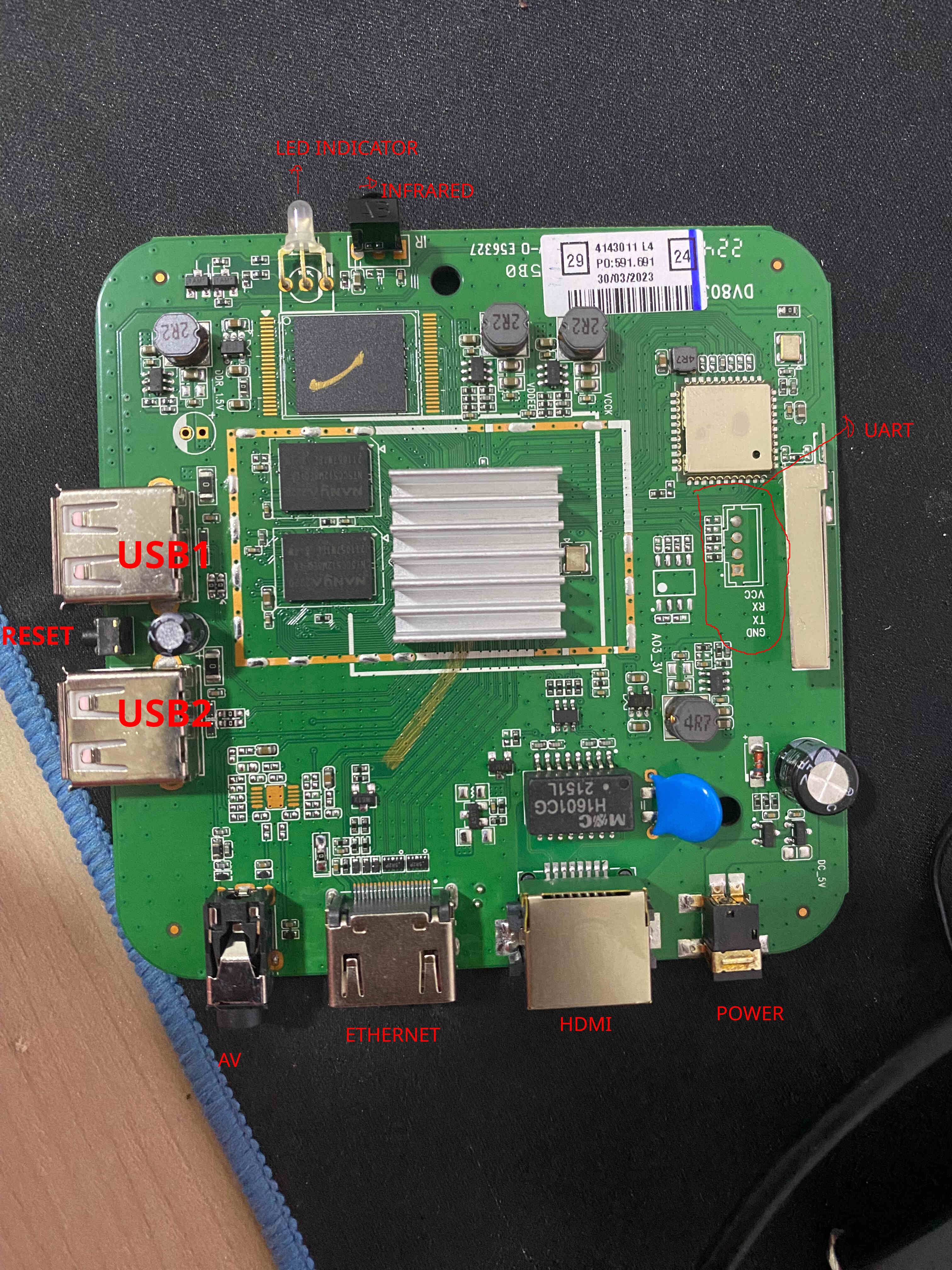
Board image
-

NanoPC-T6 LTS Reset button doesn't work on 6.18.x kernel
ando replied to ando's topic in NanoPC T6 LTS
yes, i've studied the schematic well to see if that gave any clues and I have learned that it ties into the Power Management Unit. It remains that the button doesn't work on mainline kernels but does on the vendor kernel. There must be some init step or configuration that's missing. -
 Looks like the current-rockchip64 kernel that one receives with apt on PINE64 rockpro64 is 3.18.10 (6.18.10-current-rockchip64), vulnerable to copy-fail. This seems weird because if you go to https://armbian.com/boards/rockpro64 that page says that the "current" kernel for these systems is 6.18.26 and that is what you get when you download the image file. Is there an issue with updating the apt repos?
 -
Things are still very sad with Ethernet. Is this could be related to some low-level timings in device configuration?
-
 First of all, thanks for your reply. Even though you said there are no "vendor-lockin" i felt like so that's why i created a post on this forum as this issue came only after armbian os flash. As i said, after flashing armbian os, i was not able to use MASK button to bypass emmc boot and about a dozen of different os other than armbian failed to boot from SD card. Then i experimented on different methods including the PC connectivity but changing bootloader or os image didn't work as the mask communication is getting lost during flash command run. I deleted boot files from armbian boot partition to check if that fall back to SD card, but there was no luck. However armbian SD card boot still worked. So i confirmed that it is the change in bootloader that armbian made. Then i re installed armbian os inside emmc and used dd command to write the original bootloader images which is taken from the nanopi r6s official eflasher download link. It worked! Now i am able to install other os than armbian. Kindly fix this issue and acknowledge the same, otherwise people like me will think twice before testing latest armbian os next time. Best regards
 -
Ah, this board has n out of tree dt as well which most likely overwrites the patch. Try adjusting this file: ~/build/patch/kernel/archive/rockchip64-6.18/dt/rk3576-nanopi-r76s.dts
-
I'll give it a go when ready for download 🙂 ljones
-
 I am trying to get the ARM performance assessment setup working (I'm trying to get Mali profiling for OpenCL code) on the Rock 5B+, and I've hit a blocker. The main component to this is some kernel configuration (CONFIG_ARM_SPE_PMU) and a loadable module. Oddly, those work fine in a custom kernel build. What I am hitting appears to be some missing interrupt setup that renders all those components inert. (It has to be a custom build to get CONFIG_ARM_SPE_PMU set. The issue is that even with the kernel configured and the module loaded, the SPE component remains inactive. ARM has its own system report tool which analyzes a setup, and that tool is reporting an issue: And indeed, nothing seems to show in cat /proc/interrupts. The man page for the module suggests this is the issue: It says: KPTI is definitely disabled and the SPE PMU loads (it's in lsmod) but it still doesn’t show in /sys/bus/event_source/devices/. Nothing relevant seemed to show in dmesg either. Frankly, I have no idea where to look for the SPE interrupt, or how to set it up. If anybody has any pointers or suggestions, I'd be extremely grateful.
 -
 The TV box is equipped with an AP 6330 WiFi module. The Ethernet RTL module is 8911F.
 -

Composite TV OUT WORKING in Orange Pi One H3, 6.12 current
Error1429 replied to Error1429's topic in Orange Pi One
In case someone finds this useful, I found a way to change the display mode from NTSC (default) to PAL NTSC to PAL: xrandr --output Composite-1 --set "TV mode" PAL xrandr --output Composite-1 --mode 720x576i PAL to NTSC: xrandr --output Composite-1 --set "TV mode" NTSC xrandr --output Composite-1 --mode 720x480i I thought I would have to recompile the whole kernel because the patch isn't working properly but these two commands did the trick. I don't know how to make this permanent but it works in the terminal. -
 @Ducdanh Nguyen Your board is using a HiSilicon Hi3798MV310. I have no experience with this SoC. The kernel sources for this SoC are too old. You are better off finding another cheap box to run Armbian.