Search the Community
Showing results for 'RK3399'.
-
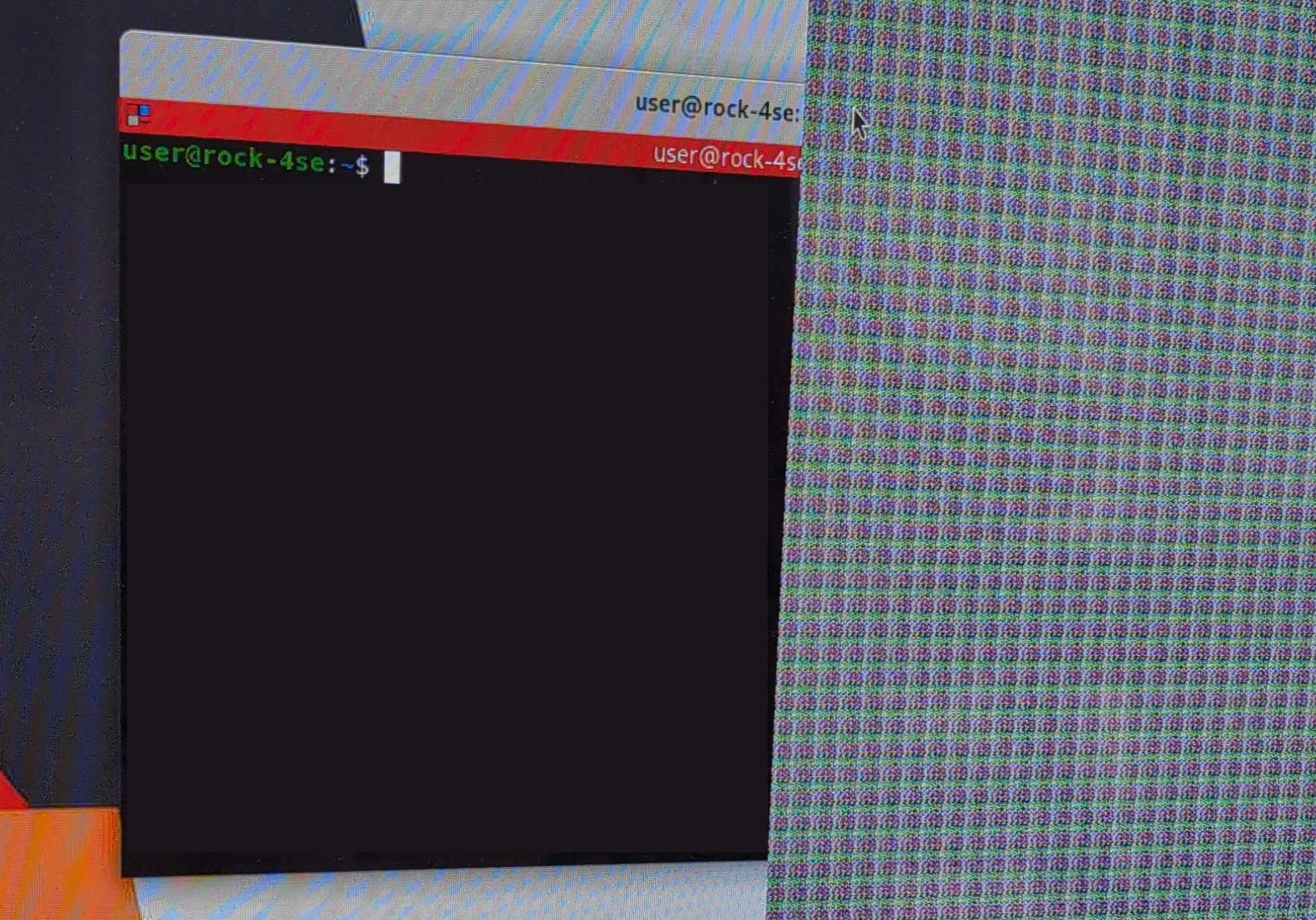
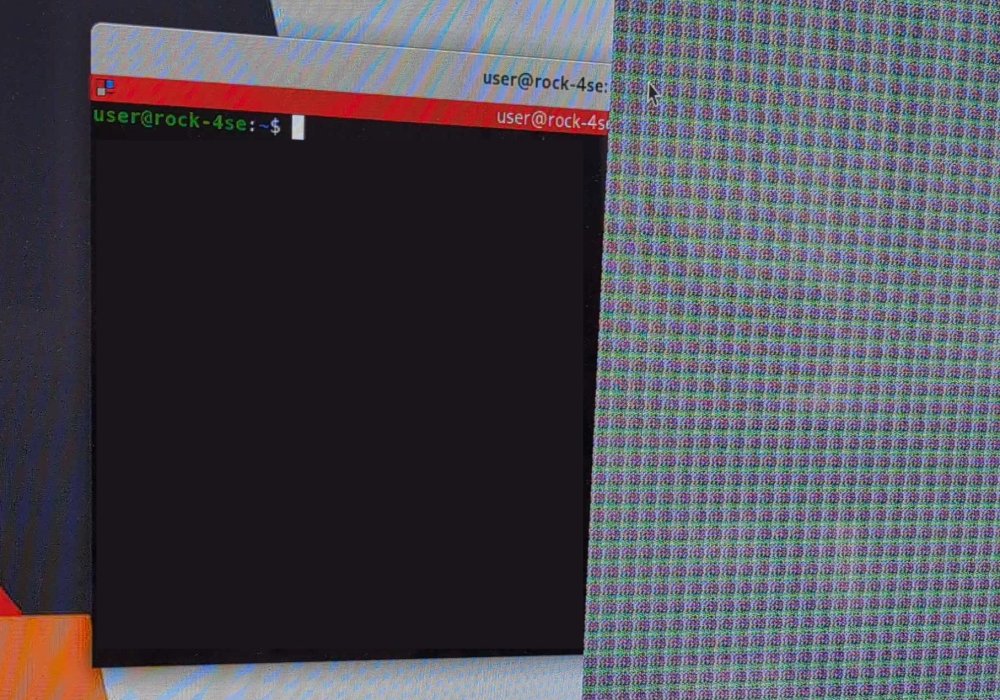
I'm getting this weird graphical artifact on a Radxa Rock 4SE connected to a TV via HDMI. It covers roughly a third of the right side of the display, note that the terminal window is covered by the artifact but the cursor is above it. I started from a Debian minimal image and added the desktop environment via armbian-config. The artifact is visible on both GNOME and KDE Plasma (with fully updated system on both rolling and stable) but not with XFCE. It also disappears with resolutions lower than 4K or switching to tty. Any idea what might be causing this?
-
 https://libre.computer/products/roc-rk3399-pc/ Can the computer run entirely on free software which is software you can use, share, modify and redistribute? The question includes firmware, microcode, etc, any piece of software that is running on the computer. If some devices on the computer requires non free software in order to work then what devices are they? And will the computer still work if you choose to not install the pieces of non free software in question? Thank you.
 -
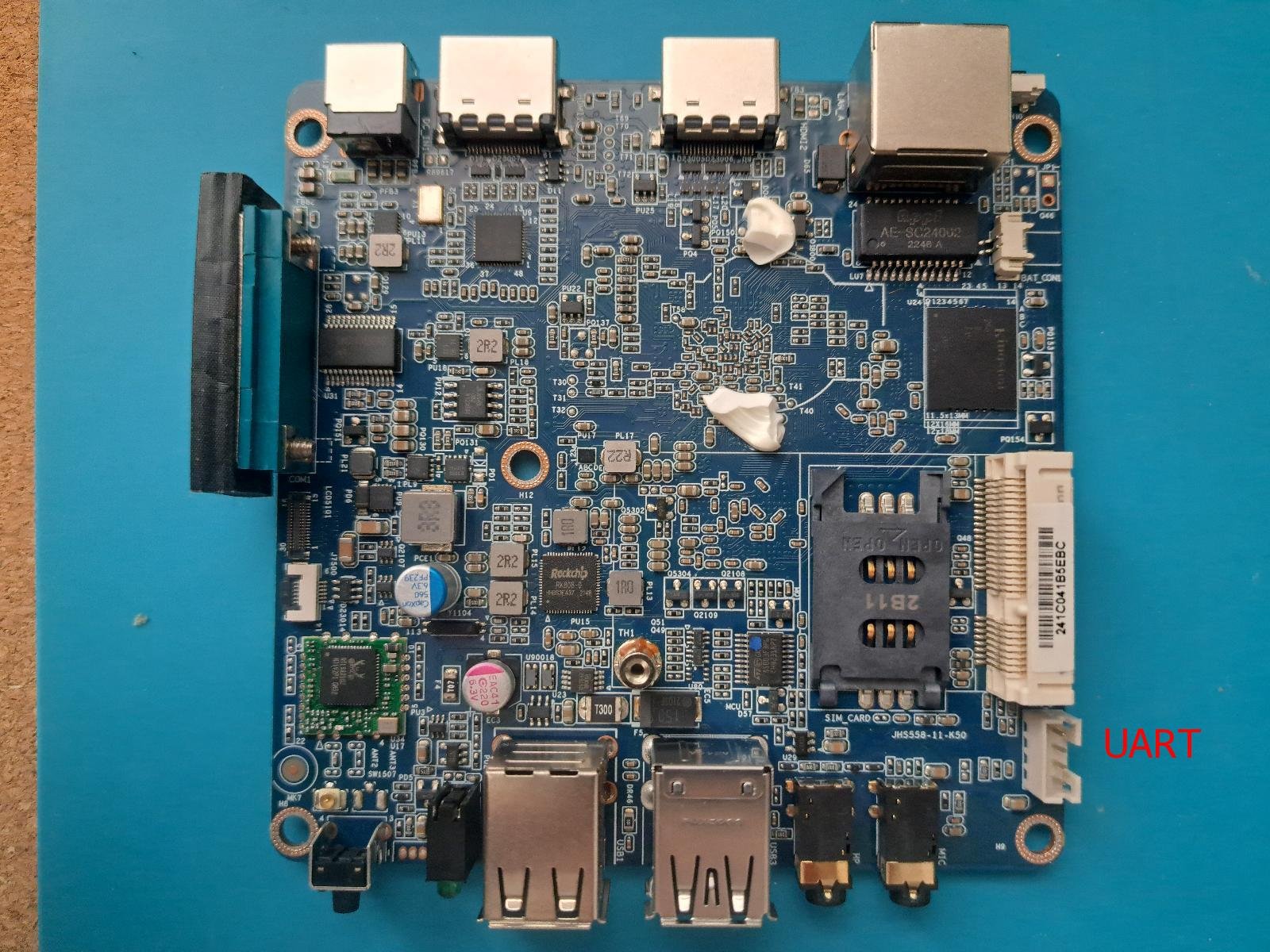
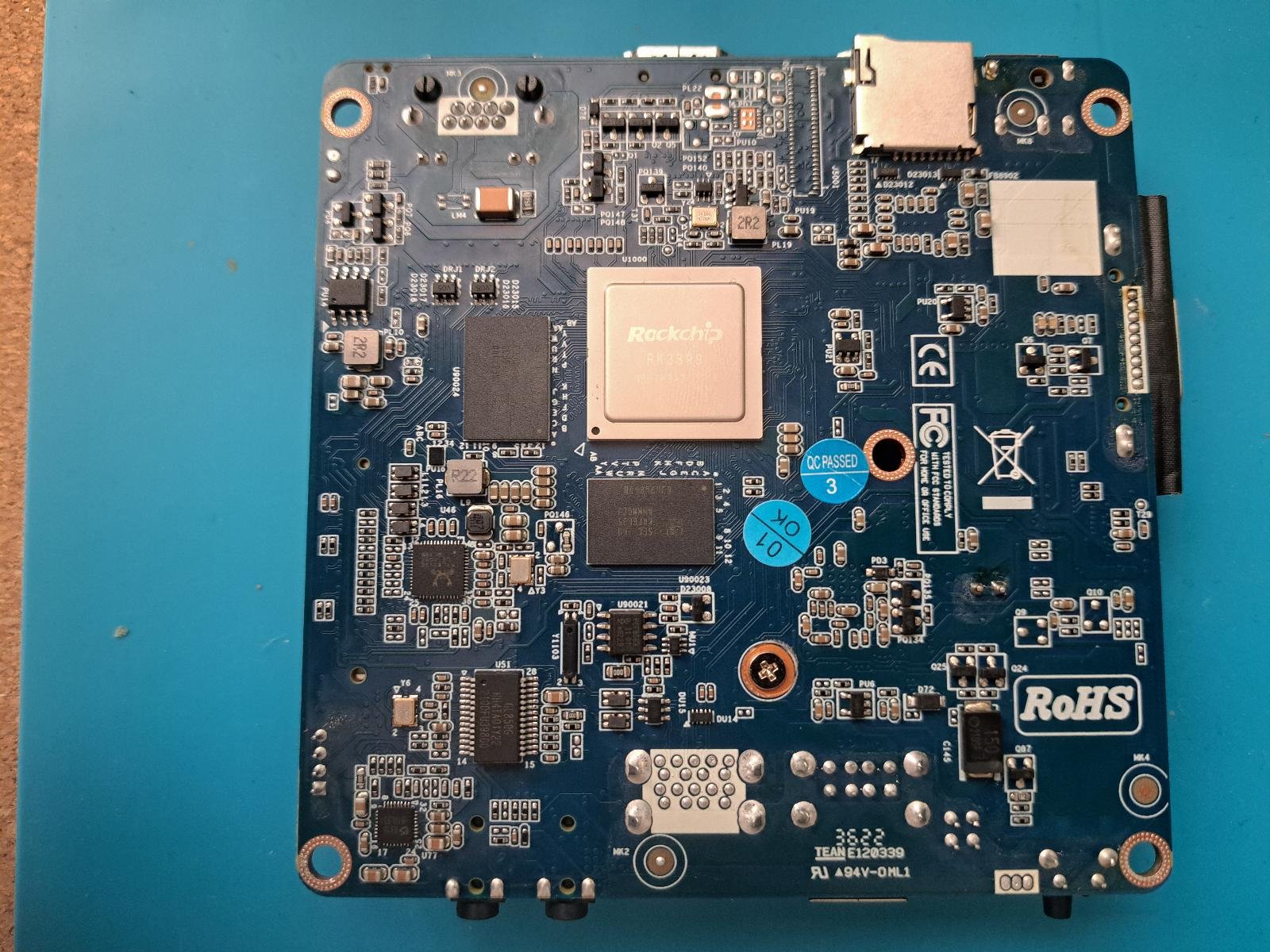
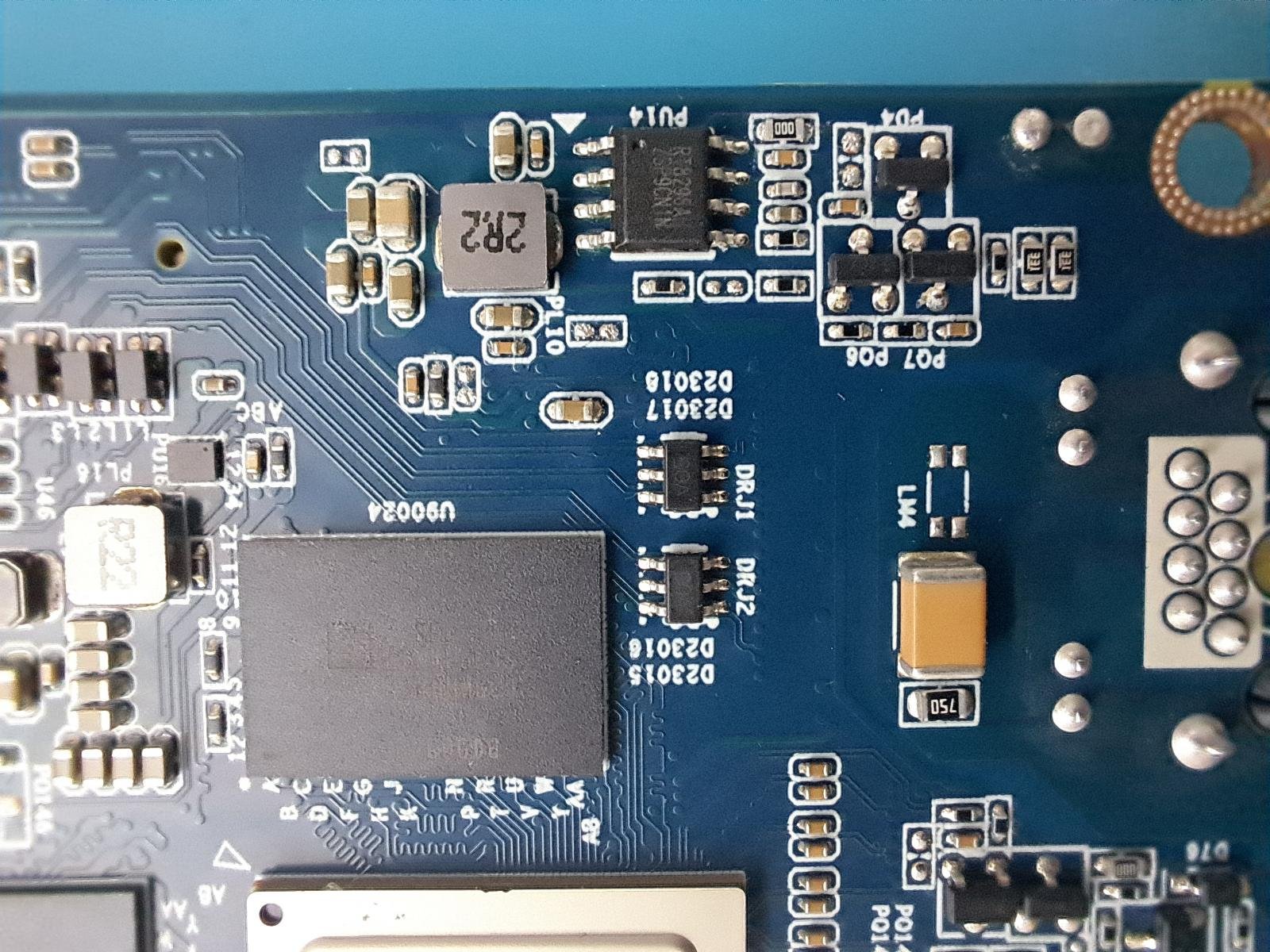
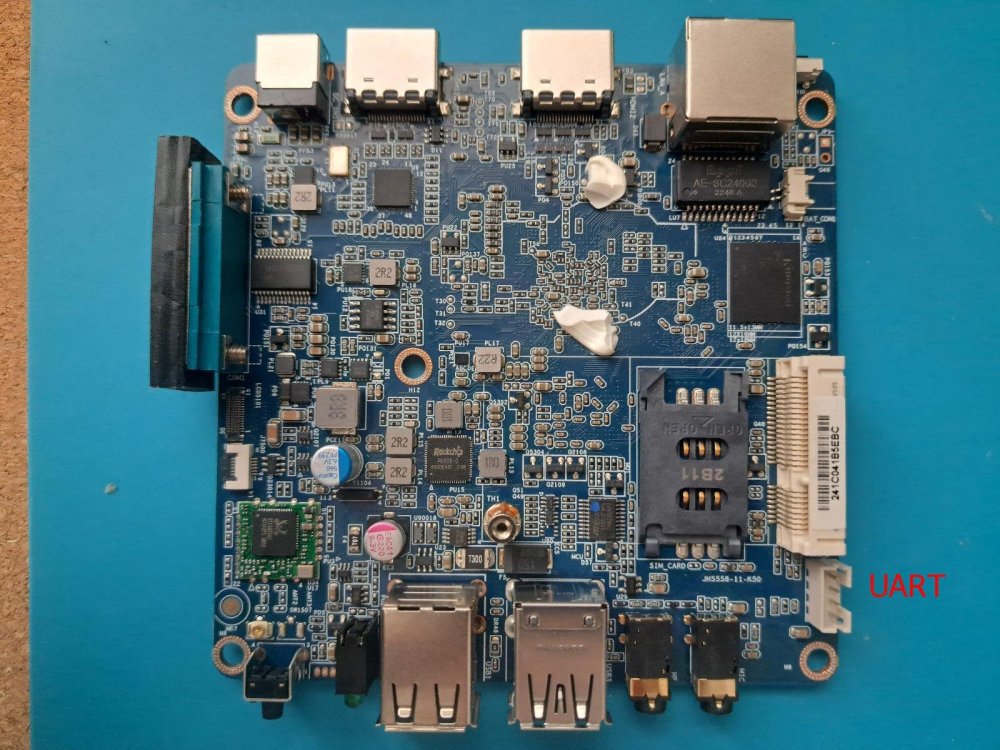
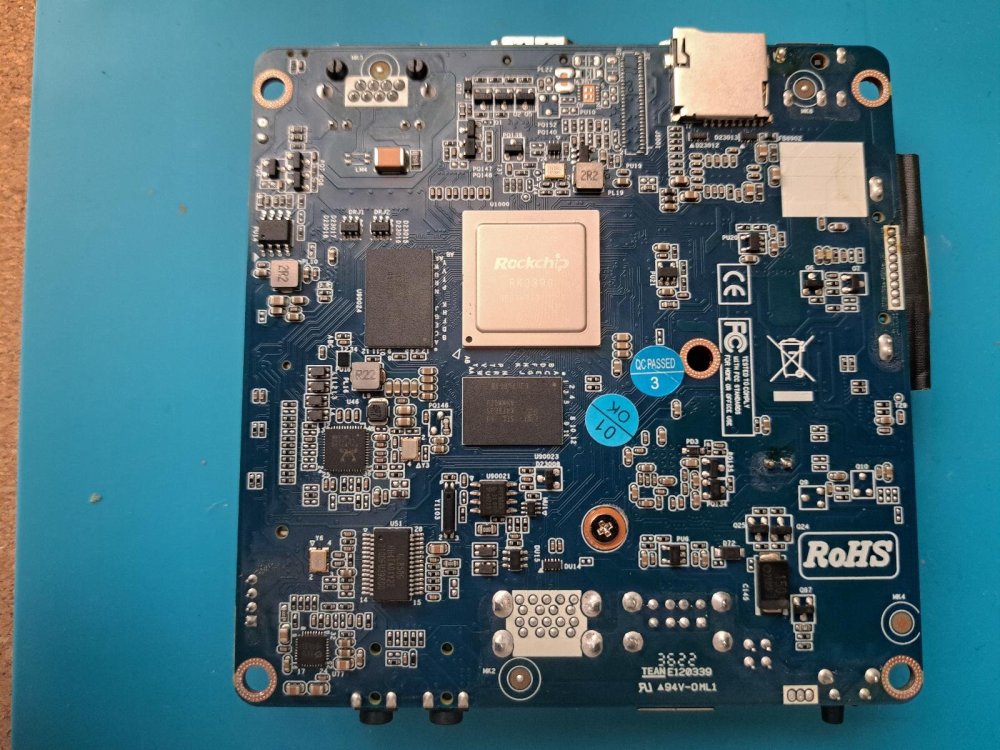
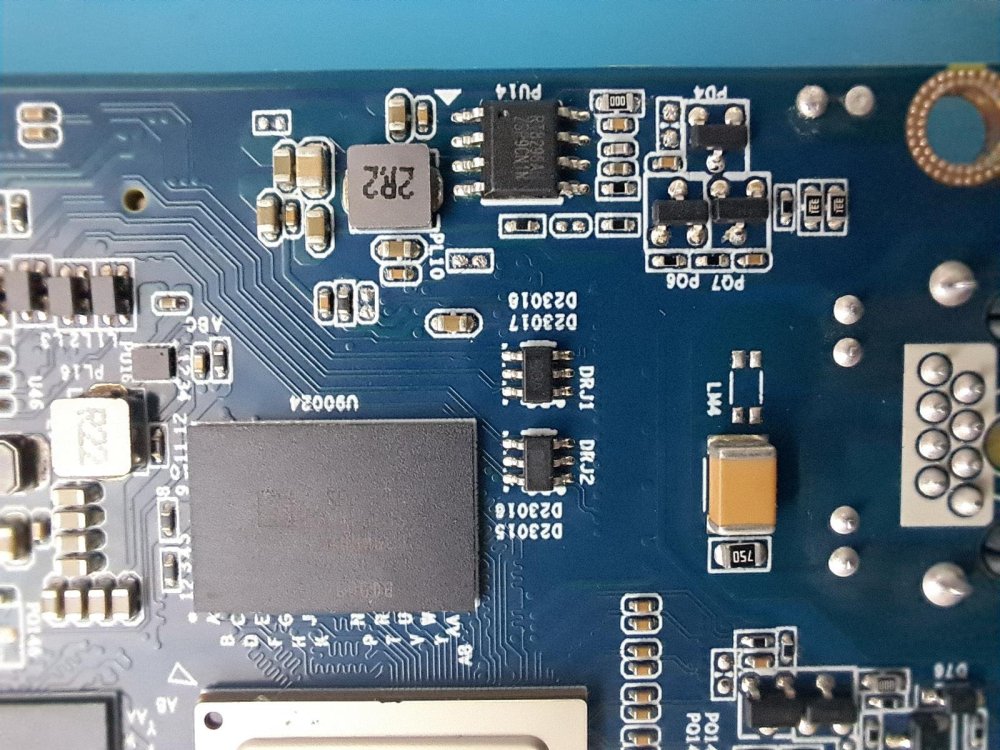
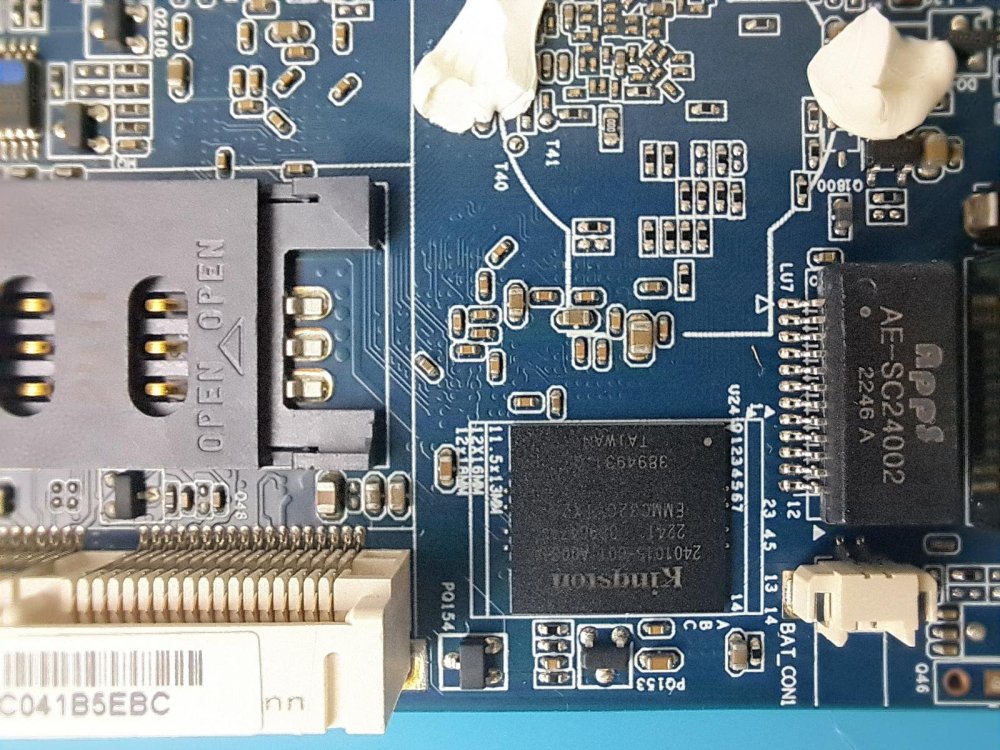
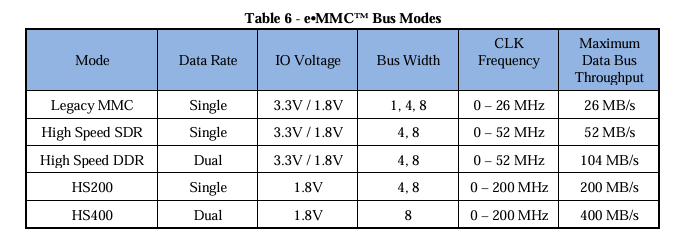
Hi Armbian community I have a Giada DN74 media player and would like to install Armbian on the box. First I try (through SD card) some community maintained images like the Orange Pi RK3399 or the Firefly RK3399, but none of them worked. Some google search teach me the Rockchip SoCs have fixed boot order (SPI->eMMC->SD card), and this cause my boot issue. Then search again how boot from SD card, the only solution which I find is to erase eMMC, so I erase the eMMC using: "rkdeveloptool ef". Unfortunately the box still not want to boot, so I open the box and try to identify the UART to see what is happening during the boot. I find a 4 pin connector (see images) which I assume this is the UART console, have a label "MCU_D" (Micro Controller Units Debug?) and have 3,3V on first pin and GND on the last pin. I try to use this connector whit some USB-to-UART (PL2303 and FT232RL) with multiple baud rate (115200, 1500000) without output. At this point was able still connect the box through USB and recover Android because MaskRom mode work fine. After some reading on https://opensource.rock-chips.com/wiki_Boot_option I deiced to build u-boot using evb-rk3399_defconfig and flash to the eMMC (which wan was a big mistake). I assume the box is try to boot from eMMC, but stuck there because is only u-boot on the eMMC nothing else. Unfortunately still no UART output (maybe is not UART connector) but also no Maskrom mode. If I understand right jock guide Unbrick Part, the only option to recover the box if I short EMMC CLK pin to GND. So my question is somebody could help me identify the eMMC CLK pin? Some extra info: According the rk3399 hardware design guide, I need to find a 22 ohm resistor near to the CLK pin. The eMMC is a Kingstone EMMC32G-TX29, and the manual write different CLK frequency's, I am don't know what I need to look. I have a Fnirsi dst-210 3in1 (sure not the best), which I could use measurements but I do not know how to set the oscilloscope parameters to find the CLK.

-
 Hi everybody, I running Helios64 with kernel 6.12.58 since a long time and the prahal dtb file rk3399-kobol-helios64.dtb-6.12.xx-L2-hs400-opp and my helios64 work well. Today, Armbian upgrade to 6.18.10 kernel. Is this update use the same change or patch like in rk3399-kobol-helios64.dtb-6.12.xx-L2-hs400-opp ? Is rk3399-kobol-helios64.dtb-6.12.xx-L2-hs400-opp work with 6..18.10 kernel ? Is I must to downgrade to 6.12.58 kernel with rk3399-kobol-helios64.dtb-6.12.xx-L2-hs400-opp and freeze at this kernel version ? Thanks for answer.
 -
Current build hangs whilst booting , any ideas anyone ? DDR Version 1.25 20210517 In soft reset SRX channel 0 CS = 0 MR0=0x18 MR4=0x1 MR5=0x1 MR8=0x10 MR12=0x72 MR14=0x72 MR18=0x0 MR19=0x0 MR24=0x8 MR25=0x0 channel 1 CS = 0 MR0=0x18 MR4=0x1 MR5=0x1 MR8=0x10 MR12=0x72 MR14=0x72 MR18=0x0 MR19=0x0 MR24=0x8 MR25=0x0 channel 0 training pass! channel 1 training pass! change freq to 416MHz 0,1 Channel 0: LPDDR4,416MHz Bus Width=32 Col=10 Bank=8 Row=16 CS=1 Die Bus-Width=16 Size=2048MB Channel 1: LPDDR4,416MHz Bus Width=32 Col=10 Bank=8 Row=16 CS=1 Die Bus-Width=16 Size=2048MB 256B stride channel 0 CS = 0 MR0=0x18 MR4=0x1 MR5=0x1 MR8=0x10 MR12=0x72 MR14=0x72 MR18=0x0 MR19=0x0 MR24=0x8 MR25=0x0 channel 1 CS = 0 MR0=0x18 MR4=0x1 MR5=0x1 MR8=0x10 MR12=0x72 MR14=0x72 MR18=0x0 MR19=0x0 MR24=0x8 MR25=0x0 channel 0 training pass! channel 1 training pass! channel 0, cs 0, advanced training done channel 1, cs 0, advanced training done change freq to 856MHz 1,0 ch 0 ddrconfig = 0x101, ddrsize = 0x40 ch 1 ddrconfig = 0x101, ddrsize = 0x40 pmugrf_os_reg[2] = 0x32C1F2C1, stride = 0xD ddr_set_rate to 328MHZ ddr_set_rate to 666MHZ ddr_set_rate to 928MHZ channel 0, cs 0, advanced training done channel 1, cs 0, advanced training done ddr_set_rate to 416MHZ, ctl_index 0 ddr_set_rate to 856MHZ, ctl_index 1 support 416 856 328 666 928 MHz, current 856MHz OUT U-Boot SPL 2022.07_armbian-2022.07-Se092-P3fcd-H28b4-V0d63-Bbf55-R448a (Dec 16 2025 - 03:12:11 +0000) Trying to boot from MMC1 mmc_load_image_raw_sector: mmc block read error Trying to boot from SPI Trying to boot from MMC1 NOTICE: BL31: v2.13.0(release):armbian NOTICE: BL31: Built : 04:23:02, Nov 24 2025 INFO: GICv3 with legacy support detected. INFO: ARM GICv3 driver initialized in EL3 INFO: Maximum SPI INTID supported: 287 INFO: plat_rockchip_pmu_init(1624): pd status 3e INFO: BL31: Initializing runtime services INFO: BL31: Preparing for EL3 exit to normal world INFO: Entry point address = 0x200000 INFO: SPSR = 0x3c9 U-Boot 2022.07_armbian-2022.07-Se092-P3fcd-H28b4-V0d63-Bbf55-R448a (Dec 16 2025 - 03:12:11 +0000) SoC: Rockchip rk3399 Reset cause: RST DRAM: 3.9 GiB PMIC: RK808 Core: 339 devices, 31 uclasses, devicetree: separate SF: Detected w25q128 with page size 256 Bytes, erase size 4 KiB, total 16 MiB MMC: mmc@fe320000: 1, mmc@fe330000: 0 Loading Environment from MMC... *** Warning - bad CRC, using default environment In: serial Out: serial Err: serial Model: Helios64 Revision: 1.2 - 4GB non ECC Net: dw_dm_mdio_init: mdio node is missing, registering legacy mdio busNo ethernet found. scanning bus for devices... Hit any key to stop autoboot: 0 switch to partitions #0, OK mmc1 is current device Scanning mmc 1:1... Found U-Boot script /boot/boot.scr 3906 bytes read in 5 ms (762.7 KiB/s) ## Executing script at 00500000 Boot script loaded from mmc 1:1 299 bytes read in 5 ms (57.6 KiB/s) 24731811 bytes read in 1050 ms (22.5 MiB/s) 39770624 bytes read in 1683 ms (22.5 MiB/s) 90994 bytes read in 20 ms (4.3 MiB/s) 725 bytes read in 6 ms (117.2 KiB/s) Applying user provided DT overlay rockchip-rk3399-op1-opp.dtbo 780 bytes read in 5 ms (152.3 KiB/s) Applying user provided DT overlay rockchip-rk3399-l2-cache.dtbo 2825 bytes read in 41 ms (66.4 KiB/s) Applying kernel provided DT fixup script (rockchip-fixup.scr) ## Executing script at 09000000 Trying kaslrseed command... Info: Unknown command can be safely ignored since kaslrseed does not apply to all boards. Unknown command 'kaslrseed' - try 'help' Moving Image from 0x2080000 to 0x2200000, end=48b0000 ## Loading init Ramdisk from Legacy Image at 06000000 ... Image Name: uInitrd Image Type: AArch64 Linux RAMDisk Image (gzip compressed) Data Size: 24731747 Bytes = 23.6 MiB Load Address: 00000000 Entry Point: 00000000 Verifying Checksum ... OK ## Flattened Device Tree blob at 01f00000 Booting using the fdt blob at 0x1f00000 Loading Ramdisk to f4747000, end f5edd063 ... OK Loading Device Tree to 00000000f46c8000, end 00000000f4746fff ... OK Starting kernel ... [ 0.000000] Booting Linux on physical CPU 0x0000000000 [0x410fd034] [ 0.000000] Linux version 6.18.10-current-rockchip64 (build@armbian) (aarch64-linux-gnu-gcc (Ubuntu 13.3.0-6ubuntu2~24.04) 13.3.0, GNU ld (GNU Binutils for Ubuntu) 2.42) #2 SMP PREEMPT Wed Feb 11 12:42:01 UTC 2026 [ 0.000000] KASLR disabled due to lack of seed [ 0.000000] Machine model: Kobol Helios64 [ 0.000000] printk: debug: ignoring loglevel setting. [ 0.000000] efi: UEFI not found. [ 0.000000] OF: reserved mem: Reserved memory: No reserved-memory node in the DT [ 0.000000] NUMA: Faking a node at [mem 0x0000000000200000-0x00000000f7ffffff] [ 0.000000] NODE_DATA(0) allocated [mem 0xf77c6380-0xf77c8b3f] [ 0.000000] Zone ranges: [ 0.000000] DMA [mem 0x0000000000200000-0x00000000f7ffffff] [ 0.000000] DMA32 empty [ 0.000000] Normal empty [ 0.000000] Movable zone start for each node [ 0.000000] Early memory node ranges [ 0.000000] node 0: [mem 0x0000000000200000-0x00000000f7ffffff] [ 0.000000] Initmem setup node 0 [mem 0x0000000000200000-0x00000000f7ffffff] [ 0.000000] On node 0, zone DMA: 512 pages in unavailable ranges [ 0.000000] cma: Reserved 128 MiB at 0x00000000e8800000 [ 0.000000] psci: probing for conduit method from DT. [ 0.000000] psci: PSCIv1.1 detected in firmware. [ 0.000000] psci: Using standard PSCI v0.2 function IDs [ 0.000000] psci: MIGRATE_INFO_TYPE not supported. [ 0.000000] psci: SMC Calling Convention v1.5 [ 0.000000] percpu: Embedded 34 pages/cpu s100376 r8192 d30696 u139264 [ 0.000000] pcpu-alloc: s100376 r8192 d30696 u139264 alloc=34*4096 [ 0.000000] pcpu-alloc: [0] 0 [0] 1 [0] 2 [0] 3 [0] 4 [0] 5 [ 0.000000] Detected VIPT I-cache on CPU0 [ 0.000000] CPU features: detected: GICv3 CPU interface [ 0.000000] CPU features: detected: ARM erratum 845719 [ 0.000000] alternatives: applying boot alternatives [ 0.000000] Kernel command line: root=UUID=0a68fe65-7fd3-47ab-b68f-ef2fddb464c9 rootwait rootfstype=ext4 splash=verbose console=ttyS2,1500000 console=tty1 consoleblank=0 loglevel=7 ubootpart=7a8c3cb1-01 usb-storage.quirks=0x2537:0x1066:u,0x2537:0x1068:u earlyprintk ignore_loglevel cgroup_enable=cpuset cgroup_memory=1 cgroup_enable=memory [ 0.000000] Unknown kernel command line parameters "earlyprintk splash=verbose ubootpart=7a8c3cb1-01 cgroup_enable=memory cgroup_memory=1", will be passed to user space. [ 0.000000] printk: log buffer data + meta data: 262144 + 917504 = 1179648 bytes [ 0.000000] Dentry cache hash table entries: 524288 (order: 10, 4194304 bytes, linear) [ 0.000000] Inode-cache hash table entries: 262144 (order: 9, 2097152 bytes, linear) [ 0.000000] software IO TLB: SWIOTLB bounce buffer size adjusted to 3MB [ 0.000000] software IO TLB: area num 8. [ 0.000000] software IO TLB: mapped [mem 0x00000000f6ce3000-0x00000000f70e3000] (4MB) [ 0.000000] Fallback order for Node 0: 0 [ 0.000000] Built 1 zonelists, mobility grouping on. Total pages: 1015296 [ 0.000000] Policy zone: DMA [ 0.000000] mem auto-init: stack:all(zero), heap alloc:on, heap free:off [ 0.000000] SLUB: HWalign=64, Order=0-3, MinObjects=0, CPUs=6, Nodes=1 [ 0.000000] ftrace: allocating 55125 entries in 216 pages [ 0.000000] ftrace: allocated 216 pages with 4 groups [ 0.000000] rcu: Preemptible hierarchical RCU implementation. [ 0.000000] rcu: RCU event tracing is enabled. [ 0.000000] rcu: RCU restricting CPUs from NR_CPUS=256 to nr_cpu_ids=6. [ 0.000000] Trampoline variant of Tasks RCU enabled. [ 0.000000] Rude variant of Tasks RCU enabled. [ 0.000000] Tracing variant of Tasks RCU enabled. [ 0.000000] rcu: RCU calculated value of scheduler-enlistment delay is 25 jiffies. [ 0.000000] rcu: Adjusting geometry for rcu_fanout_leaf=16, nr_cpu_ids=6 [ 0.000000] RCU Tasks: Setting shift to 3 and lim to 1 rcu_task_cb_adjust=1 rcu_task_cpu_ids=6. [ 0.000000] RCU Tasks Rude: Setting shift to 3 and lim to 1 rcu_task_cb_adjust=1 rcu_task_cpu_ids=6. [ 0.000000] RCU Tasks Trace: Setting shift to 3 and lim to 1 rcu_task_cb_adjust=1 rcu_task_cpu_ids=6. [ 0.000000] NR_IRQS: 64, nr_irqs: 64, preallocated irqs: 0 [ 0.000000] GICv3: GIC: Using split EOI/Deactivate mode [ 0.000000] GIC: enabling workaround for GICv3: Insecure RK3399 integration [ 0.000000] GICv3: 256 SPIs implemented [ 0.000000] GICv3: 0 Extended SPIs implemented [ 0.000000] Root IRQ handler: gic_handle_irq [ 0.000000] GICv3: GICv3 features: 16 PPIs [ 0.000000] GICv3: Broken GIC integration, security disabled [ 0.000000] GICv3: GICD_CTLR.DS=1, SCR_EL3.FIQ=0 [ 0.000000] GICv3: CPU0: found redistributor 0 region 0:0x00000000fef00000 [ 0.000000] ITS [mem 0xfee20000-0xfee3ffff] [ 0.000000] ITS@0x00000000fee20000: allocated 65536 Devices @600000 (flat, esz 8, psz 64K, shr 0) [ 0.000000] ITS: using cache flushing for cmd queue [ 0.000000] GICv3: using LPI property table @0x0000000000680000 [ 0.000000] GIC: using cache flushing for LPI property table [ 0.000000] GICv3: CPU0: using allocated LPI pending table @0x0000000000690000 [ 0.000000] GICv3: GIC: PPI partition interrupt-partition-0[0] { /cpus/cpu@0[0] /cpus/cpu@1[1] /cpus/cpu@2[2] /cpus/cpu@3[3] } [ 0.000000] GICv3: GIC: PPI partition interrupt-partition-1[1] { /cpus/cpu@100[4] /cpus/cpu@101[5] } [ 0.000000] rcu: srcu_init: Setting srcu_struct sizes based on contention. [ 0.000000] arch_timer: cp15 timer running at 24.00MHz (phys). [ 0.000000] clocksource: arch_sys_counter: mask: 0xffffffffffffff max_cycles: 0x588fe9dc0, max_idle_ns: 440795202592 ns [ 0.000001] sched_clock: 56 bits at 24MHz, resolution 41ns, wraps every 4398046511097ns [ 0.001626] Console: colour dummy device 80x25 [ 0.001652] printk: legacy console [tty1] enabled [ 0.003229] Calibrating delay loop (skipped), value calculated using timer frequency.. 48.00 BogoMIPS (lpj=96000) [ 0.003282] pid_max: default: 32768 minimum: 301 [ 0.003476] LSM: initializing lsm=capability,yama,apparmor [ 0.003600] Yama: becoming mindful. [ 0.004097] AppArmor: AppArmor initialized [ 0.004276] Mount-cache hash table entries: 8192 (order: 4, 65536 bytes, linear) [ 0.004337] Mountpoint-cache hash table entries: 8192 (order: 4, 65536 bytes, linear) [ 0.009162] rcu: Hierarchical SRCU implementation. [ 0.009217] rcu: Max phase no-delay instances is 1000. [ 0.009735] Timer migration: 1 hierarchy levels; 8 children per group; 1 crossnode level [ 0.011454] EFI services will not be available. [ 0.012131] smp: Bringing up secondary CPUs ... [ 0.013222] Detected VIPT I-cache on CPU1 [ 0.013531] GICv3: CPU1: found redistributor 1 region 0:0x00000000fef20000 [ 0.013558] GICv3: CPU1: using allocated LPI pending table @0x00000000006a0000 [ 0.013631] CPU1: Booted secondary processor 0x0000000001 [0x410fd034] [ 0.014865] Detected VIPT I-cache on CPU2 [ 0.015141] GICv3: CPU2: found redistributor 2 region 0:0x00000000fef40000 [ 0.015164] GICv3: CPU2: using allocated LPI pending table @0x00000000006b0000 [ 0.015216] CPU2: Booted secondary processor 0x0000000002 [0x410fd034] [ 0.016480] Detected VIPT I-cache on CPU3 [ 0.016759] GICv3: CPU3: found redistributor 3 region 0:0x00000000fef60000 [ 0.016782] GICv3: CPU3: using allocated LPI pending table @0x00000000006c0000 [ 0.016833] CPU3: Booted secondary processor 0x0000000003 [0x410fd034] [ 0.018025] CPU features: detected: Spectre-v2 [ 0.018042] CPU features: detected: Spectre-v3a [ 0.018054] CPU features: detected: Spectre-BHB [ 0.018065] CPU features: detected: ARM erratum 1742098 [ 0.018075] CPU features: detected: ARM errata 1165522, 1319367, or 1530923 [ 0.018083] Detected PIPT I-cache on CPU4 [ 0.018332] GICv3: CPU4: found redistributor 100 region 0:0x00000000fef80000 [ 0.018352] GICv3: CPU4: using allocated LPI pending table @0x00000000006d0000 [ 0.018400] CPU4: Booted secondary processor 0x0000000100 [0x410fd082] [ 0.019532] Detected PIPT I-cache on CPU5 [ 0.019765] GICv3: CPU5: found redistributor 101 region 0:0x00000000fefa0000 [ 0.019785] GICv3: CPU5: using allocated LPI pending table @0x00000000006e0000 [ 0.019825] CPU5: Booted secondary processor 0x0000000101 [0x410fd082] [
-
 The most current download images for Helios64 are now all provided with linux 6.18.xx. I downloaded a minimal image and checked the dtb: it would not appear to contain the opp-microvolt patch that made Helios64 finally stable. So for the ones who have stability issues again on Helios64, I attached the patched dtb compiled for linux 6.18.xx using the exact same opp-microvolt values as in the previous dtb versions I compiled for linux 6.6 and 6.12. The current linux deb files can be downloaded from beta.armbian.com, the linux 6.18.18 deb files I used can be downloaded from here (to be installed with 'dpkg -i linux*'). In order to install the dtb, simply unzip it, copy it into the proper location, update initramfs and reboot: # install the dtb with the opp-microvolt patch: unzip rk3399-kobol-helios64.dtb-6.18.18-opp.zip cp rk3399-kobol-helios64.dtb-6.18.18-opp /boot/dtb/rockchip/rk3399-kobol-helios64.dtb update-initramfs -u reboot rk3399-kobol-helios64.dtb-6.18.18-opp.zip
 -
@SymbiosisSystems, Thanks for testing and reporting back. Before diving into the panic itself, a bit of context: the CPU stability overlay we packaged from the prahal/ebin-dev recipe is opt-in precisely because, thanks to the RK3399 silicon lottery, most Helios64 units don't need it. The very fact that you do need it already hints that your particular unit is sitting closer to the edge of its operating margin than a typical one. That's not blaming the hardware — just an observation that units with marginal stability often expose other weak spots that stay invisible on an "average" board. Now to the crash itself. `Asynchronous SError` in `rockchip_pcie_rd_conf` during PCI enumeration is a known bus-level abort on the RK3399 PCIe controller, not on the CPU. Our overlay has nothing to do with CPU cluster voltages here: it only raises `vdd_cpu_b` on opp00..opp06 of the A72 cluster, while PCIe sits on `vdd_logic` and separate PCIe rails which we don't touch. The PCIe x2 Gen2 lane from the RK3399 in Helios64 is wired directly to the soldered-on JMicron JMB585 SATA controller ([Kobol Wiki — SATA](https://wiki.kobol.io/helios64/sata/)), which provides the five SATA ports. So the only possible endpoint where bus scan is currently failing is the JMB585. The typical scenario goes like this: the endpoint replies with CRS (Configuration Request Retry Status) or simply doesn't respond within the completion timeout window → the root complex raises a completion abort → AArch64 sees it as an async SError. This class of bugs on the RK3399 is well documented: - [\[BUG\] rk3399-rockpro64 pcie synchronous external abort](https://lore.kernel.org/linux-pci/CAMdYzYrYHtiEXwiKxwWcKSV7Re6dG4zTvkKtZxvso+fLBRYbPQ@mail.gmail.com/T/) — same class of bus-level abort on the same SoC. - [RFC patch: configurable bus scan delay](https://www.spinics.net/lists/linux-pci/msg103350.html) — the general nature of CRS/timeout problems (the specific HBA delays from that thread don't directly apply to Helios64, since your endpoint is a fixed JMB585, not a swappable card). - [rockchip-linux/kernel#116](https://github.com/rockchip-linux/kernel/issues/116) and [#118](https://github.com/rockchip-linux/kernel/issues/118) — "Some PCIe devices cause Rockchip PCIe controller to crash in bus scan". - The [v5 series fixing the RK3399 PCIe endpoint driver](https://patchwork.ozlabs.org/project/devicetree-bindings/cover/20230418074700.1083505-1-rick.wertenbroek@gmail.com/#3135632) — CRS handling and the Configuration Enable bit. - Armbian has known about RK3399 PCIe quirks for a long time: [commit edb45f9 — "Make PCIe reset optional"](https://github.com/armbian/build/commit/edb45f9acf322fc4b27bf7efba3f14a3a432b617). So your stack trace falls into a family of long-known RK3399 PCIe problems and is unrelated to the voltage overlay. If someone — from the rockchip64 maintainers or from the community — picks up your case, here's what is usually expected to be attached to a report like this, otherwise diagnosis will inevitably hit a wall of missing data: 1. A full serial bootlog via USB-UART (Helios64 → 1500000 baud), both with the overlay and without it (just comment out `overlays=` in `armbianEnv.txt`) — to see whether the picture differs or this is an independent problem. 2. State of the SATA bays: try booting with the bays completely empty (or one drive at a time) — if the PCIe link to the JMB585 comes up cleanly without any SATA load, the problem narrows down to one of the drives rather than the link itself. 3. u-boot and BL31 (ATF) versions — `dmesg | grep -iE "u-boot|psci|bl31"`, plus `strings /boot/u-boot.bin | grep -m1 "U-Boot 20"` if you have access. 4. The full `dmesg` up to the moment of the crash — even if truncated, whatever made it out to serial. 5. The entire contents of `/boot/armbianEnv.txt`. 6. Try two extra kernel boot parameter options — this is the simplest experiment and often helps on unstable RK3399 PCIe. **a) Disable PCIe power management** (a known workaround for the broken PM on RK3399). Open `/boot/armbianEnv.txt`: ``` sudo nano /boot/armbianEnv.txt ``` Find a line starting with `extraargs=`. Two cases: - **If such a line exists** — append the parameters at its end, separated by a space. For example, it was: ``` extraargs=console=tty1 ``` Becomes: ``` extraargs=console=tty1 pcie_aspm=off pcie_port_pm=off ``` - **If there is no such line at all** — just add a new line at the very end of the file: ``` extraargs=pcie_aspm=off pcie_port_pm=off ``` Save (Ctrl+O, Enter, Ctrl+X), `sudo reboot`, try booting. To revert: remove what you appended (or delete the added line entirely) and reboot again. **b)** You can try downgrading PCIe from Gen2 to Gen1 (RK3399 Gen2 link training is regularly unstable), but that requires writing your own device tree overlay — there is no ready-made one in Armbian. And finally, to be honest: we are not PCIe stack experts and not rockchip64
-
This week's work advances on three fronts: kernel and bleedingedge alignment across Rockchip and Sunxi trees, board and platform enablement spanning RV1106 to SpacemiT, and CI hardening with self-hosted runner maintenance. On the kernel side, bleedingedge was bumped to 7.1-rc3, accompanied by cfg80211 API fixes and re-enablement of the rtl8189fs and rtl8852bs drivers for the new release. Both the rockchip64 and sunxi patch stacks for current and edge were rewritten, an upstream ptrace fix for CVE-2026-46333 was backported to linux-rockchip, and the odroidxu4-current kernel moved to 6.6.139. Platform enablement was broad. The Ayn Odin2 gained 7.0 kernel support, the Mekotronics R58X-Pro switched its vendor build to mainline U-Boot with a corrected LCD driver, and the H96 TV box advanced to U-Boot v2026.04. RV1106 transitioned from extlinux to a bootscript and gained DS1307, PCF85063, and RV8803 RTC drivers, while SpacemiT received OpenSBI, U-Boot, and BPI-F3 DTS fixups. Smaller but user-visible improvements include NanoPi M5 second USB3 port exposure via DRD0 host-mode pinning, NORCO EMB-3531 LPDDR4X variants, RK3528 USB2 PHY corrections for high-speed NCM, and UEFI x86 images enabling iwlwifi MLD and Intel SOF audio for MTL, LNL, and PTL. Infrastructure work centered on self-hosted runner reliability and supply-chain hygiene. A new runner-cleanup module provides hourly disk and memory maintenance, skips busy runners, and ships via .deb, while a maintenance watchdog was added to the SDK repository. Multiple StepSecurity hardening passes landed across build and SDK workflows, though an overly strict egress-policy was subsequently reverted after breaking builds. #Armbian #EmbeddedLinux #Rockchip #RISCV #KernelDevelopment ChangesActions: Cleanup "Release" workflow. by @vidplace7 in armbian/MorseMicro-DKMS#4Actions: Create release workflow. by @vidplace7 in armbian/MorseMicro-DKMS#3Ayn Odin2 kernel 7.0 support. by @kasimling in armbian/build#9706Build for riscv64. by @vidplace7 in armbian/MorseMicro-DKMS#5Bump actions/download-artifact from 7 to 8. by @igorpecovnik in armbian/os#464Bump versions: stable 26.5.0, nightly 26.8.0-trunk.1. by @igorpecovnik in armbian/os#461bump bleedingedge to 7.1-rc3. by @EvilOlaf in armbian/build#9806cfg80211: fix API changes for Linux 7.1. by @EvilOlaf in armbian/wifi-rtl8852bs#5change recomputer rk35xx fan speed. by @ackPeng in armbian/linux-rockchip#472ci: add maintenance watchdog + rename action.yml → build-armbian-sdk.yml. by @igorpecovnik in armbian/sdk#25ci: drop step-security/harden-runner steps (egress-policy was breaking builds). by @igorpecovnik in armbian/sdk#26desktops: ship fprintd userspace at mid tier. by @igorpecovnik in armbian/configng#918desktops: split light/dark wallpapers in gnome + bianbu postinsts. by @igorpecovnik in armbian/configng#905Disable: SpacemiT: fix RX DMA params not set when TX is running. by @pyavitz in armbian/build#9808drivers_network: bump rtl8852bs commit ref to 35d3e266 (May 17). by @igorpecovnik in armbian/build#9841drop old lcd_vk2c21 LCD driver that never worked; backport workingvinka,vk2c21 driver; fix Mekos DTs. by @rpardini in armbian/linux-rockchip#482ebyte-ecb41-pge: Add spidev overlays (RPi-compatible). by @vidplace7 in armbian/linux-rockchip#467firmware-sof-signed: move from cli/amd64 baseline to UEFI common. by @igorpecovnik in armbian/build#9857fix(deps): add Pygments to requirements.txt (rich.syntax dep). by @iav in armbian/build#9819luckfox-lyra-zero-w: Default to onboard wifi antenna, add ipex overlay. by @vidplace7 in armbian/linux-rockchip#468maintenance-watchdog: target the workflow that actually exists. by @igorpecovnik in armbian/configng#915Mekotronics R58X-Pro (vendor): use mainline u-boot for vendor; use new LCD driver. by @rpardini in armbian/build#9836module_armbian_runners: skip busy runners + ship runner-cleanup assets via .deb. by @igorpecovnik in armbian/configng#914module_qbittorrent: poll for temporary password before showing dialog. by @igorpecovnik in armbian/configng#916nanopi-m5: pin DRD0 dwc3 to host mode to expose the second USB3 port. by @SuperKali in armbian/build#9844NORCO EMB-3531: Add LPDDR4X variants support. by @retro98boy in armbian/build#9823patch/sunxi-6.12: drop two Rockchip SPI patches (not applicable to sunxi). by @igorpecovnik in armbian/build#9827postinst/gnome: enable tap-to-click + clickpad right-click out of the box. by @igorpecovnik in armbian/configng#917Potential fix for code scanning alert no. 2: Code injection. by @iav in armbian/build#9799ptrace: backport upstream fix for CVE-2026-46333 (ssh-keysign-pwn). by @SuperKali in armbian/linux-rockchip#481restore backwards compatibility. by @EvilOlaf in armbian/wifi-rtl8852bs#6rockchip rk3566: h96-TVbox: bump to uboot v2026.04. by @hqnicolas in armbian/build#9807rockchip64-6.18: rebase rk3399 dwc3 phy-reset-quirk patch for 6.18.32. by @SuperKali in armbian/build#9847rockchip64: fix RK3528 USB2 PHY regmap split for high-speed NCM. by @rubycomm in armbian/build#9785rockchip64: opt-in helios64 CPU stability overlay (current + edge). by @iav in armbian/build#9822rockchip64: rewrite patches of current and edge. by @EvilOlaf in armbian/build#9829rtl8189fs: fix compilation for 7.1 and re-enable. by @EvilOlaf in armbian/build#9813rtl8852bs: re-enable for bleedingedge. by @EvilOlaf in armbian/build#9831runner-cleanup: drop redundant age-based _diag prune. by @igorpecovnik in armbian/configng#921runner-cleanup: hourly disk + memory maintenance for self-hosted runner hosts. by @igorpecovnik in armbian/configng#913runner-cleanup: wipe _diag/pages/ alongside _work/. by @igorpecovnik in armbian/configng#919runner-cleanup: wipe ~/_diag/ on every runner each pass. by @igorpecovnik in armbian/configng#920RV1106: add support for additional RTC drivers (DS1307, PCF85063, RV8803). by @vidplace7 in armbian/build#9812RV1106: Switch u-boot from extlinux to bootscript. by @vidplace7 in armbian/build#9801SpacemiT: Fixup OpenSBI, U-Boot and BPI-F3 DTS. by @pyavitz in armbian/build#9838sunxi: rewrite kernel patches of current and edge. by @EvilOlaf in armbian/build#9828uefi-x86: enable iwlwifi MLD + Intel SOF (MTL/LNL/PTL) audio. by @igorpecovnik in armbian/build#9846Update documentation / packaging URLs. by @vidplace7 in armbian/MorseMicro-DKMS#2Update MorseMicro suite to 1.17.8. by @vidplace7 in armbian/MorseMicro-DKMS#1Update nanopi r5s udev rule tweak for persistent net interface names. by @ruabmbua in armbian/build#9811Update odroidxu4-current to 6.6.139. by @belegdol in armbian/build#9837Workaround devcontainer/ci platform issues. by @vidplace7 in armbian/MorseMicro-DKMS#6[StepSecurity] Apply security best practices. by @step-security-bot in armbian/build#9833[StepSecurity] Apply security best practices. by @step-security-bot in armbian/build#9839[StepSecurity] Apply security best practices. by @step-security-bot in armbian/sdk#24[StepSecurity] ci: Harden GitHub Actions. by @step-security-bot in armbian/build#9803[StepSecurity] ci: Harden GitHub Actions. by @step-security-bot in armbian/build#9825View the full article
-
This week's work advances on three fronts: kernel and bleedingedge alignment across Rockchip and Sunxi trees, board and platform enablement spanning RV1106 to SpacemiT, and CI hardening with self-hosted runner maintenance. On the kernel side, bleedingedge was bumped to 7.1-rc3, accompanied by cfg80211 API fixes and re-enablement of the rtl8189fs and rtl8852bs drivers for the new release. Both the rockchip64 and sunxi patch stacks for current and edge were rewritten, an upstream ptrace fix for CVE-2026-46333 was backported to linux-rockchip, and the odroidxu4-current kernel moved to 6.6.139. Platform enablement was broad. The Ayn Odin2 gained 7.0 kernel support, the Mekotronics R58X-Pro switched its vendor build to mainline U-Boot with a corrected LCD driver, and the H96 TV box advanced to U-Boot v2026.04. RV1106 transitioned from extlinux to a bootscript and gained DS1307, PCF85063, and RV8803 RTC drivers, while SpacemiT received OpenSBI, U-Boot, and BPI-F3 DTS fixups. Smaller but user-visible improvements include NanoPi M5 second USB3 port exposure via DRD0 host-mode pinning, NORCO EMB-3531 LPDDR4X variants, RK3528 USB2 PHY corrections for high-speed NCM, and UEFI x86 images enabling iwlwifi MLD and Intel SOF audio for MTL, LNL, and PTL. Infrastructure work centered on self-hosted runner reliability and supply-chain hygiene. A new runner-cleanup module provides hourly disk and memory maintenance, skips busy runners, and ships via .deb, while a maintenance watchdog was added to the SDK repository. Multiple StepSecurity hardening passes landed across build and SDK workflows, though an overly strict egress-policy was subsequently reverted after breaking builds. #Armbian #EmbeddedLinux #Rockchip #RISCV #KernelDevelopment ChangesActions: Cleanup "Release" workflow. by @vidplace7 in armbian/MorseMicro-DKMS#4Actions: Create release workflow. by @vidplace7 in armbian/MorseMicro-DKMS#3Ayn Odin2 kernel 7.0 support. by @kasimling in armbian/build#9706Build for riscv64. by @vidplace7 in armbian/MorseMicro-DKMS#5Bump actions/download-artifact from 7 to 8. by @igorpecovnik in armbian/os#464Bump versions: stable 26.5.0, nightly 26.8.0-trunk.1. by @igorpecovnik in armbian/os#461bump bleedingedge to 7.1-rc3. by @EvilOlaf in armbian/build#9806cfg80211: fix API changes for Linux 7.1. by @EvilOlaf in armbian/wifi-rtl8852bs#5change recomputer rk35xx fan speed. by @ackPeng in armbian/linux-rockchip#472ci: add maintenance watchdog + rename action.yml → build-armbian-sdk.yml. by @igorpecovnik in armbian/sdk#25ci: drop step-security/harden-runner steps (egress-policy was breaking builds). by @igorpecovnik in armbian/sdk#26desktops: ship fprintd userspace at mid tier. by @igorpecovnik in armbian/configng#918desktops: split light/dark wallpapers in gnome + bianbu postinsts. by @igorpecovnik in armbian/configng#905Disable: SpacemiT: fix RX DMA params not set when TX is running. by @pyavitz in armbian/build#9808drivers_network: bump rtl8852bs commit ref to 35d3e266 (May 17). by @igorpecovnik in armbian/build#9841drop old lcd_vk2c21 LCD driver that never worked; backport workingvinka,vk2c21 driver; fix Mekos DTs. by @rpardini in armbian/linux-rockchip#482ebyte-ecb41-pge: Add spidev overlays (RPi-compatible). by @vidplace7 in armbian/linux-rockchip#467firmware-sof-signed: move from cli/amd64 baseline to UEFI common. by @igorpecovnik in armbian/build#9857fix(deps): add Pygments to requirements.txt (rich.syntax dep). by @iav in armbian/build#9819luckfox-lyra-zero-w: Default to onboard wifi antenna, add ipex overlay. by @vidplace7 in armbian/linux-rockchip#468maintenance-watchdog: target the workflow that actually exists. by @igorpecovnik in armbian/configng#915Mekotronics R58X-Pro (vendor): use mainline u-boot for vendor; use new LCD driver. by @rpardini in armbian/build#9836module_armbian_runners: skip busy runners + ship runner-cleanup assets via .deb. by @igorpecovnik in armbian/configng#914module_qbittorrent: poll for temporary password before showing dialog. by @igorpecovnik in armbian/configng#916nanopi-m5: pin DRD0 dwc3 to host mode to expose the second USB3 port. by @SuperKali in armbian/build#9844NORCO EMB-3531: Add LPDDR4X variants support. by @retro98boy in armbian/build#9823patch/sunxi-6.12: drop two Rockchip SPI patches (not applicable to sunxi). by @igorpecovnik in armbian/build#9827postinst/gnome: enable tap-to-click + clickpad right-click out of the box. by @igorpecovnik in armbian/configng#917Potential fix for code scanning alert no. 2: Code injection. by @iav in armbian/build#9799ptrace: backport upstream fix for CVE-2026-46333 (ssh-keysign-pwn). by @SuperKali in armbian/linux-rockchip#481restore backwards compatibility. by @EvilOlaf in armbian/wifi-rtl8852bs#6rockchip rk3566: h96-TVbox: bump to uboot v2026.04. by @hqnicolas in armbian/build#9807rockchip64-6.18: rebase rk3399 dwc3 phy-reset-quirk patch for 6.18.32. by @SuperKali in armbian/build#9847rockchip64: fix RK3528 USB2 PHY regmap split for high-speed NCM. by @rubycomm in armbian/build#9785rockchip64: opt-in helios64 CPU stability overlay (current + edge). by @iav in armbian/build#9822rockchip64: rewrite patches of current and edge. by @EvilOlaf in armbian/build#9829rtl8189fs: fix compilation for 7.1 and re-enable. by @EvilOlaf in armbian/build#9813rtl8852bs: re-enable for bleedingedge. by @EvilOlaf in armbian/build#9831runner-cleanup: drop redundant age-based _diag prune. by @igorpecovnik in armbian/configng#921runner-cleanup: hourly disk + memory maintenance for self-hosted runner hosts. by @igorpecovnik in armbian/configng#913runner-cleanup: wipe _diag/pages/ alongside _work/. by @igorpecovnik in armbian/configng#919runner-cleanup: wipe ~/_diag/ on every runner each pass. by @igorpecovnik in armbian/configng#920RV1106: add support for additional RTC drivers (DS1307, PCF85063, RV8803). by @vidplace7 in armbian/build#9812RV1106: Switch u-boot from extlinux to bootscript. by @vidplace7 in armbian/build#9801SpacemiT: Fixup OpenSBI, U-Boot and BPI-F3 DTS. by @pyavitz in armbian/build#9838sunxi: rewrite kernel patches of current and edge. by @EvilOlaf in armbian/build#9828uefi-x86: enable iwlwifi MLD + Intel SOF (MTL/LNL/PTL) audio. by @igorpecovnik in armbian/build#9846Update documentation / packaging URLs. by @vidplace7 in armbian/MorseMicro-DKMS#2Update MorseMicro suite to 1.17.8. by @vidplace7 in armbian/MorseMicro-DKMS#1Update nanopi r5s udev rule tweak for persistent net interface names. by @ruabmbua in armbian/build#9811Update odroidxu4-current to 6.6.139. by @belegdol in armbian/build#9837Workaround devcontainer/ci platform issues. by @vidplace7 in armbian/MorseMicro-DKMS#6[StepSecurity] Apply security best practices. by @step-security-bot in armbian/build#9833[StepSecurity] Apply security best practices. by @step-security-bot in armbian/build#9839[StepSecurity] Apply security best practices. by @step-security-bot in armbian/sdk#24[StepSecurity] ci: Harden GitHub Actions. by @step-security-bot in armbian/build#9803[StepSecurity] ci: Harden GitHub Actions. by @step-security-bot in armbian/build#9825View the full article
-
 @iav Thank you . I've just tried your trixie build with the overlay applied in armbianEnv but unfortunately the kernel panics with another issue now DDR Version 1.25 20210517 In channel 0 CS = 0 MR0=0x18 MR4=0x1 MR5=0x1 MR8=0x10 MR12=0x72 MR14=0x72 MR18=0x0 MR19=0x0 MR24=0x8 MR25=0x0 channel 1 CS = 0 MR0=0x18 MR4=0x1 MR5=0x1 MR8=0x10 MR12=0x72 MR14=0x72 MR18=0x0 MR19=0x0 MR24=0x8 MR25=0x0 channel 0 training pass! channel 1 training pass! change freq to 416MHz 0,1 Channel 0: LPDDR4,416MHz Bus Width=32 Col=10 Bank=8 Row=16 CS=1 Die Bus-Width=16 Size=2048MB Channel 1: LPDDR4,416MHz Bus Width=32 Col=10 Bank=8 Row=16 CS=1 Die Bus-Width=16 Size=2048MB 256B stride channel 0 CS = 0 MR0=0x18 MR4=0x1 MR5=0x1 MR8=0x10 MR12=0x72 MR14=0x72 MR18=0x0 MR19=0x0 MR24=0x8 MR25=0x0 channel 1 CS = 0 MR0=0x18 MR4=0x1 MR5=0x1 MR8=0x10 MR12=0x72 MR14=0x72 MR18=0x0 MR19=0x0 MR24=0x8 MR25=0x0 channel 0 training pass! channel 1 training pass! channel 0, cs 0, advanced training done channel 1, cs 0, advanced training done change freq to 856MHz 1,0 ch 0 ddrconfig = 0x101, ddrsize = 0x40 ch 1 ddrconfig = 0x101, ddrsize = 0x40 pmugrf_os_reg[2] = 0x32C1F2C1, stride = 0xD ddr_set_rate to 328MHZ ddr_set_rate to 666MHZ ddr_set_rate to 928MHZ channel 0, cs 0, advanced training done channel 1, cs 0, advanced training done ddr_set_rate to 416MHZ, ctl_index 0 ddr_set_rate to 856MHZ, ctl_index 1 support 416 856 328 666 928 MHz, current 856MHz OUT U-Boot SPL 2026.04_armbian-2026.04-S88dc-Pc925-H6cef-Vfcb0-Bd0d2-R448a (May 08 2026 - 19:13:18 +0000) Trying to boot from MMC2 ## Checking hash(es) for config config-1 ... OK ## Checking hash(es) for Image atf-1 ... sha256+ OK ## Checking hash(es) for Image u-boot ... sha256+ OK ## Checking hash(es) for Image fdt-1 ... sha256+ OK ## Checking hash(es) for Image atf-2 ... sha256+ OK ## Checking hash(es) for Image atf-3 ... sha256+ OK ## Checking hash(es) for Image atf-4 ... sha256+ OK load_simple_fit: Skip load 'atf-5': image size is 0! NOTICE: BL31: v2.13.0(release):armbian NOTICE: BL31: Built : 04:24:31, Mar 29 2026 INFO: GICv3 with legacy support detected. INFO: ARM GICv3 driver initialized in EL3 INFO: Maximum SPI INTID supported: 287 INFO: plat_rockchip_pmu_init(1624): pd status 3e INFO: BL31: Initializing runtime services INFO: BL31: Preparing for EL3 exit to normal world INFO: Entry point address = 0x800000 INFO: SPSR = 0x3c9 ns16550_serial serial@ff1a0000: pinctrl_select_state_full: uclass_get_device_by_phandle_id: err=-19 U-Boot 2026.04_armbian-2026.04-S88dc-Pc925-H6cef-Vfcb0-Bd0d2-R448a (May 08 2026 - 19:13:18 +0000) SoC: Rockchip rk3399 Reset cause: POR DRAM: 4 GiB (total 3.9 GiB) PMIC: RK808 Core: 359 devices, 33 uclasses, devicetree: separate SF: Detected w25q128 with page size 256 Bytes, erase size 4 KiB, total 16 MiB MMC: mmc@fe320000: 1, mmc@fe330000: 0 Loading Environment from MMC... Reading from MMC(1)... *** Warning - bad CRC, using default environment In: serial Out: serial Err: serial Model: Kobol Helios64 Revision: 1.2 - 4GB non ECC Net: eth0: ethernet@fe300000 Hit any key to stop autoboot: 0 Scanning for bootflows in all bootdevs Seq Method State Uclass Part Name Filename --- ----------- ------ -------- ---- ------------------------ ---------------- Scanning global bootmeth 'efi_mgr': Cannot persist EFI variables without system partition 0 efi_mgr ready (none) 0 <NULL> ** Booting bootflow '<NULL>' with efi_mgr Loading Boot0000 'mmc 1' failed Loading Boot0001 'mmc 0' failed EFI boot manager: Cannot load any image Boot failed (err=-14) Scanning bootdev 'mmc@fe320000.bootdev': 1 script ready mmc 1 mmc@fe320000.bootdev.part /boot/boot.scr ** Booting bootflow 'mmc@fe320000.bootdev.part_1' with script Boot script loaded from mmc 1:1 227 bytes read in 2 ms (110.4 KiB/s) 24389419 bytes read in 1032 ms (22.5 MiB/s) 40503808 bytes read in 1717 ms (22.5 MiB/s) 90994 bytes read in 12 ms (7.2 MiB/s) Working FDT set to 12000000 485 bytes read in 10 ms (46.9 KiB/s) Applying kernel provided DT overlay rockchip-rk3399-helios64-cpu-stability.dtbo 2825 bytes read in 9 ms (305.7 KiB/s) Applying kernel provided DT fixup script (rockchip-fixup.scr) ## Executing script at 09000000 Trying kaslrseed command... Info: Unknown command can be safely ignored since kaslrseed does not apply to all boards. Unknown command 'kaslrseed' - try 'help' ## Loading init Ramdisk from Legacy Image at 12180000 ... Image Name: uInitrd Image Type: AArch64 Linux RAMDisk Image (gzip compressed) Data Size: 24389355 Bytes = 23.3 MiB Load Address: 00000000 Entry Point: 00000000 Verifying Checksum ... OK ## Flattened Device Tree blob at 12000000 Booting using the fdt blob at 0x12000000 Working FDT set to 12000000 Loading Ramdisk to f34bd000, end f4bff6eb ... OK Loading Device Tree to 00000000f4e12000, end 00000000f4e90fff ... OK Working FDT set to f4e12000 Starting kernel ... [ 0.000000] Booting Linux on physical CPU 0x0000000000 [0x410fd034] [ 0.000000] Linux version 6.18.30-current-rockchip64 (build@armbian) (aarch64-linux-gnu-gcc (Ubuntu 13.3.0-6ubuntu2~24.04.1) 13.3.0, GNU ld (GNU Binutils for Ubuntu) 2.42) #2 SMP PREEMPT Thu May 14 13:30:26 UTC 2026 [ 0.000000] KASLR enabled [ 0.000000] Machine model: Kobol Helios64 [ 0.000000] printk: debug: ignoring loglevel setting. [ 0.000000] efi: UEFI not found. [ 0.000000] OF: reserved mem: Reserved memory: No reserved-memory node in the DT [ 0.000000] NUMA: Faking a node at [mem 0x0000000000200000-0x00000000f7ffffff] [ 0.000000] NODE_DATA(0) allocated [mem 0xf77c6740-0xf77c8eff] [ 0.000000] Zone ranges: [ 0.000000] DMA [mem 0x0000000000200000-0x00000000f7ffffff] [ 0.000000] DMA32 empty [ 0.000000] Normal empty [ 0.000000] Movable zone start for each node [ 0.000000] Early memory node ranges [ 0.000000] node 0: [mem 0x0000000000200000-0x00000000f7ffffff] [ 0.000000] Initmem setup node 0 [mem 0x0000000000200000-0x00000000f7ffffff] [ 0.000000] On node 0, zone DMA: 512 pages in unavailable ranges [ 0.000000] cma: Reserved 128 MiB at 0x00000000e7600000 [ 0.000000] psci: probing for conduit method from DT. [ 0.000000] psci: PSCIv1.1 detected in firmware. [ 0.000000] psci: Using standard PSCI v0.2 function IDs [ 0.000000] psci: MIGRATE_INFO_TYPE not supported. [ 0.000000] psci: SMC Calling Convention v1.5 [ 0.000000] percpu: Embedded 34 pages/cpu s100440 r8192 d30632 u139264 [ 0.000000] pcpu-alloc: s100440 r8192 d30632 u139264 alloc=34*4096 [ 0.000000] pcpu-alloc: [0] 0 [0] 1 [0] 2 [0] 3 [0] 4 [0] 5 [ 0.000000] Detected VIPT I-cache on CPU0 [ 0.000000] CPU features: detected: GICv3 CPU interface [ 0.000000] CPU features: kernel page table isolation forced ON by KASLR [ 0.000000] CPU features: detected: Kernel page table isolation (KPTI) [ 0.000000] CPU features: detected: ARM erratum 845719 [ 0.000000] alternatives: applying boot alternatives [ 0.000000] Kernel command line: root=UUID=f8e076a9-7ca2-44b1-94b7-44aed908a068 rootwait rootfstype=ext4 splash=verbose console=ttyS2,1500000 console=tty1 consoleblank=0 loglevel=7 ubootpart=dc861576-01 usb-storage.quirks= earlyprintk ignore_loglevel cgroup_enable=cpuset cgroup_memory=1 cgroup_enable=memory [ 0.000000] Unknown kernel command line parameters "earlyprintk splash=verbose ubootpart=dc861576-01 cgroup_enable=memory cgroup_memory=1", will be passed to user space. [ 0.000000] printk: log buffer data + meta data: 262144 + 917504 = 1179648 bytes [ 0.000000] Dentry cache hash table entries: 524288 (order: 10, 4194304 bytes, linear) [ 0.000000] Inode-cache hash table entries: 262144 (order: 9, 2097152 bytes, linear) [ 0.000000] software IO TLB: SWIOTLB bounce buffer size adjusted to 3MB [ 0.000000] software IO TLB: area num 8. [ 0.000000] software IO TLB: mapped [mem 0x00000000f6ce3000-0x00000000f70e3000] (4MB) [ 0.000000] Fallback order for Node 0: 0 [ 0.000000] Built 1 zonelists, mobility grouping on. Total pages: 1015296 [ 0.000000] Policy zone: DMA [ 0.000000] mem auto-init: stack:all(zero), heap alloc:on, heap free:off [ 0.000000] SLUB: HWalign=64, Order=0-3, MinObjects=0, CPUs=6, Nodes=1 [ 0.000000] ftrace: allocating 56318 entries in 220 pages [ 0.000000] ftrace: allocated 220 pages with 5 groups [ 0.000000] rcu: Preemptible hierarchical RCU implementation. [ 0.000000] rcu: RCU event tracing is enabled. [ 0.000000] rcu: RCU restricting CPUs from NR_CPUS=256 to nr_cpu_ids=6. [ 0.000000] Trampoline variant of Tasks RCU enabled. [ 0.000000] Rude variant of Tasks RCU enabled. [ 0.000000] Tracing variant of Tasks RCU enabled. [ 0.000000] rcu: RCU calculated value of scheduler-enlistment delay is 25 jiffies. [ 0.000000] rcu: Adjusting geometry for rcu_fanout_leaf=16, nr_cpu_ids=6 [ 0.000000] RCU Tasks: Setting shift to 3 and lim to 1 rcu_task_cb_adjust=1 rcu_task_cpu_ids=6. [ 0.000000] RCU Tasks Rude: Setting shift to 3 and lim to 1 rcu_task_cb_adjust=1 rcu_task_cpu_ids=6. [ 0.000000] RCU Tasks Trace: Setting shift to 3 and lim to 1 rcu_task_cb_adjust=1 rcu_task_cpu_ids=6. [ 0.000000] NR_IRQS: 64, nr_irqs: 64, preallocated irqs: 0 [ 0.000000] GICv3: GIC: Using split EOI/Deactivate mode [ 0.000000] GIC: enabling workaround for GICv3: Insecure RK3399 integration [ 0.000000] GICv3: 256 SPIs implemented [ 0.000000] GICv3: 0 Extended SPIs implemented [ 0.000000] Root IRQ handler: gic_handle_irq [ 0.000000] GICv3: GICv3 features: 16 PPIs [ 0.000000] GICv3: Broken GIC integration, security disabled [ 0.000000] GICv3: GICD_CTLR.DS=1, SCR_EL3.FIQ=0 [ 0.000000] GICv3: CPU0: found redistributor 0 region 0:0x00000000fef00000 [ 0.000000] ITS [mem 0xfee20000-0xfee3ffff] [ 0.000000] ITS@0x00000000fee20000: allocated 65536 Devices @680000 (flat, esz 8, psz 64K, shr 0) [ 0.000000] ITS: using cache flushing for cmd queue [ 0.000000] GICv3: using LPI property table @0x0000000000610000 [ 0.000000] GIC: using cache flushing for LPI property table [ 0.000000] GICv3: CPU0: using allocated LPI pending table @0x0000000000620000 [ 0.000000] GICv3: GIC: PPI partition interrupt-partition-0[0] { /cpus/cpu@0[0] /cpus/cpu@1[1] /cpus/cpu@2[2] /cpus/cpu@3[3] } [ 0.000000] GICv3: GIC: PPI partition interrupt-partition-1[1] { /cpus/cpu@100[4] /cpus/cpu@101[5] } [ 0.000000] rcu: srcu_init: Setting srcu_struct sizes based on contention. [ 0.000000] arch_timer: cp15 timer running at 24.00MHz (phys). [ 0.000000] clocksource: arch_sys_counter: mask: 0xffffffffffffff max_cycles: 0x588fe9dc0, max_idle_ns: 440795202592 ns [ 0.000001] sched_clock: 56 bits at 24MHz, resolution 41ns, wraps every 4398046511097ns [ 0.001599] Console: colour dummy device 80x25 [ 0.001625] printk: legacy console [tty1] enabled [ 0.003164] Calibrating delay loop (skipped), value calculated using timer frequency.. 48.00 BogoMIPS (lpj=96000) [ 0.003217] pid_max: default: 32768 minimum: 301 [ 0.003424] LSM: initializing lsm=capability,yama,apparmor [ 0.003547] Yama: becoming mindful. [ 0.004052] AppArmor: AppArmor initialized [ 0.004239] Mount-cache hash table entries: 8192 (order: 4, 65536 bytes, linear) [ 0.004300] Mountpoint-cache hash table entries: 8192 (order: 4, 65536 bytes, linear) [ 0.009172] rcu: Hierarchical SRCU implementation. [ 0.009222] rcu: Max phase no-delay instances is 1000. [ 0.009732] Timer migration: 1 hierarchy levels; 8 children per group; 1 crossnode level [ 0.011469] EFI services will not be available. [ 0.012154] smp: Bringing up secondary CPUs ... [ 0.013256] Detected VIPT I-cache on CPU1 [ 0.013534] GICv3: CPU1: found redistributor 1 region 0:0x00000000fef20000 [ 0.013561] GICv3: CPU1: using allocated LPI pending table @0x0000000000630000 [ 0.013635] CPU1: Booted secondary processor 0x0000000001 [0x410fd034] [ 0.014866] Detected VIPT I-cache on CPU2 [ 0.015115] GICv3: CPU2: found redistributor 2 region 0:0x00000000fef40000 [ 0.015138] GICv3: CPU2: using allocated LPI pending table @0x0000000000640000 [ 0.015191] CPU2: Booted secondary processor 0x0000000002 [0x410fd034] [ 0.016437] Detected VIPT I-cache on CPU3 [ 0.016682] GICv3: CPU3: found redistributor 3 region 0:0x00000000fef60000 [ 0.016705] GICv3: CPU3: using allocated LPI pending table @0x0000000000650000 [ 0.016757] CPU3: Booted secondary processor 0x0000000003 [0x410fd034] [ 0.017939] CPU features: detected: Spectre-v2 [ 0.017955] CPU features: detected: Spectre-v3a [ 0.017966] CPU features: detected: Spectre-BHB [ 0.017976] CPU features: detected: ARM erratum 1742098 [ 0.017986] CPU features: detected: ARM errata 1165522, 1319367, or 1530923 [ 0.017995] Detected PIPT I-cache on CPU4 [ 0.018219] GICv3: CPU4: found redistributor 100 region 0:0x00000000fef80000 [ 0.018239] GICv3: CPU4: using allocated LPI pending table @0x0000000000660000 [ 0.018286] CPU4: Booted secondary processor 0x0000000100 [0x410fd082] [ 0.019422] Detected PIPT I-cache on CPU5 [ 0.019627] GICv3: CPU5: found redistributor 101 region 0:0x00000000fefa0000 [ 0.019646] GICv3: CPU5: using allocated LPI pending ta185584] loop: module loaded [ 2.187859] Key type psk registered [ 2.191588] rockchip-spi ff1d0000.spi: error -ENODEV: Failed to request optional TX DMA channel [ 2.192404] rockchip-spi ff1d0000.spi: error -ENODEV: Failed to request optional RX DMA channel [ 2.193884] spi-nor spi1.0: supply vcc not found, using dummy regulator [ 2.217691] rockchip-spi ff1e0000.spi: error -ENODEV: Failed to request optional TX DMA channel [ 2.218507] rockchip-spi ff1e0000.spi: error -ENODEV: Failed to request optional RX DMA channel [ 2.223730] thunder_xcv, ver 1.0 [ 2.224098] thunder_bgx, ver 1.0 [ 2.224453] nicpf, ver 1.0 [ 2.238678] xhci-hcd xhci-hcd.0.auto: xHCI Host Controller [ 2.239218] xhci-hcd xhci-hcd.0.auto: new USB bus registered, assigned bus number 1 [ 2.240061] xhci-hcd xhci-hcd.0.auto: hcc params 0x0220fe64 hci version 0x110 quirks 0x0000808002000010 [ 2.240990] xhci-hcd xhci-hcd.0.auto: irq 47, io mem 0xfe900000 [ 2.241751] xhci-hcd xhci-hcd.0.auto: xHCI Host Controller [ 2.242261] xhci-hcd xhci-hcd.0.auto: new USB bus registered, assigned bus number 2 [ 2.242960] xhci-hcd xhci-hcd.0.auto: Host supports USB 3.0 SuperSpeed [ 2.243789] usb usb1: New USB device found, idVendor=1d6b, idProduct=0002, bcdDevice= 6.18 [ 2.244541] usb usb1: New USB device strings: Mfr=3, Product=2, SerialNumber=1 [ 2.245225] usb usb1: Product: xHCI Host Controller [ 2.245675] usb usb1: Manufacturer: Linux 6.18.30-current-rockchip64 xhci-hcd [ 2.246318] usb usb1: SerialNumber: xhci-hcd.0.auto [ 2.247452] hub 1-0:1.0: USB hub found [ 2.247844] hub 1-0:1.0: 1 port detected [ 2.248795] usb usb2: We don't know the algorithms for LPM for this host, disabling LPM. [ 2.249697] usb usb2: New USB device found, idVendor=1d6b, idProduct=0003, bcdDevice= 6.18 [ 2.250449] usb usb2: New USB device strings: Mfr=3, Product=2, SerialNumber=1 [ 2.251103] usb usb2: Product: xHCI Host Controller [ 2.251549] usb usb2: Manufacturer: Linux 6.18.30-current-rockchip64 xhci-hcd [ 2.252192] usb usb2: SerialNumber: xhci-hcd.0.auto [ 2.253303] hub 2-0:1.0: USB hub found [ 2.253692] hub 2-0:1.0: 1 port detected [ 2.254608] usbcore: registered new interface driver usb-storage [ 2.255507] usbcore: registered new device driver onboard-usb-dev [ 2.259338] mousedev: PS/2 mouse device common for all mice [ 2.260464] i2c_dev: i2c /dev entries driver [ 2.264336] /i2c@ff3c0000/pmic@1b: Fixed dependency cycle(s) with /i2c@ff3c0000/pmic@1b/regulators/LDO_REG8 [ 2.267805] /i2c@ff3d0000/typec-portc@22/connector: Fixed dependency cycle(s) with /phy@ff7c0000/dp-port [ 2.268724] /i2c@ff3d0000/typec-portc@22/connector: Fixed dependency cycle(s) with /phy@ff7c0000/usb3-port [ 2.269615] /i2c@ff3d0000/typec-portc@22/connector: Fixed dependency cycle(s) with /syscon@ff770000/usb2phy@e450 [ 2.276687] dw_wdt ff848000.watchdog: No valid TOPs array specified [ 2.279984] sdhci: Secure Digital Host Controller Interface driver [ 2.280554] sdhci: Copyright(c) Pierre Ossman [ 2.281075] Synopsys Designware Multimedia Card Interface Driver [ 2.282845] sdhci-pltfm: SDHCI platform and OF driver helper [ 2.286081] SMCCC: SOC_ID: ARCH_SOC_ID not implemented, skipping .... [ 2.287223] hid: raw HID events driver (C) Jiri Kosina [ 2.287839] usbcore: registered new interface driver usbhid [ 2.288347] usbhid: USB HID core driver [ 2.290686] rockchip-dfi ff630000.dfi: dfi initialized, dram type: 0x7, channels: 2 [ 2.295856] hw perfevents: enabled with armv8_cortex_a53 PMU driver, 7 (0,8000003f) counters available [ 2.299051] hw perfevents: enabled with armv8_cortex_a72 PMU driver, 7 (0,8000003f) counters available [ 2.302149] NET: Registered PF_INET6 protocol family [ 2.305586] Segment Routing with IPv6 [ 2.306002] In-situ OAM (IOAM) with IPv6 [ 2.306445] NET: Registered PF_PACKET protocol family [ 2.306958] bridge: filtering via arp/ip/ip6tables is no longer available by default. Update your scripts to load br_netfilter if you need this. [ 2.309046] Key type dns_resolver registered [ 2.323436] registered taskstats version 1 [ 2.324422] Loading compiled-in X.509 certificates [ 2.342373] zswap: loaded using pool zstd [ 2.343544] Demotion targets for Node 0: null [ 2.346646] Key type .fscrypt registered [ 2.347032] Key type fscrypt-provisioning registered [ 2.347858] Key type encrypted registered [ 2.348232] AppArmor: AppArmor sha256 policy hashing enabled [ 2.400143] fan53555-regulator 0-0040: FAN53555 Option[8] Rev[1] Detected! [ 2.400699] fan53555-regulator 0-0041: FAN53555 Option[8] Rev[1] Detected! [ 2.404882] rk_gmac-dwmac fe300000.ethernet: IRQ eth_wake_irq not found [ 2.405505] rk_gmac-dwmac fe300000.ethernet: IRQ sfty not found [ 2.406109] rk_gmac-dwmac fe300000.ethernet: Deprecated MDIO bus assumption used [ 2.406830] rk_gmac-dwmac fe300000.ethernet: PTP uses main clock [ 2.407587] rk_gmac-dwmac fe300000.ethernet: integrated PHY? (no). [ 2.413208] rk_gmac-dwmac fe300000.ethernet: init for rgmii with delay (tx: 0x28, rx: 0x20) [ 2.414985] rk_gmac-dwmac fe300000.ethernet: User ID: 0x10, Synopsys ID: 0x35 [ 2.415662] rk_gmac-dwmac fe300000.ethernet: DWMAC1000 [ 2.416141] rk_gmac-dwmac fe300000.ethernet: DMA HW capability register supported [ 2.416869] rk_gmac-dwmac fe300000.ethernet: RX Checksum Offload Engine supported [ 2.417552] rk_gmac-dwmac fe300000.ethernet: COE Type 2 [ 2.418034] rk_gmac-dwmac fe300000.ethernet: TX Checksum insertion supported [ 2.418667] rk_gmac-dwmac fe300000.ethernet: Wake-Up On Lan supported [ 2.419355] rk_gmac-dwmac fe300000.ethernet: Normal descriptors [ 2.419901] rk_gmac-dwmac fe300000.ethernet: Ring mode enabled [ 2.420428] rk_gmac-dwmac fe300000.ethernet: Enable RX Mitigation via HW Watchdog Timer [ 2.492864] usb 1-1: new high-speed USB device number 2 using xhci-hcd [ 2.553267] RTL8211F Gigabit Ethernet stmmac-0:00: attached PHY driver (mii_bus:phy_addr=stmmac-0:00, irq=POLL) [ 2.554201] RTL8211F Gigabit Ethernet stmmac-0:01: attached PHY driver (mii_bus:phy_addr=stmmac-0:01, irq=POLL) [ 2.557502] pca953x 2-0020: using no AI [ 2.578770] rk808-regulator rk808-regulator.2.auto: max buck steps per change: 4 [ 2.617133] rockchip-pcie f8000000.pcie: host bridge /pcie@f8000000 ranges: [ 2.617447] dwmmc_rockchip fe320000.mmc: IDMAC supports 32-bit address mode. [ 2.617817] rockchip-pcie f8000000.pcie: MEM 0x00fa000000..0x00fbdfffff -> 0x00fa000000 [ 2.618426] dwmmc_rockchip fe320000.mmc: Using internal DMA controller. [ 2.619109] mmc1: CQHCI version 5.10 [ 2.619157] rockchip-pcie f8000000.pcie: IO 0x00fbe00000..0x00fbefffff -> 0x00fbe00000 [ 2.619740] dwmmc_rockchip fe320000.mmc: Version ID is 270a [ 2.620361] rockchip-pcie f8000000.pcie: no bus scan delay, default to 0 ms [ 2.620913] dwmmc_rockchip fe320000.mmc: DW MMC controller at irq 70,32 bit host data width,256 deep fifo [ 2.623291] dwmmc_rockchip fe320000.mmc: Got CD GPIO [ 2.631661] usb 1-1: New USB device found, idVendor=2109, idProduct=2815, bcdDevice= 7.04 [ 2.632407] usb 1-1: New USB device strings: Mfr=1, Product=2, SerialNumber=0 [ 2.633079] usb 1-1: Product: USB2.0 Hub [ 2.633538] usb 1-1: Manufacturer: VIA Labs, Inc. [ 2.636675] mmc_host mmc0: Bus speed (slot 0) = 400000Hz (slot req 400000Hz, actual 400000HZ div = 0) [ 2.648517] mmc1: SDHCI controller on fe330000.mmc [fe330000.mmc] using ADMA [ 2.692830] hub 1-1:1.0: USB hub found [ 2.693908] hub 1-1:1.0: 4 ports detected [ 2.720760] mmc1: Command Queue Engine enabled [ 2.721204] mmc1: new HS400 Enhanced strobe MMC card at address 0001 [ 2.723545] mmcblk1: mmc1:0001 AJTD4R 14.6 GiB [ 2.727832] mmcblk1boot0: mmc1:0001 AJTD4R 4.00 MiB [ 2.731824] mmcblk1boot1: mmc1:0001 AJTD4R 4.00 MiB [ 2.735727] mmcblk1rpmb: mmc1:0001 AJTD4R 4.00 MiB, chardev (242:0) [ 2.756038] usb 2-1: new SuperSpeed USB device number 2 using xhci-hcd [ 2.831185] mmc_host mmc0: Bus speed (slot 0) = 148500000Hz (slot req 150000000Hz, actual 148500000HZ div = 0) [ 2.833193] rockchip-pcie f8000000.pcie: wait 0 ms (from device tree) before bus scan [ 2.835150] rockchip-pcie f8000000.pcie: PCI host bridge to bus 0000:00 [ 2.835781] pci_bus 0000:00: root bus resource [bus 00-1f] [ 2.836298] pci_bus 0000:00: root bus resource [mem 0xfa000000-0xfbdfffff] [ 2.837221] pci_bus 0000:00: root bus resource [io 0x0000-0xfffff] (bus address [0xfbe00000-0xfbefffff]) [ 2.838115] pci 0000:00:00.0: [1d87:0100] type 01 class 0x060400 PCIe Root Port [ 2.838797] pci 0000:00:00.0: PCI bridge to [bus 00] [ 2.839252] pci 0000:00:00.0: bridge window [mem 0x00000000-0x000fffff] [ 2.839935] pci 0000:00:00.0: supports D1 [ 2.840300] pci 0000:00:00.0: PME# supported from D0 D1 D3hot [ 2.845118] pci 0000:00:00.0: bridge configuration invalid ([bus 00-00]), reconfiguring [ 2.896013] SError Interrupt on CPU4, code 0x00000000bf000002 -- SError [ 2.896031] CPU: 4 UID: 0 PID: 55 Comm: kworker/u26:1 Tainted: G M 6.18.30-current-rockchip64 #2 PREEMPT [ 2.896044] Tainted: [M]=MACHINE_CHECK [ 2.896047] Hardware name: Kobol Helios64 (DT) [ 2.896053] Workqueue: events_unbound deferred_probe_work_func [ 2.896077] pstate: 600000c5 (nZCv daIF -PAN -UAO -TCO -DIT -SSBS BTYPE=--) [ 2.896086] pc : rockchip_pcie_rd_conf+0x184/0x290 [ 2.896098] lr : rockchip_pcie_rd_conf+0x178/0x290 [ 2.896106] sp : ffff800080b537d0 [ 2.896109] x29: ffff800080b537d0 x28: ffffd9b5ba3a3d68 x27: 0000000000000000 [ 2.896121] x26: 0000000000000001 x25: 0000000000000000 x24: ffffd9b5ba52afb0 [ 2.896132] x23: 0000000000000000 x22: ffff800080b538a4 x21: ffff800080b53804 [ 2.896142] x20: 0000000000000000 x19: 0000000000000004 x18: 00000000ffffffff [ 2.896152] x17: 6572202c295d3030 x16: 2d3030207375625b x15: ffff800080b53670 [ 2.896162] x14: ffff000001a45a1c x13: ffff000001a45290 x12: dead000000000040 [ 2.896172] x11: ffffff800000007c x10: 0000000000000000 x9 : ffffd9b5b86c6288 [ 2.896182] x8 : 000000003d4d554e x7 : ffff00000b490bc0 x6 : ffff00000b491000 [ 2.896192] x5 : ffff00000b491800 x4 : ffff800085000000 x3 : 0000000000c00008 [ 2.896202] x2 : 000000000080000a x1 : ffff800085c00008 x0 : ffff800085c0000c [ 2.896214] Kernel panic - not syncing: Asynchronous SError Interrupt [ 2.896219] CPU: 4 UID: 0 PID: 55 Comm: kworker/u26:1 Tainted: G M 6.18.30-current-rockchip64 #2 PREEMPT [ 2.896229] Tainted: [M]=MACHINE_CHECK [ 2.896232] Hardware name: Kobol Helios64 (DT) [ 2.896236] Workqueue: events_unbound deferred_probe_work_func [ 2.896248] Call trace: [ 2.896251] show_stack+0x20/0x38 (C) [ 2.896263] dump_stack_lvl+0x34/0x90 [ 2.896275] dump_stack+0x18/0x28 [ 2.896283] vpanic+0x328/0x378 [ 2.896292] panic+0x68/0x70 [ 2.896300] nmi_panic+0x74/0x80 [ 2.896308] arm64_serror_panic+0x78/0x90 [ 2.896317] do_serror+0x60/0xc0 [ 2.896325] el1h_64_error_handler+0x34/0x50 [ 2.896338] el1h_64_error+0x6c/0x70 [ 2.896345] rockchip_pcie_rd_conf+0x184/0x290 (P) [ 2.896355] pci_bus_read_config_dword+0x88/0xf8 [ 2.896365] pci_bus_generic_read_dev_vendor_id+0x38/0x1a0 [ 2.896376] pci_scan_single_device+0xb4/0x120 [ 2.896387] pci_scan_slot+0x74/0x218 [ 2.896396] pci_scan_child_bus_extend+0x50/0x2e0 [ 2.896407] pci_scan_bridge_extend+0x2c4/0x608 [ 2.896417] pci_scan_child_bus_extend+0x1c4/0x2e0 [ 2.896427] pci_scan_root_bus_bridge+0x6c/0xe8 [ 2.896438] pci_host_probe+0x38/0x118 [ 2.896448] rockchip_pcie_probe+0x548/0x678 [ 2.896457] platform_probe+0x64/0xa8 [ 2.896465] really_probe+0xc8/0x3a0 [ 2.896476] __driver_probe_device+0x8c/0x1b0 [ 2.896487] driver_probe_device+0x44/0x120 [ 2.896498] __device_attach_driver+0xc4/0x168 [ 2.896510] bus_for_each_drv+0x90/0xf8 [ 2.896520] __device_attach+0xa8/0x1c8 [ 2.896532] device_initial_probe+0x1c/0x30 [ 2.896543] bus_probe_device+0xb4/0xc0 [ 2.896554] deferred_probe_work_func+0xa4/0x100 [ 2.896567] process_one_work+0x174/0x3e8 [ 2.896584] worker_thread+0x194/0x328 [ 2.896599] kthread+0x14c/0x208 [ 2.896609] ret_from_fork+0x10/0x20 [ 2.896624] SMP: stopping secondary CPUs [ 2.896890] Kernel Offset: 0x59b537e00000 from 0xffff800080000000 [ 2.896895] PHYS_OFFSET: 0x0 [ 2.896898] CPU features: 0x100000,04125800,40004001,0400421b [ 2.896904] Memory Limit: none [ 2.925045] ---[ end Kernel panic - not syncing: Asynchronous SError Interrupt ]---
 -

H96 Max RK3528 - Cannot boot Armbian from TF/SD card
epost.deb replied to 0KTAV1US's topic in Rockchip CPU Boxes
@jock Is it possible to dump BOOTROM from Linux, or is it hidden/shadowed by ATF ? There is RK3399 dumper code at github, so i am wondering if the same can be done on RK3528. -
Hi @ebin-dev, @SymbiosisSystems, and everyone in this thread, Following the recurring instability reports here and in the older topic ( https://forum.armbian.com/topic/30074-helios64-armbian-2308-bookworm-issues-solved/ ), I've packaged your opp-microvolt workaround as an opt-in DT overlay in the Armbian build framework. PR: https://github.com/armbian/build/pull/9822 — adds the overlay to both Armbian kernel trees: `rockchip64-current` (6.18) and `rockchip64-edge` (7.0). What you get once this lands: - `rockchip-rk3399-helios64-cpu-stability.dtbo` ships inside the regular `linux-dtb-{current,edge}-rockchip64` package. No hand-patching of DTBs, no separate downloads; `apt upgrade` keeps the overlay in sync with whatever DTB your kernel ships. - **Not enabled by default** — for the people whose Helios64 "just works", the mainline OPPs stay untouched. I don't want to push a tree-wide voltage bump onto every user when only some units exhibit the instability. - Activation is the standard Armbian way, either: armbian-config → System → Kernel → Manage device tree overlays → [*] rk3399-helios64-cpu-stability → save → reboot or manually, by adding the overlay name to the `overlays=` line in `/boot/armbianEnv.txt` (the `rockchip-` prefix is implicit, because `overlay_prefix=rockchip` is already set on this board): overlays=rk3399-helios64-cpu-stability Then reboot. Voltages are exactly the ones from your post in this thread — https://forum.armbian.com/topic/58597-helios64-armbian-trixie-with-linux-618-incl-opp-microvolt-patch/?do=findComment&comment=237456 (opp00..opp06 raised to 900 / 900 / 900 / 950 / 1025 / 1100 / 1175 mV; opp07 left at the mainline 1.20 V; `max` everywhere kept at 1.25 V). Frequencies are not touched. End-to-end verified on my Helios64 with both kernels: - current / 6.18.30, Trixie SD-card image - edge / 7.0.7, Trixie SD-card image (locally built) After enabling the overlay and a reboot: for n in 0 1 2 3 4 5 6 7; do od -An -tx4 --endian=big \ /sys/firmware/devicetree/base/opp-table-1/opp0$n/opp-microvolt done opp00 000dbba0 000dbba0 001312d0 opp01 000dbba0 000dbba0 001312d0 opp02 000dbba0 000dbba0 001312d0 opp03 000e7ef0 000e7ef0 001312d0 opp04 000fa3e8 000fa3e8 001312d0 opp05 0010c8e0 0010c8e0 001312d0 opp06 0011edd8 0011edd8 001312d0 opp07 00124f80 00124f80 001312d0 ...which matches your table 1:1. U-boot log line on boot: Applying kernel provided DT overlay rockchip-rk3399-helios64-cpu-stability.dtbo confirms that u-boot picks up the `.dtbo` from `/boot/dtb/.../rockchip/overlay/` and applies it via `fdt apply` before the kernel starts. Ready-to-flash **current/6.18** images, built from the PR branch by the official Armbian builder workflow: https://fi.mirror.armbian.de/incoming/iav/helios64/archive/ - Armbian_26.5.0_Helios64_resolute_current_6.18.30_minimal.img.xz - Armbian_26.5.0_Helios64_resolute_current_6.18.30_xfce_desktop.img.xz - Armbian_26.5.0_Helios64_trixie_current_6.18.30_minimal.img.xz If any of you can grab one of those (or wait for a nightly after the PR is merged) and confirm the workaround applies cleanly through the overlay path on your board, that would help the PR land. Bug reports are welcome too. Attribution lives in the overlay README block (look for the heading `### rk3399-helios64-cpu-stability`), pointing back to forum topics 30074 and 58597, prahal and ebin-dev: https://github.com/armbian/build/blob/feat/helios64-cpu-stability-overlay/patch/kernel/archive/rockchip64-6.18/overlay/README.rockchip-overlays https://github.com/armbian/build/blob/feat/helios64-cpu-stability-overlay/patch/kernel/archive/rockchip64-7.0/overlay/README.rockchip-overlays Thanks!
-
Hi @ebin-dev, @SymbiosisSystems, and everyone in this thread, Following the recurring instability reports here and in the older topic 30074, I've packaged your opp-microvolt workaround as an opt-in DT overlay in the Armbian build framework. PR: **armbian/build#9822** — adds the overlay to both Armbian kernel trees: `rockchip64-current` (6.18) and `rockchip64-edge` (7.0). What you get once this lands: - `rockchip-rk3399-helios64-cpu-stability.dtbo` ships inside the regular `linux-dtb-{current,edge}-rockchip64` package. No hand-patching of DTBs, no separate downloads; `apt upgrade` keeps the overlay in sync with whatever DTB your kernel ships. - **Not enabled by default** — for the people whose Helios64 "just works", the mainline OPPs stay untouched. I don't want to push a tree-wide voltage bump onto every user when only some units exhibit the instability. - Activation is the standard Armbian way, either: armbian-config → System → Kernel → Manage device tree overlays → [*] rk3399-helios64-cpu-stability → save → reboot or manually, by adding the overlay name to the `overlays=` line in `/boot/armbianEnv.txt` (the `rockchip-` prefix is implicit, because `overlay_prefix=rockchip` is already set on this board): overlays=rk3399-helios64-cpu-stability Then reboot. Voltages are exactly the ones from post #237456 (opp00..opp06 raised to 900 / 900 / 900 / 950 / 1025 / 1100 / 1175 mV; opp07 left at the mainline 1.20 V; `max` everywhere kept at 1.25 V). Frequencies are not touched. End-to-end verified on my Helios64 with both kernels: - current / 6.18.30, Trixie SD-card image - edge / 7.0.7, Trixie SD-card image (locally built) After enabling the overlay and a reboot: for n in 0 1 2 3 4 5 6 7; do od -An -tx4 --endian=big \ /sys/firmware/devicetree/base/opp-table-1/opp0$n/opp-microvolt done opp00 000dbba0 000dbba0 001312d0 opp01 000dbba0 000dbba0 001312d0 opp02 000dbba0 000dbba0 001312d0 opp03 000e7ef0 000e7ef0 001312d0 opp04 000fa3e8 000fa3e8 001312d0 opp05 0010c8e0 0010c8e0 001312d0 opp06 0011edd8 0011edd8 001312d0 opp07 00124f80 00124f80 001312d0 ...which matches your table 1:1. U-boot log line on boot: Applying kernel provided DT overlay rockchip-rk3399-helios64-cpu-stability.dtbo confirms that u-boot picks up the `.dtbo` from `/boot/dtb/.../rockchip/overlay/` and applies it via `fdt apply` before the kernel starts. Ready-to-flash **current/6.18** images, built from the PR branch by the official Armbian builder workflow: https://fi.mirror.armbian.de/incoming/iav/helios64/archive/ - Armbian_26.5.0_Helios64_resolute_current_6.18.30_minimal.img.xz - Armbian_26.5.0_Helios64_resolute_current_6.18.30_xfce_desktop.img.xz - Armbian_26.5.0_Helios64_trixie_current_6.18.30_minimal.img.xz If any of you can grab one of those (or wait for a nightly after the PR is merged) and confirm the workaround applies cleanly through the overlay path on your board, that would help the PR land. Bug reports are welcome too. Attribution lives in `patch/kernel/archive/rockchip64-{6.18,7.0}/overlay/README.rockchip-overlays` under `### rk3399-helios64-cpu-stability`, pointing back to topics 30074 and 58597, prahal and ebin-dev. Thanks!
-
@iav The kobol dtbs (rk3399-kobol-helios64.dtb) linked in the messages before are patched in the following way having the effect that helios64 is finally stable (see here) : The opp-microvolt values in opp-table-1 are just replaced by the ones given below (for all linux kernel versions). opp-table-1 { compatible = "operating-points-v2"; opp-shared; phandle = <0x0d>; opp00 { opp-hz = <0x00 0x18519600>; opp-microvolt = <0xdbba0 0xdbba0 0x1312d0>; clock-latency-ns = <0x9c40>; }; opp01 { opp-hz = <0x00 0x23c34600>; opp-microvolt = <0xdbba0 0xdbba0 0x1312d0>; }; opp02 { opp-hz = <0x00 0x30a32c00>; opp-microvolt = <0xdbba0 0xdbba0 0x1312d0>; }; opp03 { opp-hz = <0x00 0x3c14dc00>; opp-microvolt = <0xe7ef0 0xe7ef0 0x1312d0>; }; opp04 { opp-hz = <0x00 0x47868c00>; opp-microvolt = <0xfa3e8 0xfa3e8 0x1312d0>; }; opp05 { opp-hz = <0x00 0x54667200>; opp-microvolt = <0x10c8e0 0x10c8e0 0x1312d0>; }; opp06 { opp-hz = <0x00 0x5fd82200>; opp-microvolt = <0x11edd8 0x11edd8 0x1312d0>; }; opp07 { opp-hz = <0x00 0x6b49d200>; opp-microvolt = <0x1312d0 0x1312d0 0x1312d0>; }; };
-
@iav individual dts files attached , the other part of the dtb at the top of this thread is to run the eMMC in HS400 mode but that's already in the mainline. The source is this post rockchip-rk3399-l2-cache.dts rockchip-rk3399-op1-opp.dts
-
 Hello, this quick tutorial is to introduce an experimental Debian and Ubuntu APT repository to install ffmpeg compiled with v4l2request and v4l2drmprime patches developed by Linux kernel, LIbreELEC and Kodi folks to allow hardware video decoding on stateless decoders like those implemented in Rockchip and Allwinner SoCs for h.264, h.265, vp8 and vp9 codecs. The repository introduces a new ffmpeg package that integrates and substitues the base ffmpeg package and its related packages. Preconditions: Mainline kernel 6.1 or more recent armhf or arm64 architecture Supported distributions: Debian 12 - Bookworm Debian 13 - Trixie (unsuggested: ffmpeg works, mpv doesn't) Ubuntu 22.04 - Jammy Ubuntu 24.04 - Noble Rockchip and Allwinner have already been tested, but this should work on other platforms with stateless decoders supported in kernel APT REPOSITORY SETUP To install the repository, just copy and paste the lines in a terminal: $ sudo wget http://apt.undo.it:7242/apt.undo.it.asc -O /etc/apt/trusted.gpg.d/apt.undo.it.asc $ . /etc/os-release && echo "deb http://apt.undo.it:7242 $VERSION_CODENAME main" | sudo tee /etc/apt/sources.list.d/apt.undo.it.list $ echo -e "Package: *\nPin: release o=apt.undo.it\nPin-Priority: 600" | sudo tee /etc/apt/preferences.d/apt-undo-it INSTALL FFMPEG AND MPV PACKAGES $ sudo apt update $ sudo apt install ffmpeg mpv SETUP MPV CONFIG FILE $ sudo mkdir -p /etc/mpv $ echo -e "hwdec=drm\ndrm-drmprime-video-plane=primary\ndrm-draw-plane=overlay" | sudo tee /etc/mpv/mpv.conf You can now play your videos using mpv and they should run with hardware decoding if supported, either in virtual terminals or in X11/Wayland windows! Enjoy! Notes: your mileage may vary a lot: the more recent is the kernel version, the better is support (you may need edge kernel) bug: when rendered in X11/Wayland window, video may show scattered tiles during frames bug: Lima driver (Mali 400/450) shows a red/pink tint when video is played in X11/Wayland (see https://github.com/mpv-player/mpv/issues/12968) (workaround below: https://forum.armbian.com/topic/32449-repository-for-v4l2request-hardware-video-decoding-rockchip-allwinner/?do=findComment&comment=177968) you may want to add --gpu-hwdec-interop=drmprime-overlay to the mpv command line if used in pure virtual terminal (no X, no Wayland) to use direct-to-overlay output Panfrost driver should work flawlessy 10 bit HEVC are generally supported on all Rockchip devices (rk322x, rk3288, rk33x8, rk3399), but Allwinner H3 have no hardware support for that
 -
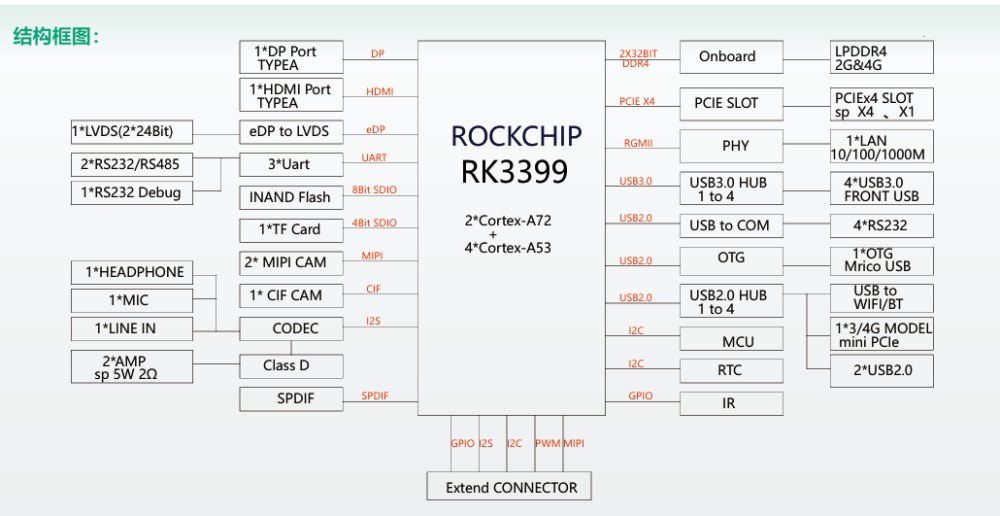
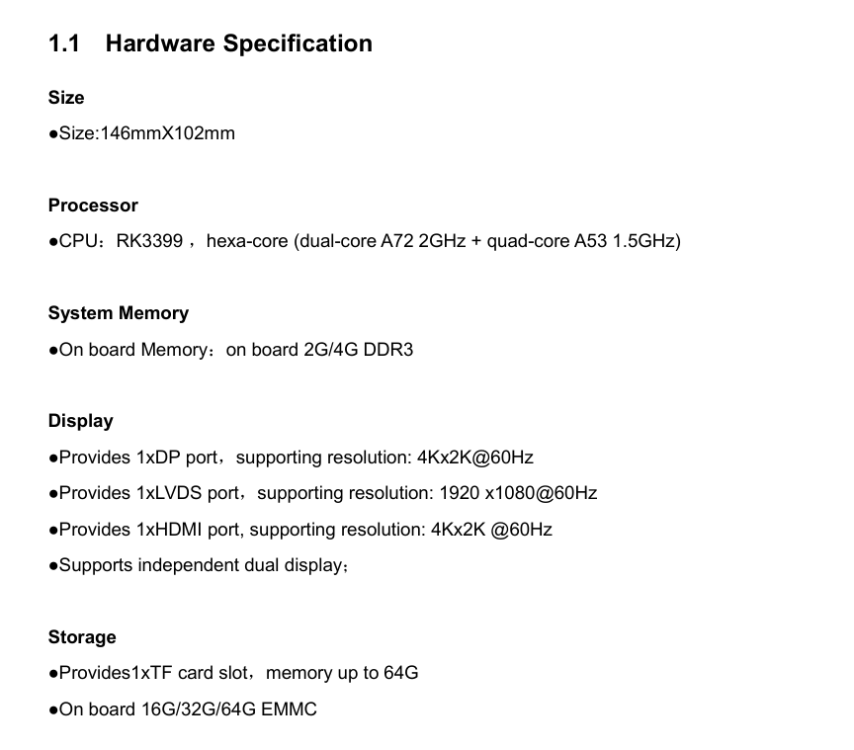
Hi all, I would like to ask support for the board EMB-3531. I'm having problem with booting this board from SD card. Here are some informations about this board. I hope that someone can help me with it. Thank you so much! I try to erase the emmc and flash the MiniLoaderAll.bin but it doesn't help. Or i don't have a correct image with armbian for this board. https://my.kos.org.cn:5154/rockchip/EMB3531/emb3531.pdf
-
 I have just cleaned-up / changed (again) things w.r.t. network names for my Nanopi-R6C. Same as Nanopi-R4S, it has 'wan' and 'lan', where wan is on-chip ethernet and lan is external PCIe connected. Double check for the R4S, but I am almost sure. So a mainline kernel in principle just numbers them eth<x> depending on timing and other things. New kernel behavior is that the on-chip gets named end0 and for my Nanopi-R6C the external gets named enP3p49s0, as that represents how it is HW connected via PCI-e. That is 7.0.<x-flavor> generic distro kernel. Then Armbian has 2 udev rules to rename to wan? and lan?. That is where the problem was and is for me as I use various different bootloader/firmware. I removed those udev rules as I run standard main distros as well and I need the names for bridges and vlans etc future proof and I don't care about names wan and lan (not using it as router). But if you want to keep that naming, check bootloader version (U-Boot I guess for you) and also udev rules and maybe other patches for RK3399 and/or R4S.
 -
Okay, here's the error I'm getting from the serial console: DDR Version 1.25 20210517 In channel 0 CS = 0 MR0=0x18 MR4=0x1 MR5=0x1 MR8=0x10 MR12=0x72 MR14=0x72 MR18=0x0 MR19=0x0 MR24=0x8 MR25=0x0 channel 1 CS = 0 MR0=0x18 MR4=0x1 MR5=0x1 MR8=0x10 MR12=0x72 MR14=0x72 MR18=0x0 MR19=0x0 MR24=0x8 MR25=0x0 channel 0 training pass! channel 1 training pass! change freq to 416MHz 0,1 Channel 0: LPDDR4,416MHz Bus Width=32 Col=10 Bank=8 Row=16 CS=1 Die Bus-Width=16 Size=2048MB Channel 1: LPDDR4,416MHz Bus Width=32 Col=10 Bank=8 Row=16 CS=1 Die Bus-Width=16 Size=2048MB 256B stride channel 0 CS = 0 MR0=0x18 MR4=0x1 MR5=0x1 MR8=0x10 MR12=0x72 MR14=0x72 MR18=0x0 MR19=0x0 MR24=0x8 MR25=0x0 channel 1 CS = 0 MR0=0x18 MR4=0x1 MR5=0x1 MR8=0x10 MR12=0x72 MR14=0x72 MR18=0x0 MR19=0x0 MR24=0x8 MR25=0x0 channel 0 training pass! channel 1 training pass! channel 0, cs 0, advanced training done channel 1, cs 0, advanced training done change freq to 856MHz 1,0 ch 0 ddrconfig = 0x101, ddrsize = 0x40 ch 1 ddrconfig = 0x101, ddrsize = 0x40 pmugrf_os_reg[2] = 0x32C1F2C1, stride = 0xD ddr_set_rate to 328MHZ ddr_set_rate to 666MHZ ddr_set_rate to 928MHZ channel 0, cs 0, advanced training done channel 1, cs 0, advanced training done ddr_set_rate to 416MHZ, ctl_index 0 ddr_set_rate to 856MHZ, ctl_index 1 support 416 856 328 666 928 MHz, current 856MHz OUT U-Boot SPL 2022.07-armbian (Jun 30 2024 - 19:41:33 +0000) Trying to boot from SPI Trying to boot from MMC1 Card did not respond to voltage select! : -110 spl: mmc init failed with error: -95 Trying to boot from MMC2 NOTICE: BL31: lts-v2.8.8(release):armbian NOTICE: BL31: Built : 19:41:23, Jun 30 2024 INFO: GICv3 with legacy support detected. INFO: ARM GICv3 driver initialized in EL3 INFO: Maximum SPI INTID supported: 287 INFO: plat_rockchip_pmu_init(1624): pd status 3e INFO: BL31: Initializing runtime services INFO: BL31: Preparing for EL3 exit to normal world INFO: Entry point address = 0x200000 INFO: SPSR = 0x3c9 U-Boot 2022.07-armbian (Jun 30 2024 - 19:41:33 +0000) SoC: Rockchip rk3399 Reset cause: POR DRAM: 3.9 GiB PMIC: RK808 Core: 339 devices, 31 uclasses, devicetree: separate SF: Detected w25q128 with page size 256 Bytes, erase size 4 KiB, total 16 MiB MMC: mmc@fe320000: 1, mmc@fe330000: 0 Loading Environment from MMC... *** Warning - bad CRC, using default environment In: serial Out: serial Err: serial Model: Helios64 Revision: 1.2 - 4GB non ECC Net: dw_dm_mdio_init: mdio node is missing, registering legacy mdio busNo ethernet found. scanning bus for devices... Hit any key to stop autoboot: 0 Card did not respond to voltage select! : -110 switch to partitions #0, OK mmc0(part 0) is current device Scanning mmc 0:1... Found U-Boot script /boot/boot.scr 3906 bytes read in 17 ms (223.6 KiB/s) ## Executing script at 00500000 Boot script loaded from mmc 0:1 179 bytes read in 13 ms (12.7 KiB/s) 20409746 bytes read in 1952 ms (10 MiB/s) 39770624 bytes read in 3781 ms (10 MiB/s) 90994 bytes read in 79 ms (1.1 MiB/s) 2825 bytes read in 173 ms (15.6 KiB/s) Applying kernel provided DT fixup script (rockchip-fixup.scr) ## Executing script at 09000000 Trying kaslrseed command... Info: Unknown command can be safely ignored since kaslrseed does not apply to all boards. Unknown command 'kaslrseed' - try 'help' Moving Image from 0x2080000 to 0x2200000, end=48b0000 ## Loading init Ramdisk from Legacy Image at 06000000 ... Image Name: uInitrd Image Type: AArch64 Linux RAMDisk Image (gzip compressed) Data Size: 20409682 Bytes = 19.5 MiB Load Address: 00000000 Entry Point: 00000000 Verifying Checksum ... OK ## Flattened Device Tree blob at 01f00000 Booting using the fdt blob at 0x1f00000 Loading Ramdisk to f4b66000, end f5edcd52 ... OK Loading Device Tree to 00000000f4ae7000, end 00000000f4b65fff ... OK Starting kernel ... ERROR: rockchip_plat_sip_handler: unhandled SMC (0x82000003) ERROR: rockchip_plat_sip_handler: unhandled SMC (0x82000003) ERROR: rockchip_plat_sip_handler: unhandled SMC (0x82000003) ERROR: rockchip_plat_sip_handler: unhandled SMC (0x82000003) ERROR: rockchip_plat_sip_handler: unhandled SMC (0x82000003) ERROR: rockchip_plat_sip_handler: unhandled SMC (0x82000003) ERROR: rockchip_plat_sip_handler: unhandled SMC (0x82000003) ERROR: rockchip_plat_sip_handler: unhandled SMC (0x82000003) ERROR: rockchip_plat_sip_handler: unhandled SMC (0x82000003) ERROR: rockchip_plat_sip_handler: unhandled SMC (0x82000003) ERROR: rockchip_plat_sip_handler: unhandled SMC (0x82000003) ERROR: rockchip_plat_sip_handler: unhandled SMC (0x82000003) ERROR: rockchip_plat_sip_handler: unhandled SMC (0x82000003) ERROR: rockchip_plat_sip_handler: unhandled SMC (0x82000003) ERROR: rockchip_plat_sip_handler: unhandled SMC (0x82000003) ERROR: rockchip_plat_sip_handler: unhandled SMC (0x82000003) ERROR: rockchip_plat_sip_handler: unhandled SMC (0x82000003) ERROR: rockchip_plat_sip_handler: unhandled SMC (0x82000003) ERROR: rockchip_plat_sip_handler: unhandled SMC (0x82000003) ERROR: rockchip_plat_sip_handler: unhandled SMC (0x82000003) ERROR: rockchip_plat_sip_handler: unhandled SMC (0x82000003) ERROR: rockchip_plat_sip_handler: unhandled SMC (0x82000003) ERROR: rockchip_plat_sip_handler: unhandled SMC (0x82000003) ERROR: rockchip_plat_sip_handler: unhandled SMC (0x82000003) ERROR: rockchip_plat_sip_handler: unhandled SMC (0x82000003) ERROR: rockchip_plat_sip_handler: unhandled SMC (0x82000003) ERROR: rockchip_plat_sip_handler: unhandled SMC (0x82000003) ERROR: rockchip_plat_sip_handler: unhandled SMC (0x82000003) ERROR: rockchip_plat_sip_handler: unhandled SMC (0x82000003) ERROR: rockchip_plat_sip_handler: unhandled SMC (0x82000003) ERROR: rockchip_plat_sip_handler: unhandled SMC (0x82000003) ERROR: rockchip_plat_sip_handler: unhandled SMC (0x82000003) ERROR: rockchip_plat_sip_handler: unhandled SMC (0x82000003) ERROR: rockchip_plat_sip_handler: unhandled SMC (0x82000003) ERROR: rockchip_plat_sip_handler: unhandled SMC (0x82000003) ERROR: rockchip_plat_sip_handler: unhandled SMC (0x82000003) ERROR: rockchip_plat_sip_handler: unhandled SMC (0x82000003) ERROR: rockchip_plat_sip_handler: unhandled SMC (0x82000003) ERROR: rockchip_plat_sip_handler: unhandled SMC (0x82000003) ERROR: rockchip_plat_sip_handler: unhandled SMC (0x82000003) ERROR: rockchip_plat_sip_handler: unhandled SMC (0x82000003) ERROR: rockchip_plat_sip_handler: unhandled SMC (0x82000003) ERROR: rockchip_plat_sip_handler: unhandled SMC (0x82000003) ERROR: rockchip_plat_sip_handler: unhandled SMC (0x82000003) ERROR: rockchip_plat_sip_handler: unhandled SMC (0x82000003) ERROR: rockchip_plat_sip_handler: unhandled SMC (0x82000003) ERROR: rockchip_plat_sip_handler: unhandled SMC (0x82000003) ERROR: rockchip_plat_sip_handler: unhandled SMC (0x82000003) ERROR: rockchip_plat_sip_handler: unhandled SMC (0x82000003) ERROR: rockchip_plat_sip_handler: unhandled SMC (0x82000003) ERROR: rockchip_plat_sip_handler: unhandled SMC (0x82000003) ERROR: rockchip_plat_sip_handler: unhandled SMC (0x82000003) ERROR: rockchip_plat_sip_handler: unhandled SMC (0x82000003) ERROR: rockchip_plat_sip_handler: unhandled SMC (0x82000003) ERROR: rockchip_plat_sip_handler: unhandled SMC (0x82000003) ERROR: rockchip_plat_sip_handler: unhandled SMC (0x82000003) ERROR: rockchip_plat_sip_handler: unhandled SMC (0x82000003) ERROR: rockchip_plat_sip_handler: unhandled SMC (0x82000003) ERROR: rockchip_plat_sip_handler: unhandled SMC (0x82000003) ERROR: rockchip_plat_sip_handler: unhandled SMC (0x82000003) ERROR: rockchip_plat_sip_handler: unhandled SMC (0x82000003) ERROR: rockchip_plat_sip_handler: unhandled SMC (0x82000003) ERROR: rockchip_plat_sip_handler: unhandled SMC (0x82000003) ERROR: rockchip_plat_sip_handler: unhandled SMC (0x82000003) ERROR: rockchip_plat_sip_handler: unhandled SMC (0x82000003) ERROR: rockchip_plat_sip_handler: unhandled SMC (0x82000003) ERROR: rockchip_plat_sip_handler: unhandled SMC (0x82000003) ERROR: rockchip_plat_sip_handler: unhandled SMC (0x82000003) ERROR: rockchip_plat_sip_handler: unhandled SMC (0x82000003) ERROR: rockchip_plat_sip_handler: unhandled SMC (0x82000003) ERROR: rockchip_plat_sip_handler: unhandled SMC (0x82000003) ERROR: rockchip_plat_sip_handler: unhandled SMC (0x82000003) ERROR: rockchip_plat_sip_handler: unhandled SMC (0x82000003) ERROR: rockchip_plat_sip_handler: unhandled SMC (0x82000003) ERROR: rockchip_plat_sip_handler: unhandled SMC (0x82000003) ERROR: rockchip_plat_sip_handler: unhandled SMC (0x82000003) ERROR: rockchip_plat_sip_handler: unhandled SMC (0x82000003) ERROR: rockchip_plat_sip_handler: unhandled SMC (0x82000003) ERROR: rockchip_plat_sip_handler: unhandled SMC (0x82000003) ERROR: rockchip_plat_sip_handler: unhandled SMC (0x82000003) ERROR: rockchip_plat_sip_handler: unhandled SMC (0x82000003) ERROR: rockchip_plat_sip_handler: unhandled SMC (0x82000003) ERROR: rockchip_plat_sip_handler: unhandled SMC (0x82000003) ERROR: rockchip_plat_sip_handler: unhandled SMC (0x82000003) ERROR: rockchip_plat_sip_handler: unhandled SMC (0x82000003) ERROR: rockchip_plat_sip_handler: unhandled SMC (0x82000003) ERROR: rockchip_plat_sip_handler: unhandled SMC (0x82000003) ERROR: rockchip_plat_sip_handler: unhandled SMC (0x82000003) ERROR: rockchip_plat_sip_handler: unhandled SMC (0x82000003) ERROR: rockchip_plat_sip_handler: unhandled SMC (0x82000003) ERROR: rockchip_plat_sip_handler: unhandled SMC (0x82000003) ERROR: rockchip_plat_sip_handler: unhandled SMC (0x82000003) ERROR: rockchip_plat_sip_handler: unhandled SMC (0x82000003) ERROR: rockchip_plat_sip_handler: unhandled SMC (0x82000003) ERROR: rockchip_plat_sip_handler: unhandled SMC (0x82000003) ERROR: rockchip_plat_sip_handler: unhandled SMC (0x82000003) ERROR: rockchip_plat_sip_handler: unhandled SMC (0x82000003) ERROR: rockchip_plat_sip_handler: unhandled SMC (0x82000003) ERROR: rockchip_plat_sip_handler: unhandled SMC (0x82000003) ERROR: rockchip_plat_sip_handler: unhandled SMC (0x82000003) ERROR: rockchip_plat_sip_handler: unhandled SMC (0x82000003) ERROR: rockchip_plat_sip_handler: unhandled SMC (0x82000003) ERROR: rockchip_plat_sip_handler: unhandled SMC (0x82000003) ERROR: rockchip_plat_sip_handler: unhandled SMC (0x82000003) ERROR: rockchip_plat_sip_handler: unhandled SMC (0x82000003) ERROR: rockchip_plat_sip_handler: unhandled SMC (0x82000003) ERROR: rockchip_plat_sip_handler: unhandled SMC (0x82000003) ERROR: rockchip_plat_sip_handler: unhandled SMC (0x82000003) ERROR: rockchip_plat_sip_handler: unhandled SMC (0x82000003) ERROR: rockchip_plat_sip_handler: unhandled SMC (0x82000003) ERROR: rockchip_plat_sip_handler: unhandled SMC (0x82000003) ERROR: rockchip_plat_sip_handler: unhandled SMC (0x82000003) ERROR: rockchip_plat_sip_handler: unhandled SMC (0x82000003) ERROR: rockchip_plat_sip_handler: unhandled SMC (0x82000003) ERROR: rockchip_plat_sip_handler: unhandled SMC (0x82000003) ERROR: rockchip_plat_sip_handler: unhandled SMC (0x82000003) ERROR: rockchip_plat_sip_handler: unhandled SMC (0x82000003) ERROR: rockchip_plat_sip_handler: unhandled SMC (0x82000003) ERROR: rockchip_plat_sip_handler: unhandled SMC (0x82000003)
-
@BipBip1981 the dtb posted for the 6.18 kernel is different to the dtb posted for the 6.6 kernel though so where can I find the dtb built for the 6.12 kernel that Prahal shared with you rk3399-kobol-helios64.dtb-6.XX.xx-L2-hs400-opp ?
-
@BipBip1981 where can I download rk3399-kobol-helios64.dtb-6.XX.xx-L2-hs400-opp ? Thanks
-
Helios64 hangs with 26.2.1 / 6.18.10 kernel on cpu5
SymbiosisSystems replied to SymbiosisSystems's topic in Rockchip
It's booted a bit further but I've just got a kernel panic on cpu5 DDR Version 1.25 20210517 In channel 0 CS = 0 MR0=0x18 MR4=0x1 MR5=0x1 MR8=0x10 MR12=0x72 MR14=0x72 MR18=0x0 MR19=0x0 MR24=0x8 MR25=0x0 channel 1 CS = 0 MR0=0x18 MR4=0x1 MR5=0x1 MR8=0x10 MR12=0x72 MR14=0x72 MR18=0x0 MR19=0x0 MR24=0x8 MR25=0x0 channel 0 training pass! channel 1 training pass! change freq to 416MHz 0,1 Channel 0: LPDDR4,416MHz Bus Width=32 Col=10 Bank=8 Row=16 CS=1 Die Bus-Width=16 Size=2048MB Channel 1: LPDDR4,416MHz Bus Width=32 Col=10 Bank=8 Row=16 CS=1 Die Bus-Width=16 Size=2048MB 256B stride channel 0 CS = 0 MR0=0x18 MR4=0x1 MR5=0x1 MR8=0x10 MR12=0x72 MR14=0x72 MR18=0x0 MR19=0x0 MR24=0x8 MR25=0x0 channel 1 CS = 0 MR0=0x18 MR4=0x1 MR5=0x1 MR8=0x10 MR12=0x72 MR14=0x72 MR18=0x0 MR19=0x0 MR24=0x8 MR25=0x0 channel 0 training pass! channel 1 training pass! channel 0, cs 0, advanced training done channel 1, cs 0, advanced training done change freq to 856MHz 1,0 ch 0 ddrconfig = 0x101, ddrsize = 0x40 ch 1 ddrconfig = 0x101, ddrsize = 0x40 pmugrf_os_reg[2] = 0x32C1F2C1, stride = 0xD ddr_set_rate to 328MHZ ddr_set_rate to 666MHZ ddr_set_rate to 928MHZ channel 0, cs 0, advanced training done channel 1, cs 0, advanced training done ddr_set_rate to 416MHZ, ctl_index 0 ddr_set_rate to 856MHZ, ctl_index 1 support 416 856 328 666 928 MHz, current 856MHz OUT U-Boot SPL 2022.07_armbian-2022.07-Se092-P3fcd-H28b4-V0d63-Bbf55-R448a (Dec 16 2025 - 03:12:11 +0000) Trying to boot from MMC1 NOTICE: BL31: v2.13.0(release):armbian NOTICE: BL31: Built : 04:23:02, Nov 24 2025 INFO: GICv3 with legacy support detected. INFO: ARM GICv3 driver initialized in EL3 INFO: Maximum SPI INTID supported: 287 INFO: plat_rockchip_pmu_init(1624): pd status 3e INFO: BL31: Initializing runtime services INFO: BL31: Preparing for EL3 exit to normal world INFO: Entry point address = 0x200000 INFO: SPSR = 0x3c9 U-Boot 2022.07_armbian-2022.07-Se092-P3fcd-H28b4-V0d63-Bbf55-R448a (Dec 16 2025 - 03:12:11 +0000) SoC: Rockchip rk3399 Reset cause: POR DRAM: 3.9 GiB PMIC: RK808 Core: 339 devices, 31 uclasses, devicetree: separate SF: Detected w25q128 with page size 256 Bytes, erase size 4 KiB, total 16 MiB MMC: mmc@fe320000: 1, mmc@fe330000: 0 Loading Environment from MMC... *** Warning - bad CRC, using default environment In: serial Out: serial Err: serial Model: Helios64 Revision: 1.2 - 4GB non ECC Net: dw_dm_mdio_init: mdio node is missing, registering legacy mdio busNo ethernet found. scanning bus for devices... Hit any key to stop autoboot: 0 switch to partitions #0, OK mmc1 is current device Scanning mmc 1:1... Found U-Boot script /boot/boot.scr 3906 bytes read in 5 ms (762.7 KiB/s) ## Executing script at 00500000 Boot script loaded from mmc 1:1 299 bytes read in 4 ms (72.3 KiB/s) 24731811 bytes read in 1050 ms (22.5 MiB/s) 39770624 bytes read in 1684 ms (22.5 MiB/s) 90994 bytes read in 20 ms (4.3 MiB/s) 725 bytes read in 6 ms (117.2 KiB/s) Applying user provided DT overlay rockchip-rk3399-op1-opp.dtbo 780 bytes read in 5 ms (152.3 KiB/s) Applying user provided DT overlay rockchip-rk3399-l2-cache.dtbo 2825 bytes read in 41 ms (66.4 KiB/s) Applying kernel provided DT fixup script (rockchip-fixup.scr) ## Executing script at 09000000 Trying kaslrseed command... Info: Unknown command can be safely ignored since kaslrseed does not apply to all boards. Unknown command 'kaslrseed' - try 'help' Moving Image from 0x2080000 to 0x2200000, end=48b0000 ## Loading init Ramdisk from Legacy Image at 06000000 ... Image Name: uInitrd Image Type: AArch64 Linux RAMDisk Image (gzip compressed) Data Size: 24731747 Bytes = 23.6 MiB Load Address: 00000000 Entry Point: 00000000 Verifying Checksum ... OK ## Flattened Device Tree blob at 01f00000 Booting using the fdt blob at 0x1f00000 Loading Ramdisk to f4747000, end f5edd063 ... OK Loading Device Tree to 00000000f46c8000, end 00000000f4746fff ... OK Starting kernel ... [ 0.000000] Booting Linux on physical CPU 0x0000000000 [0x410fd034] [ 0.000000] Linux version 6.18.10-current-rockchip64 (build@armbian) (aarch64-linux-gnu-gcc (Ubuntu 13.3.0-6ubuntu2~24.04) 13.3.0, GNU ld (GNU Binutils for Ubuntu) 2.42) #2 SMP PREEMPT Wed Feb 11 12:42:01 UTC 2026 [ 0.000000] KASLR disabled due to lack of seed [ 0.000000] Machine model: Kobol Helios64 [ 0.000000] printk: debug: ignoring loglevel setting. [ 0.000000] efi: UEFI not found. [ 0.000000] OF: reserved mem: Reserved memory: No reserved-memory node in the DT [ 0.000000] NUMA: Faking a node at [mem 0x0000000000200000-0x00000000f7ffffff] [ 0.000000] NODE_DATA(0) allocated [mem 0xf77c6380-0xf77c8b3f] [ 0.000000] Zone ranges: [ 0.000000] DMA [mem 0x0000000000200000-0x00000000f7ffffff] [ 0.000000] DMA32 empty [ 0.000000] Normal empty [ 0.000000] Movable zone start for each node [ 0.000000] Early memory node ranges [ 0.000000] node 0: [mem 0x0000000000200000-0x00000000f7ffffff] [ 0.000000] Initmem setup node 0 [mem 0x0000000000200000-0x00000000f7ffffff] [ 0.000000] On node 0, zone DMA: 512 pages in unavailable ranges [ 0.000000] cma: Reserved 128 MiB at 0x00000000e8800000 [ 0.000000] psci: probing for conduit method from DT. [ 0.000000] psci: PSCIv1.1 detected in firmware. [ 0.000000] psci: Using standard PSCI v0.2 function IDs [ 0.000000] psci: MIGRATE_INFO_TYPE not supported. [ 0.000000] psci: SMC Calling Convention v1.5 [ 0.000000] percpu: Embedded 34 pages/cpu s100376 r8192 d30696 u139264 [ 0.000000] pcpu-alloc: s100376 r8192 d30696 u139264 alloc=34*4096 [ 0.000000] pcpu-alloc: [0] 0 [0] 1 [0] 2 [0] 3 [0] 4 [0] 5 [ 0.000000] Detected VIPT I-cache on CPU0 [ 0.000000] CPU features: detected: GICv3 CPU interface [ 0.000000] CPU features: detected: ARM erratum 845719 [ 0.000000] alternatives: applying boot alternatives [ 0.000000] Kernel command line: root=UUID=0a68fe65-7fd3-47ab-b68f-ef2fddb464c9 rootwait rootfstype=ext4 splash=verbose console=ttyS2,1500000 console=tty1 consoleblank=0 loglevel=7 ubootpart=7a8c3cb1-01 usb-storage.quirks=0x2537:0x1066:u,0x2537:0x1068:u earlyprintk ignore_loglevel cgroup_enable=cpuset cgroup_memory=1 cgroup_enable=memory [ 0.000000] Unknown kernel command line parameters "earlyprintk splash=verbose ubootpart=7a8c3cb1-01 cgroup_enable=memory cgroup_memory=1", will be passed to user space. [ 0.000000] printk: log buffer data + meta data: 262144 + 917504 = 1179648 bytes [ 0.000000] Dentry cache hash table entries: 524288 (order: 10, 4194304 bytes, linear) [ 0.000000] Inode-cache hash table entries: 262144 (order: 9, 2097152 bytes, linear) [ 0.000000] software IO TLB: SWIOTLB bounce buffer size adjusted to 3MB [ 0.000000] software IO TLB: area num 8. [ 0.000000] software IO TLB: mapped [mem 0x00000000f6ce3000-0x00000000f70e3000] (4MB) [ 0.000000] Fallback order for Node 0: 0 [ 0.000000] Built 1 zonelists, mobility grouping on. Total pages: 1015296 [ 0.000000] Policy zone: DMA [ 0.000000] mem auto-init: stack:all(zero), heap alloc:on, heap free:off [ 0.000000] SLUB: HWalign=64, Order=0-3, MinObjects=0, CPUs=6, Nodes=1 [ 0.000000] ftrace: allocating 55125 entries in 216 pages [ 0.000000] ftrace: allocated 216 pages with 4 groups [ 0.000000] rcu: Preemptible hierarchical RCU implementation. [ 0.000000] rcu: RCU event tracing is enabled. [ 0.000000] rcu: RCU restricting CPUs from NR_CPUS=256 to nr_cpu_ids=6. [ 0.000000] Trampoline variant of Tasks RCU enabled. [ 0.000000] Rude variant of Tasks RCU enabled. [ 0.000000] Tracing variant of Tasks RCU enabled. [ 0.000000] rcu: RCU calculated value of scheduler-enlistment delay is 25 jiffies. [ 0.000000] rcu: Adjusting geometry for rcu_fanout_leaf=16, nr_cpu_ids=6 [ 0.000000] RCU Tasks: Setting shift to 3 and lim to 1 rcu_task_cb_adjust=1 rcu_task_cpu_ids=6. [ 0.000000] RCU Tasks Rude: Setting shift to 3 and lim to 1 rcu_task_cb_adjust=1 rcu_task_cpu_ids=6. [ 0.000000] RCU Tasks Trace: Setting shift to 3 and lim to 1 rcu_task_cb_adjust=1 rcu_task_cpu_ids=6. [ 0.000000] NR_IRQS: 64, nr_irqs: 64, preallocated irqs: 0 [ 0.000000] GICv3: GIC: Using split EOI/Deactivate mode [ 0.000000] GIC: enabling workaround for GICv3: Insecure RK3399 integration [ 0.000000] GICv3: 256 SPIs implemented [ 0.000000] GICv3: 0 Extended SPIs implemented [ 0.000000] Root IRQ handler: gic_handle_irq [ 0.000000] GICv3: GICv3 features: 16 PPIs [ 0.000000] GICv3: Broken GIC integration, security disabled [ 0.000000] GICv3: GICD_CTLR.DS=1, SCR_EL3.FIQ=0 [ 0.000000] GICv3: CPU0: found redistributor 0 region 0:0x00000000fef00000 [ 0.000000] ITS [mem 0xfee20000-0xfee3ffff] [ 0.000000] ITS@0x00000000fee20000: allocated 65536 Devices @600000 (flat, esz 8, psz 64K, shr 0) [ 0.000000] ITS: using cache flushing for cmd queue [ 0.000000] GICv3: using LPI property table @0x0000000000680000 [ 0.000000] GIC: using cache flushing for LPI property table [ 0.000000] GICv3: CPU0: using allocated LPI pending table @0x0000000000690000 [ 0.000000] GICv3: GIC: PPI partition interrupt-partition-0[0] { /cpus/cpu@0[0] /cpus/cpu@1[1] /cpus/cpu@2[2] /cpus/cpu@3[3] } [ 0.000000] GICv3: GIC: PPI partition interrupt-partition-1[1] { /cpus/cpu@100[4] /cpus/cpu@101[5] } [ 0.000000] rcu: srcu_init: Setting srcu_struct sizes based on contention. [ 0.000000] arch_timer: cp15 timer running at 24.00MHz (phys). [ 0.000000] clocksource: arch_sys_counter: mask: 0xffffffffffffff max_cycles: 0x588fe9dc0, max_idle_ns: 440795202592 ns [ 0.000002] sched_clock: 56 bits at 24MHz, resolution 41ns, wraps every 4398046511097ns [ 0.001597] Console: colour dummy device 80x25 [ 0.001623] printk: legacy console [tty1] enabled [ 0.003196] Calibrating delay loop (skipped), value calculated using timer frequency.. 48.00 BogoMIPS (lpj=96000) [ 0.003250] pid_max: default: 32768 minimum: 301 [ 0.003441] LSM: initializing lsm=capability,yama,apparmor [ 0.003564] Yama: becoming mindful. [ 0.004065] AppArmor: AppArmor initialized [ 0.004245] Mount-cache hash table entries: 8192 (order: 4, 65536 bytes, linear) [ 0.004307] Mountpoint-cache hash table entries: 8192 (order: 4, 65536 bytes, linear) [ 0.009116] rcu: Hierarchical SRCU implementation. [ 0.009170] rcu: Max phase no-delay instances is 1000. [ 0.009687] Timer migration: 1 hierarchy levels; 8 children per group; 1 crossnode level [ 0.011405] EFI services will not be available. [ 0.012079] smp: Bringing up secondary CPUs ... [ 0.013167] Detected VIPT I-cache on CPU1 [ 0.013474] GICv3: CPU1: found redistributor 1 region 0:0x00000000fef20000 [ 0.013501] GICv3: CPU1: using allocated LPI pending table @0x00000000006a0000 [ 0.013576] CPU1: Booted secondary processor 0x0000000001 [0x410fd034] [ 0.014810] Detected VIPT I-cache on CPU2 [ 0.015084] GICv3: CPU2: found redistributor 2 region 0:0x00000000fef40000 [ 0.015107] GICv3: CPU2: using allocated LPI pending table @0x00000000006b0000 [ 0.015159] CPU2: Booted secondary processor 0x0000000002 [0x410fd034] [ 0.016428] Detected VIPT I-cache on CPU3 [ 0.016708] GICv3: CPU3: found redistributor 3 region 0:0x00000000fef60000 [ 0.016731] GICv3: CPU3: using allocated LPI pending table @0x00000000006c0000 [ 0.016783] CPU3: Booted secondary processor 0x0000000003 [0x410fd034] [ 0.017959] CPU features: detected: Spectre-v2 [ 0.017975] CPU features: detected: Spectre-v3a [ 0.017988] CPU features: detected: Spectre-BHB [ 0.017998] CPU features: detected: ARM erratum 1742098 [ 0.018008] CPU features: detected: ARM errata 1165522, 1319367, or 1530923 [ 0.018016] Detected PIPT I-cache on CPU4 [ 0.018263] GICv3: CPU4: found redistributor 100 region 0:0x00000000fef80000 [ 0.018283] GICv3: CPU4: using allocated LPI pending table @0x00000000006d0000 [ 0.018332] CPU4: Booted secondary processor 0x0000000100 [0x410fd082] [ 0.019463] Detected PIPT I-cache on CPU5 [ 0.019695] GICv3: CPU5: found redistributor 101 region 0:0x00000000fefa0000 [ 0.019714] GICv3: CPU5: using allocated LPI pending table @0x00000000006e0000 [ 0.019754] CPU5: Booted secondary processor 0x0000000101 [0x410fd082] [ [ 2.387408] fan53555-regulator 0-0041: FAN53555 Option[8] Rev[1] Detected! [ 2.394288] pca953x 2-0020: using no AI [ 2.402892] rk808-regulator rk808-regulator.2.auto: max buck steps per change: 4 [ 2.409232] vcc_sdio_s0: Bringing 3300000uV into 3000000-3000000uV [ 2.427666] rockchip-pcie f8000000.pcie: host bridge /pcie@f8000000 ranges: [ 2.428440] rockchip-pcie f8000000.pcie: MEM 0x00fa000000..0x00fbdfffff -> 0x00fa000000 [ 2.429237] rockchip-pcie f8000000.pcie: IO 0x00fbe00000..0x00fbefffff -> 0x00fbe00000 [ 2.430604] rockchip-pcie f8000000.pcie: no bus scan delay, default to 0 ms [ 2.488396] usb 1-1: new high-speed USB device number 2 using xhci-hcd [ 2.628879] usb 1-1: New USB device found, idVendor=2109, idProduct=2815, bcdDevice= 7.04 [ 2.629647] usb 1-1: New USB device strings: Mfr=1, Product=2, SerialNumber=0 [ 2.630293] usb 1-1: Product: USB2.0 Hub [ 2.630755] usb 1-1: Manufacturer: VIA Labs, Inc. [ 2.640368] rockchip-pcie f8000000.pcie: wait 0 ms (from device tree) before bus scan [ 2.641911] rockchip-pcie f8000000.pcie: PCI host bridge to bus 0000:00 [ 2.642522] pci_bus 0000:00: root bus resource [bus 00-1f] [ 2.643026] pci_bus 0000:00: root bus resource [mem 0xfa000000-0xfbdfffff] [ 2.643651] pci_bus 0000:00: root bus resource [io 0x0000-0xfffff] (bus address [0xfbe00000-0xfbefffff]) [ 2.644635] pci 0000:00:00.0: [1d87:0100] type 01 class 0x060400 PCIe Root Port [ 2.645329] pci 0000:00:00.0: PCI bridge to [bus 00] [ 2.645794] pci 0000:00:00.0: bridge window [mem 0x00000000-0x000fffff] [ 2.646492] pci 0000:00:00.0: supports D1 [ 2.646864] pci 0000:00:00.0: PME# supported from D0 D1 D3hot [ 2.653826] pci 0000:00:00.0: bridge configuration invalid ([bus 00-00]), reconfiguring [ 2.704782] SError Interrupt on CPU5, code 0x00000000bf000002 -- SError [ 2.704804] CPU: 5 UID: 0 PID: 55 Comm: kworker/u26:1 Tainted: G M 6.18.10-current-rockchip64 #2 PREEMPT [ 2.704822] Tainted: [M]=MACHINE_CHECK [ 2.704826] Hardware name: Kobol Helios64 (DT) [ 2.704833] Workqueue: events_unbound deferred_probe_work_func [ 2.704859] pstate: 600000c5 (nZCv daIF -PAN -UAO -TCO -DIT -SSBS BTYPE=--) [ 2.704871] pc : rockchip_pcie_rd_conf+0x184/0x290 [ 2.704885] lr : rockchip_pcie_rd_conf+0x178/0x290 [ 2.704894] sp : ffff800083213810 [ 2.704899] x29: ffff800083213810 x28: ffff8000824f3748 x27: 0000000000000000 [ 2.704915] x26: 0000000000000001 x25: 0000000000000000 x24: ffff800082677f70 [ 2.704930] x23: 0000000000000000 x22: ffff8000832138e4 x21: ffff800083213844 [ 2.704945] x20: 0000000000000000 x19: 0000000000000004 x18: 00000000ffffffff [ 2.704959] x17: 6572202c295d3030 x16: 2d3030207375625b x15: ffff8000832136b0 [ 2.704973] x14: ffff00000ba5ba1c x13: ffff00000ba5b290 x12: dead000000000040 [ 2.704986] x11: ffffff800000007c x10: 00000f80007fffff x9 : ffff8000808c0c48 [ 2.705000] x8 : 000000003d4d554e x7 : ffff00000ba6db80 x6 : ffff00000ba6e800 [ 2.705014] x5 : ffff00000ba6f000 x4 : ffff800087000000 x3 : 0000000000c00008 [ 2.705027] x2 : 000000000080000a x1 : ffff800087c00008 x0 : ffff800087c0000c [ 2.705043] Kernel panic - not syncing: Asynchronous SError Interrupt [ 2.705050] CPU: 5 UID: 0 PID: 55 Comm: kworker/u26:1 Tainted: G M 6.18.10-current-rockchip64 #2 PREEMPT [ 2.705064] Tainted: [M]=MACHINE_CHECK [ 2.705068] Hardware name: Kobol Helios64 (DT) [ 2.705074] Workqueue: events_unbound deferred_probe_work_func [ 2.705090] Call trace: [ 2.705095] show_stack+0x20/0x38 (C) [ 2.705115] dump_stack_lvl+0x34/0x90 [ 2.705139] dump_stack+0x18/0x28 [ 2.705153] vpanic+0x328/0x378 [ 2.705165] panic+0x68/0x70 [ 2.705175] nmi_panic+0x74/0x80 [ 2.705186] arm64_serror_panic+0x78/0x90 [ 2.705198] do_serror+0x44/0x80 [ 2.705209] el1h_64_error_handler+0x34/0x50 [ 2.705227] el1h_64_error+0x6c/0x70 [ 2.705238] rockchip_pcie_rd_conf+0x184/0x290 (P) [ 2.705251] pci_bus_read_config_dword+0x88/0xf8 [ 2.705262] pci_bus_generic_read_dev_vendor_id+0x38/0x1a0 [ 2.705277] pci_scan_single_device+0xb4/0x120 [ 2.705289] pci_scan_slot+0x74/0x218 [ 2.705301] pci_scan_child_bus_extend+0x50/0x2e0 [ 2.705314] pci_scan_bridge_extend+0x2c4/0x608 [ 2.705326] pci_scan_child_bus_extend+0x1c4/0x2e0 [ 2.705338] pci_scan_root_bus_bridge+0x6c/0xe8 [ 2.705351] pci_host_probe+0x38/0x118 [ 2.705364] rockchip_pcie_probe+0x3f0/0x510 [ 2.705373] platform_probe+0x64/0xa8 [ 2.705390] really_probe+0xc8/0x3a0 [ 2.705402] __driver_probe_device+0x84/0x170 [ 2.705415] driver_probe_device+0x44/0x120 [ 2.705427] __device_attach_driver+0xc4/0x168 [ 2.705440] bus_for_each_drv+0x90/0xf8 [ 2.705451] __device_attach+0xa8/0x1c8 [ 2.705463] device_initial_probe+0x1c/0x30 [ 2.705476] bus_probe_device+0xb4/0xc0 [ 2.705487] deferred_probe_work_func+0xa4/0x100 [ 2.705500] process_one_work+0x174/0x3e8 [ 2.705516] worker_thread+0x2dc/0x3f8 [ 2.705531] kthread+0x14c/0x208 [ 2.705546] ret_from_fork+0x10/0x20 [ 2.705563] SMP: stopping secondary CPUs [ 2.705778] Kernel Offset: disabled [ 2.705782] CPU features: 0x080000,04105800,40004001,0400421b [ 2.705792] Memory Limit: none [ 2.733695] ---[ end Kernel panic - not syncing: Asynchronous SError Interrupt ]--- -
Support for rotation is better in modern 6.18.y Linux. Fastest is to download image and try https://www.armbian.com/boards/roc-rk3399-pc But VPU acceleration in rotated screen might be a problem ... and you will need to generate Gnome desktop image to facilitate Wayland or no fun.
-
 Updating via `apt update && apt upgrade` causes Armbian to fail to boot on the single-board computer. I'm attaching the UART logs in the file `failed_log.txt`. Start-Date: 2025-11-13 04:45:12 Commandline: apt -y upgrade Upgrade: armbian-bsp-cli-nanopct4-current:arm64 (25.11.0-trunk.146, 25.11.0-trunk.469), linux-dtb-current-rockchip64:arm64 (25.11.0-trunk.146, 25.11.0-trunk.469), linux-image-current-rockchip64:arm64 (25.11.0-trunk.146, 25.11.0-trunk.469), linux-u-boot-nanopct4-current:arm64 (25.11.0-trunk.146, 25.11.0-trunk.469), armbian-firmware:arm64 (25.11.0-trunk.146, 25.11.0-trunk.469) End-Date: 2025-11-13 04:47:04 out: Starting kernel ... efi_free_pool: illegal free 0x00000000f0f09040 "Synchronous Abort" handler, esr 0x96000004 elr: 00000000002856e4 lr : 00000000002702f0000000f3f9b2f0 x0 : dfb6333a7ba2b4b7 x1 : 00000000f3fba060 x2000000 x5 : dfb6333a7ba2b4b7 x6 : 00000000f0d07000 x7 : 00000000000ef98 x11: 00000000f1f0b5bc x12: 000000000000ef98 x13: 000003f558a4 x17: 00000000d8136251 x18: 00000000f1f22d90 x19: 000000000000001 x23: 00000000f1f303c0 x24: 00000000f3fdcff0 x25: 00000000000000001 x29: 00000000f1f0b470 Code: eb04005f 54000061 5resetting ... To reproduce the issue (~13.11.2025-16.11.2025), simply download and flash the current `Minimal/IOT for Armbian Linux v6.12 [Debian] Debian 12 (Bookworm)` images (`https://www.armbian.com/nanopc-t4/`) and run `apt update & upgrade` on a running system, then reboot. After this, the system, regardless of whether the `SD card` or `EMMC` is used, will enter an infinite boot loop (`out` and file `failed_out.txt`). Thank you. failed_log.txt armbian_release.txt normal_log.txt
 -
This week in Armbian development saw a significant expansion of hardware support, including new board images and compatibility for devices such as the Ariaboard Photonicat 2, SpacemiT MUSE Book, NanoPC T6 Plus, and Mekotronics R58S2. Kernel patches were updated across multiple platforms, notably for Rockchip and Sunxi families, enhancing stability and performance. Several new modules were introduced in the configuration framework, including browser-based code-server, memory management, Docker log viewing, and subscription tracking. Improvements to documentation, security hardening, and code formatting were also implemented. Notable fixes addressed USB, Ethernet, and device-specific issues, while ZFS functionality and tuning interfaces received updates. The release continues Armbian’s commitment to broad hardware support and robust system features. Changesaction: fix typos, update defaults, and harden GPG signing. by @igorpecovnik in armbian/build#9613Add Ariaboard Photonicat 2 support for rockchip64-6.18. by @HackingGate in armbian/build#9535Add container_type field to Uptime Kuma config. by @igorpecovnik in armbian/configng#776Add image and reusable slug for Qidi X-4. by @Shadowrom2020 in armbian/armbian.github.io#262Add Laptop SpacemiT MUSE Book. by @pyavitz in armbian/build#9591Add line breaks to improve .md rendering. by @igorpecovnik in armbian/configng#784Add NanoPC T6 plus image. by @igorpecovnik in armbian/armbian.github.io#266Add radxa-dragon-q6a to nightly release blacklist. by @igorpecovnik in armbian/armbian.github.io#260add recomputer rk3588-devkit support. by @ackPeng in armbian/linux-rockchip#460add rockchip patch for fusb302 to support aw3561. by @ackPeng in armbian/linux-rockchip#456add rockchip zbit mtd spi flash support. by @ackPeng in armbian/linux-rockchip#464Add rtl8710bufw_SMIC.bin for RTL8188GU WiFi USB. by @Shadowrom2020 in armbian/firmware#121add support for imx708 raspberry pi v3 camera. by @ackPeng in armbian/linux-rockchip#457Add trixie and noble to nightly manual targets. by @igorpecovnik in armbian/armbian.github.io#263Add xfce desktop for riscv64 legacy branch in stable builds. by @igorpecovnik in armbian/armbian.github.io#264aic8800-dkms extension. by @Shadowrom2020 in armbian/build#9578arm64: dts: rockchip: add Mekotronics R58S2. by @HeyMeco in armbian/linux-rockchip#461armbian-kernel: improve code documentation and formatting. by @igorpecovnik in armbian/build#9559Board image: Add Mekotronics R58S2. by @igorpecovnik in armbian/armbian.github.io#265Board: Add Mekotronics R58S2. by @HeyMeco in armbian/build#9610Bump geekyeggo/delete-artifact from 5 to 6. by @igorpecovnik in armbian/os#443docs: expand GitHub Actions section with examples and inputs reference. by @igorpecovnik in armbian/documentation#900docs: reorganize ZFS documentation with proper tab formatting. by @igorpecovnik in armbian/configng#779docs: simplify code-server documentation footer. by @igorpecovnik in armbian/configng#792Dozzle: Proper image. by @igorpecovnik in armbian/configng#775families: sm8550: Limit kernel version to 6.18.18. by @kasimling in armbian/build#9604feat: add code-server module for browser-based VS Code. by @igorpecovnik in armbian/configng#790feat: add comprehensive memory management module. by @igorpecovnik in armbian/configng#781feat: add Dozzle Docker log viewer module. by @igorpecovnik in armbian/configng#773feat: add Wallos subscription tracker module. by @igorpecovnik in armbian/configng#785feat: ZFS pool import and scan functionality. by @igorpecovnik in armbian/configng#782Fix Docker image configuration for GitHub Actions. by @igorpecovnik in armbian/docker-armbian-build#12fix: force destroy VMs when graceful shutdown fails. by @igorpecovnik in armbian/configng#793fix: improve kvmtest module security, UI, and add channel selection. by @igorpecovnik in armbian/configng#789fix: resolve mixed indentation in prometheus heredoc. by @igorpecovnik in armbian/configng#794framework artifact-rootfs - remove the last vestige of LEGACY_DEBOOTSTRAP. by @tabrisnet in armbian/build#9599HACK: Enable PCIe switch on RK3399. by @retro98boy in armbian/build#9574KDE Neon: add more packages for touchscreen devices. by @kasimling in armbian/build#9551mkspi: fix devicetree opp voltage settings. by @redrathnure in armbian/build#9603nanopi-zero2: add USB support for RK3528 (current + edge). by @rubycomm in armbian/build#9500OrangePi5Pro: Comprehensive HW Support: YT6801 PCIe-Eth, Codec ES8388 Audio, eFUSE & U-Boot v2025.10. by @c127dev in armbian/build#9600qcom/sc8280xp: sync microsoft blackrock (windows dev kit 2023) latest firmware for mainline kernel. by @rbqvq in armbian/firmware#122Qidi X-6: fix devicetree opp voltage settings. by @Shadowrom2020 in armbian/build#9577refactor: update KVM test images to latest releases. by @igorpecovnik in armbian/configng#783rock-3a: bump uboot to v2026.04-rc4. by @EvilOlaf in armbian/build#9576rockchip-rv1106: Enable (=m) Realtek 8188EU wifi. by @vidplace7 in armbian/build#9607rockchip64-6.18: rewrite kernel patches against 6.18.20. by @EvilOlaf in armbian/build#9587rockchip64: rk3528: fix USB OTG and ethernet for NanoPi Zero2. by @rubycomm in armbian/build#9597sm8550-6.18: Fix TF card IO performance regression. by @kasimling in armbian/build#9546SpacemiT MUSE Book: Fixup SRC_CMDLINE var. by @pyavitz in armbian/build#9612stmmac: Refactor Phytium ethernet patches into modular components. by @igorpecovnik in armbian/build#9585style: simplify markdown formatting in Wallos footer. by @igorpecovnik in armbian/configng#787sunxi-6.18: rewrite kernel patches against 6.18.20. by @EvilOlaf in armbian/build#9611sunxi: drm/gem-dma: Support dedicated DMA device for allocation. by @EvilOlaf in armbian/build#9605sunxi: edge: bump to 7.0. by @EvilOlaf in armbian/build#9549sunxi: Enable device mapper snapshot support. by @frank-f in armbian/build#9590sunxi: fix iommu driver patch to allow compilation. by @EvilOlaf in armbian/build#9592sunxi: fix Unhandled Exception in EL3. and/causing secondary cpus not coming online. by @EvilOlaf in armbian/build#9586sunxi: remove BSP GMAC/EPHY patch that breaks H6 internal EMAC. by @igorpecovnik in armbian/build#9609uefi edge: bump to 7.0. by @EvilOlaf in armbian/build#9547uefi-arm64-6.12: fix stmmac compilation errors. by @igorpecovnik in armbian/build#9596uefi-x86-6.18: rewrite kernel patches against 6.18.20. by @EvilOlaf in armbian/build#9588update seeed studio rk3576 devkit camera and dp overlay. by @ackPeng in armbian/linux-rockchip#463Update some board csc file. by @retro98boy in armbian/build#9573Update ZFS tuning recommendations and remove settings view. by @igorpecovnik in armbian/configng#780ZFS Performance Tuning Interface. by @igorpecovnik in armbian/configng#777[2026.5] - framework rootfs-create: remove LEGACY_DEBOOTSTRAP, use only the upstream mmdebstrap. by @tabrisnet in armbian/build#9512View the full article